Search government contractors
Part of these button learning paths: All Government Contractors
Video sections for this page
Video sections for this page
From Main Menu, select All Government Contractors to open Find a Contractor. Choose a search type, enter its matching identifier or text, add location or business-type filters if useful, and select Search Contractors. The next page is headed Find a Subcontractor. Select View Details on a company row to open its profile; Back returns to the search.
Start a search
- Choose an option under Product or Service by ?.
- Enter a company identifier, classification or search text.
- Add location or business-type filters if you need a smaller list.
- Select Search Contractors, then View Details beside a company. See contractor results and profiles.
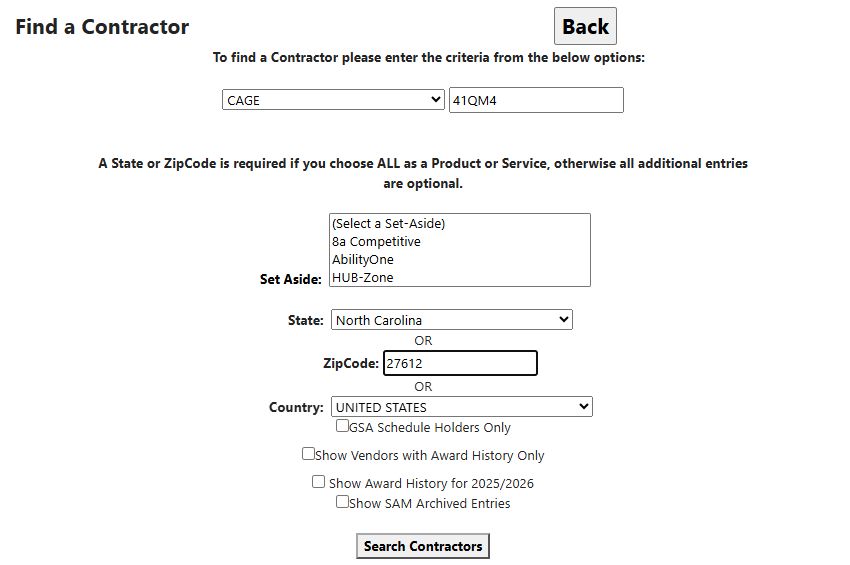
Choose what to search
| Search choice | What to enter and what it finds |
|---|---|
| Company Name | All or part of the business name. A distinctive portion helps find names with different endings such as LLC or Inc. |
| CAGE | The full five-character company/facility code. Useful when you already have the code from an award or parts record. |
| UEI | The full Unique Entity ID used for the company's SAM.gov registration. |
| DUNS # | The full older business identifier, useful when researching older company records. |
| All or part of a contact email address. | |
| Phone #, Fax # | A telephone or fax number. If a number does not find the company, try its name or CAGE instead; number formatting can affect matching. |
| Contact Name | All or part of the company's listed electronic-business contact name. |
| NAICS | An industry code. A full six-digit code selects a specific industry; a shorter beginning broadens it. Separate alternative codes with commas. |
| FSC | A complete Federal Supply Class code for the type of product. Separate alternative codes with commas. |
| PSC | A Product or Service Code, or its beginning to search a broader code family. Separate alternative codes with commas. |
| Keyword | Words in the descriptions of the company's registered NAICS industries. Separate alternatives with commas. This searches industry descriptions rather than company capability statements. |
| SIN | A GSA Schedule category. This option can return broader GSA records, so check the company's schedule worksheet for the particular SIN you need. |
| All | Browse using location or business-type filters instead of a primary search value. Choose a State, ZIP, non-default Country or Set Aside to narrow the search. |
For unfamiliar abbreviations, see the glossary.
Find a NAICS code by keyword
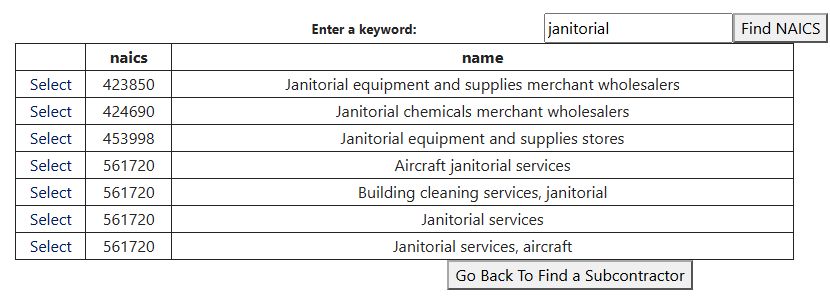
Choose NAICS, then Click here to search for a NAICS Code By Keyword. Enter a word and select Find NAICS. The results show naics (the industry code) and name (its description). Select Select beside the relevant row to fill the main search box. Go Back To Find a Subcontractor returns without selecting a code.
For example, janitorial includes 561720 — Janitorial services. Existing State and ZIP selections remain in place when you return, so review those before searching.
Narrow the company list
| Filter | What it does and why you might use it |
|---|---|
| Set Aside | Finds companies with selected business-type designations, such as small disadvantaged, women-owned, veteran-owned or HUBZone. Select multiple categories to include any of them. None selects companies outside the listed categories and takes precedence if combined with another choice. |
| State | Limits the company's registered address to the selected state. All States leaves this unrestricted. |
| ZipCode | Finds registered postal codes beginning with your entry. Use the full ZIP for a local search. |
| Country | Limits the registered address when a non-default country is selected. The initial UNITED STATES option does not apply a country restriction. |
| GSA Schedule Holders Only | Limits results to companies identified as GSA Schedule holders. See GSA Schedule for the meaning of this purchasing arrangement. |
| Show Vendors with Award History Only | Limits results to companies marked as having award history. Open the company profile's award-history link to see the work they received. |
| Show Award History for prior/current year | Uses the company's prior-year award-history indicator. Use the linked award history to examine individual dates. |
| Show SAM Archived Entries | Includes older registration entries that the default search leaves out. Useful when researching an older award or company record. |
Combining filters: The form prints OR between State, ZipCode and Country, but when you fill more than one, all must match. Business-type and history selections also narrow the list. Alternatives within a comma-separated code list or selected business-type group match any listed choice.
Back returns to the previous page. Use the site's Main Menu navigation to choose another search.
Useful search combinations
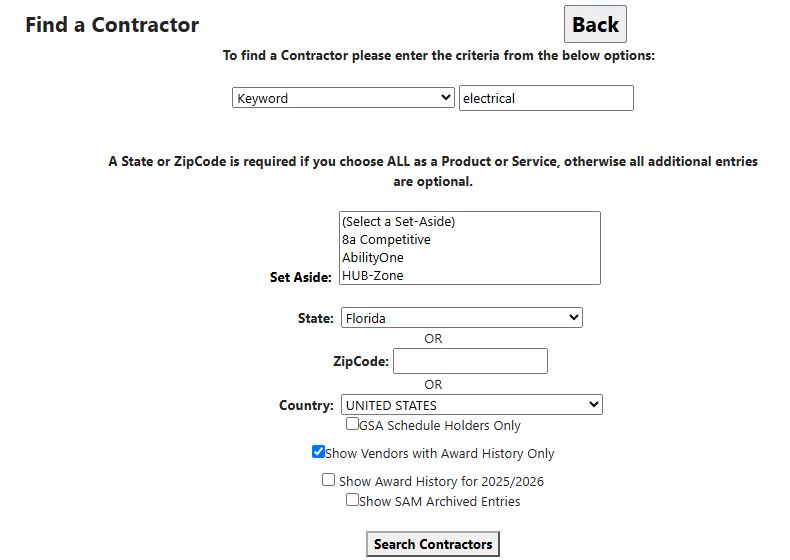
Find Florida electrical businesses with government award experience
Your objective: build a list of businesses to research as potential partners, customers or competitors, then examine what they have sold to the government.
- From Main Menu, choose All Government Contractors. The search form is headed Find a Contractor.
- Choose Keyword under Product or Service by ? and enter electrical.
- Select Florida under State. Leave ZIP blank and the other choices at their defaults.
- Check Show Vendors with Award History Only, then select Search Contractors.
The next screen is headed Find a Subcontractor. It is the company list returned by this search. Compare Company, City, State and CAGE to decide which firms to investigate. Keyword searches use registered industry descriptions; the keyword does not have to appear in the company name. Florida refers to the company's registered location.
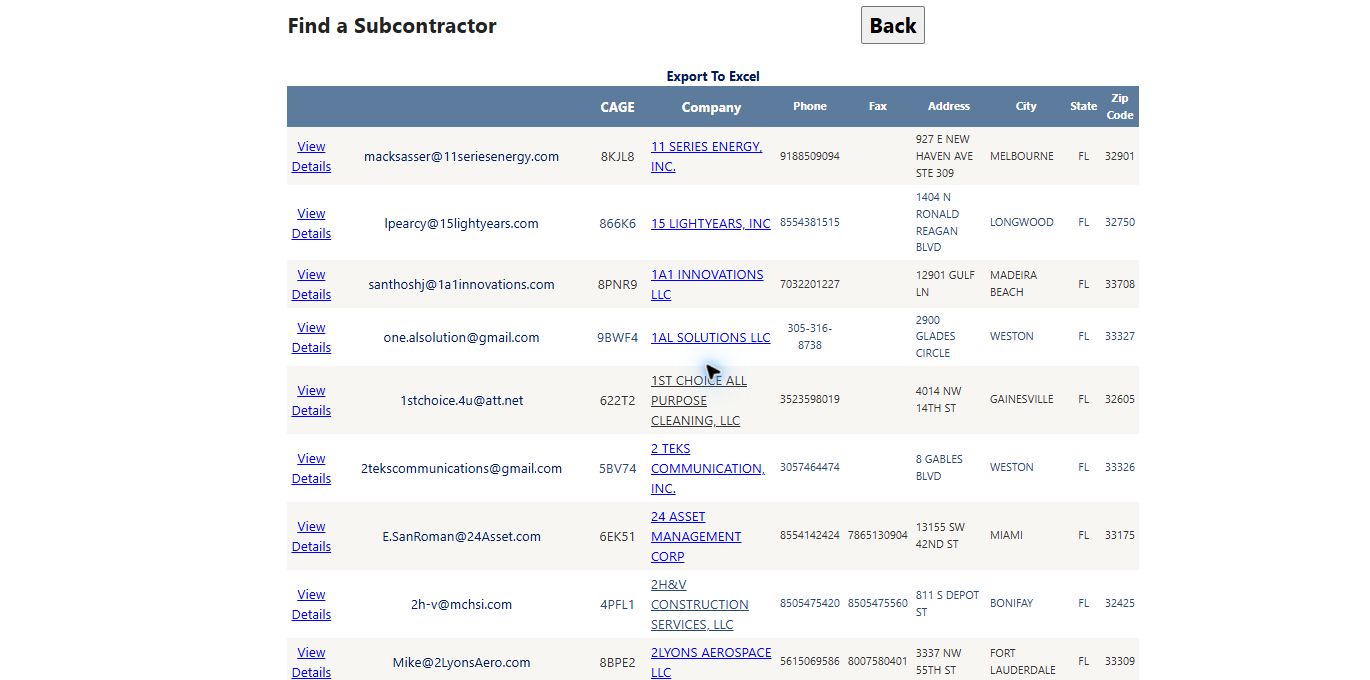
The on-screen list shows up to 50 companies per page; use its page controls to continue browsing. In the October 11 example, Export To Excel produced 3,908 company rows in one Contacts worksheet. That is the exported list for this exact search, not a count of contracts won or a promise that every row will appear on the current screen. The Show Vendors with Award History Only filter qualifies companies by a recorded history flag; open an individual company's awards to see its actual work and dates. The results guide explains the worksheet fields and how to keep each CAGE with its contact data.
- Locate a company in the list, using its page controls as needed, and select View Details on that row. In this example, A A ELECTRIC S.E., INC, CAGE 7Y971, opens a profile showing Lakeland, Florida.
- From that profile, select View FBO/FPDS Award History. Read Subject, buying agency, Award Date and Total to understand the work the firm has received. The example includes controller and electrical-parts purchases. These are historical awards; check their dates when judging how recent the experience is.
- Select a Contract # to read a particular award. The award-results guide explains the group arrow and other links; the award-details guide explains the selected record.
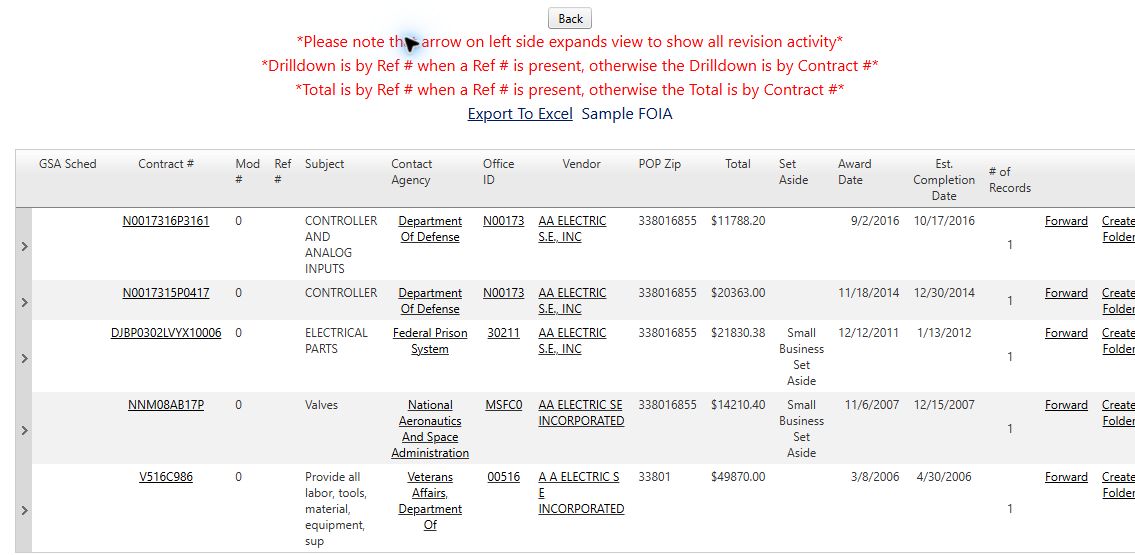
Keep or refine your research: return to the contractor list and select Export To Excel to work with the company list in a worksheet. Sort or filter by city, keep CAGE with each company, and add your own follow-up notes in your working copy. For a smaller area, return to Find a Contractor and add a ZIP code; for a specific industry classification, choose NAICS instead of Keyword. See contractor results and exports for the result fields and download control.
Use Back to retrace your steps. If a detail link opened another tab, return to the original list tab. Select Main Menu to begin a different kind of research.
Other useful combinations
| What you want to find | Enter | Why this combination helps |
|---|---|---|
| A known contractor | CAGE: 41QM4 | Finds the identified company without relying on name spelling. The October 10, 2026 example returned L L BROOKS ENTERPRISES INC in Raleigh, NC 27612. |
| Janitorial businesses in one state | NAICS: 561720 plus State | Combines the industry's classification with the companies' registered location. Add a business-type selection when looking for a particular kind of partner. |
| Suppliers in a product class | FSC: the four-digit class from an NSN | Finds firms associated with that type of product. Add State to narrow the list geographically. |
| Firms with government award experience | NAICS or PSC, plus Show Vendors with Award History Only | Finds companies to research as experienced suppliers or teaming partners. |
If no companies appear, remove one extra filter at a time. For example, CAGE 41QM4 with North Carolina / 27612 matched the company; changing ZIP to 99999 excluded it. Company location is its registered address, which can differ from where it performs contract work.