My Government RoadMap
Part of these button learning paths: My Government RoadMap
Video sections for this page
- 0:00 — Open My Government RoadMap
- 0:15 — Identify the RoadMap report
- 0:34 — Move through the report
- 0:43 — Adjust the report view
- 0:53 — Find a code in the report
- 1:14 — Read the industry row
- 2:06 — Return from solicitation results
- 2:16 — Read the active-solicitations result row
- 2:38 — Open contracting agencies
- 3:02 — Read an agency’s offices
- 3:35 — Open current vendors
- 4:04 — Open GSA Schedule companies
- 4:28 — Open the 2027 contract results
- 4:41 — Read one expiring-contract result
- 5:04 — Return to Main Menu
Application paths: Main Menu → My Government RoadMap for your account, or Main Menu → All Government Contractors → Search Contractors → View Details → Biz Plan for a selected contractor.
Start with an industry, then choose a question
- Select My Government RoadMap on the application's Main Menu.
- Find the industry row by NAICS and Name. Stay in that row while comparing its counts and dollars.
- For work available now, select its Active Solicitations count and continue with solicitation results. For future work, select a count under an Expiring Contracts year and continue with expiring-contract results.
- To research buyers or suppliers, select Contracting Agencies or Current Vendors in that same row. Return to the RoadMap with browser Back, or close the child tab if the destination opened separately, before choosing a different industry.
My Government RoadMap summarizes government contracting activity for the industries associated with your company or saved search criteria. Use it to see who buys in those industries, who supplies them, what opportunities are available now, and which contracts are approaching expiration.
Open it from Main Menu → My Government RoadMap for your account. The Biz Plan button on a contractor's CAGE profile opens that contractor's RoadMap; for example, CAGE 8EWY6 opened a four-page report with the selected firm's name and industry rows. Return to the profile with the browser's Back button. See report controls for paging, finding text and viewing the report.
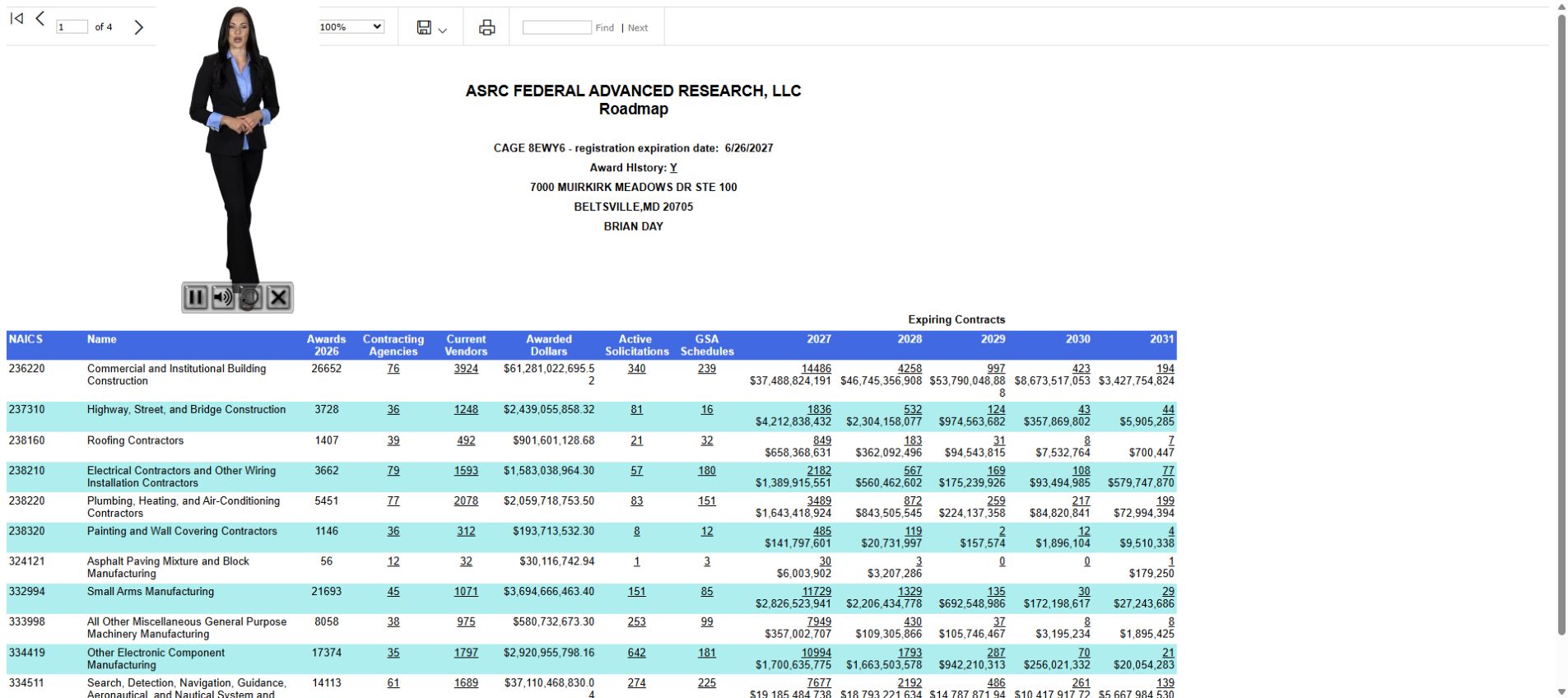
Company information
| Field | What it means |
|---|---|
| Company name | The company whose RoadMap you are viewing. |
| CAGE | Its five-character company/facility identifier. |
| Registration expiration date | The displayed expiration date of the company's registration. |
| Address | The company's listed business location. |
| Contact name | The listed electronic-business contact. |
| Award History: Y/N | Whether award history is recorded for the company: Yes or No. Select the link to open its award history. |
Read an industry row
| Field | What it displays and why it is useful |
|---|---|
| NAICS | The six-digit industry code. Each row represents a line of business. |
| Name | The industry name, so you can identify the kind of work the row covers. |
| Awards [year] | The number of awards shown for the industry under that year heading. It shows the volume of contracting activity. |
| Contracting Agencies | The number of agencies buying in the industry. Select the count to see those agencies and identify potential customers. |
| Current Vendors | The number of vendors shown for the industry. Select the count to research competitors or potential business partners. |
| Awarded Dollars | The dollar amount of industry awards. It helps show the size of the market. |
| Active Solicitations | The number of current solicitations in the industry. Select the count to open the opportunities. |
| GSA Schedules | The number of companies shown with GSA Schedules. Select the count to see the companies. A GSA Schedule is a purchasing arrangement through which government buyers can order listed products or services. |
| Expiring Contracts — each year | The count of contracts expiring and dollar amount of contracts expiring in the displayed year. Select the count to see those contracts. This helps you plan ahead for potential follow-on work. |
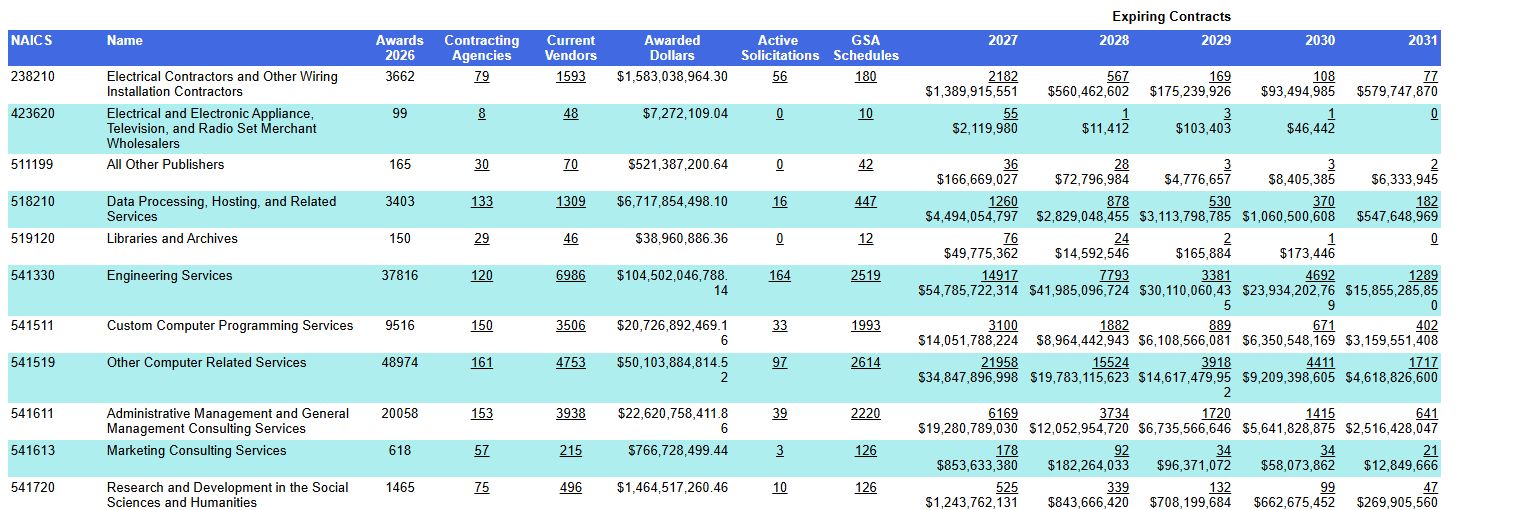
The screenshot omits the company header. In its 541720 — Research and Development in the Social Sciences and Humanities row, 2027 shows 525 contracts and $1,243,762,131 in expiring contracts. Each later year is read the same way.
Choose your next step
- To find work available now, select Active Solicitations and follow the solicitation results guide.
- To identify government customers, select Contracting Agencies.
- To research companies already serving the market, select Current Vendors or GSA Schedules.
- To plan for future work, select an expiring-contract count. The expiring-contract results guide explains that list and its details.
The keyword RoadMap provides another view organized by saved search terms rather than industry codes.