Build a marketing contact list
Part of these button learning paths: Create Email Lists
Video sections for this page
- 0:00 — Open Create Email Lists
- 0:16 — Enter a known NAICS or open the finder
- 0:36 — Choose a business industry
- 1:09 — Set the list area and criteria
- 1:44 — Choose radius and optional designation
- 2:11 — Open and organize the contact worksheet
- 2:45 — Review location and plan follow up
- 3:18 — Read contact and company columns
- 3:43 — Read phone and location columns
- 4:03 — Return to the form for another list
From industry selection to a downloaded list
- Choose Create Email Lists under B2B on Main Menu.
- Enter NAICS Code, or select Click here to search for a NAICS Code By Keyword, enter an industry word, press Find NAICS, and use Select beside the matching code to return to the form.
- Enter the origin ZipCode, choose Radius, and optionally choose a Set Aside category.
- Press Search. This produces a download, rather than an on-screen contact-results table. Open the downloaded worksheet in Excel or Google Sheets and use the column reference below.
- Return to the form to change the radius or industry and run another list. Search creates the file; it does not send a campaign.
Choose Create Email Lists on the Main Menu to open Marketing Email Blast. This page builds a company contact list for an industry and ZIP-area radius. Search downloads the list; it does not write or send email. Check each contact before outreach.
Choose the audience
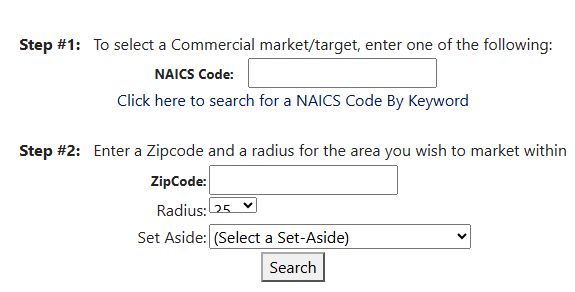
| Field or action | What it means and why to use it |
|---|---|
| NAICS Code | Industry classification for the target companies. Enter a code before searching. A matching code does not guarantee a company offers your exact product or service. |
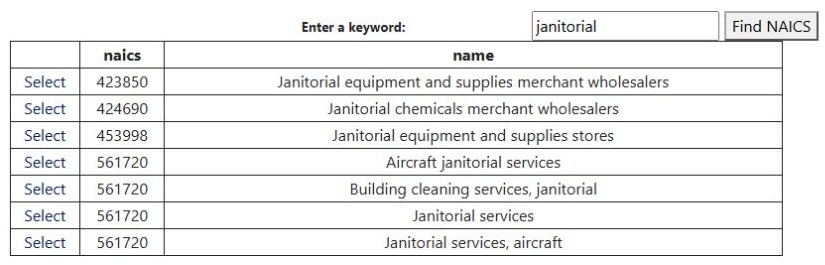
| Click here to search for a NAICS Code By Keyword | Opens a code-finder view. Enter a word from the industry description and press Find NAICS; the finder matches stored descriptions containing that text. The grid shows naics (the code) and name (its description). Select copies that code into the main form and returns to it. |
| ZipCode | Origin ZIP for the radius search. Use a known five-digit ZIP; the form does not validate it before export. |
| Radius | Choose 25, 50, 100, 250 or 500 miles from the ZIP; the default is 25. It narrows company locations, not their service territories. |
| Set Aside | Optional filter, initially (Select a Set-Aside). The menu labels are 8a Competitive, AbilityOne, HUB-Zone, African American Owned, Hispanic Owned, Native American, Small Disadvantage Business, Women-owned Business, Veteran-owned Small Business and Service-disabled Veteran-owned. These choices filter stored business-type designations; they do not verify current certification or ownership. Confirm those independently before relying on the list. |
| Search | Downloads the matching contact list when a NAICS code is entered. If the code is blank, the form stays open without a visible error. It does not send a message. |
The search combines the NAICS code, a company location within the selected ZIP radius and any chosen Set Aside designation. Start with the closest useful radius, then widen it if needed. Companies without a usable stored location will not appear.
Example: choose janitorial services, then set the area
On October 12, 2026, Main Menu → Create Email Lists opened Marketing Email Blast. Select Click here to search for a NAICS Code By Keyword, enter janitorial, and press Find NAICS. The finder returned seven rows. They included 423850 for janitorial equipment and supplies merchant wholesalers, 424690 for janitorial chemicals merchant wholesalers, 453998 for janitorial equipment and supplies stores, and several descriptions under 561720, including aircraft janitorial services and Building cleaning services, janitorial. Choose the description that fits the work you sell: a building-cleaning service should not select a wholesale-supplies industry just because it contains the word janitorial.
Open the janitorial code-finder result at full size.
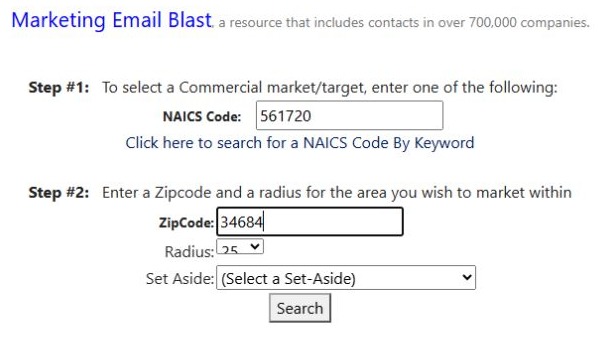
Select 561720 — Building cleaning services, janitorial. The finder returns to the main form with NAICS Code 561720 filled in. Enter ZipCode 34684, leave Radius 25, and leave Set Aside at (Select a Set-Aside) for a list without a set-aside filter. Select Search to download the contact list for these criteria. The October 12 download contained 752 data rows and 11 columns. That count describes this search at that time; repeat the search for a current audience.
Open the filled marketing form at full size.
Understand the download
Open this worksheet view at full size.

Open this worksheet view at full size.
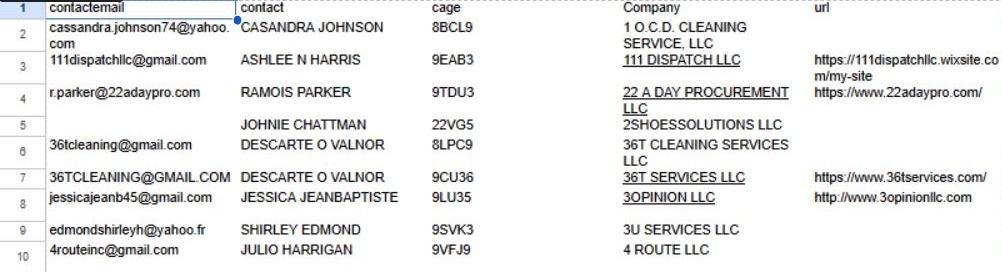
The first row in this downloaded file was 1 O.C.D. CLEANING SERVICE, LLC, CAGE 8BCL9, in CLEARWATER, FL 33756. The next rows included 111 DISPATCH LLC in Tampa and 22 A DAY PROCUREMENT LLC in Saint Petersburg. Read across each row from the contact fields to the company, website, telephone and address. For follow-up planning, filter the entire table by City or state, and use Company and cage to identify the business. Open the company's website to check its fit before contacting it. Keep all columns together when sorting; a location in the selected radius does not establish that every listed company offers janitorial services today.
The download is named MarketingEmails.xls and has these eleven columns:
| Column | Meaning and use |
|---|---|
| contactemail | Recorded contact email address; verify currency and suitability before outreach. |
| contact | Recorded electronic-business point of contact. This is a name, not evidence of marketing consent. |
| cage | CAGE identifier on the company record, useful for disambiguating similar names. |
| Company | Legal business name. The report links this cell to the stored company URL when one exists. |
| url | Recorded website address, useful for confirming business fit. |
| Phone, Fax | Recorded business phone and fax contact channels. |
| Address1, City, state, Zip | Stored company street, city, state and postal code used to review geographic fit. |
The page does not provide sending, unsubscribe management or campaign tracking.
Check the downloaded file and each contact against a current source before outreach. A list entry does not establish consent, current employment or eligibility for a campaign.