Review opportunities related to a contractor
Part of these button learning paths: Just My Opportunities · All Government Contractors · Search by NSN/NIIN · NSN Market Analysis 3 years · DLA Prime Contractors · Construction Menu · Expiring Contracts through 2030 · Award History · SubContractor History · Teaming/SubContractor Data · Prime Contractors By NAICS
This walkthrough uses a signed-in search for CAGE 8EWY6, ASRC FEDERAL ADVANCED RESEARCH, LLC. From Main Menu, choose All Government Contractors, select CAGE, enter 8EWY6, and select Search Contractors. In the result row, choose View Details. The Vendor / CAGE Detail View has an Opportunities button beside the award, MCRL, GSA, SAM, Biz Plan and subcontractor-report buttons. See the illustrated profile and all its actions.
Select Opportunities. The next page says Loading Opportunities for Cage 8EWY6 while it assembles matches. When Click here to see your results appears, select it. The result page is headed My Solicitations. Despite that heading, these matches belong to the contractor whose CAGE you selected. The account's Just My Opportunities on Main Menu is a different feature.
Read the match summary
The observed 8EWY6 result showed NAICS 4,535, Keywords 3,066, FSC 34,682, FBO 7,807, DLA 33,670, and State, local 1,795 bid matches on October 11, 2026. These are matching categories, not six lists of unique, confirmed-open bids. Categories can overlap, and the values change as notice data changes. Use the tables below to choose a notice, then read its original source and current deadline.
The page describes its matches as a starting point based on the company's registration and related codes or keywords. It does not establish that the company is eligible to bid, that every notice is still open, or that a source deadline equals a displayed date.
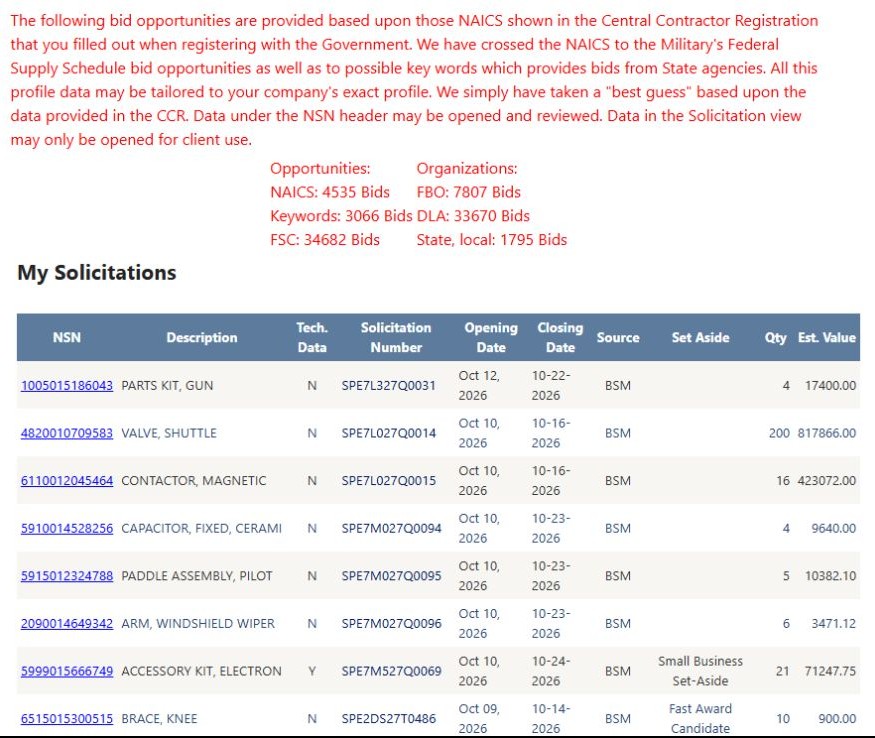
Open the company opportunities image at full size.
Inspect a DLA part opportunity
The first table has NSN, Description, Tech. Data, Solicitation Number, Opening Date, Closing Date, Source, Set Aside, Qty, and Est. Value. In the 8EWY6 example, the first row was NSN 1005015186043 — PARTS KIT, GUN, solicitation SPE7L327Q0031, quantity 4, estimated value 17,400.00, and displayed closing date October 22, 2026. Select the linked NSN to research that part. Select the linked Solicitation Number to read the original DLA RFQ PDF in a separate tab; use its current instructions and amendments before acting. Tech. Data is an indicator; confirm actual drawing availability in the source notice.
This table displays up to 100 rows per page. Use its numbered page links to inspect more rows. The displayed opening and closing dates are stored values; verify the response deadline on the original RFQ. Source identifies the stored solicitation source, Set Aside describes the listed reservation, and Est. Value is an estimate rather than an award or offer price.
Inspect a federal or state notice
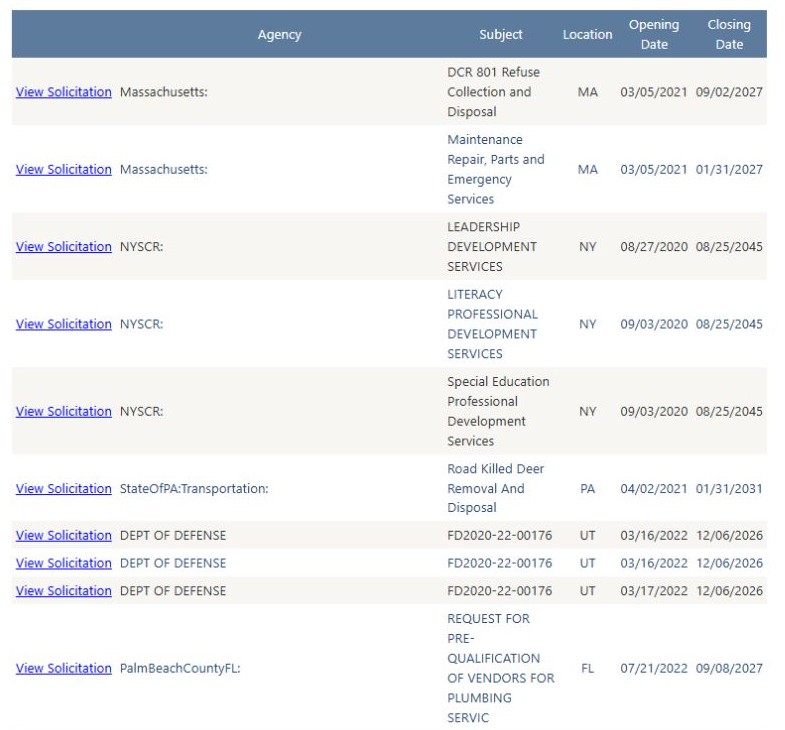
The next table has View Solicitation, Agency, Subject, Location, Opening Date, and Closing Date. One observed row offered Massachusetts: DCR 801 Refuse Collection and Disposal, with MA as its location and a View Solicitation link to the publisher's notice in a new tab. Choose a relevant row by buyer, subject and location; then open View Solicitation and confirm the current scope, dates, set-aside and submission steps at the publisher. A displayed closing date is not enough to decide that a bid is open.
The federal/state table also has numbered pages and no Excel export control. Use the browser's back navigation to return from the result page to the matching page, then again to the contractor profile. A publisher's notice may open in another tab; return to the application tab to continue company research.