Read agency small-business and FOIA contact directories
Part of these button learning paths: Federal and State Institutions
Video sections for this page
To start from the Main Menu, choose Research → Federal and State Institutions, select a state and Submit, then expand a federal department and choose OSDBU or FOIA Contacts on an office row when that link is present. You can also open a contracting-office profile from an award result and choose SADBU/OSDBU or FOIA Contacts there. Review the directory and use browser Back to return to the office or institution; these pages do not send a message or submit a records request. The VA examples below show the small-business and records-request fields. Confirm a person, address or request channel on the agency's current official site before contacting them.
Choose the directory for your question
| Question | Directory and next step |
|---|---|
| Where can a small business learn about selling to this agency? | OSDBU, the Office of Small and Disadvantaged Business Utilization. SBA describes agency small-business offices as a resource for finding opportunities after researching agency purchases and forecasts. Confirm the agency's current office before using a stored contact. SBA guidance |
| Which office handles requests for agency records? | FOIA Contacts, a directory associated with the Freedom of Information Act. Confirm the current component that maintains the records and its official request process. FOIA.gov explains that many agencies handle requests through separate components or offices. FOIA.gov guidance |
| Who answers a question about a particular solicitation? | Start with the current solicitation and its designated contact. These agency directories do not identify the responsible solicitation contact or replace the notice's instructions. See solicitation results. |
Opening a directory does not send a message, register your business, save a prospect or submit a records request. Neither directory provides those actions.
Understand which contacts you are seeing
OSDBU shows contacts for the selected agency, not just the contracting office or other filters used on the previous screen. Keep the agency name from that screen with your notes.
FOIA Contacts first shows entries for the selected agency and office. If that office has no entry, the page shows agency-wide contacts instead, without announcing the change. Use Department and Branch to find the component that handles the records you want.
A missing link or empty table does not mean the agency has no such office. These directories show no last-verified date; use the agency's official contact page for current details.
In the VA OSDBU example, some address, fax and website cells are blank. Use the agency's official page for those details.
Every OSDBU field
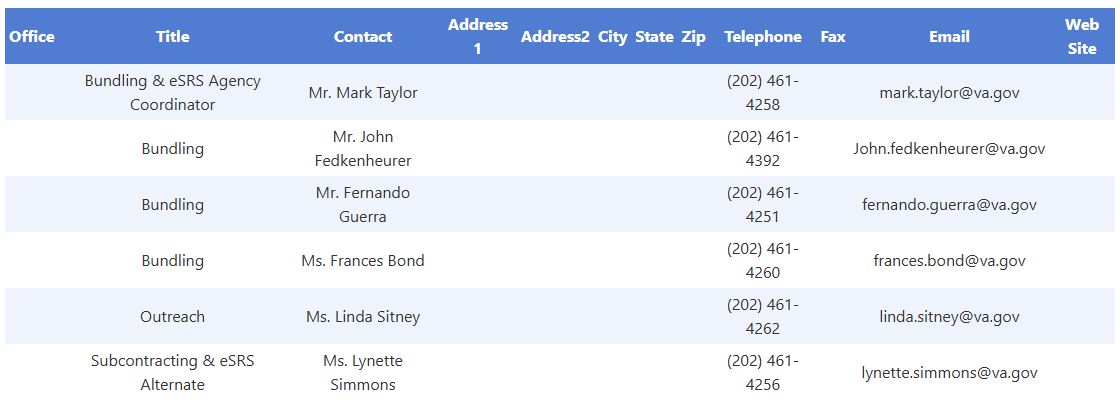
Open the OSDBU directory image at full size.
| Displayed field | Meaning and business use |
|---|---|
| Office | Stored small-business directory office name. Match it to the selected agency's current small-business organization; it is not the contracting-office name from an award row. |
| Title | Stored title associated with the directory entry. Use it with Office and Contact to identify the entry's role; it is not a solicitation title or industry classification. |
| Contact | Stored contact name or contact description. It is a lead for identifying the current point of contact, not proof of current employment or responsibility for a particular procurement. |
| Address 1 | First recorded address line for the directory entry. Confirm it before using it as a mailing address. |
| Address2 | Second recorded address line, such as a suite or other address detail when supplied. Keep it with Address 1; a blank value does not establish that the mailing address is complete. |
| City | Recorded contact-address city. It does not filter the directory or identify where a contract will be performed. |
| State | Recorded contact-address state text. It is separate from a state selected on an earlier research screen. |
| Zip | Recorded postal code. Preserve leading zeros; it is not a distance, radius or performance-location filter. |
| Telephone | Stored telephone text. Verify the current number and any extension on the agency's official site. |
| Fax | Stored fax text. Its presence does not establish that fax is currently an accepted submission method. |
| Stored email text. The table does not provide a compose/send action or verify that the address still works. | |
| Web Site | Stored website text. The page defines a text field rather than an explicit clickable website control; verify the current official destination before using it. |
Every FOIA field, including the blank headings
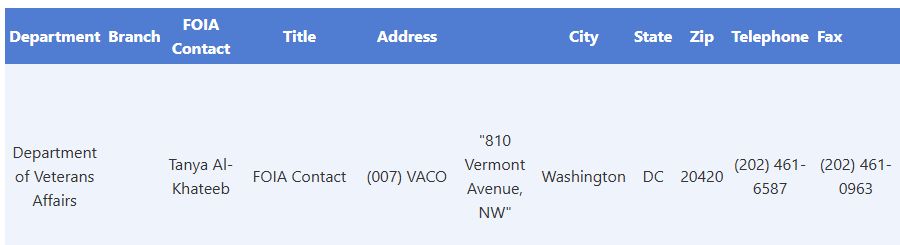
Open the FOIA directory image at full size.
| Displayed field | Meaning and business use |
|---|---|
| Department | Stored department name. Compare it with the originating agency and the agency's current records-request directory. |
| Branch | Stored organizational branch. Particularly important when agency-wide fallback returns several components; the page does not verify which component holds the records you want. |
| FOIA Contact | Stored FOIA contact name or description. Confirm the current designated contact through the agency's official FOIA guidance. |
| Title | Stored title associated with the FOIA entry. Use it to understand the listed contact's role; it is not the title of a contract or requested document. |
| Address | First recorded address line. This is the heading used by the FOIA table, whereas the small-business table calls its first line Address 1. |
| Unlabeled column after Address | Second recorded address line. Include it when comparing a complete address; the missing heading does not mean the value belongs to City. |
| City | Recorded contact-address city, not necessarily the contracting office's city or the contract's performance location. |
| State | Recorded contact-address state. It does not establish the office's records jurisdiction. |
| Zip | Recorded postal code; preserve leading zeros and keep it with the other address fields. |
| Telephone | Stored contact telephone text. Confirm the current agency number before asking which component handles the records. |
| Fax | One fax field, despite extra spacing in its heading. Use the agency's current instructions before sending anything. |
| Stored email text. Check the agency's current request instructions; displaying an email does not establish that emailing it is the required submission process. | |
| Additional Contacts | First stored additional-contact text. It can supplement the primary FOIA Contact, but does not establish who should receive a request. |
| Unlabeled column after Additional Contacts | Second stored additional-contact text. Read it as a separate continuation field; it has no heading or send action. |
| Web Site | Stored website text. No explicit website hyperlink is defined in this table. Use current official guidance to confirm the agency/component and request channel. |
These are contact directories, not award or solicitation result lists.
Controls, navigation and exports
These tables have no search, edit, save, delete, email-send, print or export controls. They do not page or sort by clicking column headings; the first row is not ranked as the primary contact.
Use your browser's Back button to return to the originating office or institution and choose another agency. Send any business inquiry or records request through that agency's current official process; these tables do not submit one.
There is no export on either directory page. Other research screens have separate Excel exports.
Business examples
Small-business market development: After researching an agency's awards and forecast, open its OSDBU link when present. Compare Office, Title, Contact and Web Site with the agency's current small-business page. Keep agency scope separate from the contracting office you started with. The useful result is a verified route for learning about agency opportunities; this directory alone does not identify an active bid or establish your eligibility for a set-aside.
Researching a predecessor contract: Keep the agency and office context from a contracting-office profile, then open FOIA Contacts when available. Review Department and Branch before selecting a contact. If the list covers several branches, account for the agency-wide fallback. Check whether the desired records are already public and use the agency's current FOIA instructions for any request. The application has not sent or recorded a request. FOIA.gov guidance