Understand the NSN batch report worksheets
Application user guide
Use this guide after requesting a batch report from Main Menu → Search by NSN/NIIN → Create a Batch Report. On Batch Reporting, enter full NSNs separated by commas in the text box, or upload a text file with one NSN per line; select the report sections and choose Create Report. The download is an Excel .xls workbook. Open it in Excel and choose a worksheet tab along the bottom to review that section. To run another report, return to Batch Reporting with the browser Back control if it remains open, or follow the route above. Creating a report replaces the saved NSN list, so keep a copy of the list before submitting if you need it again.
The screenshots below show actual worksheets from two reports with these stock numbers: 6140014469506 and 8345002500919. They demonstrate the layout and field meanings; your rows depend on your inputs and the report selections.
Catalog and reference worksheets
This report selected the required FLIS Header and the optional MCRL, ML-C, Technical Characteristics, Associated Docs, Substitutes, and Moe Rules sections. The two award-history options were not selected. The workbook has seven tabs.
MCRL
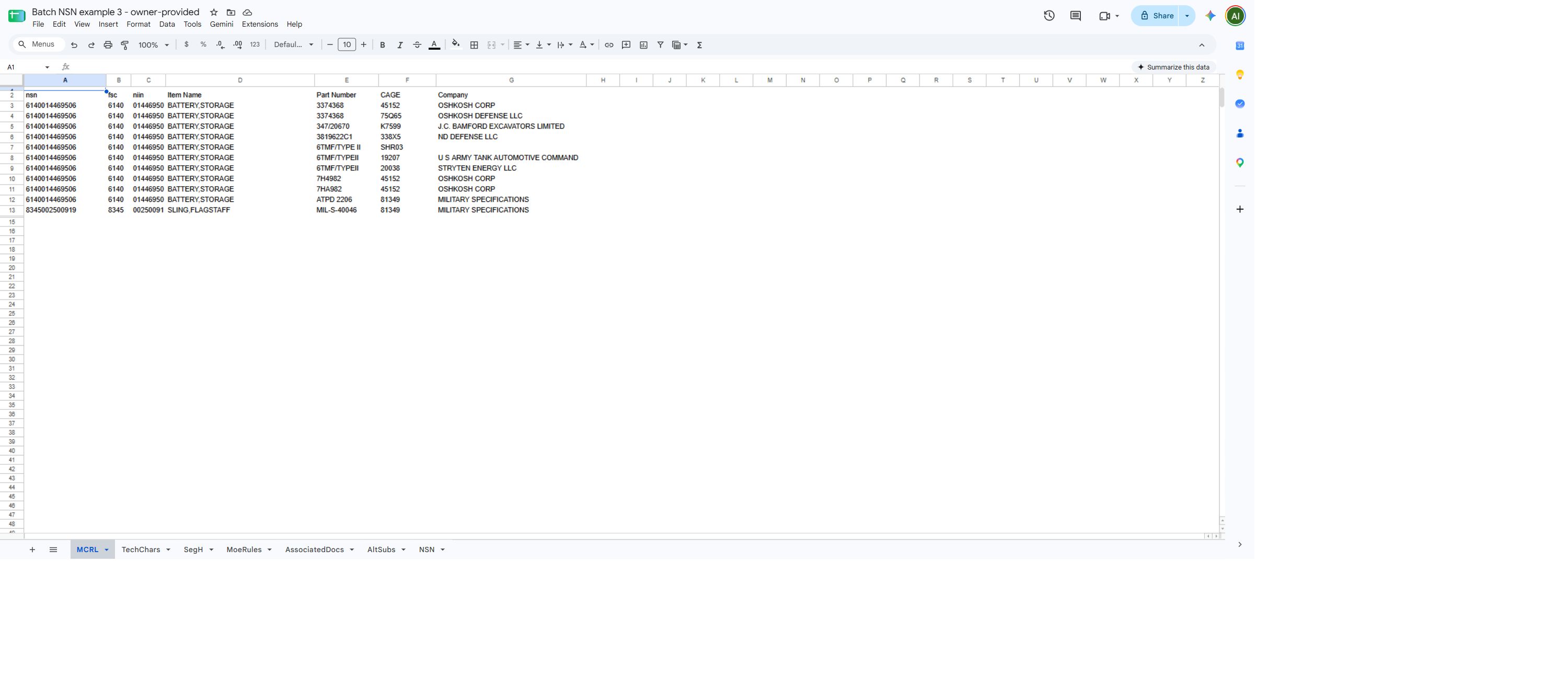
| Column | Meaning |
|---|---|
nsn |
Stock number used to identify the item. |
fsc |
Federal Supply Classification portion of the stock number. |
niin |
National Item Identification Number portion of the stock number. |
Item Name |
Catalog name of the item. |
Part Number |
Part number recorded for the item. |
CAGE |
Commercial and Government Entity code associated with the reference. |
Company |
Company name associated with the CAGE. |
Compare the part number and CAGE together when checking a reference.
TechChars
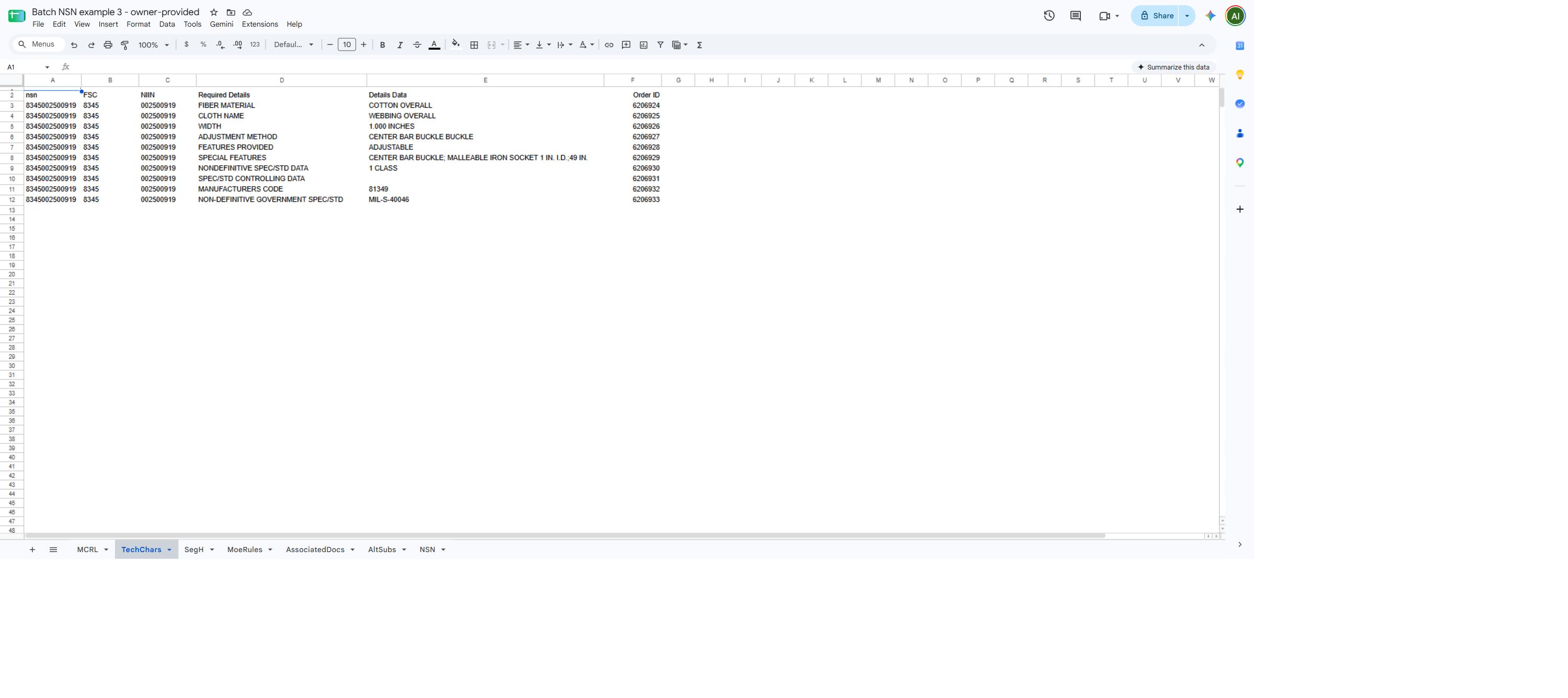
| Column | Meaning |
|---|---|
nsn |
Stock number of the item. |
FSC |
Federal Supply Classification portion of the stock number. |
NIIN |
National Item Identification Number portion of the stock number. |
Required Details |
Characteristic or requirement name. |
Details Data |
Recorded response for that characteristic. |
Order ID |
Identifier attached to the characteristic row. |
SegH
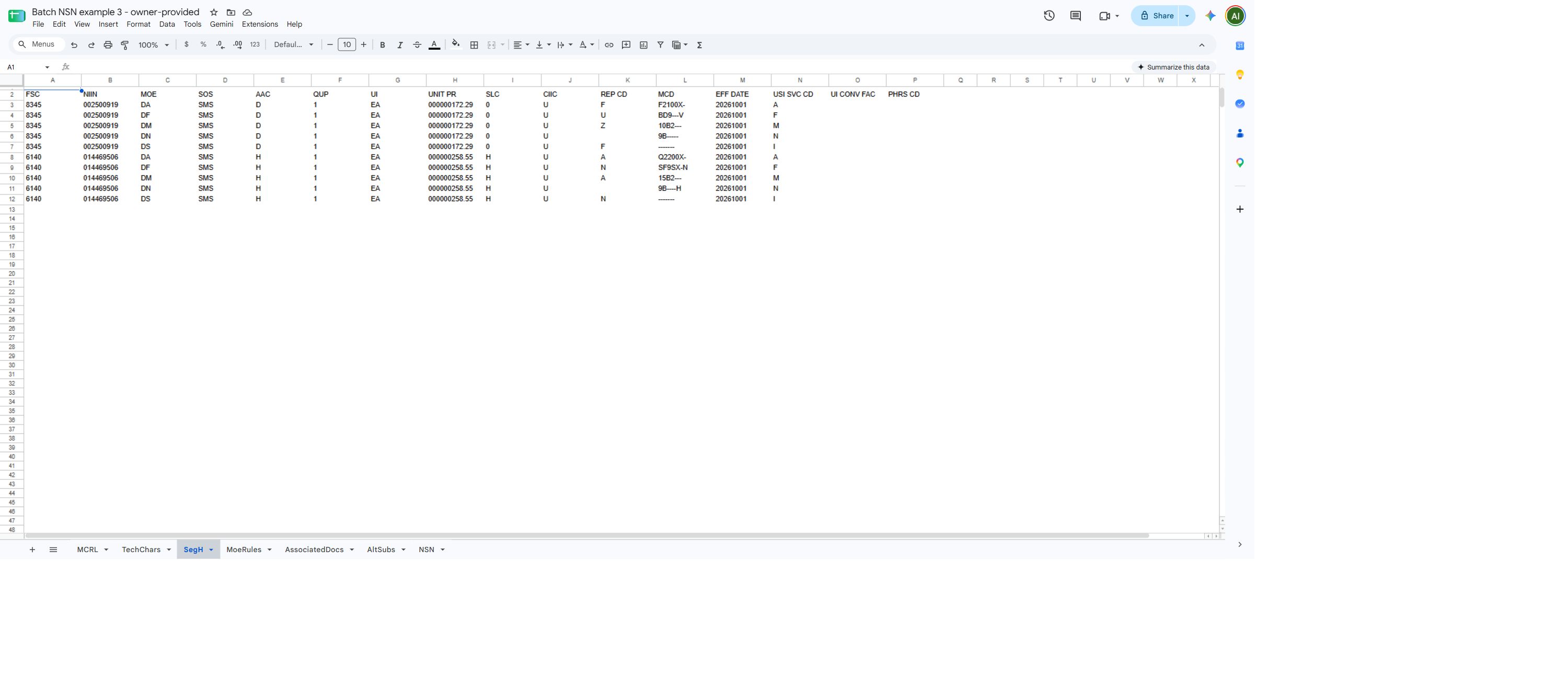
| Column | Meaning |
|---|---|
FSC, NIIN |
Identify the item. |
MOE |
Major Organizational Entity or service-agency context; decode before naming an organization. |
SOS |
Source of supply. |
AAC |
Acquisition Advice Code; decode it before drawing buying or supply conclusions. |
QUP |
Quantity per Unit Pack code/value; verify the rule and unit before translating pack quantities. |
UI |
Unit of Issue code; decode it before comparing prices or quantities. |
UNIT PR |
Management-list unit price; this is not an award-history price or supplier quote. |
SLC |
Shelf Life Code; check the applicable value and lot or packaging requirements. |
CIIC |
Controlled Inventory Item Code; decode before interpreting controls. |
REP CD |
Repairability code for the management record; interpret it in its service and management context. |
MCD |
Service-specific Management Control Data; decode its positions with the applicable service reference. |
EFF DATE |
Management-record effective-date value; encoding and present applicability require confirmation. |
USI SVC CD |
Stored using-service code; decode the value before identifying a service. |
UI CONV FAC |
Unit of issue conversion factor; confirm both units before calculating. |
PHRS CD COUNT |
Phrase-code count; a blank value does not show how many management phrases the item has. |
These are catalog codes. Use the applicable catalog reference to interpret codes before relying on them.
MoeRules
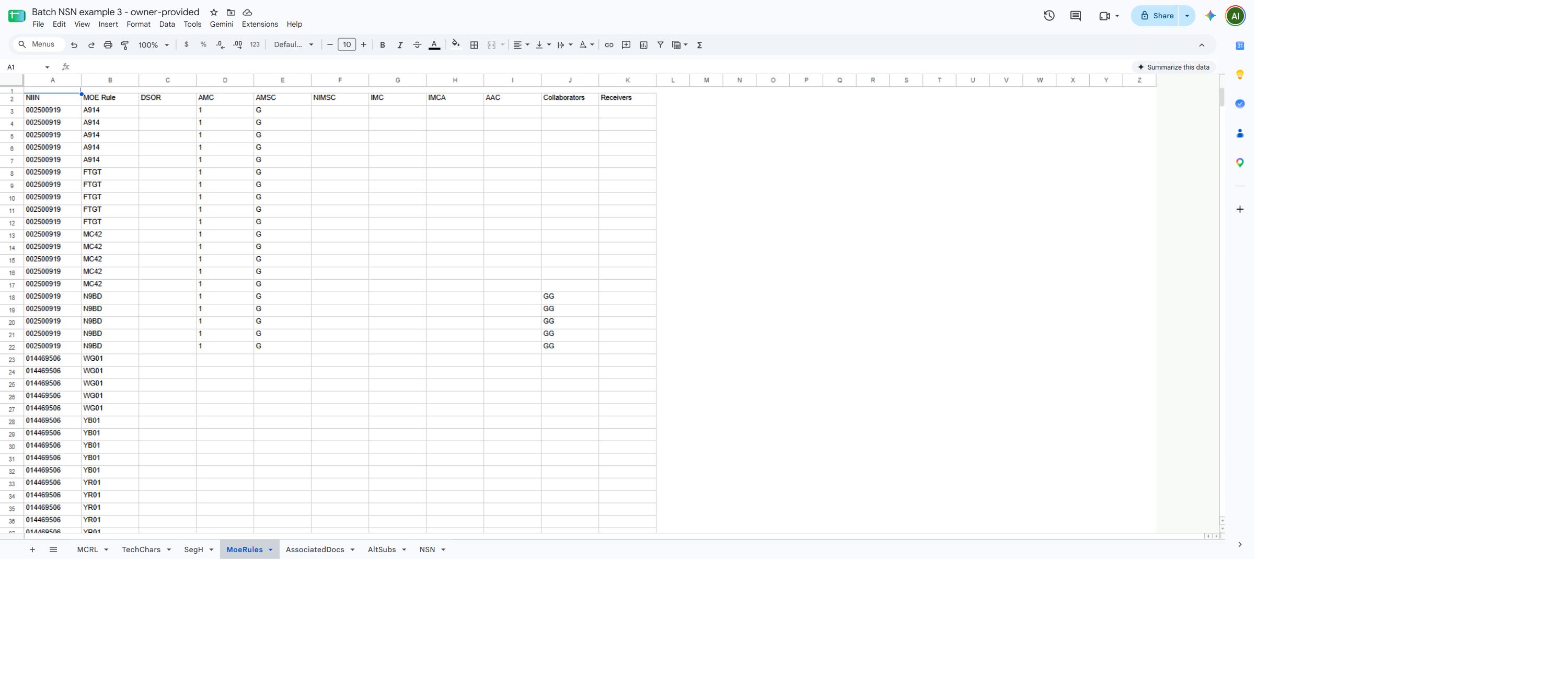
| Column | Meaning |
|---|---|
NIIN |
National Item Identification Number. |
MOE Rule |
Organization or service rule identifier. |
DSOR |
Depot source of repair code. |
AMC |
Acquisition method code. |
AMSC |
Acquisition method suffix code. |
NIMSC |
Nonconsumable item management support code. |
IMC |
Item management code. |
IMCA |
Stored item-management activity code; the value does not name an organization. |
AAC |
Acquisition Advice Code; decode it before drawing buying or supply conclusions. |
Collaborators |
Collaborator code values. |
Receivers |
Receiver code values. |
Use an applicable catalog reference to decode these codes; a code alone does not identify an organization or establish approval to offer a part.
AssociatedDocs
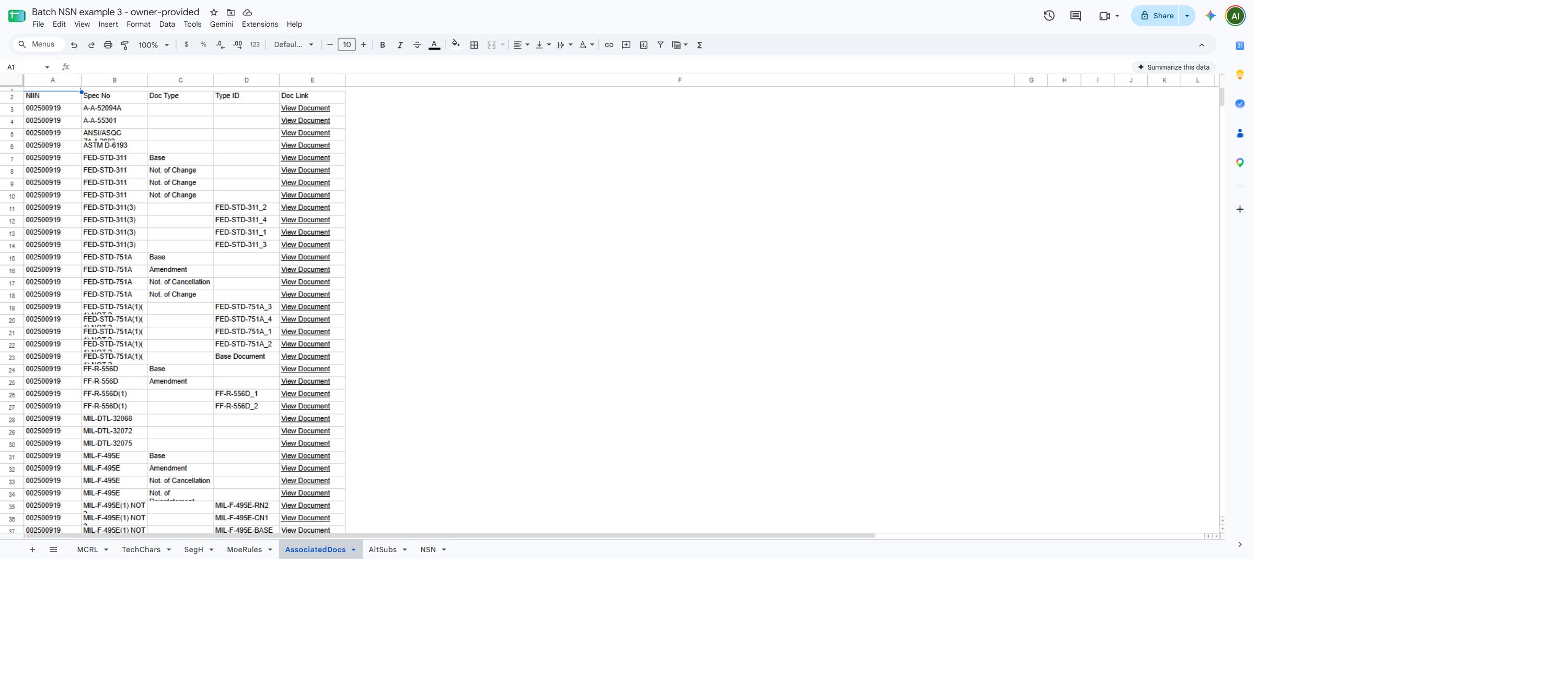
| Column | Meaning |
|---|---|
NIIN |
National Item Identification Number. |
Spec No |
Specification or document identifier. |
Doc Type |
Document reference type, when provided. |
Type ID |
Document type identifier, when provided. |
Doc Link |
View Document link to the referenced file. |
Open the referenced file and confirm its revision meets the current requirement; the worksheet does not establish that a document is current or accessible.
AltSubs
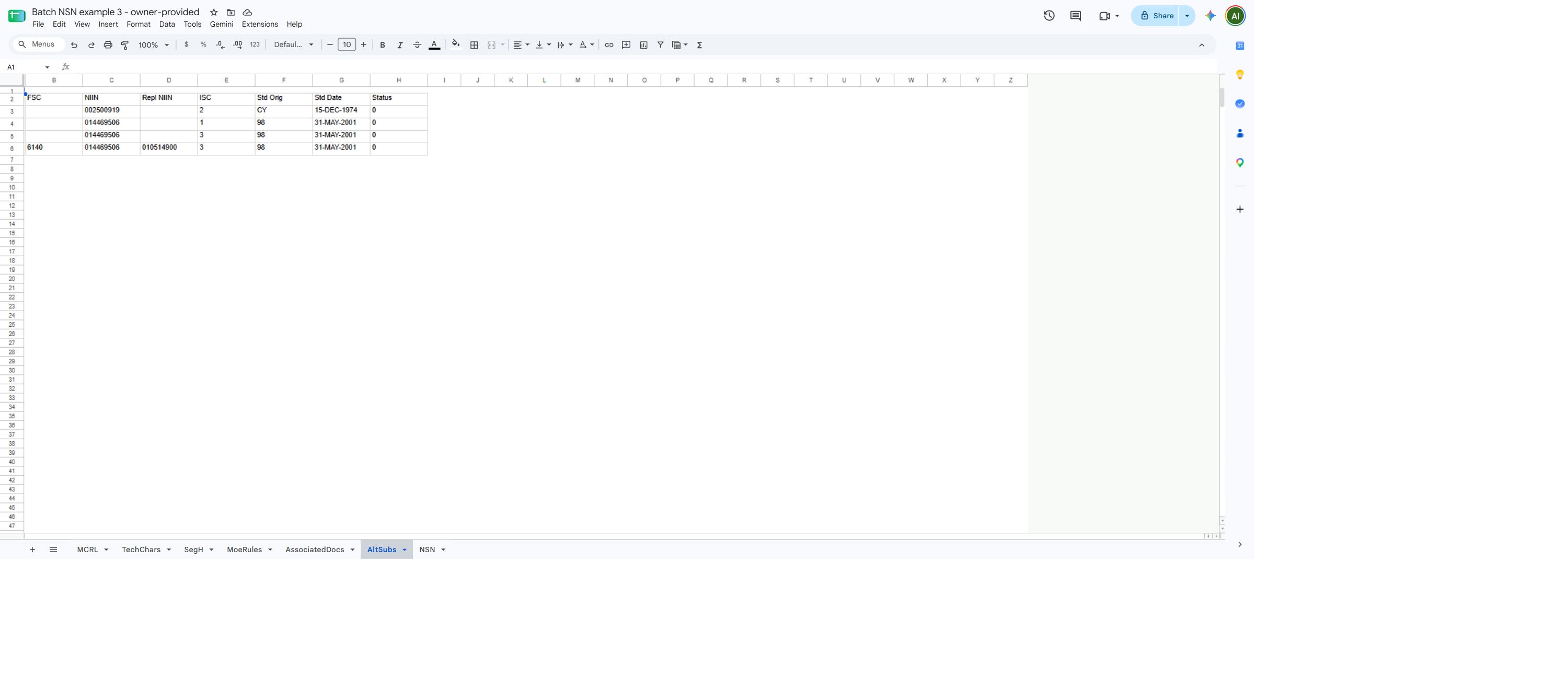
| Column | Meaning |
|---|---|
| (blank heading) | The first column has no heading in this workbook. |
FSC |
Federal Supply Classification. |
NIIN |
Original item's National Item Identification Number. |
Repl NIIN |
Replacement item's National Item Identification Number, if present. |
ISC |
Stored interchangeability/standardization relationship code; decode before treating a relationship as a permitted replacement. |
Std Orig |
Origin code for the standardization decision; consult the applicable FLIS reference. |
Std Date |
Date shown for the standardization decision; confirm meaning and present applicability. |
Status |
NIIN status code; consult the applicable FLIS reference before interpreting it. |
A blank replacement identifier does not identify an alternative. Confirm the relationship and decode status codes before treating an item as a substitute.
NSN
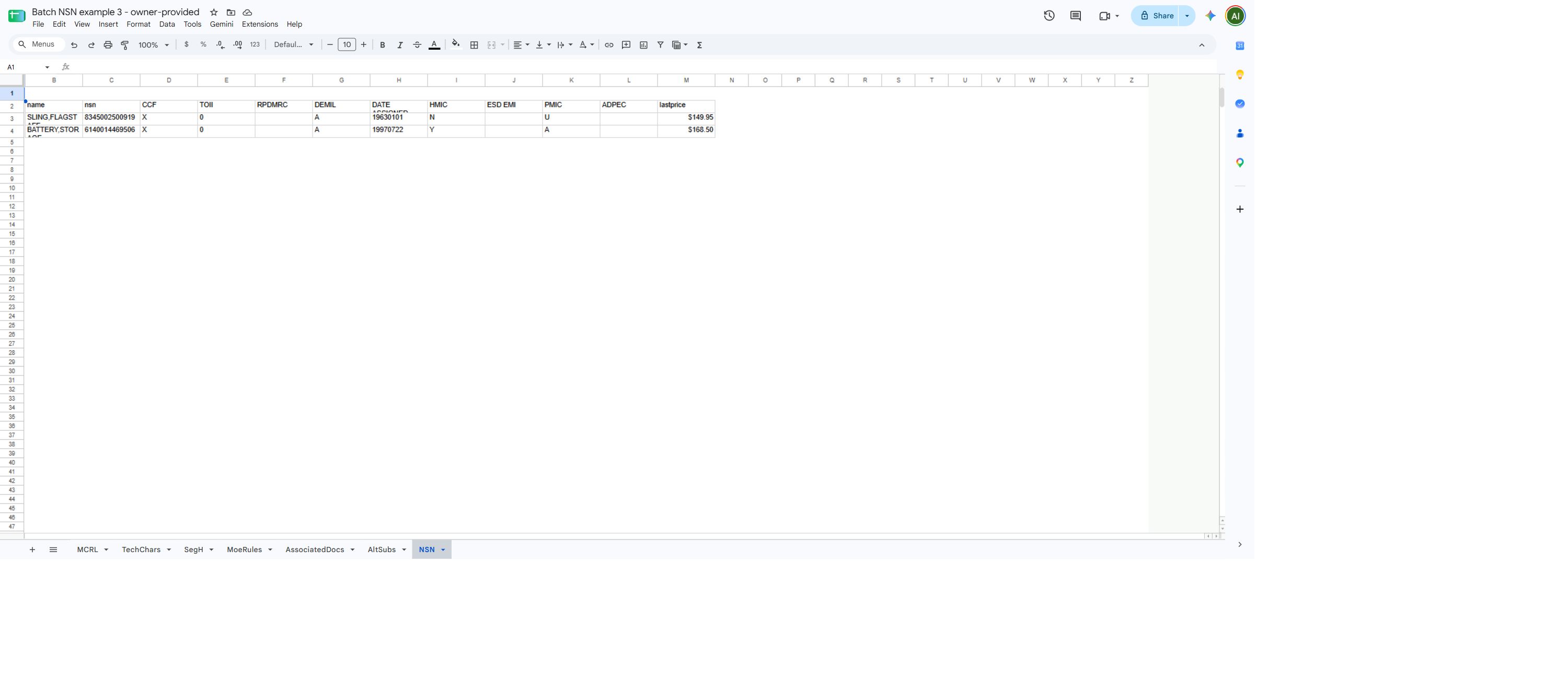
| Column | Meaning |
|---|---|
| (blank heading) | The first column has no heading in this workbook. |
name |
Catalog item name. |
nsn |
National Stock Number. |
CCF |
Item criticality code; consult the catalog value before using it in a specification. |
TOII |
Item-identification type indicator; use the applicable catalog definition before interpreting a value. |
RPDMRC |
Reference or Partial Descriptive Method Reason Code; it qualifies how the item was identified and is not source approval. |
DEMIL |
Demilitarization code; decode the value before applying handling requirements. |
DATE ASSIGNED |
Stock-number assignment date, not a procurement or drawing date. |
HMIC |
Hazardous Material Indicator Code; confirm actual hazards in current documents. |
ESD EMI |
Electrostatic-discharge/electromagnetic-interference code; decode before specifying handling. |
PMIC |
Precious Metals Indicator Code; it is not a physical metal quantity. |
ADPEC |
Automated Data Processing Equipment Identification Code; decode the category. |
lastprice |
Last-award price shown when available; not a supplier quote. Compare its unit, date, and quantity with the award record. It differs from UNIT PR and award-row Price. |
Award history worksheets
This report selected the required FLIS Header and Award History 5 Years only. It contains an AwardHistory tab and an NSN tab.
AwardHistory
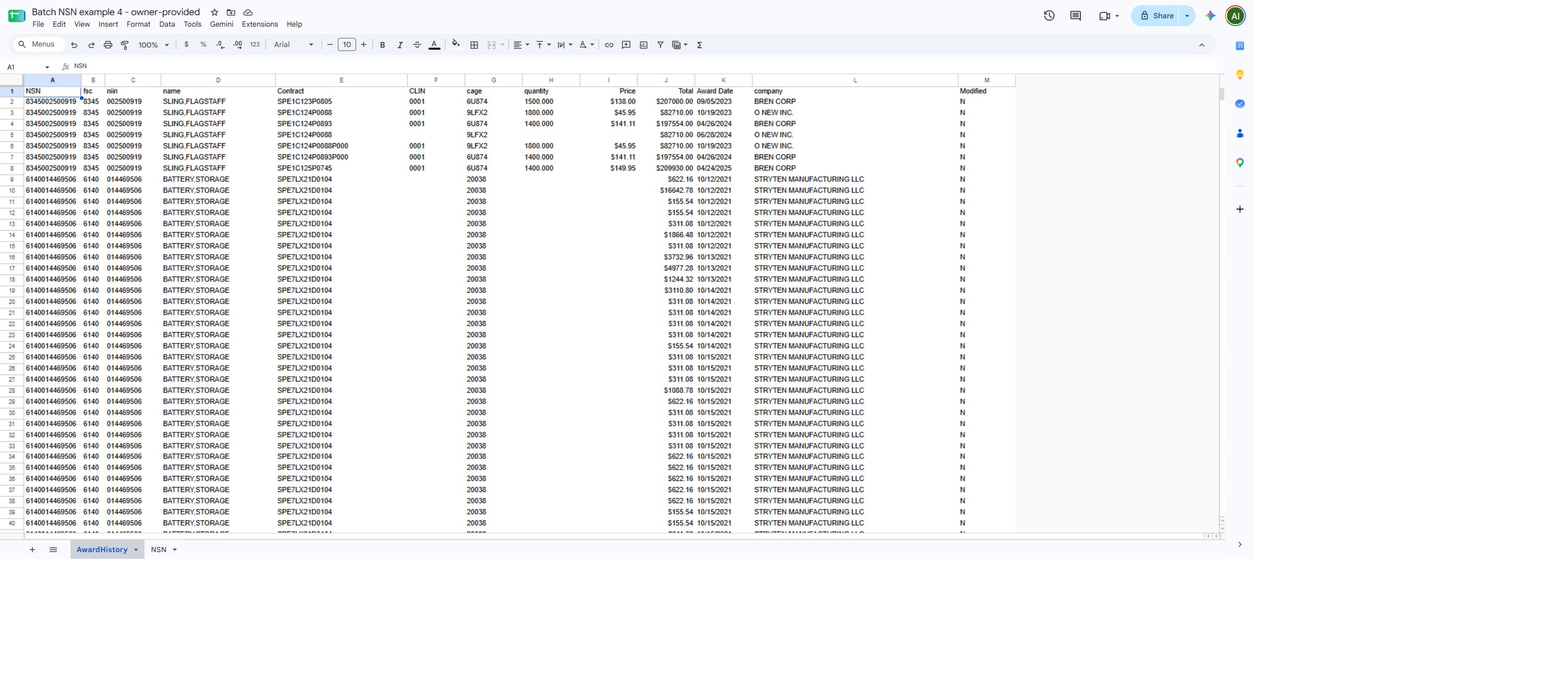
| Column | Meaning |
|---|---|
NSN |
National Stock Number. |
fsc |
Federal Supply Classification portion of the stock number. |
niin |
National Item Identification Number portion of the stock number. |
name |
Catalog item name. |
Contract |
Contract identifier. |
CLIN |
Contract line item number. |
cage |
CAGE code for the recorded recipient. |
quantity |
Awarded quantity. This workbook does not show a unit-of-issue column, so check the award before comparing prices. |
Price |
Award unit price as displayed; compare with the individual award record before relying on it. |
Total |
Award line value as displayed; it may not equal quantity multiplied by displayed Price. Check the award record. |
Award Date |
Award-action date, displayed as month/day/year. The five-year option uses this date. |
company |
Recorded recipient name. |
Modified |
Y indicates the workbook adjusted displayed price values; N means it did not. This does not mean the contract was modified. |
Blank cells are blank values, not zero. Confirm units and the corresponding award record before comparing amounts.
NSN
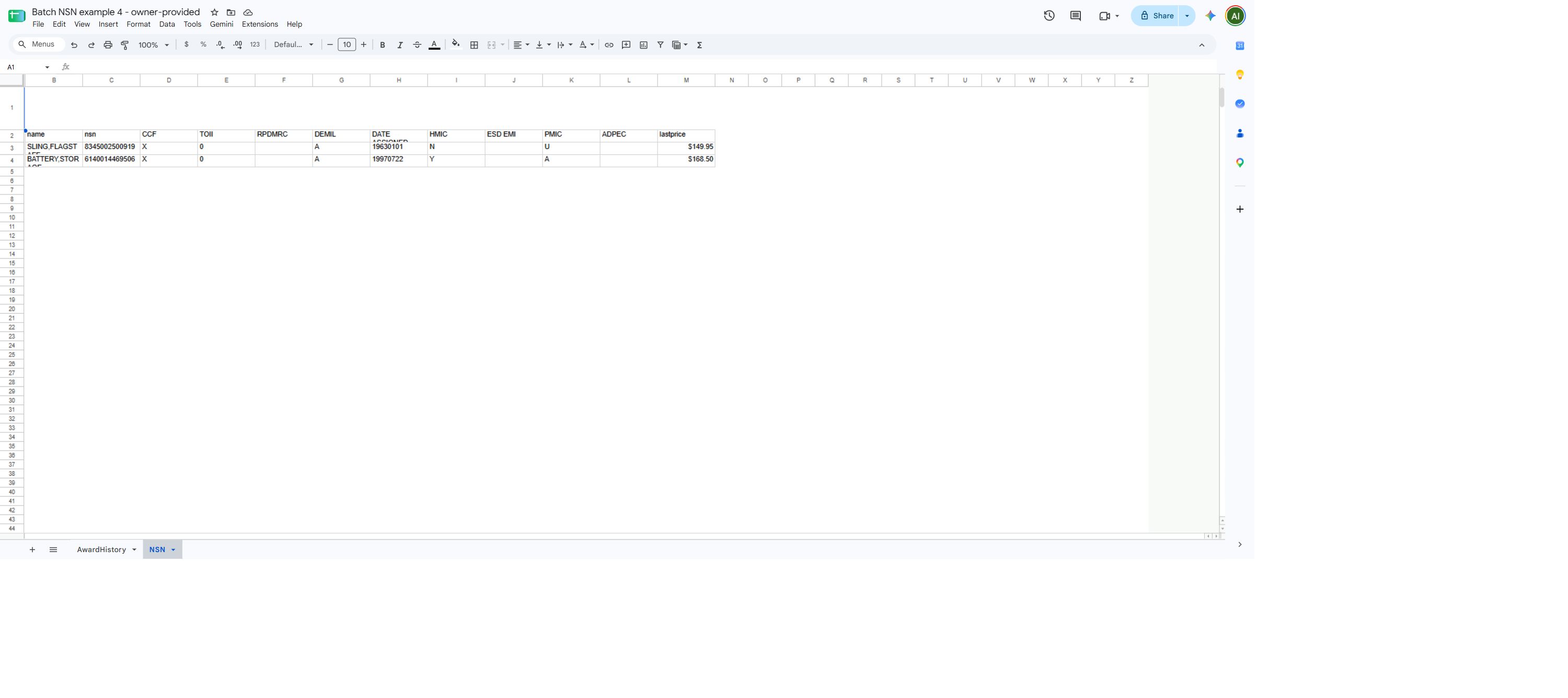
| Column | Meaning |
|---|---|
| (blank heading) | The first column has no heading in this workbook. |
name |
Catalog item name. |
nsn |
National Stock Number. |
CCF |
Item criticality code; consult the catalog value before using it in a specification. |
TOII |
Item-identification type indicator; use the applicable catalog definition before interpreting a value. |
RPDMRC |
Reference or Partial Descriptive Method Reason Code; it qualifies how the item was identified and is not source approval. |
DEMIL |
Demilitarization code; decode the value before applying handling requirements. |
DATE ASSIGNED |
Stock-number assignment date, not a procurement or drawing date. |
HMIC |
Hazardous Material Indicator Code; confirm actual hazards in current documents. |
ESD EMI |
Electrostatic-discharge/electromagnetic-interference code; decode before specifying handling. |
PMIC |
Precious Metals Indicator Code; it is not a physical metal quantity. |
ADPEC |
Automated Data Processing Equipment Identification Code; decode the category. |
lastprice |
Catalog last-award price when available; this is distinct from award-history Price. |
To continue application research, return to the browser tab containing Batch Reporting if it remains open, or begin again from Main Menu → Search by NSN/NIIN → Create a Batch Report. Browser Back returns to the prior page when available; it does not restore an NSN list replaced by a submitted report. For a single item, use Search by NSN/NIIN and its normal item-search controls.
Download this article as Markdown