Research prime contractors by NAICS
Part of these button learning paths: Prime Contractors By NAICS
Video sections for this page
From Main Menu → Research, choose Prime Contractors By NAICS. Select a NAICS category and code, then choose a contractor group and state; the list refreshes with each selection. Select a Cage link to open the company profile, or AwardTotal to open the agency/office report described in spending report fields. Export to Excel prepares the matching list after qualifying selections. Use browser Back to return to the prior list. The screen says “last 12 months,” but the exact period behind AwardTotal is not established.
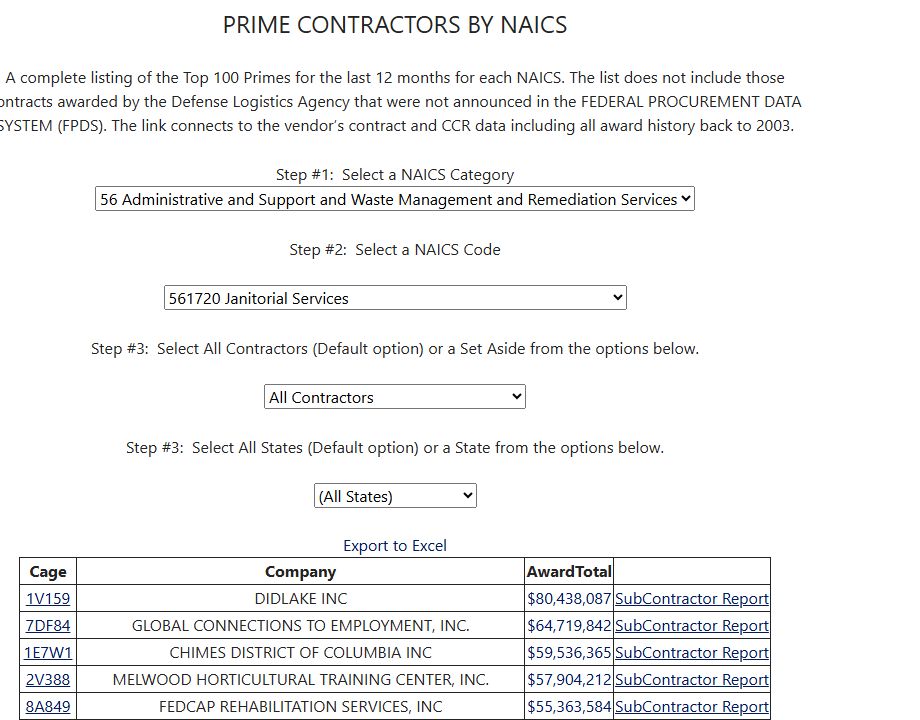
Example: NAICS 561720 Janitorial Services with All Contractors and All States, October 11, 2026. The list links each CAGE to a company profile and each AwardTotal to an agency breakdown.
Select the market
| Control | Meaning and action |
|---|---|
| Select a NAICS Category | Narrows the six-digit NAICS choices to the selected broad industry category. Choosing a category refreshes the page. |
| Select a NAICS Code | Chooses the specific six-digit industry code and refreshes the contractor list. Use the code that represents the offering or buying history being researched. |
| Select All Contractors or a Set Aside | Filters companies by a listed business category, such as 8(a), AbilityOne, HUBZone, ownership or veteran group. It does not show that a particular award was set aside or confirm that a company is currently certified. |
| Select All States or a State | Filters the stored company state. It does not necessarily locate the award's place of performance. |
| Export to Excel | Available after you make qualifying selections. It provides matching company rows, including stored contact, phone, email and address fields. |
Selections refresh the list automatically; there is no separate button to show contractors.
Read the result
| Column or action | Meaning and limit |
|---|---|
| Cage | CAGE identifier linked to the company's detail profile. Open it to inspect the recorded entity and capabilities; preserve its characters and verify current registration separately. |
| Company | Stored legal business name. Confirm the actual operating division and capability before treating it as a prospective prime. |
| AwardTotal | Dollar total shown for the selected company and NAICS. Select it to open a separate agency breakdown for the CAGE. That breakdown does not carry the NAICS, state or business-category filters, so its total can differ. |
| SubContractor Report | Opens the available subcontracting report. Check the report's date and contents before relying on it. |
The page shows the top 100 matching companies by AwardTotal. The export can contain more companies than the visible list.
Use the exported contractor list
Choose Export to Excel after selecting the NAICS category and code plus the contractor and state choices. Use the exported fields to compare the matching companies and keep their contact and location details together.
For example, an October 11, 2026 search for NAICS 561720 — Janitorial Services, All Contractors and All States produced a workbook with 1,726 company rows. The page shows at most 100 rows, so the exported list can include additional matches.

Open the Prime Contractors worksheet at full size.
| Export field | How to use it |
|---|---|
| Cage | Company CAGE identifier. Keep it as text and use it to distinguish the business record. |
| CompanyName | Stored legal business name. Compare it with the profile and current registration. |
| Contact | Electronic business point of contact recorded for the company. |
| Phone | Recorded business telephone number. |
| Ext | Telephone extension, when provided. Keep it with the phone number. |
| contactemail | Recorded electronic business email address. Verify it before outreach. |
| city, state, ZipCode | Company address fields. Preserve leading zeroes in the postal code; the business address may differ from the work location. |
| AwardTotal | Stored total associated with the matched company and NAICS. Use it to compare rows in this list; check current award records for the individual contracts, dates and amounts. |
The spending-report field reference explains the CAGE-wide agency breakdown opened from AwardTotal and why its Total can differ from the prime list.
Planning recipe (not run for this guide): for a small machining company seeking primes, select its NAICS code and a target state, first with All Contractors, then with a relevant company category if useful. Open a promising CAGE and the agency breakdown to see the company's broader award history; check its current registration and subcontracting contact before outreach.