Find contracting officers and their related opportunities
Part of these button learning paths: Just My Contracting Officers · Find Contracting Officers
Video sections for this page
- 0:00 — Open Find Contracting Officers
- 0:14 — Read the search form
- 0:47 — Run a Florida NAICS search
- 1:29 — Read the officer results
- 2:09 — Inspect the accepted worksheet
- 2:31 — Finish the worksheet field list
- 2:54 — Follow Recent RFQs
- 3:35 — Open the associated office
- 4:09 — Choose an office research action
- 4:39 — Read the office identifiers and links
- 5:09 — Review the office email directory
- 5:44 — Search by contact name
- 6:07 — Search notice text by keyword
- 6:36 — Search a Federal Supply Group
- 7:03 — Search a broad PSC category
- 7:29 — Return and prepare another search
From Main Menu → Research, choose Find Contracting Officers. Enter one search criterion and use its adjacent Search button; the matching contacts open in the results list. A result can offer Recent RFQs and, when a matching office is available, an office-profile link. Use those next pages to check the notice and office; Back returns to the prior search or result. This is separate from Just My Contracting Officers, which uses saved account criteria and has no search boxes. The performed Florida/NAICS example below shows how to move from an officer row to recent RFQs and its office profile.
Choose a search mode
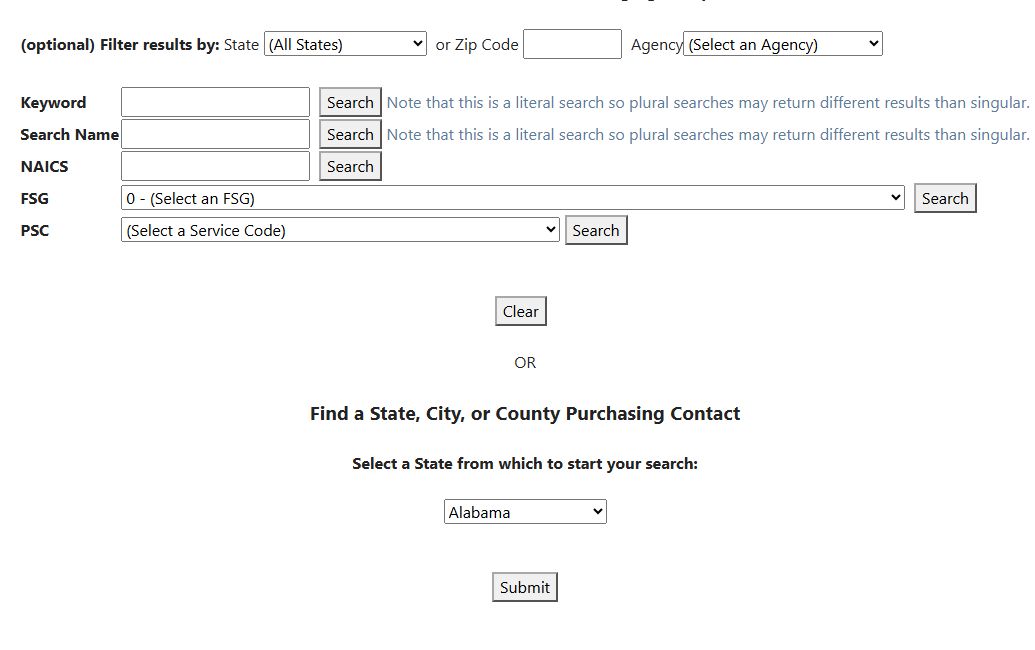
Open the contracting-officer search image at full size.
The form has five separate Search buttons. Each button chooses the adjacent mode; merely filling several boxes does not combine five independent subject searches.
| Field or action | What it searches and why to use it |
|---|---|
| State | Optional geographic filter. The search can match the solicitation record's state or a state associated with its place-of-performance ZIP. A state match is therefore not proof the officer's office is physically in that state. The page notes that some FS.gov and FWS.gov purchasing contacts belong to nationwide organizations and can appear regardless of the selected state. |
| or Zip Code | Optional ZIP entered against the stored office-address text. Treat ZIP as an identifier, including any leading zero; it is not a distance or radius search. |
| Agency | Optional selected agency, or an agency-and-office choice when the selected value contains both. It narrows the solicitation-derived records, not every official contact directory. |
| Keyword → Search | Searches solicitation subject and description using related word forms. The screen calls this a “literal search,” but related word forms may also appear. Use distinctive terms and inspect the returned notices. |
| Search Name → Search | Searches the stored contact text. The contact may include formatting or multiple names; check the exact person and current office before outreach. |
| NAICS → Search | Searches the exact entered industry code attached to solicitation records. Use the code relevant to the business capability. |
| FSG → Search | Searches the selected Federal Supply Group code exactly. Use it when the product group is known. |
| PSC → Search | Searches the selected one-letter service/product category exactly. The menu groups broad service categories; choose the one aligned with the offering. |
| Clear | Resets keyword, NAICS and the selected agency/state/FSG/PSC controls, but does not clear Search Name or ZIP. Clear those two manually before an unrelated search. |
| State purchasing State → Submit | Opens the state purchasing directory for the selected state. This is a separate directory route, described in the state and local guide, not the contracting-officer results. |
Contacts come from solicitation records and can include older notices. A blank term or unchanged FSG/PSC placeholder produces Please enter a term or make a selection. State, ZIP and Agency narrow a subject search; they are not standalone search buttons.
Read search results
| Column or action | Meaning and next step |
|---|---|
| Recent RFQs → View | Opens up to five matching solicitation rows associated with the contact and current filter values, sorted by opening date. It does not independently limit them to an active or five-year period. |
| Office → View | Appears only for rows flagged as federal. It opens an office profile inferred from the solicitation contact and record. A missing View link does not establish that no office exists. |
| Contact Information | Stored contact text from a solicitation. Verify spelling, role, email and current authority from the live notice or agency before using it. |
| Office | Name of the office associated with the solicitation contact. If the displayed name is incomplete, check the current notice or office profile. |
| Location | Location text recorded with the solicitation. It may differ from the place where work is performed. |
| Office Address | Address recorded for the office. The ZIP filter searches this address text; confirm the current full address before correspondence. |
| Export To Excel | Downloads the search results, including contact and email details that are not shown in the grid. Review the worksheet and handle its contact information appropriately before sharing. |
| Back | Returns to the search view without clearing entered values. |
| New Search | Returns to search and partially clears values; Search Name and ZIP persist. |
| No results were found | Appears when the chosen mode and retained filters return no rows. This does not mean there are no contracting officers for the state or industry; revisit the search term, agency, state and ZIP before broadening. |
Recent RFQs carries relevant filters from the search. Before starting a different search, use Clear and also erase Search Name and ZIP manually, since those two values remain. An Export To Excel link can appear even when no rows matched.
Performed search: Florida and NAICS 238210
On October 12, 2026, Main Menu → Research → Find Contracting Officers opened the form. Select Florida for State, leave or Zip Code blank and Agency at its default, enter 238210 in NAICS, and press the Search beside NAICS. State narrows the solicitation-derived search; it does not mean every listed officer is based in Florida or that every contract is performed there.
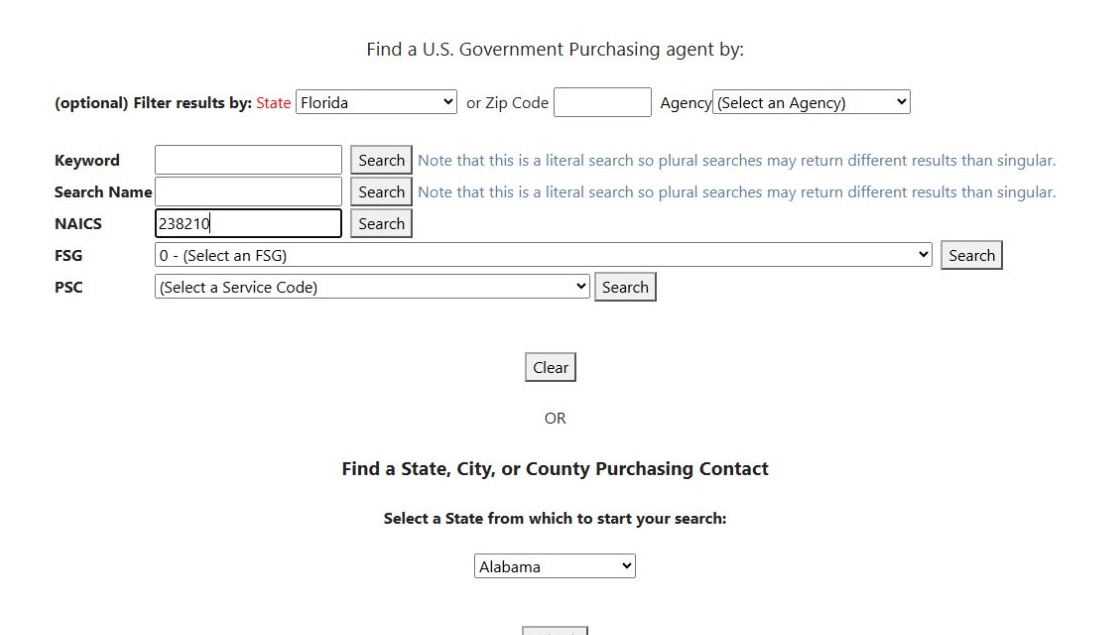
Open the Florida NAICS search form at full size.
The first result showed contact text for Charles Cowart / Kurt Armbruster, Department of the Air Force, office FA2521 45 CONS PK, and Patrick SFB, FL 32925-3237. Use the contact and office fields together to identify the buyer before opening related notices; the office-profile guide follows this row's Office → View link.
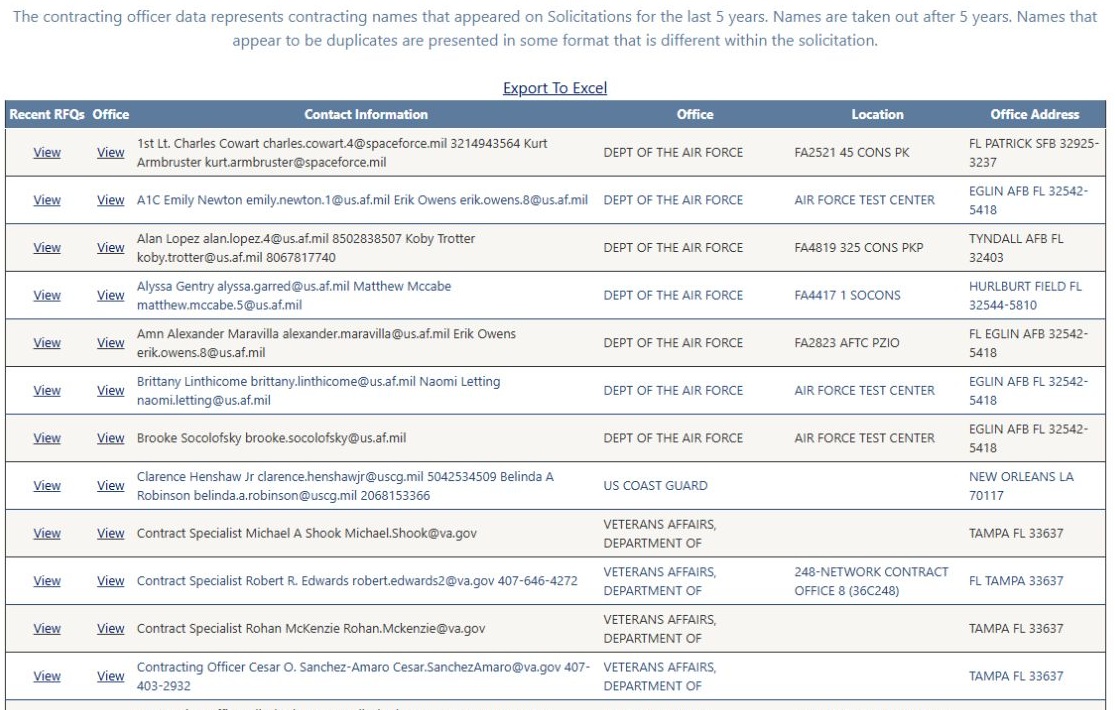
Open the officer results at full size.
Select Recent RFQs → View on that first row. It opened five solicitation rows. The first was SLD 45 Simplified Acquisition for Base Engineering Requirements (SABER), with Opening Date 08/26/26 and Closing Date 09/09/26. Further rows included SABER notices opening 08/14/26 and 08/04/26, then two street-repair rows from 2025. These records show subjects associated with the contact; the list includes older notices and does not itself identify an open bid. Use the displayed View SAM link to inspect the original notice and its current status. Browser Back returned to the officer results.
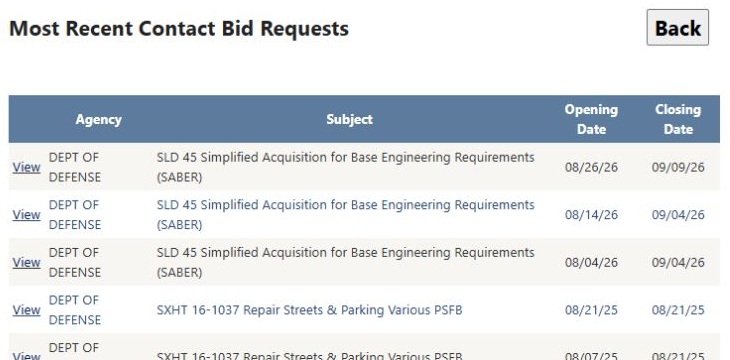
Open the Recent RFQs result at full size.
From the officer results, Office → View opens the matching buying-location page. After researching that office, New Search returns to the search form. Clear retained Search Name or ZIP manually before switching to an unrelated search.
Compare the other search modes
The same October 12 session used New Search between searches, with ZIP blank and Agency at its default. Select the mode's own Search button; these are separate searches, not terms combined with the earlier NAICS search.
| Mode and exact input | Result shown | Why use it |
|---|---|---|
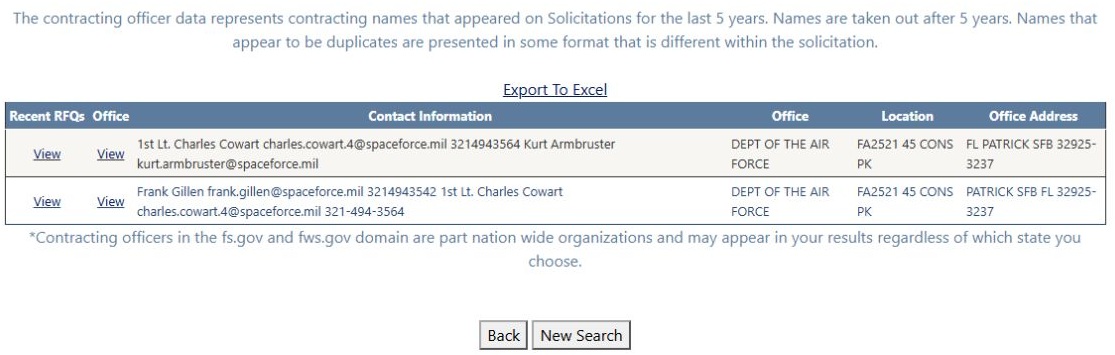
| Search Name: Cowart; State at All States | 2 rows: Charles Cowart / Kurt Armbruster first, Frank Gillen / Charles Cowart second. View result. | Find contact records when you know a person's surname; check the full contact text because more than one person can appear in a row. |
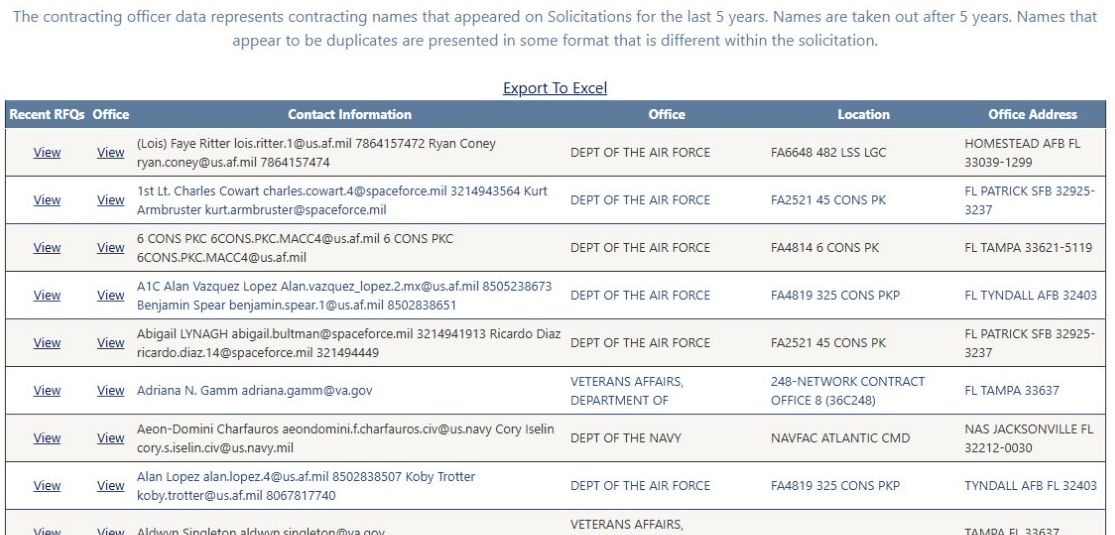
| Keyword: electrical; State Florida | First row (Lois) Faye Ritter / Ryan Coney, FA6648 482 LSS LGC, Homestead AFB, FL 33039-1299. View result. | Find officers linked to notices whose subjects or descriptions concern a service or product term. |
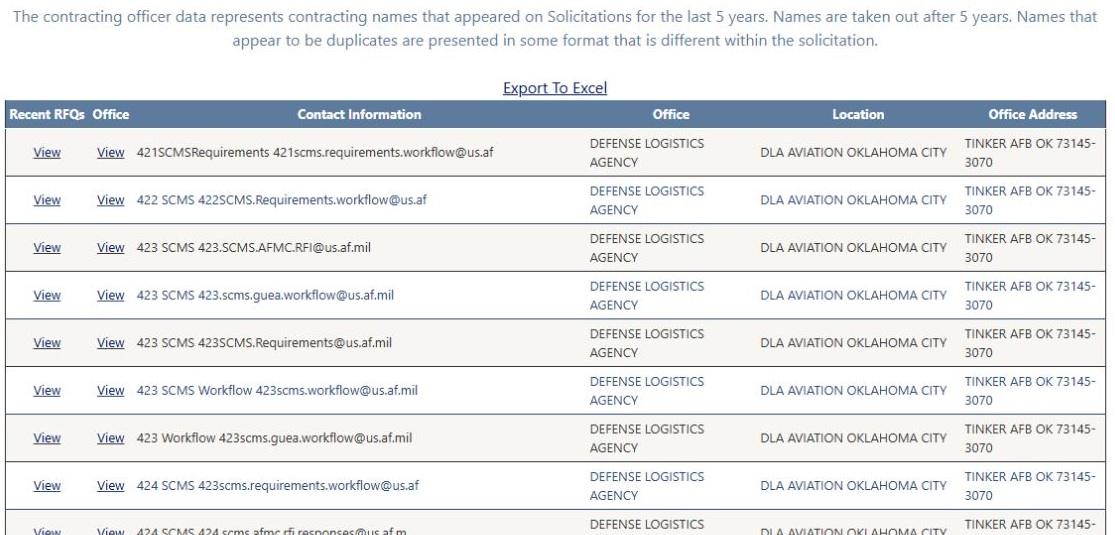
| FSG: 48 Valves; State at All States | First row 421 SCMS Requirements, DLA Aviation Oklahoma City, Tinker AFB, OK 73145-3070. View result. | Find contacts tied to a known supply group. |
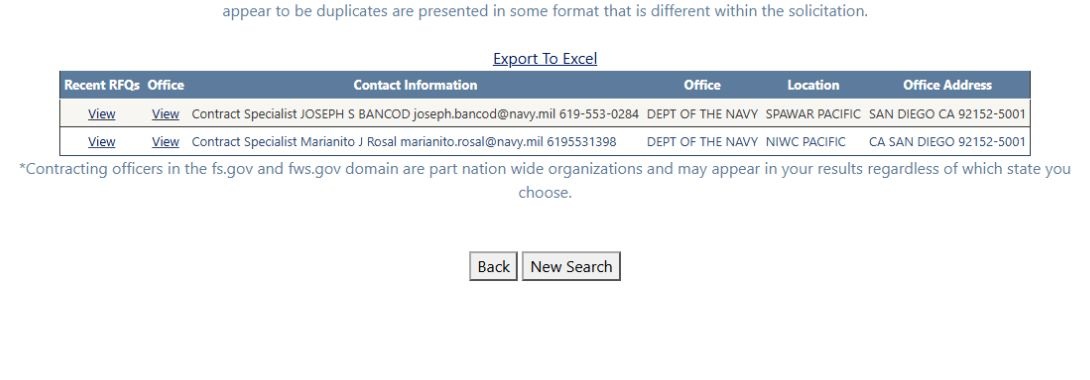
| PSC: D — Information Technology (including telecom); State at All States | 2 rows: Joseph S. Bancod at SPAWAR Pacific and Marianito J. Rosal at NIWC Pacific, San Diego, CA 92152-5001. View result. | Search a broad service category when a specific NAICS or name is not the best starting point. |
The Florida NAICS 238210 example above covers the fifth search button and follows its first result into RFQs and an office directory. Each mode reflects stored solicitation contacts. Use the linked notice and office page to confirm who handles the current requirement.
Columns in the Excel export
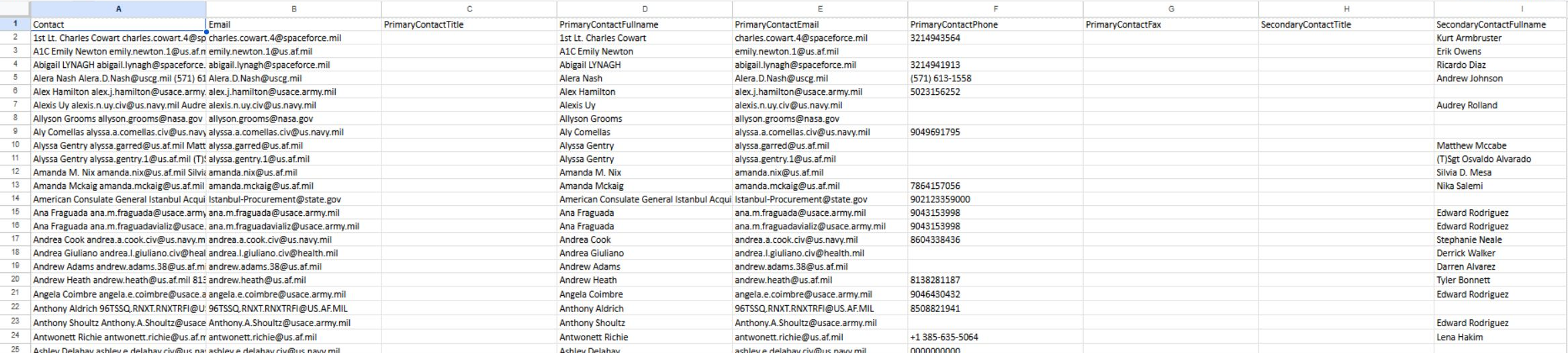
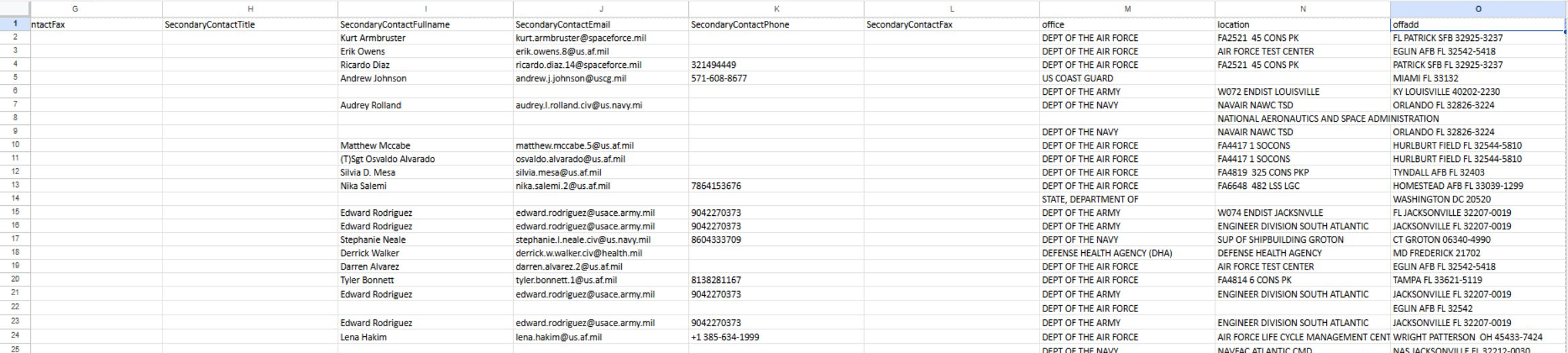
Open a larger view: primary contacts · secondary contacts and offices.
These are two views of the same downloaded worksheet. Filter the full table by office or location to organize a buyer list, then read its primary and secondary contact fields. Return to the search results and select Recent RFQs → View for the matching contact to check the notices associated with that person. The spreadsheet organizes your research; it does not send a message.
An inspected ContractingOfficers worksheet has these 15 columns. They include contact details for the primary and secondary contacts, plus the office information used by the result list.
| Worksheet column | Meaning |
|---|---|
| Contact | Contact name or text associated with the solicitation result. |
| Email address listed for the contact. | |
| PrimaryContactTitle | Title of the primary contact. |
| PrimaryContactFullname | Full name of the primary contact. |
| PrimaryContactEmail | Email address of the primary contact. |
| PrimaryContactPhone | Phone number of the primary contact. |
| PrimaryContactFax | Fax number of the primary contact. |
| SecondaryContactTitle | Title of the secondary contact, when listed. |
| SecondaryContactFullname | Full name of the secondary contact, when listed. |
| SecondaryContactEmail | Email address of the secondary contact, when listed. |
| SecondaryContactPhone | Phone number of the secondary contact, when listed. |
| SecondaryContactFax | Fax number of the secondary contact, when listed. |
| office | Office name associated with the result. |
| location | Location text associated with the result. |
| offadd | Office address text associated with the result. |
Contact details can be outdated or belong to a different role. Check the current notice or agency source before using them.
Read Recent RFQs
| Field | Meaning and use |
|---|---|
| Unlabeled opening link | Opens the stored external notice URL. Confirm the destination and that the notice remains accessible and current. |
| Agency | Buying agency name recorded with the notice. Use it to confirm the organization associated with the contact. |
| Subject | Solicitation subject; read the current notice for full scope and amendments. |
| Opening Date | Recorded opening date, displayed as month/day/two-digit year. |
| Closing Date | Recorded closing date, displayed the same way. Check the live notice for extensions or amendments before treating it as an actionable deadline. |
| Back | Returns through browser history. |
When the linked contact has an email address, the list matches notices by that email; otherwise it matches the contact text. The list shows up to five rows. “Recent” is its label rather than a promised date window.
Read the conditional office profile
The profile groups offices by department and starts with those groups collapsed. Its table supports grouping or reordering columns. Department, Agency, Contracting Office and Zip Code identify the stored organization and location. The office name may link to a stored external site. ZIP is an identifier, not a number to calculate with.
Other columns are actions whose links appear only when supporting records or URLs are available:
| Action column | What it opens; what to verify |
|---|---|
| Contact Emails | Office email directory when records exist. Confirm which address belongs to the current office and person. |
| Pre-Sols | Related presolicitations. Check dates and relevance; a link is not a current opportunity guarantee. |
| Award History | Related award results. Compare agency/office identifiers and award dates before citing an incumbent. |
| 90 Day Expiring Contracts | Conditional expiring-contract results. The label does not establish a literal 90-day period; the link requests a current-month filter, and the downstream result must be checked on its own terms. |
| OSDBU | Agency small-business office directory when records exist. Verify current contact information. |
| Phone Book | Stored external phone-book URL when present; inspect that source for current details. |
| FOIA Contacts | Agency/office FOIA directory with a fallback when records exist. Use it for the appropriate information-request process, not as a solicitation contact substitute. |
The office profile has no separate Excel export button.
The Florida example illustrates a practical buyer-research sequence: search the service code, read the office and contact, compare subjects in Recent RFQs, then inspect the office directory. Confirm a current solicitation and contact on the agency source before reaching out.