Search and read APL/AEL equipment lists
Part of these button learning paths: Research All Open Solicitations · Just My Opportunities · Machine Shops Opportunities · Unfulfilled NSN Opportunities · Search by NSN/NIIN · APL/AEL Historical · Naics To FSC Cross · Commercial Part Number to NSN · Weapons System Designator Codes
Video sections for this page
- 0:00 — Open APL/AEL Historical
- 0:20 — Choose a search field
- 0:46 — Use the optional CAGE filter
- 1:03 — Search for hydraulic pump
- 1:27 — Confirm the selected equipment
- 1:56 — Read Parts List
- 2:17 — Follow the cartridge-kit NIIN
- 2:39 — Confirm the catalog item
- 3:11 — Compare part references and research buttons
- 3:41 — Follow the supplier CAGE
- 4:11 — Read Component Characteristics
- 4:36 — Check multiple references
- 5:00 — Check plan-document references
- 5:20 — Check manual references
- 5:36 — Check detailed support status
- 5:51 — Return or start another search
Video sections for this page
Choose APL/AEL Historical from the Parts/Products menu, or open the search with a NIIN from an NSN result. An Allowance Parts List or Allowance Equipage List relates parts and supporting documents to an equipment list. It is historical reference material; check the current equipment configuration and solicitation before relying on a listed part. The examples below show both an empty NIIN search and a populated nomenclature search.
How to get here and continue
- From Main Menu, choose Parts/Products > APL/AEL Historical, or open APL from an NSN result. The next screen is the APL/AEL search form.
- Search by the known APL/AEL identifier, equipment nomenclature, NIIN or part number. Matching list identifiers open a detail page, where the Parts List, CCF, Multi. Ref Nr., Plan Doc. and Manual Numbers choices show their corresponding sections.
- New Search returns to APL/AEL search; Back uses browser history. On the detail page, Main Menu returns to the menu. No export is shown on the search or detail pages.
Choose a search
| Input or button | What the page actually does |
|---|---|
| APL/AEL | Search the exact entered list identifier against the header; use it when the list number is known. |
| Nomenclature | Search the entered equipment/list wording as one quoted full-text phrase. It is not a separate-words or arbitrary substring search; use wording from a known equipment designation and compare the returned list title. |
| NIIN | A manual search takes the last nine characters of the entered value after trimming trailing spaces. The automatic link from another page handles the value differently. Confirm the intended NIIN in results. |
| Part Number | Match an exact stored reference number. It is not a wildcard or partial-number search. |
| Only show results for CAGE Code entered below for NIIN and Part Number searches | Apply the entered CAGE to NIIN and part-number searches only when checked. APL/AEL and nomenclature searches ignore this filter. |
| CAGE | Company identifier used with that checkbox. Leave the checkbox clear to search regardless of CAGE; text entered in this box alone does not filter APL/AEL or nomenclature searches. |
Choose the key you actually have. A known APL/AEL number identifies a list; a NIIN identifies a catalog item; Part Number + CAGE can narrow a reference to an organization. The CAGE checkbox changes only the NIIN and part-number searches in this page's source. If an APL/AEL or nomenclature search looks unexpectedly broad, changing that checkbox will not narrow those routes. Compare the returned APL/AEL, Type and Nomenclature before opening a list. The exact stored list and its current revision still need confirmation.
Use the button beside the field you entered; pressing Enter in one of the four search boxes submits that field's corresponding search. A search with no matching rows shows a message naming the route used: APL/AEL, nomenclature, NIIN or part number. A blank grid says only that this particular lookup returned no list; it does not establish that the item has no equipment application or related technical records.
Read the result fields
| Field | Meaning and why to use it |
|---|---|
| APL/AEL | Linked list identifier: Allowance Parts List or Allowance Equipage List. Use it to identify the equipment/list record you intend to research. |
| Type | This application displays AEL when the second character of the stored AINAC is Q; otherwise it displays APL. Confirm the underlying list, especially when the code is blank. |
| Nomenclature | Equipment or list description. Compare it with the actual equipment designation before following a parts relationship. |
| TCC | Technical Cognizance Code: identifies technical responsibility in the allowance-support classification. Use it to orient further technical research. |
| AINAC | Application Identification Number Activity Code: identifies the programme-support activity/classification. Read it with the list identifier, not as a part number. |
| LSSC | Logistic Support Status Code: records the equipment/component's support classification. Use it to identify support questions; it is not a stock balance. |
The code names and allowance-support context follow the historical NAVSUP P-485 Volume I, Revision 3, section 2092, pages 2-33–2-34. Use the applicable list's code legend to interpret a particular value. Back returns to the previous page. The search page has no export.
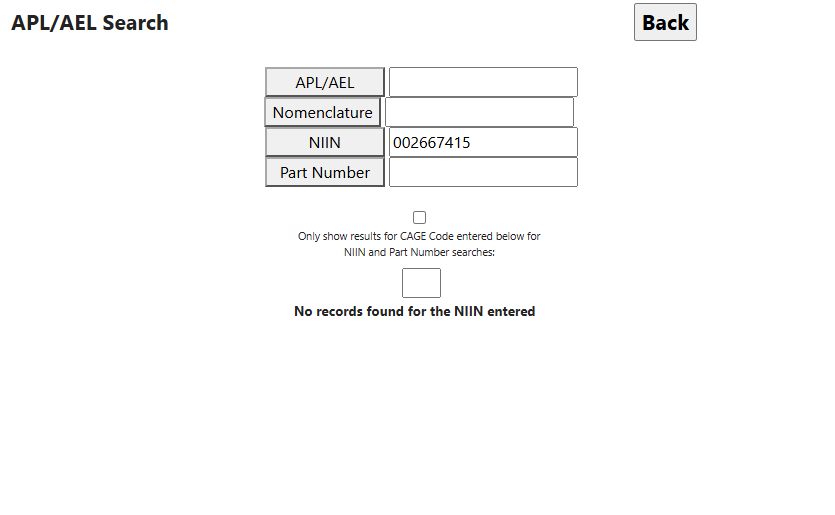
For NSN 4030-00-266-7415, the NSN-result link opened this search with NIIN 002667415 filled in. The page showed all four search buttons and the optional CAGE checkbox, followed by No records found for the NIIN entered. That message applies to this APL lookup; it does not determine whether other parts, drawings or equipment records exist for the item.
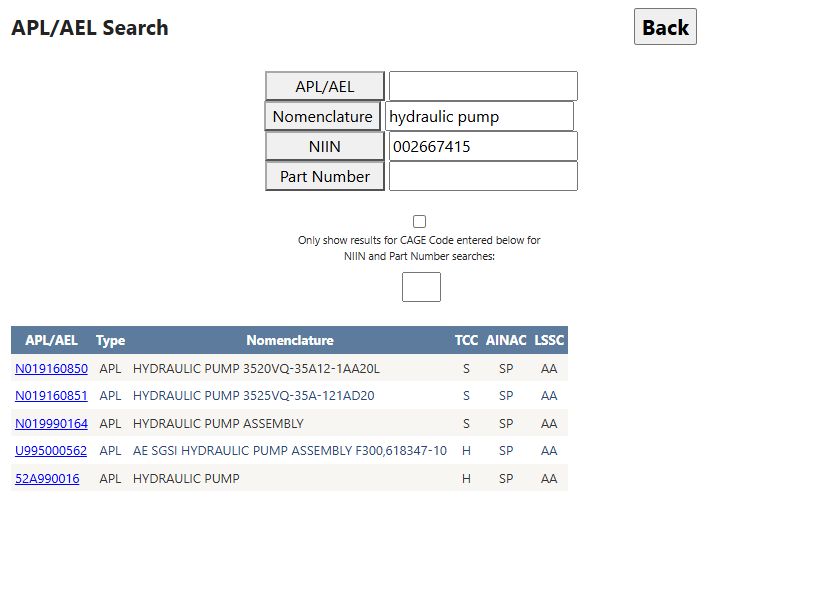
For a populated example, enter hydraulic pump in Nomenclature and select that button. The observed search returned five APL/AEL rows. Its first linked list, N019160850, was labeled HYDRAULIC PUMP 3520VQ-35A12-1AA20L, with Type APL, TCC S, AINAC SP and LSSC AA. The screenshot also shows an earlier NIIN left in its box; selecting Nomenclature ran the nomenclature search, not a combined search with that NIIN. Compare the other results' descriptions before choosing a list; a shared phrase does not establish an equipment match.
Read a selected list
The detail heading repeats APL/AEL, Type, Nomenclature, TCC, AINAC and LSSC from the header. Use the list identifier and nomenclature to confirm that you opened the intended equipment. Then select one of these sections:
| Section button | Fields shown and practical meaning |
|---|---|
| Parts List | Part Number is the reference number; CAGE identifies the associated company; Item Name describes the item; NIIN is its nine-character catalog identifier when supplied. Compare the displayed fields before deciding whether a part matches this list. Use a displayed CAGE link to open company details or a displayed NIIN link to open its stock-number summary. |
| CCF | Component Characteristics shows stored component text in CCF-line order. Read the full text and reconcile it with current equipment configuration. |
| Multi. Ref Nr. | Multi. Ref Number and Primary Reference Number show a recorded alternate-primary number relation. Its NIIN links to a stock-number summary and CAGE to supplier detail. Check both identities and the applicable list; this relation does not independently authorize substitution. |
| Plan Doc. | Plan Documents and Doc Type are stored plan-document identifiers and codes. They render as text, not a downloadable document link. |
| Manual Doc. | Manual Number and Doc. Type are stored manual identifiers and codes. They render as text, not a downloadable manual. |
| LSSC | Displays detailed Logistic Support Status Code text. Compare it with the list's LSSC value and applicable equipment guidance. |
| Sec. B | Select this control only if it is available on the page; use the displayed section and its fields to continue research. |
Selecting one data section hides the other section grids. New Search returns to APL search; Back uses browser history; Main Menu is visible on this detail page. No detail-page export is present.
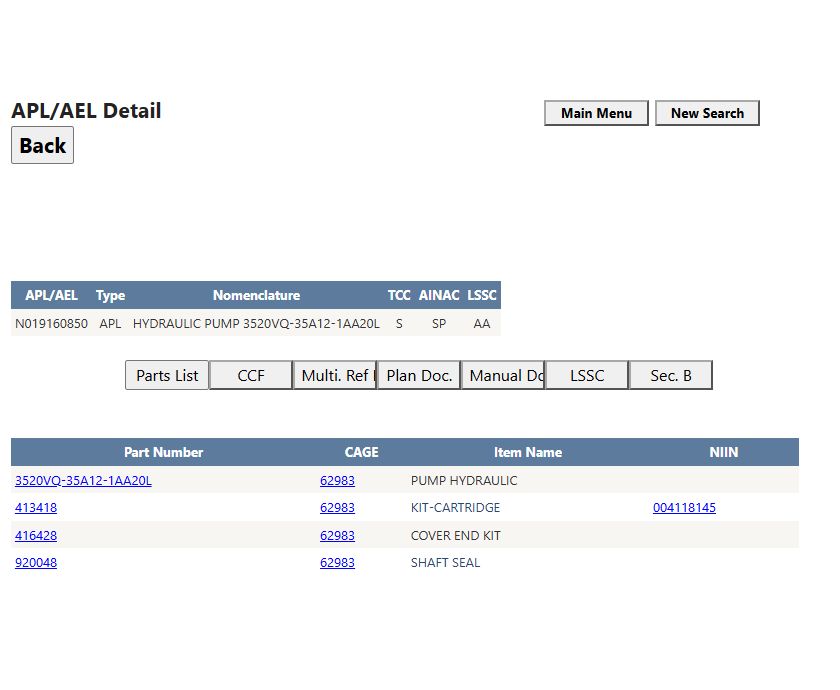
In the observed N019160850 detail, Parts List showed four rows, all with CAGE 62983. The part numbers were 3520VQ-35A12-1AA20L (PUMP HYDRAULIC), 413418 (KIT-CARTRIDGE), 416428 (COVER END KIT) and 920048 (SHAFT SEAL). Only 413418 had a displayed NIIN, 004118145; the other three NIIN cells were blank. A blank cell is missing information in this list, not evidence that the part has no NIIN. Following 004118145 opened the stock-number summary for 4320-00-411-8145, named PARTS KIT,CENTRIFUGAL PUMP; its APL section showed part 413418 with CAGE 62983. Following that CAGE link opened a supplier detail for EATON AEROSPACE, LLC. These links help cross-check identities, but they do not replace current configuration and source-approval checks.
CCF displayed 17 component-characteristic lines for this list. They include text such as FLOW RATE-35GPM, while fields such as OPERATING PRESSURE- have no value after the label. Treat these as recorded list details, not a current equipment specification; a blank or N/A entry does not settle the current requirement. Multi. Ref Nr. and Manual Doc. displayed no-data messages in the example. Check the current governing documents before drawing a conclusion from an empty section.
An equipment-list entry connects the selected list with a recorded part or NIIN. It is different from an MCRL reference-number/CAGE match for an NSN, and neither relationship approves an alternate for today's purchase. In Parts List, use Part Number, CAGE, Item Name and NIIN together; then check the current equipment manual or solicitation for configuration, revision and source restrictions. Plan Doc. and Manual Doc. provide identifiers to locate governing material. If a section is blank, check the current governing material before drawing a conclusion.
Maintenance-business example
A repair shop with an equipment APL number can search by exact identifier, check the equipment nomenclature, open Parts List, and compare candidate Part Number, CAGE and NIIN. CCF and the plan/manual identifiers can guide further checks. If the current repair instruction, drawing or approved-source requirement conflicts with this list, follow the current governing document and obtain clarification.