Read an item's technical characteristics
Part of these button learning paths: Research All Open Solicitations · Just My Opportunities · Machine Shops Opportunities · Unfulfilled NSN Opportunities · Search by NSN/NIIN · APL/AEL Historical · DLA Prime Contractors · Naics To FSC Cross · Commercial Part Number to NSN · Weapons System Designator Codes
Video sections for this page
Video sections for this page
Video sections for this page
Video sections for this page
Video sections for this page
Video sections for this page
Video sections for this page
Video sections for this page
Choose Tech. Characteristics on an NSN result to read the item's recorded characteristic statements.
How to get here and continue
- Search through Search by NSN/NIIN, confirm the item on its NSN result, then choose Tech. Characteristics.
- The next page lists the recorded characteristics for that item. Compare the requirement wording and values with the solicitation; do not infer unshown units or tolerances.
- Back returns to the preceding item page. For a multi-item keyword/reply workflow, return to the search form and use Search Technical Characteristics; that separate route changes the account's saved reply list.
What appears on the page
The heading identifies the stock number and item name. The page lists recorded characteristics for that item; row order is for display and does not indicate priority.
| Field | Meaning and why to use it |
|---|---|
| MRC | Master Requirement Code. It identifies the characteristic described in the row. |
| Requirement | Characteristic description, such as a material or dimension. |
| Reply | Recorded value or text for that characteristic. Read any unit or qualifier shown in the reply. |
Read each row as MRC → Requirement → Reply. Keep the requirement and reply together when comparing a candidate part. Words such as nominal and units such as inches are part of the recorded reply. DLA's PUB LOG guidance explains characteristics as one part of the catalog record.
Use Back to return to the previous page. This view has no page-specific export. If no rows are returned, the page says No Technical Characteristics found.
Live example: hook, pelican
For NSN 4030-00-266-7415, the page displayed HOOK,PELICAN and ten MRC/Requirement/Reply rows. Examples include AARN · Fabrication Method · Forged, ABHP · Overall Length · Inches Nominal 18.562, MATT · Material · Steel, and SFTT · Surface Treatment · Zinc.
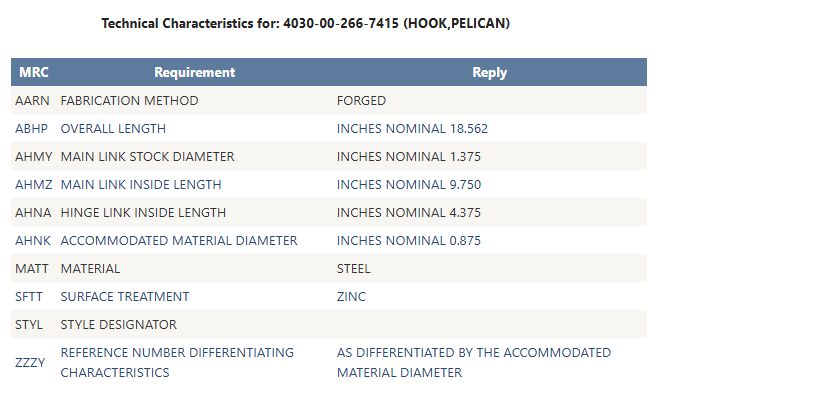
The STYL · Style Designator reply was blank in this result. The ZZZY reply says the reference number is differentiated by accommodated material diameter; the page also shows AHNK · Accommodated Material Diameter · Inches Nominal 0.875. Read related rows together while retaining their exact wording.
Here, ABHP 18.562 and AHNK 0.875 are different dimensions despite both using inches. AARN Forged, MATT Steel and SFTT Zinc describe fabrication, material and treatment. Compare the full set with the candidate part's documentation.
Manufacturer example
For an NSN on a request for quotation, confirm the item on the NSN result, then compare each Requirement and Reply with the offered part and the solicitation's specification and revision. Include the MRC and exact statement when asking an engineer about a mismatch.
The combined item report uses different field names and may show different characteristic text.
Download this article as Markdown