Research weapon-system designator codes and their items
Part of these button learning paths: Weapons System Designator Codes
Video sections for this page
- 0:00 — Open Weapons System Designator Codes
- 0:16 — Search by system name
- 0:41 — Expand the selected system
- 1:10 — Read the item classification fields
- 1:42 — Open the same hinge item
- 2:09 — Continue item research and return
- 2:34 — Search by designator code
- 3:01 — Use the exported item list
- 3:31 — Use your shortlist for further research
Weapon System Designator Codes (WSDC) groups stock items by a recorded weapon-system designator and name. Search for a system, expand its group, and open an NSN to review the catalog item.
How to get here and continue
- From Main Menu > Parts/Products, choose Weapons System Designator Codes. The next page presents the designator search controls.
- Choose WS Name or WSDC in Search by, enter the name or code, and press Search. Expand a group with its left arrow, then select an NSN to open the item result in a new tab. Confirm the stock number and item name there.
- Close the item-detail tab to return to the original designator results. Change the search mode or text in that tab for another search; use Main Menu → Parts/Products → Weapons System Designator Codes to restart from elsewhere.

Search and expand a system
| Control or field | Meaning and use |
|---|---|
| Search by: WSDC | Search by a complete designator code. |
| Search by: WS Name | Search for words in a recorded weapon-system name. Use a distinctive phrase and confirm the displayed name. |
| Search text | Enter the code or name phrase for the chosen mode. A blank Search shows no group rows. |
| Search | Refreshes the grouped result. The group list pages at 20 rows. |
| WSDC | Recorded weapon-system designator. It is the grouping key for the expandable item list. |
| WS Name | Stored weapon-system name. Similar names can appear under different designators; confirm the intended system. |
| # of NIINs | Count shown for the group. |
| Expand group | Shows the group's item rows, ten at a time. |
Each expanded row has:
| Field | Meaning and limit |
|---|---|
| NSN | Opens the item result, where you can review identity, characteristics and references. |
| NIIN | Nine-character National Item Identification Number; retain leading zeros when comparing records. |
| Item Name | Stored catalog item description/name. It may be broad; open the NSN and compare its technical record. |
| Security | Security classification shown for the item. |
| WSEC | Weapon System Essentiality Code: indicates how failure of the item affects the system's ability to perform its mission. |
| WSGC | Weapon System Group Code: identifies the weapon system's criticality group. |
| WSIC | Weapon System Indicator Code shown with the item. Keep the code when referring to the record. |
The DLA Customer Handbook includes these code names in its glossary. For WSEC meanings, use the DLA data dictionary, which identifies the governing code reference.
Performed example: search by name, then by code
On October 12, 2026, Main Menu → Parts/Products → Weapons System Designator Codes opened the search. Choose WS Name in Search by, enter forklift, and press Search. The result showed six groups: 15A (1 NIIN), 93A — TRUCK, FORKLIFT 1000M (2,317), CMA (1,428), KVM (1,472), MCM (1,899), and WRA (1,715). The differing names and counts help you choose the intended system before looking at thousands of item rows.
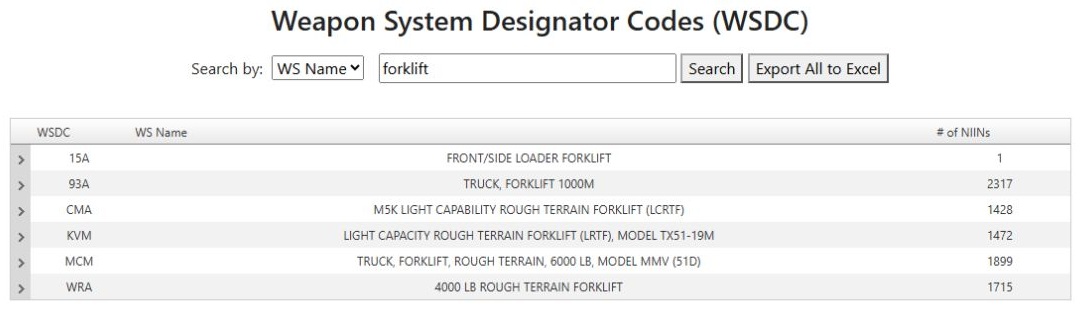
Open the forklift group results at full size.
Select the arrow at the left of 93A to expand its items. The grid displayed 10 rows per page and 2,317 items in 232 pages. Use its page controls to move through the group rather than assuming the first page contains all related items. On page 1, NSN 2510012936034 had NIIN 012936034, a shortened HINGE,DOOR,VEHICULA item name, Security U, WSEC 3, WSGC B, and WSIC S. Keep these codes with the item; their presence alone does not establish the item's suitability for your work.
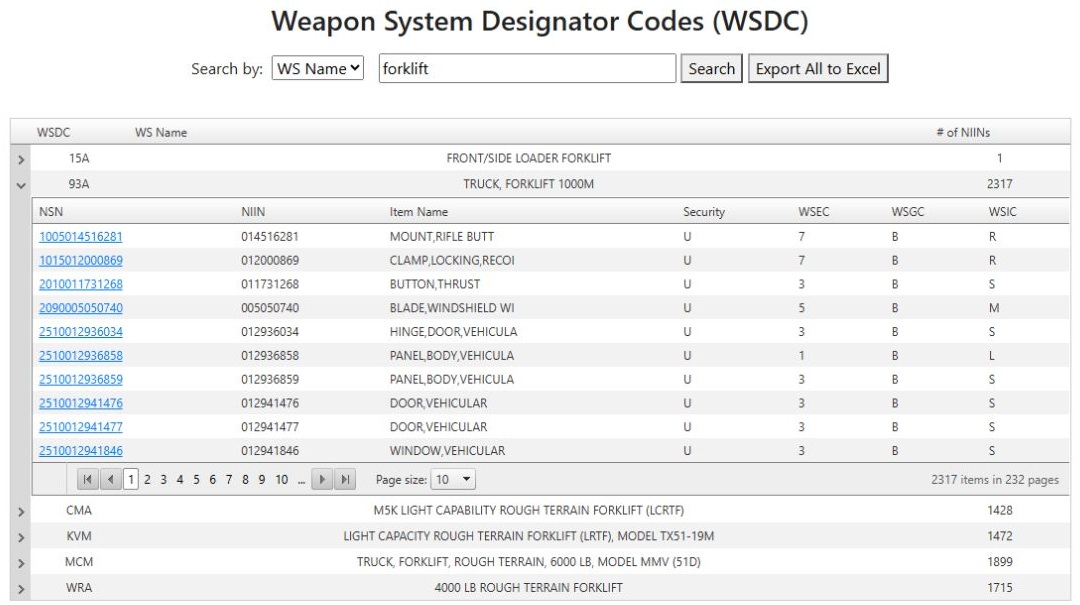
Open the expanded 93A result at full size.
Selecting NSN 2510012936034 opened a new browser tab with the populated item detail. It gave the full name HINGE,DOOR,VEHICULAR, End Item 3930-01-158-0849, and Last Award Price $16.41 dated 03/25/16. The part table listed 7077261 for JLG INDUSTRIES INC, CAGE 1YHH8, and TRAK INTERNATIONAL, CAGE 3Y949. This item page lets you compare exact stock and part identifiers before researching technical details or purchasing history. Close its tab to return to the original expanded 93A result.
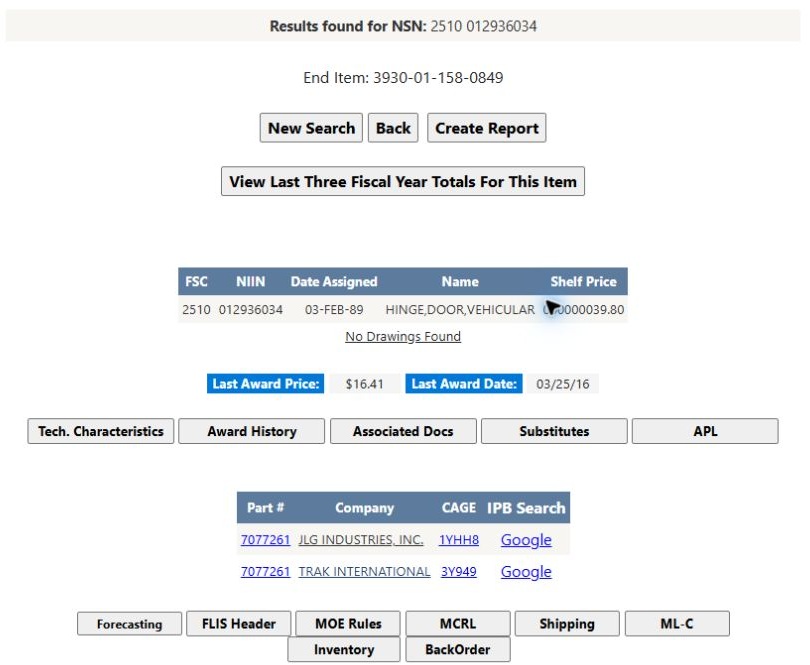
Open the hinge item detail at full size.
For a direct code lookup, switch Search by to WSDC, enter 93A, and press Search. The result contains one group, 93A — TRUCK, FORKLIFT 1000M, with 2,317 NIINs. Expand it for the same kind of paged item list. Use name search when you know the product or system wording; use code search when you already have the designator.

Open the direct code result at full size.
A system association helps identify items worth researching, but it does not establish a current bid. Open each relevant NSN result for technical data, drawings and award history, then check current solicitations separately.
Treat the export as a separate selection
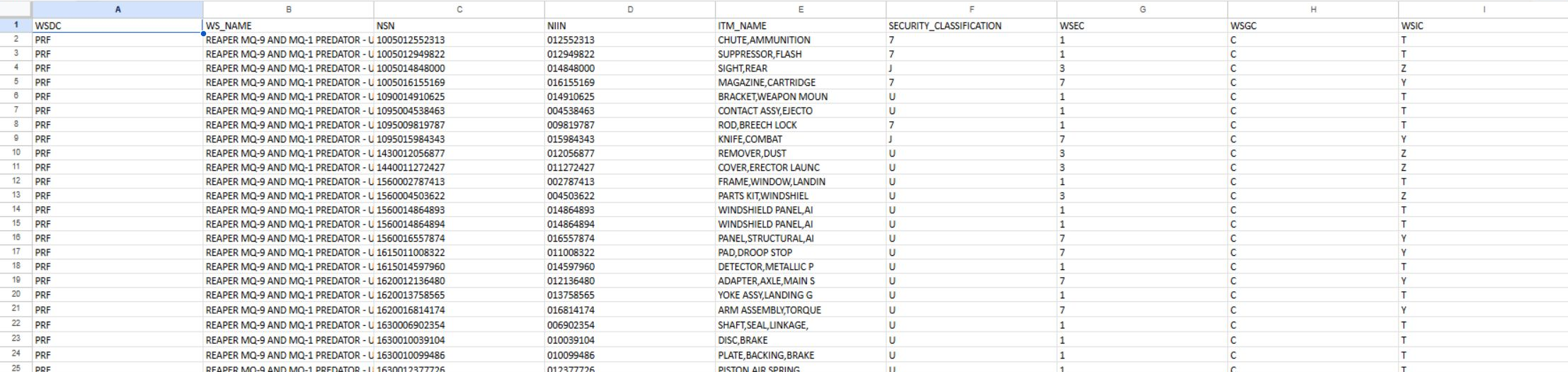
Open the worksheet image at full size.
This saved worksheet illustrates the nine-column layout. It is an older export, so run your own search for a current working list. WS_NAME, ITM_NAME and SECURITY_CLASSIFICATION are the worksheet headings corresponding to the screen's WS Name, Item Name and Security. The other headings retain their screen labels.
After exporting, filter the full table by ITM_NAME to shortlist the kinds of items you supply. Keep NSN and NIIN as text so their leading zeros remain intact. Return to the application and open a shortlisted NSN for its characteristics, references and award history. The worksheet helps organize the list; the NSN page provides the item research.
Export All to Excel downloads item rows for the entered code or name search. The export contains WSDC, WS Name, NSN, NIIN, Item Name, Security, WSEC, WSGC, and WSIC. It does not include the grouped # of NIINs count.
The displayed count and item list are useful for navigating the recorded associations. For a specific item, open its NSN result and compare the catalog details with the system or solicitation documents you are using.
Download this article as Markdown