Read contracts expected to expire
Part of these button learning paths: Expiring Contracts 120 Days · My Government RoadMap · Expiring Contracts through 2030
Video sections for this page
Start at Main Menu → Research → Expiring Contracts through 2030. After choosing a route and expected-completion year, press its adjacent Search. In this grouped result, select the arrow beside a contract to expand its actions; select Contract # to open Award Details. Use Back to return to the list.
After searching expected completions, use this grouped result to see which contracts may be worth monitoring. It shows related past actions together and an Est. Completion Date. NAICS 561720, year 2027 and default Step 3 choices returned 1,189 groups across 12 pages in the example below. Some searches instead open the flat action list.
Parent rows and expanded actions
The parent grid sorts and shows 100 rows per page. Select the arrow beside a parent to see its award actions. Related rows are grouped by Ref # when present, otherwise by Contract #. # of Records counts action rows in that group; Total adds their displayed obligations. Each child has its own amount and date, which helps explain the parent Total.
Contract 127EAY24P0006 shows P00003 in its parent row, a $41,760 Total, 5 Records, an award date of January 2, 2026, and Est. Completion Date January 2, 2027. Expanding it shows five action rows: base action 0 for $10,440; P00001 for $0; two P00002 rows for $10,440 each; and P00003 for $10,440. All five display January 2, 2027 as estimated completion. Together their amounts equal the $41,760 parent Total. Both P00002 rows belong in that displayed total; # of Records counts rows, not distinct modification numbers.
Open the parent's Contract # to read the selected P00003, transaction 0 in Award Details. It shows $10,440 Action Obligation, the amount of this action rather than the $41,760 group. Date Signed is January 2, 2026; Effective Date is January 3, 2024; Completion Date is blank; and Ultimate Completion Date is January 2, 2027. The detail also shows solicitation 127EAY24Q0002, PSC S201, NAICS 561720 and an option-year-2 janitorial description. These identifiers help locate the right requirement and compare related actions.

Open the full-size expiring-contract result.
| Visible field or action | What it is and why to use it |
|---|---|
| GSA Sched | View opens a related GSA reference when a link is available. A blank cell offers no link here. |
| Contract # | Contract identifier linked to the action detail. Use it with Mod # and Ref # to identify the action. |
| Mod # | Modification number of the displayed action. The base award and later mods may change scope, amount or completion date. |
| Ref # | Referenced parent agreement when present. It can determine which actions appear together. |
| subject | First 50 characters of the requirement description. Open Contract # for the fuller text. |
| Contact Agency | Buying-agency name linked to related contacts. Use it to learn which agency bought the work. |
| Office ID | Buying-office identifier linked to its profile. Use it to distinguish offices within an agency. |
| Vendor | Awardee name linked to its contractor profile. Use it to research the firm associated with the action. |
| POP Zip | Award place-of-performance postal code, distinct from the vendor's business ZIP. It helps test whether the work is in your service area. |
| Total | In a parent, the group's combined obligations; in a child, that action's obligation. Compare child amounts to understand the group. |
| Set Aside | Historical competition category for the action. Use it to see how that work was bought. |
| Award Date | Date of the historical action. It is not the start date or expiration date. |
| Est. Completion Date | Estimated ultimate completion. Use it to decide when to check agency plans and current notices for related work. |
| # of Records | Number of action rows in the parent group. Expand the row to see them. |
| Forward | Opens a prefilled email draft with contract identifiers, dates and an internal link. The email program controls sending; inspect recipient and contents before sending. |
| Create Folder / Go To Folder | Opens the FPDS project-folder route. The new-folder form asks for a name; an existing folder link can enter it directly. See project folders before changing real working records. |
| Export To Excel | Downloads action and contact fields in 25 columns. The file can have a different number of rows from the 100 visible parent groups. |
| Sample FOIA | Opens an example document for preparing an information request. It does not send the request. |
What the 25-column export contains
The file is named AwardHistory. Without an Open Contracts Dollar Value choice, it can list up to 5,000 individual award actions with each action's obligation and vendor contact fields. With that dollar choice, its grouping and row limit can differ. Read Total as an action amount or grouped amount according to the export route; the file is not a copy of the 100 visible parent rows.
| Export column | How to use it |
|---|---|
| Contract # | Contract identifier; pair it with Mod # and Ref #. |
| Mod # | Base action or modification identifier. |
| Ref # | Referenced parent agreement or vehicle. |
| Subject | Short requirement description, up to 50 characters. |
| Contact Agency | Buying-agency name. |
| Office ID | Buying-office identifier. |
| Cage | Awardee's CAGE identifier. |
| DunsNumber | Older vendor identifier; distinct from UEI. |
| Naics | Industry code recorded for the action. |
| Vendor | Awardee name. |
| Contact | Vendor-registration contact, not a government contracting officer. |
| ContactEmail | Vendor contact email. |
| Phone | Vendor telephone number. |
| Ext | Vendor telephone extension. |
| City | Vendor-registration city, not the worksite. |
| State | Vendor-registration state. |
| ZipCode | Vendor-registration postal code. |
| Pop Zip | Award worksite postal code. |
| Total | Action obligation or grouped amount, depending on the export route. |
| Set Aside | Historical competition category recorded for the action. |
| Award Date | Date of the historical action. |
| Est Completion Date | Estimated ultimate completion date. |
| Last Modified By | Historical FPDS field identifying who last modified the record. |
| Eight8ExitDate | Historical 8(a) program exit date from older SBA records. SBA no longer publishes this field; it does not establish current program status. |
| Long Description | Fuller requirement text; compare it with the short Subject. |
A renewal-research sequence
With the NAICS 561720 / 2027 result, identify a relevant contract by number and worksite, expand its actions, then open detail to compare dates and obligations. Note the buyer, awardee and estimated completion date alongside the service description. Check the agency forecast or current notices for related work. If you export, read each spreadsheet row as an action or group according to the export route.
Vendor and keyword walkthroughs
Searching CAGE 1UF60 for expected completion in 2027 returned 131 grouped items across two pages. The first parent, SPE4A625PV722 / P00001, shows $14,290 Total, three records, and January 4, 2027 Est. Completion Date. Select the left arrow: two displayed base-action rows are $14,290 each, and P00001 is −$14,290. Those displayed amounts add to the parent Total. Select the P00001 Contract #: its Award Details shows −$14,290 Action Obligation, June 12, 2026 Date Signed, and January 4, 2027 Ultimate Completion Date. Use Back to return to the grouped list; the parent Total is not the selected modification's amount.
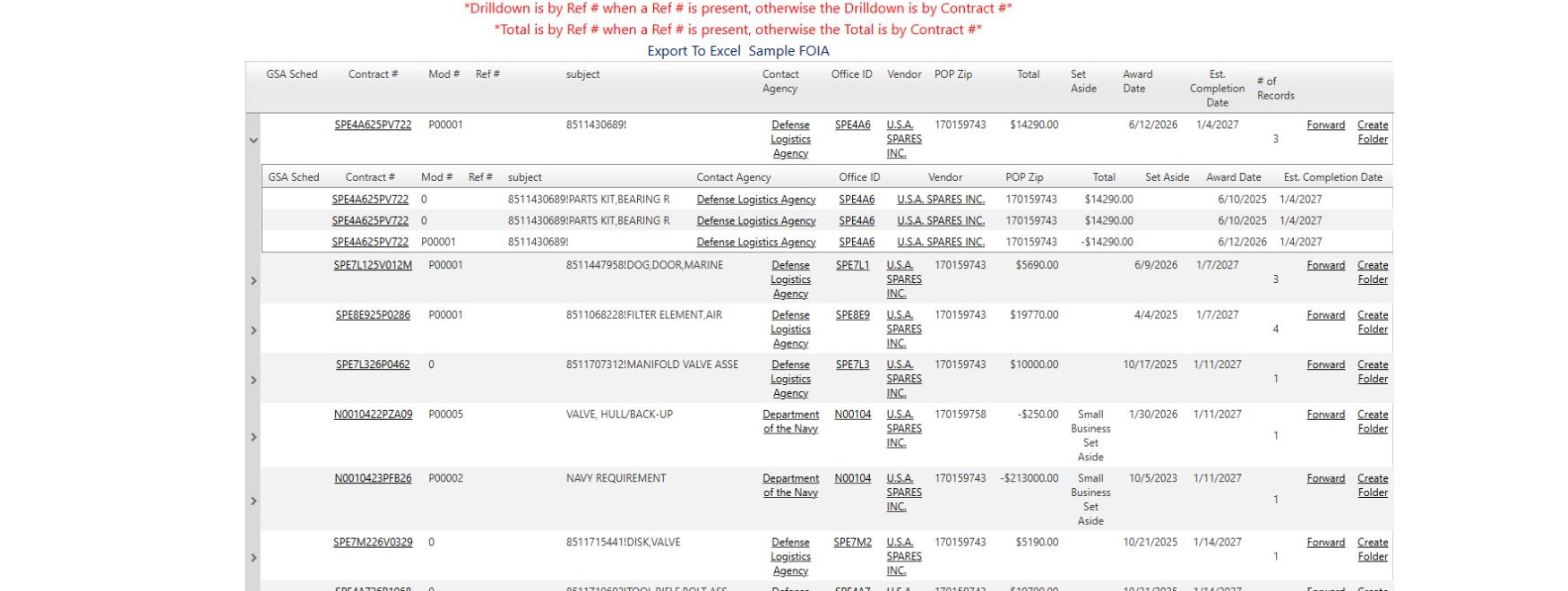
For a different route, entering janitorial in Keyword 1 and choosing 2027 opened a flat Award History action list. The first row, 36C24123F0092 / P00004, has $31,200 action Total, a December 22, 2025 Award Date and January 1, 2027 Est. Completion Date. Opening Contract # confirmed those action and ultimate-completion dates; Back returned to the flat list. Keep the expected-completion year separate from the year the action was signed. The search guide shows both inputs.