Read document references from a parts opportunity
Part of these button learning paths: Research All Open Solicitations
Application user guide
Alternate application path: Main Menu → Machine Shops Opportunities guide → select a row's Assoc. Docs link.
How to reach this list
There are two separate ways to reach a row with Assoc. Docs:
- From Main Menu → Parts/Products → Machine Shops Opportunities, open a matching opportunity and select its Assoc. Docs link.
- From Review solicitations linked to a supply class, reached by selecting View Solicitations on the NAICS-to-FSC crosswalk, open a matching row and select Assoc. Docs.
Either link passes that row's stock number to this page; there is no search box here. Select View Document for a listed reference, close the document tab when finished, then select the page's Back button to return to the preceding opportunity/list.
Follow a populated FSC solicitation to its documents
On October 12, 2026, the signed-in route from Main Menu → Parts/Products → NAICS To FSC Cross used 332510: Hardware Manufacturing. The crosswalk's 4030 — Fittings for Rope, Cable, and Chain row offered View 320 Primes and View 147 Solicitations. Select View 147 Solicitations to open the FSC solicitation list. These counts describe that captured list and may change.
Find HOOK, PELICAN, NSN 4030002667415, then select its Assoc. Docs link. The captured row showed quantity 3, estimated value $12,161.94, opening date 09/29/2026 and closing date 10/06/2026. Its closing date had passed by the capture date; use it as a document-research example, not an open bid.

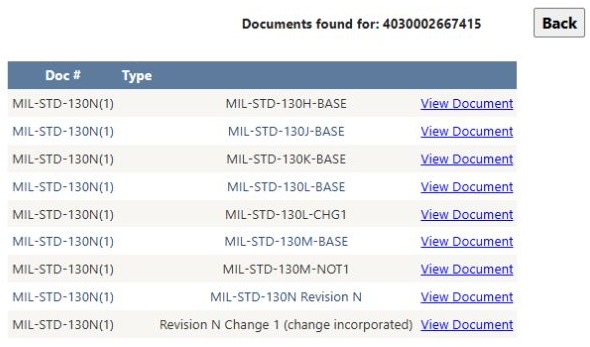
The document page repeated NSN 4030002667415 and displayed nine rows. Each Doc # was MIL-STD-130N(1). The Type cells were blank in this example; the next, unlabeled column contained different version or file descriptions, including MIL-STD-130H-BASE, MIL-STD-130N Revision N, and Revision N Change 1 (change incorporated). Read the whole row before choosing a file; the shared Doc # alone does not distinguish these nine entries.
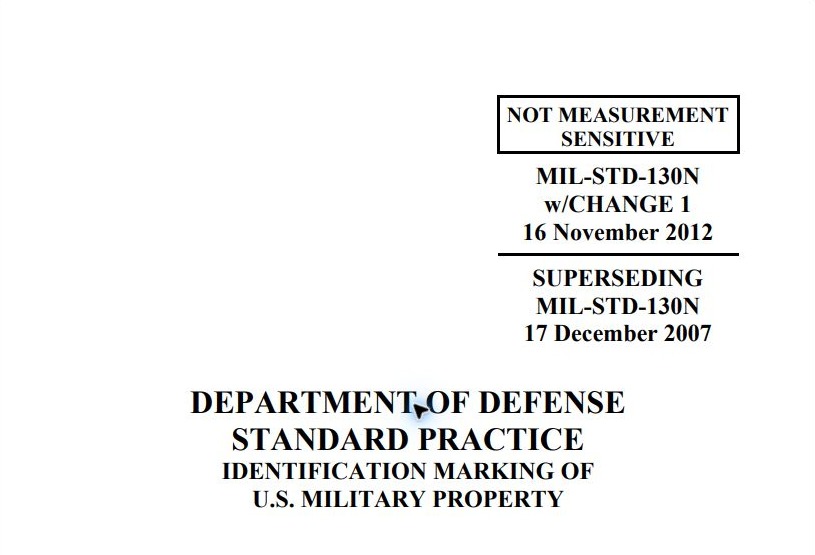
Selecting View Document on the last row opened a new tab with a 71-page PDF. Its first page identified MIL-STD-130N w/CHANGE 1, dated 16 November 2012, superseding MIL-STD-130N dated 17 December 2007, titled Identification Marking of U.S. Military Property. This checks the opened file's displayed identity against the chosen list row; it is not a review of all 71 pages or a determination that this revision governs a particular quote. Close the PDF tab, then use Back on the document list to return to the FSC 4030 solicitations.
Use Assoc. Docs in fabrication opportunities or the FSC solicitation list to see document references for an item's stock number. The list can point you to specifications, drawings and standards needed for a quote. Open the actual document and check its revision against the solicitation.
This is a different list from documents associated with an NSN. That view shows Document No., Status and Title; this one shows Doc #, Type, an unlabeled value and a document/access link.
| Displayed field or control | Meaning and next check |
|---|---|
| Documents found for: | Repeats the stock number passed by the opportunity row. Compare it with the item in the notice before using any document. This page has no visible stock-number entry box. |
| Doc # | Document identifier. Compare its complete number and revision with the solicitation; this text is not the file-opening link. |
| Type | Description of the document category when available. |
| Unlabeled column after Type | In the HOOK, PELICAN example it shows version or file descriptions, such as MIL-STD-130L-CHG1 and Revision N Change 1 (change incorporated). The page gives no column legend, so check the opened file rather than treating this text alone as the governing revision. |
| View Document | Opens the selected document in a new tab in the worked example. Check the file identity and revision there. |
| Back | Returns to the preceding page. |
| Page navigation | Use page controls if the list spans more than one page. The column headings are not sorting controls. |
| No Associated Documents Found | If shown, this message means this lookup has no displayed matches. It does not prove that the notice requires no documents or that no document exists elsewhere. |

The Assoc. Docs link for one FSC 1560 result showed this empty state on October 10, 2026. Check another item's link separately; this message applies only to the stock number in the heading.
This page has no search box, Excel export, selection checkbox or batch-download button.
The list uses the full stock number passed by the opportunity row. Start from that row's Assoc. Docs link; the other NSN document view can show different references. The order is by document identifier and type, not newest revision.
For a fabrication quote, open Assoc. Docs, compare each Doc # and Type with the solicitation, then open the required files. Check all drawing sheets and revisions before assessing manufacturing capability. If a required file is missing, ask the issuing office for it. Military specifications and standards offers a separate number/title search and version list.
Download this article as Markdown