Explore the NAICS-to-FSC crosswalk
Part of these button learning paths: Naics To FSC Cross
Video sections for this page
- 0:00 — Start at Main Menu
- 0:18 — Open the crosswalk
- 0:43 — Compare mapped supply classes
- 1:13 — Open the FSC solicitation list
- 1:42 — Confirm the linked catalog item
- 2:09 — Switch to a separate item example
- 2:33 — Open Technical Characteristics
- 2:46 — Read each characteristic across its row
- 3:48 — Open Award History
- 4:06 — Compare the award date, quantity and price
- 5:09 — Open Associated Documents
- 5:31 — Choose the matching document number
- 6:05 — Read the listed specification revisions
- 6:46 — Open the item's drawing list
- 6:57 — Compare drawing, sheet, type and revision
- 7:39 — Confirm the selected drawing row
- 8:03 — Return to the NSN summary
This page connects an industry code (NAICS) to related four-character supply classes (FSCs). Use the crosswalk to discover item markets, DLA suppliers and solicitations, then follow the links to review the underlying company or notice.
How to get here and continue
- From Main Menu → Parts/Products, choose Naics To FSC Cross. The next page presents the NAICS choice and its linked supply-class information.
- Choose a NAICS code to display its FSC rows and counts. From a row, use View Solicitations to open the FSC notice list; follow the other displayed links for company or parts research.
- On the solicitation list, Back returns to the previous crosswalk view. To explore another industry, return to the crosswalk and select a different NAICS code. Use browser Back from the crosswalk to return to the page that opened it.
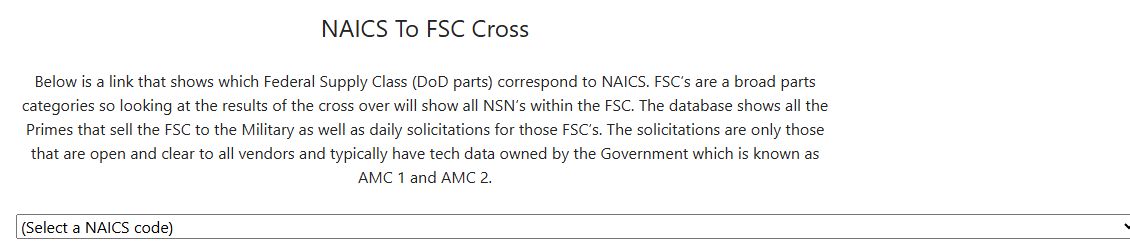
Choose a market and read the counts
| Field or control | Meaning and reason to use it |
|---|---|
| NAICS dropdown | Selects an industry code/description drawn from the application's stored crosswalk. Choosing it refreshes the page; there is no separate Search button. A NAICS classifies an industry, while an FSC groups cataloged supplies, so one NAICS can connect to several FSCs. |
| FSC | Four-character supply class associated with the selected NAICS. Use it to narrow subsequent parts and DLA research. |
| Description | Stored plain-language title for the FSC. Check it before following a link; broad labels can include products outside your own capability. |
| View {n} Primes | Opens the recorded prime-contractor list for this FSC. Use the company links to learn more about each listed contractor. |
| View {n} Solicitations | Opens the solicitation list for this FSC. Open a notice to review its dates, status and requirements. |
Performed example: NAICS 332912 to FSC 4810
On October 12, 2026, the route Main Menu → Parts/Products → Naics To FSC Cross opened the NAICS selector. Selecting 332912: Fluid Power Valve and Hose Fitting Manufacturing refreshed the crosswalk without a Search button. Three displayed FSC rows gave different research paths:
| FSC | Description | Displayed links |
|---|---|---|
| 2895 | Miscellaneous Engines and Components | View 37 Primes; View 0 Solicitations |
| 4810 | Valves, Powered | View 562 Primes; View 288 Solicitations |
| 4820 | Valves, Nonpowered | View 999 Primes; View 1609 Solicitations |
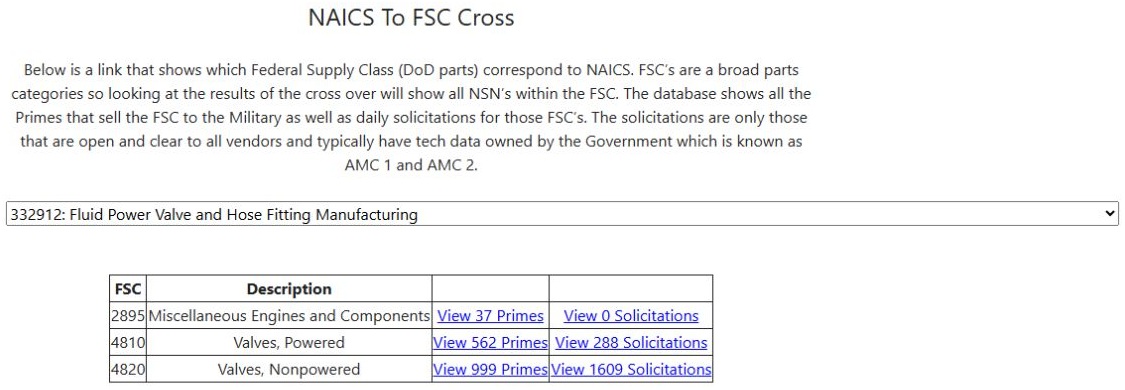
Open the NAICS crosswalk example at full size.
To investigate suppliers of powered valves, select View 562 Primes in the 4810 row. The prime contractor example follows one company to its exact item and catalog record. Return to the crosswalk, then select View 288 Solicitations in the same row to inspect individual notices. The solicitation list example follows an NSN to its catalog detail. A count describes rows reachable from that link; it is not an award or proof that every listed notice remains open.
For another market, choose a different NAICS code and compare the FSC descriptions before opening a class. For exact stock-number identity, continue with NSN search.
Follow View Primes
| Column or action | What it tells you |
|---|---|
| Company | Recorded contractor name; clicking opens that company's profile. Check its actual capabilities and contact data before proposing a partnership. |
| Year-labelled Dollars | Award-dollar amount shown for the displayed year. |
| Items Sold | Opens the company's item details for this CAGE and FSC. |
The FSC 4810 link above opened a populated prime list. The page can also say No Primes Found. The prime list has no direct export control. Company records are explained further in company results.
Follow View Solicitations
Each solicitation row has View Solicitation, NSN, Description, Tech Chars, Award Hist, Assoc Docs, Drawings or No Drawings, Forecast, Qty, Est. Value, Opening Date, Closing Date, and a folder link. Open the notice to check its dates and requirements. The folder link can create or change a project record; see project folders before using it. Related destinations are described in solicitation results, parts results, and technical-characteristics help.
The solicitation list may vary with the signed-in account and selected drawings filter. Use the original notice as the source for whether an opportunity is open and what it requires.