Search companies and institutions for a local market
Part of these button learning paths: Commercial Prospecting
Video sections for this page
- 0:00 — Open Commercial Prospecting
- 0:21 — Set a ZIP radius and industry
- 0:47 — Add institutions to the research list
- 1:07 — Read the company results
- 1:34 — Use the result links
- 1:54 — Inspect the selected cleaning company
- 2:21 — Read the hospital section
- 2:47 — Read the university section
- 3:09 — Change to a statewide search
- 3:29 — Understand how the filters combine
- 3:55 — Review the statewide company list
- 4:20 — Read the nursing-home section
- 4:46 — Read the state-prison section
- 5:12 — Create a current workbook from the results
- 5:37 — Read company contacts and identifiers
- 6:03 — Review company flags and industry codes
- 6:30 — Read the service and office worksheet
- 6:56 — Read the hospital worksheet
- 7:17 — Read the nursing-home worksheet
- 7:37 — Read the university worksheet
- 7:58 — Read the state-prison worksheet layout
- 8:17 — Return and refine the market
From Main Menu → B2B, choose Commercial Prospecting. Enter a location and market term, optionally select institution lists, and press Search. The results guide shows two searches performed on October 12, 2026, including company and institution results, a company profile, and the return path. These are market leads; use solicitation search for open opportunities.
Step 1: choose a market area
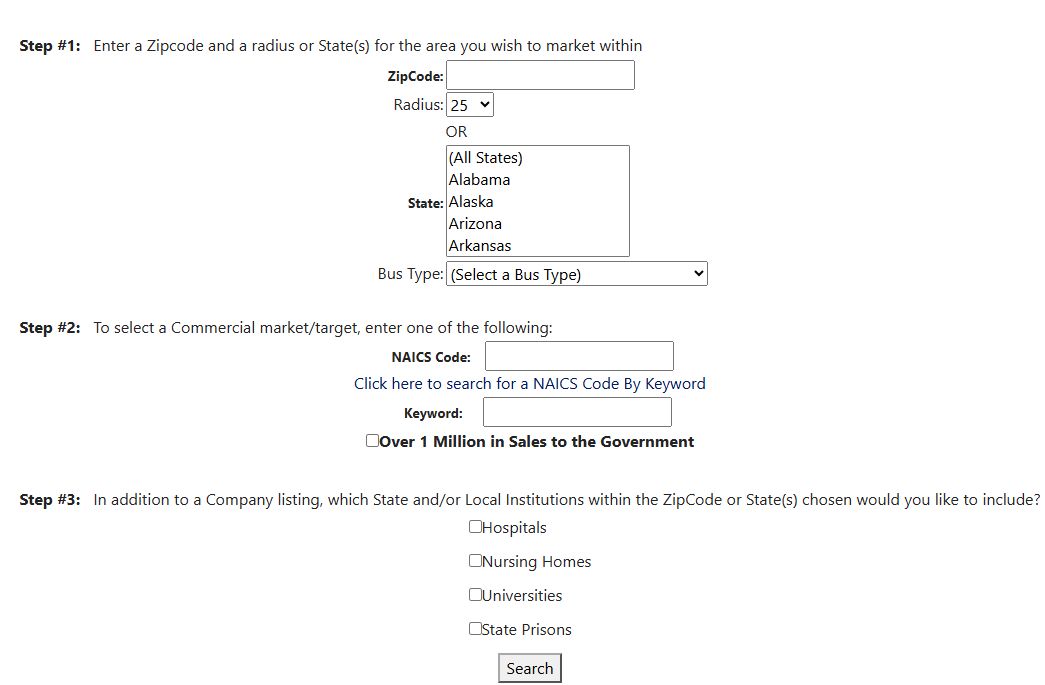
Open the Commercial Prospecting form image at full size.
| Control | What to enter and what it selects |
|---|---|
| ZipCode | Enter a five-character ZIP as the center of the area you want to search. Preserve leading zeroes. |
| Radius | Choose 25, 50, 100, 250 or 500 around the ZIP; 25 appears first. Radius has no effect without a ZIP. |
| State | Select one or more company registration states. A company can match any selected state. If you also enter a ZIP, a company must match both the ZIP-area search and a selected state. |
| Bus Type | Choose one listed company classification: 8a Competitive, AbilityOne, HUB-Zone, African American Owned, Hispanic Owned, Native American, Small Disadvantage Business, Women-owned Business, Veteran-owned Small Business or Service-disabled Veteran-owned. The initial (Select a Bus Type) leaves this filter open. This describes the company record, not a particular contract's set-aside. |
Although OR appears between ZIP/radius and State on the form, entering both narrows company results to records matching both. Without a ZIP, choose at least one State and a Bus Type. With a ZIP, State and Bus Type are optional. The institution lists use the area choices separately; a company Bus Type does not classify a hospital or university.
Step 2: select a commercial market
| Control | What to enter and what it selects |
|---|---|
| NAICS Code | Exact stored NAICS comparison for a company registration associated with that code. Enter a full code or use the helper. A registered industry code is a market lead, not proof of capability. |
| Click here to search for a NAICS Code By Keyword | Opens a helper view with Enter a keyword, Find NAICS, and a grid of naics and name. Select copies one code back to the search form. Confirm the current meaning in the official Census NAICS reference. |
| Keyword | Finds the word in descriptions associated with the company's NAICS records. It does not search company websites, capability statements, awards or notices. |
| Over 1 Million in Sales to the Government | Selects companies marked with this flag in their stored records. The screen does not give the measurement period, so use the flag to shortlist companies and check their current information before comparing sales. |
Enter a NAICS Code or Keyword. If you fill both, a company must match both. If Search leaves you on the form, check that Step 1 has a valid ZIP or a State-and-Bus-Type combination and that Step 2 has at least one market term.
Step 3: include institution lists
The four optional checkboxes are Hospitals, Nursing Homes, Universities and State Prisons. They add separate lists for the selected geographic area, alongside the company results. The lists identify organizations for research; they are not open solicitations. This form has no military-facilities checkbox.
Press Search to open the results. If an older results page no longer shows your search, return to the form and run it again.
Example 1: cleaning companies near ZIP 34684
This search was performed on October 12, 2026 from Main Menu → B2B → Commercial Prospecting.
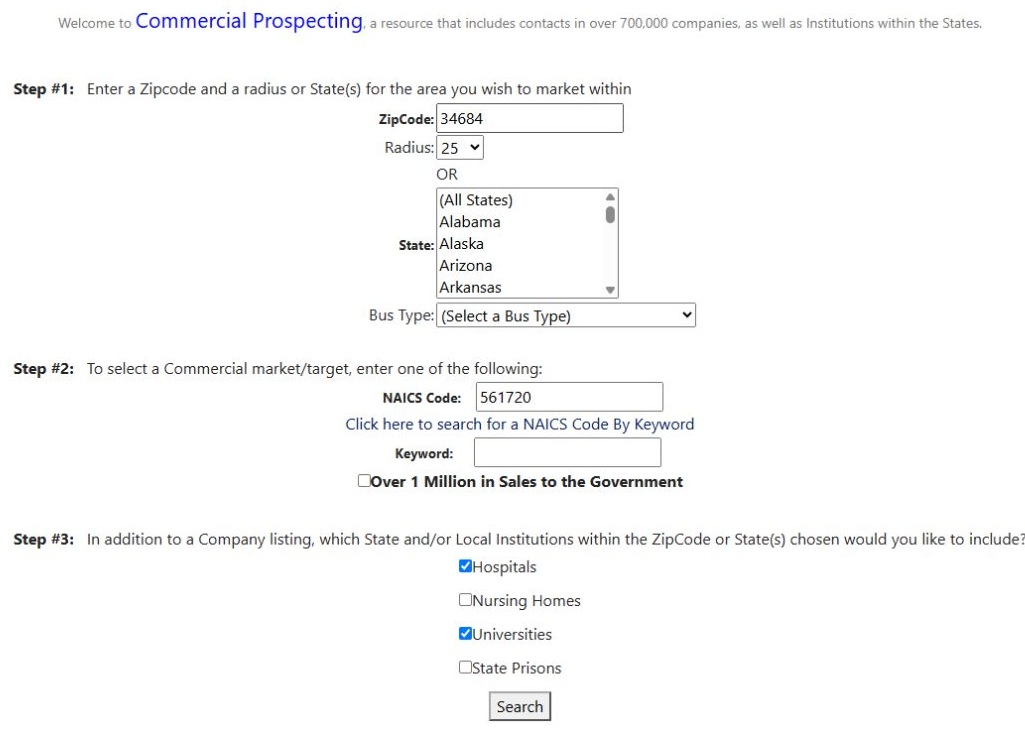
Open the first search form at full size.
Enter 34684 in ZipCode, keep Radius 25, leave State and Bus Type unselected, and enter 561720 in NAICS Code. Leave Keyword empty and Over 1 Million in Sales to the Government unchecked. Check Hospitals and Universities, then press Search.
The resulting UMRResults page contained company rows with 50 rows per page, a Hospitals section with 29 rows, and a Universities section with 6 rows. The first company was O.C.D. CLEANING SERVICE LLC, CAGE 8BCL9, in Clearwater, FL 33756. These company records matched the search; the nearby institutions are separate research leads, not assertions that they need cleaning services. The results walkthrough explains the displayed fields and the observed profile/return steps.
Example 2: Florida women-owned companies by keyword
A second October 12, 2026 search used these form choices.
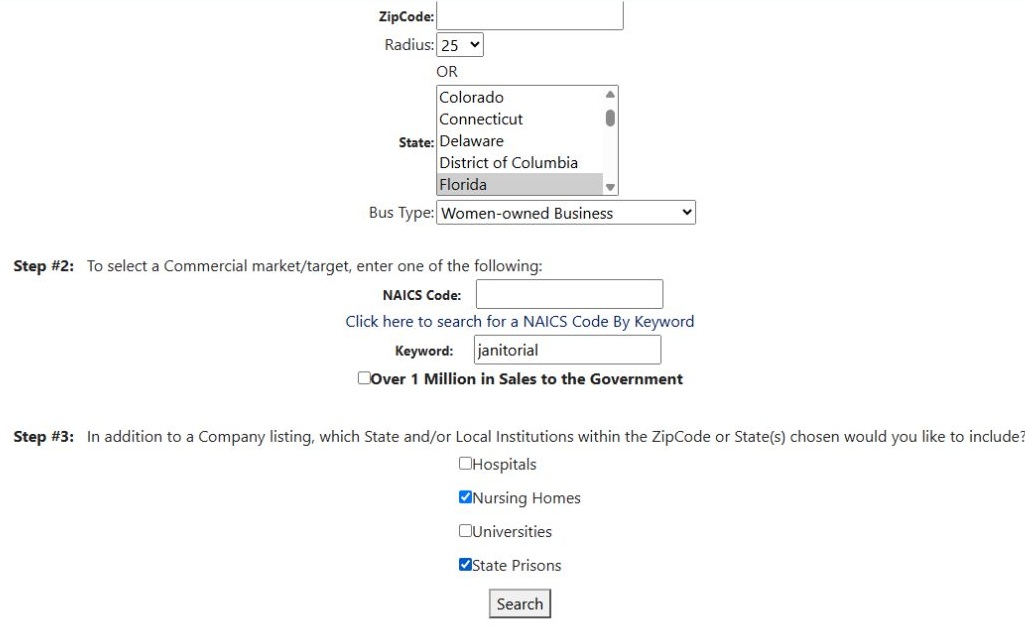
Open the second search form at full size.
It left ZipCode empty, selected Florida under State and Women-owned Business under Bus Type, left NAICS Code empty, and entered janitorial in Keyword. Over 1 Million in Sales to the Government remained unchecked. Nursing Homes and State Prisons were checked; Hospitals and Universities were not. Press Search.
This search returned company rows with 50 rows per page, 543 Nursing Homes rows, and 75 State Prisons rows. The first company was “#1 CLEANING”, LLC, CAGE 8NQP5, in Panama City, FL 32404. The first nursing-home row was Abbey Delray; the first state-prison row was Apalachee-E C.I. The second results walkthrough shows how to read those sections and return to the form.
The two searches illustrate distinct ways to narrow company records: a ZIP radius plus an exact stored NAICS code, or a state and business classification plus a keyword in associated NAICS descriptions. The institution checkboxes add area lists separately. For either example, use browser Back from results to revisit the form and adjust a filter; after opening a company profile, return to results first, then go back again for the form. These October 12 observations illustrate the workflow, not a guarantee that row counts or listings remain current.
Download this article as Markdown