Prepare an account NSN list and request its batch report
Part of these button learning paths: Search by NSN/NIIN
Video sections for this page
- 0:00 — Read item identity and assignment fields
- 0:30 — Read the remaining catalog indicators
- 1:05 — Match part references to CAGE and company
- 1:54 — Read requirements beside their replies
- 2:35 — Read ML-C supply, unit and price fields
- 3:08 — Read ML-C control and service fields
- 3:41 — Read MOE rule rows
- 4:31 — Identify associated document references
- 5:03 — Read substitute relationships
- 5:49 — Identify each returned award line
- 6:12 — Read price, date and the sling example
- 6:47 — Use the right view for the next question
Video sections for this page
- 41:48 — Prepare an NSN batch report
- 42:23 — Select report sections
- 43:09 — Identify the report workbook and its tabs
- 43:27 — Read the battery MCRL reference
- 43:36 — Read the sling TechChars reply
- 43:48 — Identify the award-only workbook tabs
- 43:59 — Read the sling award line
- 44:34 — Read item identity and assignment fields
- 45:05 — Read the remaining catalog indicators
- 45:39 — Match part references to CAGE and company
- 46:28 — Read requirements beside their replies
- 47:09 — Read ML-C supply, unit and price fields
- 47:42 — Read ML-C control and service fields
- 48:16 — Read MOE rule rows
- 49:05 — Identify associated document references
- 49:37 — Read substitute relationships
- 50:24 — Identify each returned award line
- 50:46 — Read price, date and the sling example
- 51:21 — Use the right view for the next question
From Search by NSN/NIIN, choose Create a Batch Report to supply up to 250 entries and select report sections. The saved batch-report reference provides related field context; the single-item combined report is a separate workflow.
How to get here and continue
- From Main Menu, choose Search by NSN/NIIN, then Create a Batch Report. The next page is Batch Reporting, with a text list/file input and report-section choices.
- Enter the items, choose the sections, and select Create Report to request the report. The generated response is the batch report described in the field reference; it is not the single-item combined report.
- Back returns to the preceding page, but it does not undo the saved-list replacement described below. To resume single-item research, return to Search by NSN/NIIN.
Before Create Report: submitting a nonempty list replaces your account's saved batch list; it does not append. Keep a copy of any list you may need again. Browser Back does not restore the replaced list.
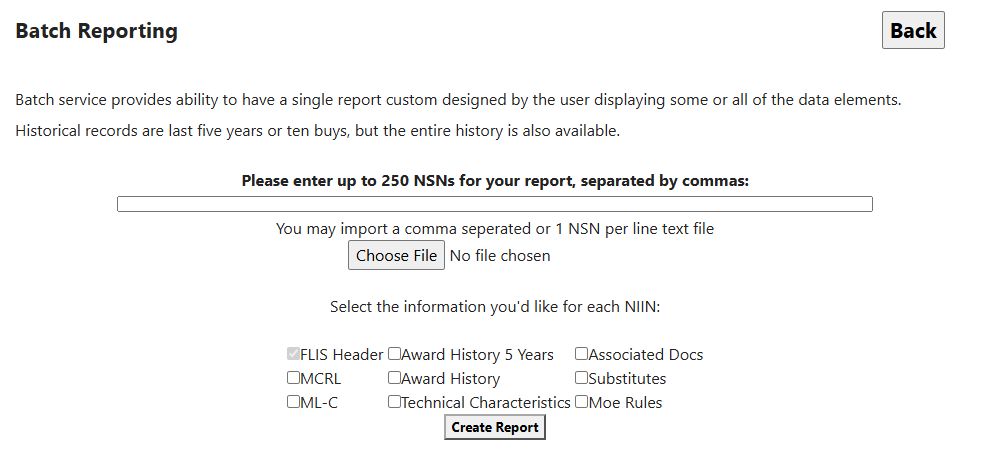
Supply one list
| Field or control | Meaning and behavior |
|---|---|
| Please enter up to 250 NSNs for your report, separated by commas | Enter full NSNs separated by commas, keeping leading zeroes. Hyphens are accepted. Use full stock numbers rather than NIINs so the report can show the item's complete identifier. |
| Text-file upload / file chooser | Choose a plain-text file containing comma-separated NSNs or one NSN per line. This input accepts text files, not Excel workbooks. |
| Using both input sources | A nonempty uploaded file takes precedence over the text box; it is not merged with it. An empty uploaded file falls back to the text box. Clear an old file choice before relying on a new typed list. |
| Back | Browser history, without undoing a submitted saved-list replacement. |
The text box and uploaded file handle separators differently. In the text box, separate entries with commas; line breaks and spaces inside an entry are not treated like file line breaks. In a text file, use commas or one NSN per line. Prepare the list in one format and keep a copy.
The limit is 250 comma-separated entries. More than 250 shows Please enter 250 or less NSNs and leaves the saved list unchanged. Blank overall input does not create a report. Duplicate entries are retained.
Select the information
All eight optional boxes start unchecked in the current design. Each is independent; the report receives their checked states together with the account's saved list.
| Option or button | What it requests |
|---|---|
| FLIS Header | Always checked and disabled: the catalog-identification section is included. It is not an additional editable option. |
| MCRL | Reference numbers, CAGE and company relationships for each saved item's NIIN. |
| ML-C | Management-list records, including service/agency, unit, price and management codes. Several management rows can apply to an item. |
| Award History 5 Years | Award actions newer than the current server time minus five years. This is a rolling date cutoff, not five complete fiscal years or the most recent ten purchases. |
| Award History | All matching stored award history. If both award boxes are checked, this all-history option overrides the five-year restriction. With neither checked, no award section is requested. |
| Technical Characteristics | Requirement/reply pairs included in this workbook. The rows can differ from the individual characteristics page. |
| Associated Docs | Specification, drawing and standard references with document links. The rows can differ from the individual associated-document page. |
| Substitutes | Replacement or standardization relationships. Treat these as research leads, not approval to offer a replacement. |
| Moe Rules | Major Organizational Entity, acquisition and management-rule codes. |
| Create Report | Replaces the saved account list and downloads the selected sections as an Excel .xls file. The supplied examples were named ImportNSNsByPartNumbersUserID.xls, with browser-added numbers after repeat downloads. |
Optional tables appear when selected and when matching rows are available. A missing report section means it was not included or no matching rows were returned. The report downloads as an Excel file; there is no PDF option.
Read the downloaded workbook
For the two example NSNs, 6140014469506 (BATTERY,STORAGE) and 8345002500919 (SLING,FLAGSTAFF), the optional sections appeared as separate worksheet tabs. The compulsory catalog header appeared on an NSN tab in both files.
Catalog and reference example. With MCRL, ML-C, Technical Characteristics, Associated Docs, Substitutes and Moe Rules selected, and both award-history boxes clear, the download contained MCRL, TechChars, SegH (ML-C management records), MoeRules, AssociatedDocs, AltSubs (substitutes) and NSN. Read each tab's heading before comparing values; one item can have several references, management rows or documents. For example, MCRL shows battery part number 3374368 with CAGE 45152 and also 75Q65, while TechChars gives the sling WIDTH as 1.000 INCHES.
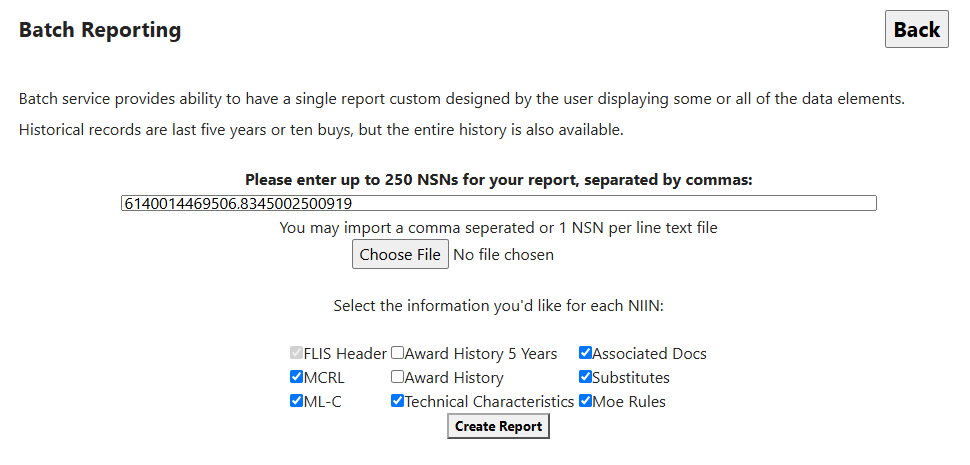
Open the catalog and reference selection image at full size.
Five-year award example. With only Award History 5 Years selected, the download contained AwardHistory and NSN. AwardHistory has a row for each returned award line or action; its columns are NSN, fsc, niin, name, Contract, CLIN, cage, quantity, Price, Total, Award Date, company and Modified. The sling example shows Contract SPE1C123P0805, CLIN 0001, quantity 1500.000, Price 138, Total 207000 and Award Date 09/05/2023. Some award rows leave CLIN, quantity or Price blank, so read the cells as shown rather than filling in zeroes. This one file had 23,178 award rows across the two items; that is the example's size, not a promised row count for another search.
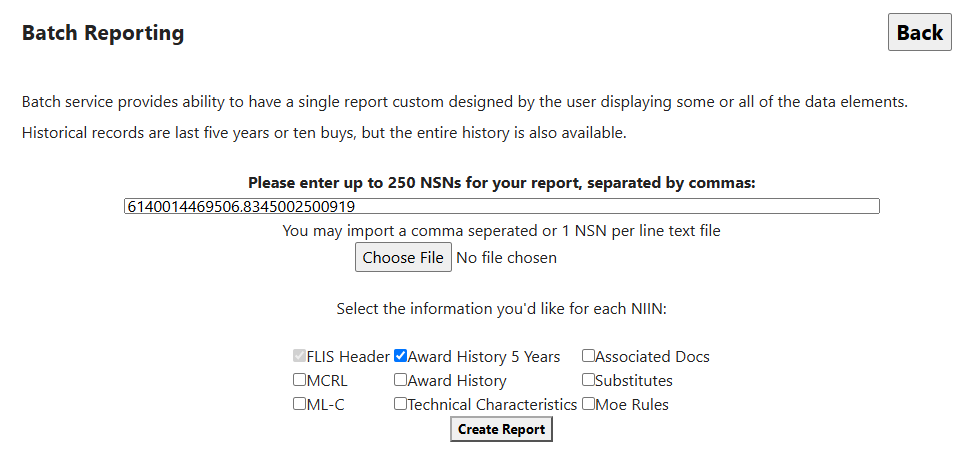
Open the five-year award selection image at full size.
The tab-specific field explanations below help you interpret the download. NSN carries item identity and catalog values in both examples. Price and Total on AwardHistory describe award rows; UNIT PR on SegH is a management-list price, and lastprice on NSN is a catalog-header value. Keep those measures separate.
Read the report fields
The report groups fields by section. Repeated NSN/FSC/NIIN values identify the item in that section.
Catalog header
| Label | Meaning and use |
|---|---|
| name | Recorded item name. Confirm the type of item against the full stock number and requirement. |
| nsn | Stored catalog stock number. Compare all 13 characters with the saved input. |
| CCF | Item criticality code. It flags whether the catalog identifies technical or safety-critical characteristics, such as exact fit or application requirements. Read the actual code against the catalog before using it in a specification. |
| TOII | Stored item-identification type indicator; use the applicable catalog definition before interpreting a value. |
| RPDMRC | Reference or Partial Descriptive Method Reason Code. It qualifies how an item was identified; it is not source approval. |
| DEMIL | Demilitarization code. Decode the actual value before applying handling requirements. |
| DATE ASSIGNED | Stored stock-number assignment date, not a procurement or drawing date. |
| HMIC | Hazardous Material Indicator Code. Confirm the actual hazard requirement in current documents. |
| ESD EMI | Stored electrostatic-discharge/electromagnetic-interference code; decode before specifying handling. |
| PMIC | Precious Metals Indicator Code; not a physical metal quantity. |
| ADPEC | Automated Data Processing Equipment Identification Code; decode the actual category. |
| lastprice | Last-award price shown when available. A nine-character input may identify the item while this value remains blank. A displayed value is not a supplier quote; compare its unit, date and quantity with the award record. |
See the identification guide for catalog context and applicable dictionary links. This header's displayed columns differ from the individual FLIS Header page; do not infer that every individual-page field is also printed here.
Award history
| Label | Meaning and use |
|---|---|
| NSN, fsc, niin | Award-item stock number, class and nine-character identifier. Compare with the saved list and catalog item. |
| name | Item name shown with the award. It may be blank; use the NSN to identify the item. |
| Contract | Contract number. Keep it with the CLIN when tracing an award line. |
| CLIN | Contract line item number. Keep it with the contract number when tracing an award line. |
| cage | CAGE shown for the award recipient. |
| quantity | Awarded quantity. This workbook does not show a unit-of-issue column, so check the award before comparing prices. |
| Price | Award unit price as displayed in the workbook. Some values may be adjusted for display; compare them with the individual award record before using them. |
| Total | Award line value as displayed. It may not equal quantity multiplied by the displayed Price; check the award record. |
| Award Date | Date of the award action, displayed as month/day/four-digit year. The five-year option uses this date. |
| company | Company name shown for the award. Verify current identity separately. |
| Modified | Y indicates the workbook adjusted the displayed price values; N means it did not. This does not mean the contract was modified. |
Keep full-history and five-year comparisons separate. Compare the exact award line, quantity, unit, date and displayed amounts with the individual award-history guide. The batch workbook labels its contract line field CLIN; confirm the same line in the award record before comparing it with another report.
MCRL references
| Label | Meaning and use |
|---|---|
| nsn, fsc, niin | Saved input stock number and matched reference class/NIIN. A nine-character saved input remains nine characters in the saved-input field; it is not automatically expanded. |
| Item Name | Stored reference item-name text. |
| Part Number | Original recorded commercial reference number. Compare exact suffixes and punctuation. |
| CAGE | Entity associated with that reference. Pair it with Part Number when evaluating a candidate. |
| Company | Company name shown for the reference. It may be blank; use the CAGE and part number to continue checking the reference. |
This section does not print all the reference-category/status codes available on the individual MCRL page. Use that page when the original reference's qualification matters.
Technical characteristics
| Label | Meaning and use |
|---|---|
| nsn, FSC, NIIN | Saved stock-number text and derived class/NIIN. FSC is derived from the first four characters of the saved input; when entering a nine-character NIIN, check the class on the item result. |
| Required Details | Requirement text shown for the characteristic. |
| Details Data | Reply text shown for the characteristic. Read any dimensions, units and qualifiers; if a code or unit is not clear, confirm it against the current technical requirement before comparing. |
| Order ID | Row identifier. It is not an engineering requirement or a physical measurement. |
Compare a disputed value with the individual characteristics page and the current technical requirement. The workbook and individual page can show different rows or ordering.
ML-C management records
| Label | Meaning and use |
|---|---|
| FSC, NIIN | Management record's class and item identifier. |
| MOE | Stored Major Organizational Entity/service-agency context. Decode before naming a specific organization. |
| SOS | Source of Supply code, not live warehouse stock. |
| AAC | Acquisition Advice Code; decode for the item before drawing buying or supply conclusions. |
| QUP | Quantity per Unit Pack code/value. Verify the rule and unit before translating pack quantities. |
| UI | Unit of Issue code. Decode before comparing prices or quantities. |
| UNIT PR | Stored management-list unit price. Its scale, effective date and unit need reconciliation; it is not this report's award Price or a quote. |
| SLC | Shelf Life Code; verify the applicable value and lot/packaging requirements. |
| CIIC | Controlled Inventory Item Code; decode before interpreting controls. |
| REP CD | Repairability code for this management record. It helps identify how the item is treated for repair or recovery; interpret the code in its service/management context. |
| MCD | Service-specific Management Control Data. Decode its positions with the applicable service reference. |
| EFF DATE | Stored management-record effective-date value; encoding and present applicability require confirmation. |
| USI SVC CD | Stored using-service code. Decode the actual value before identifying a service. |
| UI CONV FAC | Unit of issue conversion factor. Use it with UI when comparing quantities expressed in different issue units; the report does not print both sides of a conversion, so confirm the units before calculating. |
| PHRS CD COUNT | Phrase-code count column. It is blank in this batch report, so it does not show how many management phrases an item has. View the item's phrase details separately when needed. |
Read management and shipping guidance for the related individual page. Multiple rows can represent different management contexts; do not collapse them into a single price or unit record without checking the context.
MOE rules
| Label | Meaning and use |
|---|---|
| NIIN | Item identifier attached to the rule. |
| MOE Rule | Organizational-rule identifier. Decode the applicable organization and rule before applying it. |
| DSOR | Depot Source of Repair code. |
| AMC | Acquisition Method Code, read with AMSC and current procurement terms. |
| AMSC | Acquisition Method Suffix Code. |
| NIMSC | Nonconsumable Item Material Support Code; decode before describing a support relationship. |
| IMC | Item Management Code. |
| IMCA | Stored item-management activity code; the displayed value is not a named organization. |
| AAC | Acquisition Advice Code in the rule record. |
| Collaborators, Receivers | Stored supplementary collaborator and receiver codes. They do not name the organizations without a value lookup. |
These fields qualify catalog management/sourcing context, not whether your offered part meets the current solicitation. See Segment B guidance.
Associated documents
| Label or action | Meaning and use |
|---|---|
| NIIN | Item associated with the document record. |
| Spec No | Stored specification, drawing or standard number. Match exact identifier and required revision. |
| Doc Type | Document-type description shown for the reference. |
| Type ID | Document-type identifier. Use the description and document number to judge relevance. |
| Doc Link → View Document | Opens a document when the link is available. Check the document number and revision in the opened file against the current requirement. |
This section can show different rows from the individual document page. Open a relevant link and verify the document and revision before relying on it.
Substitutes
| Label | Meaning and use |
|---|---|
| FSC | Class of the recorded replacement stock number, not necessarily the original item's FSC. |
| NIIN | Original item identifier matched to the saved list. |
| Repl NIIN | Replacement item's nine-character identifier. Combine with the replacement FSC when tracing it. |
| ISC | Stored interchangeability/standardization relationship code. Decode the value before treating the relationship as a permitted replacement. |
| Std Orig | Origin code for the standardization decision. Check the applicable FLIS reference before interpreting the displayed value. |
| Std Date | Date shown for the standardization decision. Confirm its meaning and current applicability before relying on it. |
| Status | NIIN status code. Check the applicable FLIS reference before interpreting the displayed value. |
Use the substitute guide and current solicitation terms. A catalog relationship alone does not approve an alternative offer.
Choose useful combinations
For an engineering comparison, request FLIS Header + MCRL + Technical Characteristics + Associated Docs for a small retained list of full NSNs. Confirm names and references first, then compare the technical values and applicable documents. For purchase-history research, add Award History 5 Years and ML-C so quantity, management unit and price context can be reconciled; leave the all-history box unchecked if the rolling cutoff is intended. For sourcing questions, add Moe Rules and Substitutes, then decode restrictions and verify the current notice.
The report uses the current account's saved list. Keep the original NSNs and selected boxes with your workbook so you can interpret its tabs later.
Workflow: compare reference details with recent awards
Use this workflow when you need both catalog/reference context and recent award history for the same intended NSN list. The two accepted workbook examples use 6140014469506 and 8345002500919 with different section selections. These are historical examples; do not replace your account's saved list with them unless they are the list you intend to use.
- From Main Menu > Parts/Products, choose Search by NSN/NIIN, then Create a Batch Report. On Batch Reporting, type your intended full NSNs separated by commas, or upload a text file with one NSN per line. A nonempty submission replaces the account's saved list, so keep a copy before continuing.
- For the catalog/reference workbook, select MCRL, ML-C, Technical Characteristics, Associated Docs, Substitutes and Moe Rules. Leave both award-history options clear, then select Create Report. The accepted example contains these sections on MCRL, TechChars, SegH, MoeRules, AssociatedDocs, AltSubs and NSN tabs.
- Keep the workbook with a note of the list and selected sections. Return to Batch Reporting with browser Back if it remains open, or follow the route from the NSN search again. Use the same intended NSN list and select only Award History 5 Years, then choose Create Report. The accepted award example contains AwardHistory and NSN tabs.
- In Excel, match rows using the full NSN/NIIN, then compare item/reference details with each award line's contract, CLIN, quantity, displayed price, total and award date. Keep both files and their criteria together. See the batch workbook guide for the worksheet layout and tab-specific field explanations.
- After reviewing the files, use browser Back to return to Batch Reporting or the preceding NSN search page. Follow the documented route to prepare another report; each new submission replaces the account's saved NSN list again.
The reference and award workbook examples demonstrate separate section choices. They do not establish the layout of a single report with both sets of options selected.
Download this article as Markdown