Read an NSN's award history
Part of these button learning paths: Research All Open Solicitations · Just My Opportunities · Machine Shops Opportunities · Unfulfilled NSN Opportunities · Search by NSN/NIIN · APL/AEL Historical · DLA Prime Contractors · Naics To FSC Cross · Commercial Part Number to NSN · Weapons System Designator Codes
Video sections for this page
Video sections for this page
Video sections for this page
Video sections for this page
Video sections for this page
Video sections for this page
Award History on the NSN result shows historical DLA award lines for the NIIN, not a current solicitation or an offer price.
How to get here and continue
- Open an NSN result and choose Award History. The next screen shows the item's historical award rows.
- Review the contract/order, date, quantity, price and company context together. A company link opens its profile; the separate market summary and combined report are linked below.
- Back returns through browser history to the item page. Printer Friendly opens a separate print view.
Award-line fields
| Column | Meaning and how to use it |
|---|---|
| Contract Number | Award identifier shown for the row. When a delivery order is present, this column shows that delivery-order number; otherwise it shows the contract number. |
| Delivery Order No | Shows the original contract number when the row has a delivery order; otherwise it is blank. |
| MOD | Modification value recorded for the award. It is separate from the Modified price-adjustment column below. |
| Line Item | Contract line-item number (CLIN), useful for tying the price and quantity to the actual item on a multi-line award. |
| Qty | Awarded quantity for the line. Read it with the unit of issue when comparing prices. |
| Price | Unit price shown as currency. When Modified is Y, this value reflects a price adjustment; compare it with ReportedPrice below. |
| Total | Line total, calculated from Qty and Price when Qty is numeric; otherwise the stored line-item value. |
| Awarded | Award date, shown newest first. |
| Company Name | Awardee name. Select it to open the company's CAGE details. |
| Modified | Y means the displayed Price was adjusted; N means it was not. This is separate from the award's MOD value. |
| ReportedPrice | Original unit price before the adjustment shown in Price. |
| ReportedTotal | Line total based on the original reported price. It can differ from Total when Modified is Y. |
The grid pages at 100 rows. Back returns to the previous page. Printer Friendly opens a separate print view for the item.
For an account search, Export To Excel downloads the award rows as awards.xlsx with 12 columns.
The historical workbook example from September 29, 2026 has an awards worksheet with 41 data rows and 12 columns. See its worksheet excerpt. Those rows are an example of the export, not the current screen results.
Live example: 4030-00-266-7415
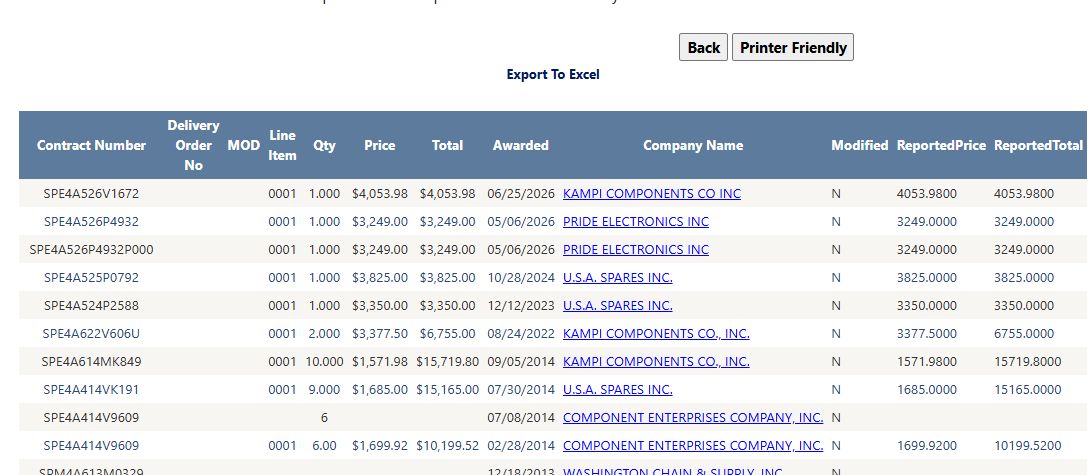
The newest visible line was Contract Number SPE4A526V1672, Line Item 0001, Qty 1.000, Price and Total $4,053.98, Awarded 06/25/2026, Company Name KAMPI COMPONENTS CO INC, Modified N, and ReportedPrice/ReportedTotal 4053.9800. In this row, Price and ReportedPrice match because no adjustment is shown. Older rows may have blank fields.
Price-comparison example
For a historical price comparison, choose the relevant line and award date, then read Qty, Price, Modified and ReportedPrice together. Compare awards on the same item and unit basis. The market summary and combined item report show different price measures.
Print the socket-head screw's award rows and inspect an awardee
For NSN 5305-01-480-4927, Printer Friendly opens a separate tab with a compact award table for NIIN 014804927. Read one line across the table: the newest visible award, SPE4A621V115K, shows 8 units at $125 each, $1,000 total, awarded 03/08/2021 to QUALITY SOCKET SCREW CORPORATION. The print layout retains the contract, line-item, price, date, company and reported-price columns. Close that tab to return to Award History.

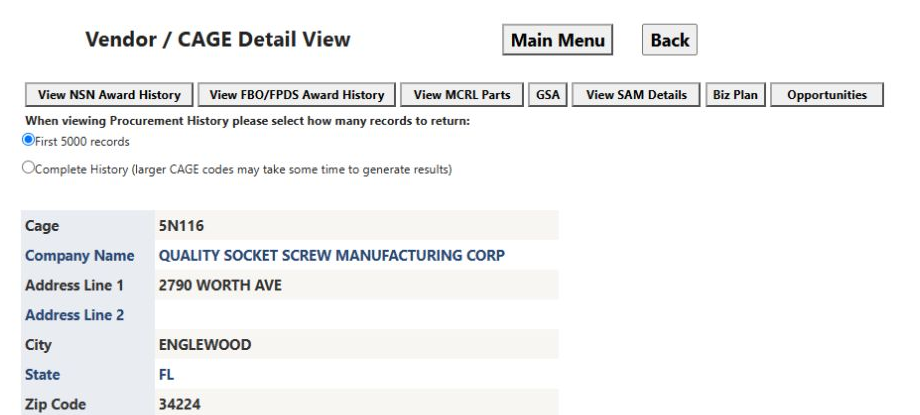
On the award grid, select that company's name. The Vendor / CAGE Detail View opens at CAGE 5N116 and shows QUALITY SOCKET SCREW MANUFACTURING CORP in Englewood, Florida. The profile uses a slightly different company name than the award row; the linked CAGE keeps the award and vendor lookup connected. The buttons across the profile offer the company's award history, MCRL parts and other research routes. Choose Back to return to this item's Award History.