Find NSNs from a commercial part number
Part of these button learning paths: Commercial Part Number to NSN
Video sections for this page
- 0:00 — Open Commercial Part Number to NSN
- 0:23 — Enter the commercial reference
- 0:47 — Compare the exact-reference matches
- 1:25 — Use a prefix to discover variants
- 2:03 — Open the matching NIIN
- 2:28 — Choose a useful item action
- 3:09 — Confirm the part reference in MCRL
- 3:53 — Compare the recorded characteristics
- 4:34 — Open the recorded drawing
- 5:04 — Review the drawing file
- 5:35 — Return to the reference search
Choose Commercial Part Number to NSN from the Main Menu when you have a manufacturer's reference rather than an NSN. Use a match to continue item research; it does not establish current stock, approved source status or interchangeability.
How to get here and continue
- From Main Menu > Parts/Products, select Commercial Part Number to NSN. The next page is the commercial-reference search form.
- Enter the manufacturer's part number and press Search. A trailing-percent example can broaden the candidate matches; the results page lists matching stock references. Select an NSN to open its item result.
- New Search on the results returns to this form. Back uses browser history to return to the preceding page. Check the full reference and CAGE before continuing.
Enter the reference
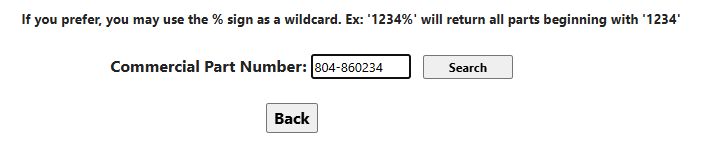
| Field or control | Meaning and action |
|---|---|
| Commercial Part Number | Enter the manufacturer's part or reference number, keeping letters and leading zeroes. Compare the returned Part No. with the number on your drawing or manufacturer's document. |
| Search | With nonempty input, opens the cross-reference results. A reference ending in %, such as 1234%, searches for references beginning with that prefix. Without a final %, the search looks for the entered reference after ignoring formatting characters. A % elsewhere does not broaden the search. Empty input does not open results. |
| Back | Returns through browser history. Check that the previous search context is still the one intended. |
Use the prefix example to discover candidate matches, then verify the exact returned part number and CAGE. Neither this form nor the result has a CAGE filter: distinguish companies after the cross-reference rows appear. Use this Main Menu search when you have a manufacturer's part number and want to find associated stock-number candidates.
Read every result column
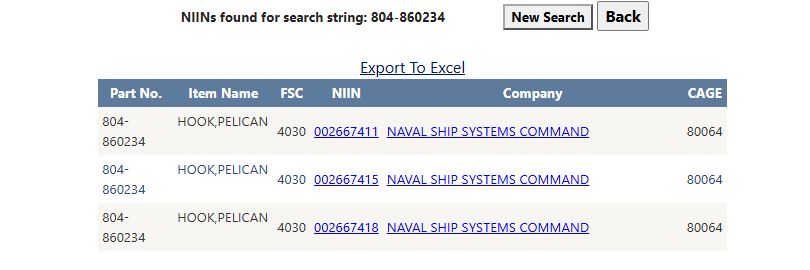
The example returns three NIINs for 804-860234. The NIIN links open the individual items; the Company links open the associated organization's details.
| Column or action | Meaning and use |
|---|---|
| Part No. | Original stored reference number. Compare exact punctuation and suffixes with your drawing or manufacturer's record; the displayed number can retain characters removed for matching. |
| Item Name | Description of the item associated with the reference. Confirm the item type before following a stock number. |
| FSC | Four-character Federal Supply Class associated with the reference. It supplies the NSN's first four characters. |
| NIIN | Nine-character item identifier. Its link opens the NSN result; verify the complete FSC-plus-NIIN stock number there. |
| Company | Legal business name shown with the reference's CAGE. The company link opens contractor details. Confirm current registration and supply eligibility separately. |
| CAGE | Entity code associated with the reference. Compare CAGE and Part No. together; the same-looking reference can occur against more than one entity or item. |
| Page numbers / next or previous page | Results display 15 rows per page. Use the page controls to browse more matches. |
| New Search | Returns to the commercial reference entry. |
| Back | Browser history. |
| Export To Excel | Downloads the matching rows as Parts.xlsx, with Part No., Item Name, FSC, NIIN, Company, CAGE columns. |
When no rows match, the page can display No results found for: followed by the entered reference. This cross-reference search shows matches in its stored company and part-reference records.
Example: research a reference before bidding
The existing NSN example lists reference 804-860234 against CAGE 80064. A supplier could enter that original reference here, inspect any returned Part No./CAGE pair, then open the NIIN result. Compare the MCRL reference fields, characteristics, documents and current solicitation before treating a cross-reference as an eligible offered part. Use a prefix search only to discover candidate suffixes, then verify the exact reference.
Workflow: trace a commercial part to its NSN and supplier
Use this route when a drawing or manufacturer's document gives you a part number but not the stock number.
- From Main Menu > Parts/Products, choose Commercial Part Number to NSN. Enter
804-860234in Commercial Part Number and select Search. - The accepted result example shows three candidate NIINs. Compare Part No., Item Name, CAGE and Company; continue only with a row whose reference and supplier match your document. The existing item example records
804-860234with CAGE 80064. - Select that row's Company link to open contractor details. Use browser Back to return to the cross-reference results, then select the matching NIIN link.
- On the NSN result, confirm the complete FSC-plus-NIIN stock number and item name. Use its reference, technical and award links to continue checking the candidate against the current requirement.
- On the cross-reference result, New Search returns to the part-number form. Back returns through browser history to the page that opened it.
The commercial-reference screenshots show the entered part number and three-result example. A CAGE/part-number match identifies a recorded relationship; verify the current registration, source eligibility and solicitation requirements separately.
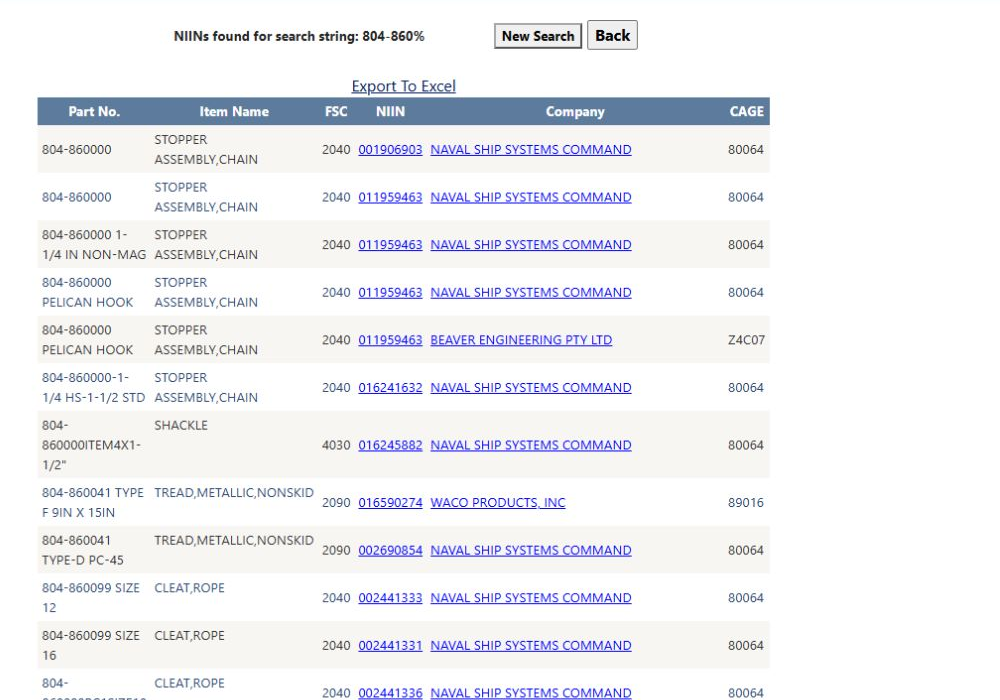
Live prefix-search example
From Main Menu → Parts/Products → Commercial Part Number to NSN, enter 804-860% to find references that begin with this prefix. The first page includes references 804-860000, 804-860041 and 804-860099, with item names, FSCs, NIINs, companies and CAGEs. The first row is 804-860000, STOPPER ASSEMBLY,CHAIN, FSC 2040, NIIN 001906903, NAVAL SHIP SYSTEMS COMMAND, CAGE 80064. Use the page link to continue through results. New Search returns to the entry form. Searching the full reference 804-860234 returns three NIIN candidates.