Review possible award-history matches
Part of these button learning paths: Just My Opportunities
Video sections for this page
Video sections for this page
Video sections for this page
Follow a notice to its possible previous contracts
- Open My Opportunities from Just My Opportunities on the Main Menu, or run a solicitation search and locate a notice in the results.
- On that notice's row, select Possible History. The following list contains candidate earlier contracts, rather than the notice itself.
- Compare Subject, buyer and dates. Select a candidate Contract # to open its award details.
- Return to the candidate list with the browser's Back control; if the detail opened in a separate tab, close that tab. Return to the original notice to compare its scope with the earlier work.
Select Possible History from solicitation results or My Opportunities to open SAM.GOV to Expiring Contracts Match. This list helps you find earlier work that may relate to the solicitation, using its industry and work-location ZIP.
Use a candidate's work description, agency and dates to decide whether it is relevant. A possible match is a starting point for research, rather than confirmation that the current notice replaces that contract.
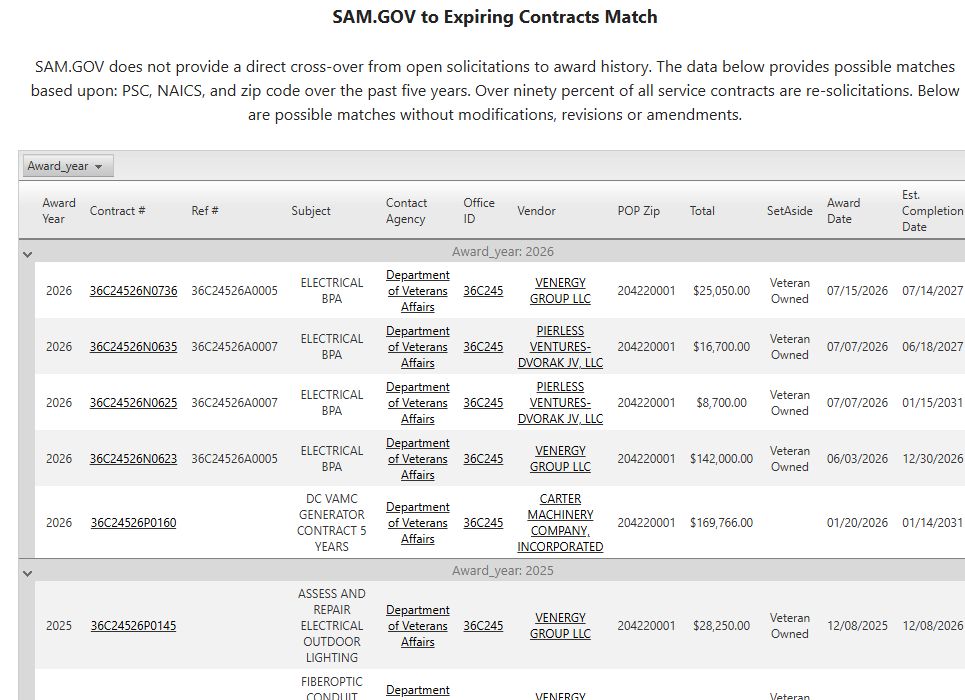
A possible-history list reached from an assigned notice. It groups public award rows by year and links to award, agency, office and vendor details; the rows are candidates to compare, not confirmed predecessors.
Read the candidate awards
| Field or link | What it means |
|---|---|
| Award Year | The award year used to group the list. |
| Contract # | The contract identifier. Select it to open award details. |
| Ref # | A referenced parent agreement or contract, when supplied. |
| Subject | Description of the awarded work. Compare it with the current solicitation's requirement. |
| Contact Agency | The agency associated with the award; its link opens contact information. |
| Office ID | The contracting office identifier. Select it for the office profile. |
| Vendor | The company that received the award. Select its name to open the company profile. |
| POP Zip | ZIP code where the work was performed, rather than the vendor's business address. |
| Total | The obligated dollar amount for the award action. |
| SetAside | The award's business or competition category. |
| Award Date | Date of the award action. |
| Est. Completion Date | The contract's estimated final completion date. |
Research a possible match
For a complete example, follow the Florida electrical-opportunity walkthrough: Main Menu → Research All Open Solicitations → NAICS 238210 + Florida → Search beside NAICS → Possible History on the VA projector-installation notice. The candidate list includes 36C24826C0045, awarded to DOUBLE BAR CONSTRUCTION, LLC, with a $493,071.00 Total and March 25, 2027 Est. Completion Date. Select its Contract # to read the award action, or its Vendor to research the company. Return to the candidate list and compare its subject with the original notice.
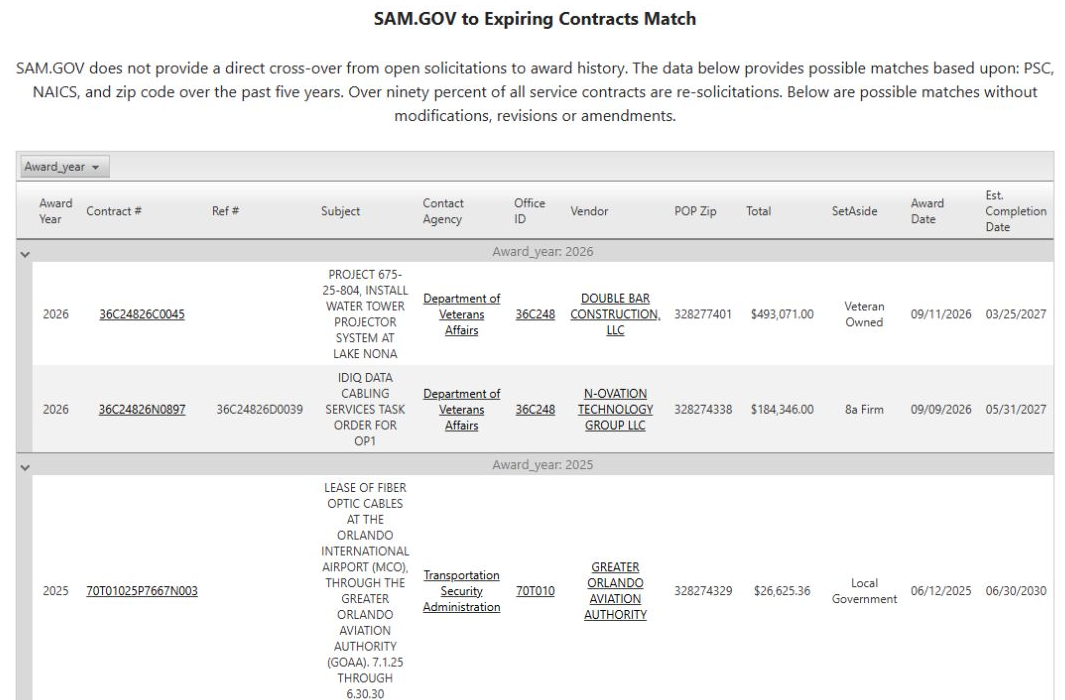
The list begins grouped by Award Year. Use its sorting and grouping controls to arrange the rows. If no rows appear, this lookup found no candidate matches. There is no separate page-level Excel button.
Download this article as Markdown