Read solicitation search results
Part of these button learning paths: Research All Open Solicitations · Just My Opportunities · My Government RoadMap
Video sections for this page
Video sections for this page
Video sections for this page
Video sections for this page
- 0:00 — Read the DLA parts result and its available actions
- 1:06 — Read a prior purchase without confusing it with this RFQ
- 1:39 — doc-reach-cap-screw-documents
- 2:08 — doc-open-document-number
- 2:35 — doc-use-document-actions
- 3:02 — doc-return-to-the-item
- 3:29 — Open Technical Characteristics
- 3:42 — Read each characteristic across its row
- 4:45 — Open Award History
- 5:03 — Compare the award date, quantity and price
- 6:06 — Open Associated Documents
- 6:28 — Choose the matching document number
- 7:01 — Read the listed specification revisions
- 7:43 — Open the item's drawing list
- 7:54 — Compare drawing, sheet, type and revision
- 8:36 — Confirm the selected drawing row
- 9:00 — Return to the NSN summary
- 9:29 — Read the screw's forecast result
- 9:55 — Open the printable award table
- 10:33 — Follow an awardee to its CAGE profile
Video sections for this page
Video sections for this page
From Main Menu → Primary Searches → Research All Open Solicitations, enter one search and press its adjacent Search button to reach this page. Select View Solicitation in a service or DLA row to open the publisher's notice; select New Search to return to the ordinary form. Use Back for browser history.
This page can show service notices, DLA parts solicitations, or both. The image follows a Title search for custodial. For the preceding form, see Search for solicitations.
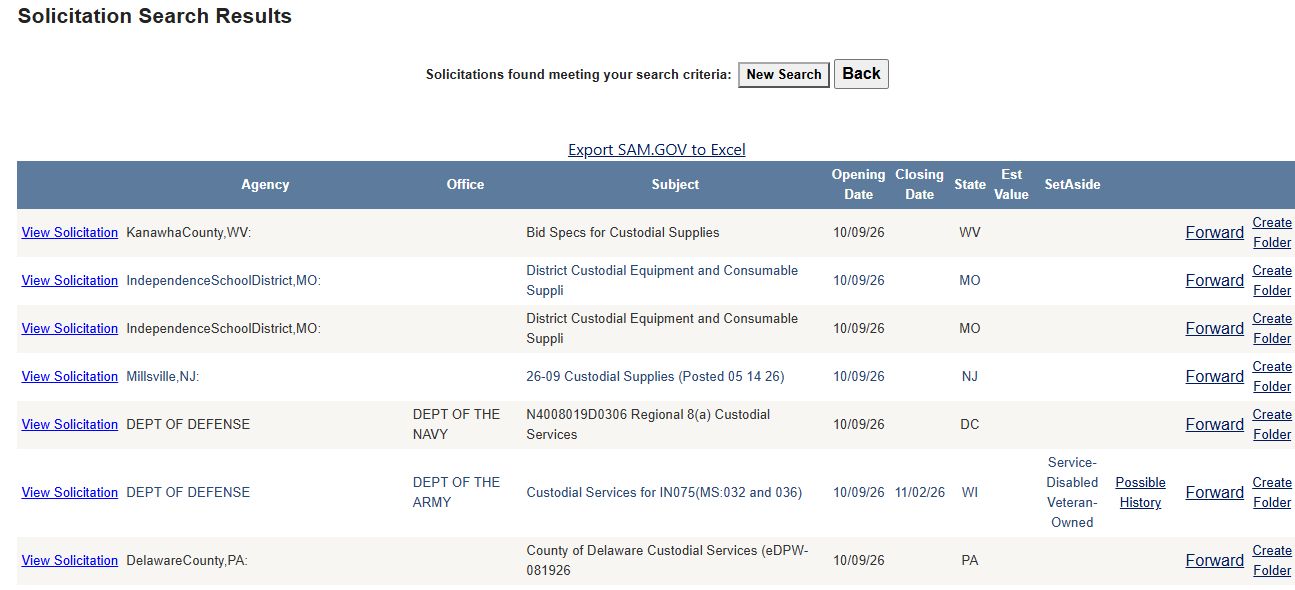
Keyword results captured on October 10, 2026. Open a row's original notice to see its current status and response instructions.
Follow a result to the next decision
- Check whether a dated notice is still actionable. Search
HQC00826QE006from the solicitation form. The October capture showed one service row and a separate No Solicitations Found label below it. On the row, choose View Solicitation. The link opened a historical SAM.gov version; choose Current Record and check the current status, deadline and amendments. It showed canceled effective September 2, 2026, so the right next step was to stop treating it as an open bid. Return to the results tab to review other rows, or choose New Search to enter another criterion. - Check a parts result before deciding what to investigate. Search the NSN
4030002667415. The October 10 result capture showed a DLA row for HOOK, PELICAN and a closing date of October 6, 2026. That date had passed at capture time, so it is a dated research example rather than a current opportunity. Read the row's description and dates; when the corresponding links are present, choose TechChars for item characteristics or Award Hist for historical purchases. Browser Back returns to the results when the linked item page is in the same tab; New Search returns to the standard form.
What this page can show
The heading is Solicitation Search Results. A search may return the service-style grid, a DLA parts grid, both, or no visible rows. Each grid displays up to 100 rows per page and offers page navigation when needed. Service-style rows appear by opening date, newest first. A displayed page is not necessarily the entire result set, and a row's position does not rank its fit.
Export SAM.GOV to Excel names the service-grid export, but this grid can also contain state and local notices. The original publisher's notice gives the current response instructions. Rows may represent presolicitations, closed notices or linked older documents.
Service-style grid: every column and row action
| Column or action | What it means or does |
|---|---|
| View Solicitation | Opens the original notice in a new tab for a signed-in user. Read the notice, attachments and amendments there. |
| Agency | Buyer or publisher shown on the row. |
| Office | Purchasing office within the agency. |
| Subject | First 50 characters of the notice title; open the notice for the full scope. |
| Opening Date | Date the notice was recorded as opened or posted. Rows are shown newest first by this field. |
| Closing Date | Recorded response deadline, if supplied. Confirm the current date and time zone at the original notice. |
| State | State shown on the notice row; confirm the actual worksite in the notice. |
| Est Value | Estimated amount, not an award amount or guaranteed order. |
| SetAside | Recorded competition category; check the notice for eligibility terms. |
| Possible History | When present, opens a separate award-history search using the row's service code, NAICS and ZIP. It is not an award for this notice. |
| Interested Parties | May appear on other result types. Ordinary service rows do not display an interested-party list here. |
| Forward | Opens a prefilled email draft. Review it in the mail program before sending. |
| Create Folder / Go To Folder | Opens the project folder for this notice. Create Folder can immediately add an assignment and create a directory; use it only when you intend to save the notice. See project folders. |
DLA parts grid: every column and row action
The DLA grid lists parts solicitations. An NSN or supply-class search may also show service-style notices in the grid above. In the October 10 example, NSN 4030002667415 returned one DLA row for HOOK, PELICAN with an October 6 closing date already past. See the field-reference lesson.
| Column or action | What it means or does |
|---|---|
| View Solicitation | Opens the original DLA RFQ for a signed-in user. Without an account, it leads to login or a vendor access page. Read the RFQ and amendments before responding. |
| NSN | Stock-number link to the parts summary. Compare the item and required specification with the RFQ. |
| Description | Short item name; the RFQ supplies the full technical requirement. |
| TechChars | Tech. Chars. opens item characteristics; No Tech Chars means this grid has no such linked characteristics. |
| AMC / AMSC | Acquisition Method Code and its suffix. Read them with the item's technical package; see the code example below. |
| Award Hist | Opens past awards for the stock number. This is separate from the current RFQ. |
| HasForecast | Forecast opens DLA demand information; No Forecast means this grid has no forecast link. A forecast is not an order. |
| Assoc Docs | Assoc. Docs opens the stock-number document list; No Assoc Docs means this grid has no document link. See associated NSN documents for how to read a related document list. |
| Drawings | Opens the stock-number drawing list when available; otherwise the cell says No Drawings. Check drawing identity and revision in the RFQ. |
| Est. Value | Recorded estimate, not a guaranteed order. |
| Opening Date / Closing Date | Recorded notice dates. Confirm the current deadline at the DLA notice. |
| Forward | Opens a prefilled email draft; review it before sending. |
| Create Folder / Go To Folder | Opens a project-folder action for the DLA notice and stock number. Use it when you intend to save the project; see project folders. |
The DLA export includes Solicitation Number and Qty, although the visible grid does not. Links to parts, history and technical material require account access. In the file, Link opens the source RFQ, Solicitation Number identifies the request, and Qty is the amount requested; check the RFQ for its unit.
Read AMC and AMSC together
The observed row displays AMC 1 / AMSC G. Official spare-parts guidance describes AMC 1 as suitable for repeat competitive acquisition and 2 as suitable for a first competitive acquisition. G indicates government technical-data rights, a complete data package and no listed technical-data, engineering, tooling or manufacturing restrictions; it pairs with 1 or 2. DFARS PGI 217.7506, sections 2-201.1 and 2-201.2
Use these codes as item-screening clues. The RFQ and technical package still determine what you may offer.
Page buttons, empty state and exports
New Search returns to the search form. Back returns to the previous page. This direct search is separate from saved Just My Opportunities monitoring.
If No Solicitations Found appears, look at both grids before starting over. The exact-number search for HQC00826QE006 showed one service row even though that message appeared below it. If both grids are empty, use New Search to revise your terms.
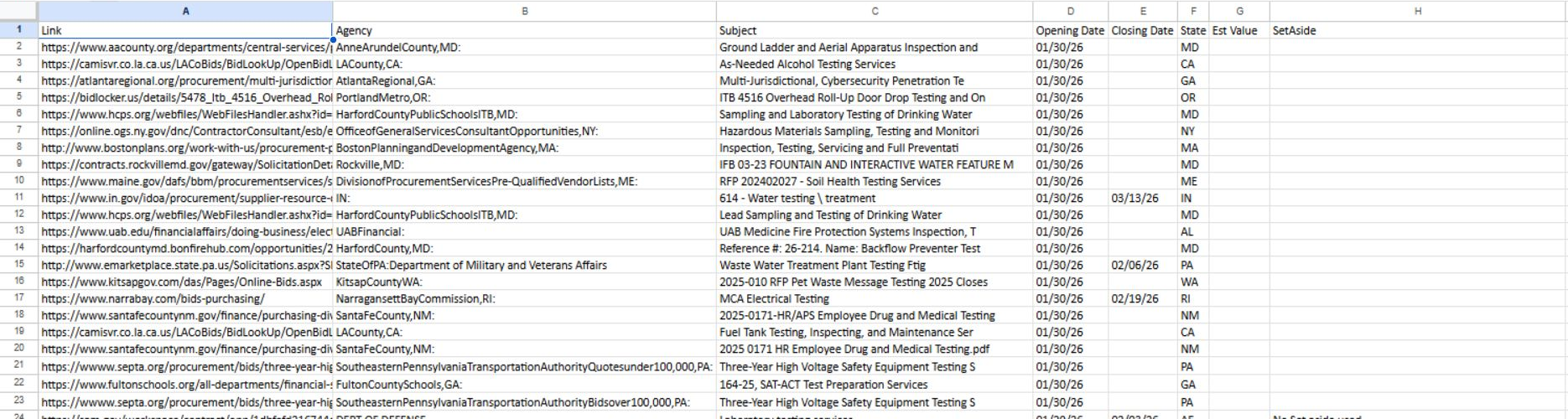
Export SAM.GOV to Excel appears with service rows for signed-in subscribers. It includes Link, Agency, Subject, Opening Date, Closing Date, State, Est Value and SetAside. It does not include every on-screen action or the Office column. The export can include more than the displayed page's 100 rows. See Excel exports for file-handling help.
Export DLA to Excel appears with DLA rows for signed-in subscribers. It includes Link, NSN, Description, Solicitation Number, Opening Date, Closing Date, Qty, Est Value, AMC and AMSC. The Solicitation Number and Qty are extra fields; the file omits the grid's technical, forecast, document, drawing, history and folder actions.
Historical SAM worksheet layout
The image shows the eight-column SAMSolicitations worksheet from a January 2026 download. It is a historical layout example, not a current opportunity list. Run a fresh search and open the original notice to confirm its current status and deadline.
Open the full-size SAM worksheet image.
Historical DLA worksheet layout
This image shows the ten-column DLASolicitations worksheet from a January 2026 download. It is a historical layout example, not a current opportunity list. Run a fresh search and confirm the RFQ and deadline before acting.

Open the full-size DLA worksheet image.
Decide whether a row is useful
- Open the original notice and compare its work, location, deadline and eligibility with your business.
- Use history, forecasts and documents for the separate questions they answer.
- If saving or sharing a row, review the Folder action or Forward draft before proceeding.
A dated row can point to an older official version
The October 9 exact search for HQC00826QE006 returned one SAM.gov row showing October 20 as its closing date, even while the unrelated DLA empty-state label appeared below it. Its View Solicitation link opened an August 24 version. Choosing the latest Current Record on SAM.gov showed that the notice was canceled on September 2. Check the version and current status, even when the row has a future date. The custodial walkthrough demonstrates this stop decision.
Download this article as Markdown