Find DLA requirements that remain unfulfilled
Part of these button learning paths: Just My Opportunities · Unfulfilled NSN Opportunities
Video sections for this page
Unfulfilled Opportunities are DLA solicitations whose closing dates have passed, but DLA still needs the items and continues to list them as unfulfilled. Use this list to find requirements your company may be able to supply. It works like the NSN portion of My Opportunities, using a different set of opportunities.
Start with your account's opportunities
- From Main Menu, find Parts/Products.
- Choose Unfulfilled NSN Opportunities. If you are already on My Opportunities, its Unfulfilled NSN Opportunities link is another entry point.
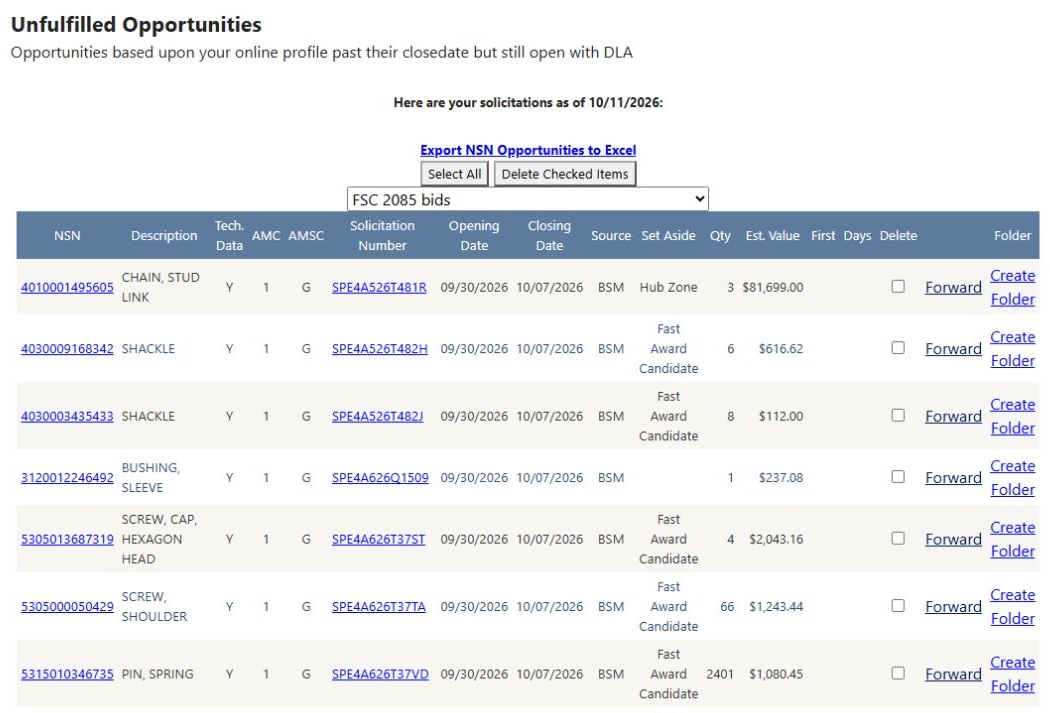
- Read the as-of date, then use the dropdown above the grid to choose which matches to review. You do not need to type a new search: these opportunities are matched to your account profile.
- Read the description, quantity and estimated value to identify a requirement worth researching. Follow its NSN to related solicitation results, or its Solicitation Number to the DLA notice.
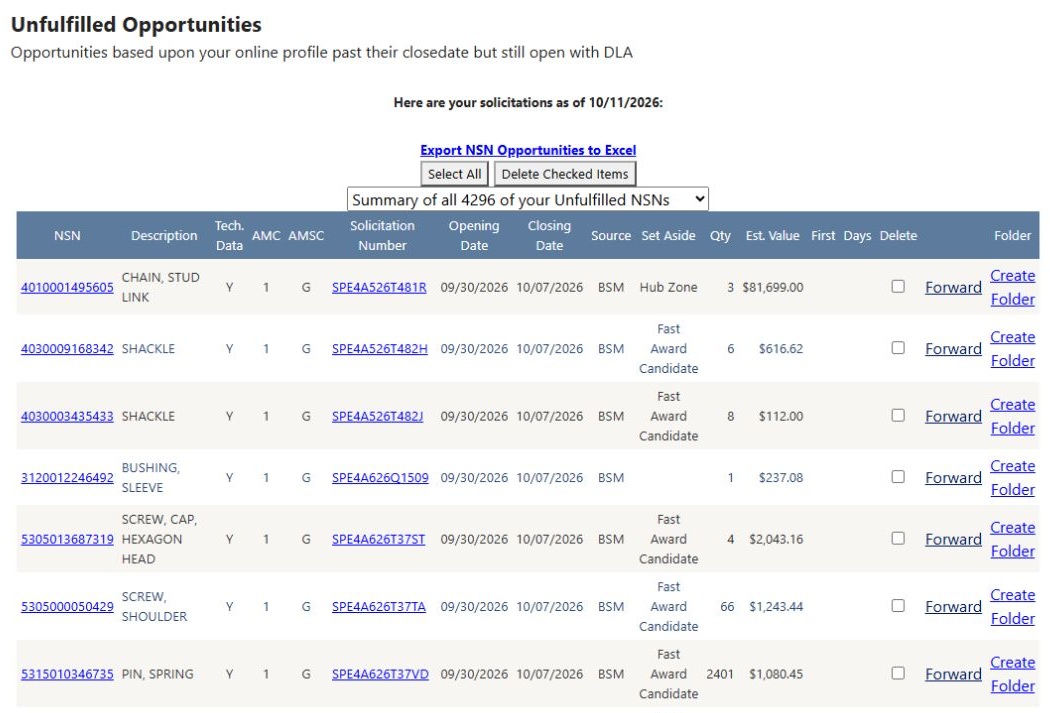
This example was viewed on October 12, 2026; the page's as-of date is October 11. The summary selection reads Summary of all 4296 of your Unfulfilled NSNs. Counts, dates and available opportunities change as the data changes.
Follow a requirement from the Main Menu
This example starts with the Unfulfilled NSN Opportunities button on the Main Menu. On October 14, 2026, the summary selector displayed 3819 and the first row showed 8455016598778 — INSIGNIA, SHOULDER S, solicitation SPE1C127Q0052. Its closing date was October 12, 2026, its quantity 3,500, and its estimated value $3,290.00. The past closing date is consistent with this list's purpose: DLA still lists the requirement as unfulfilled.
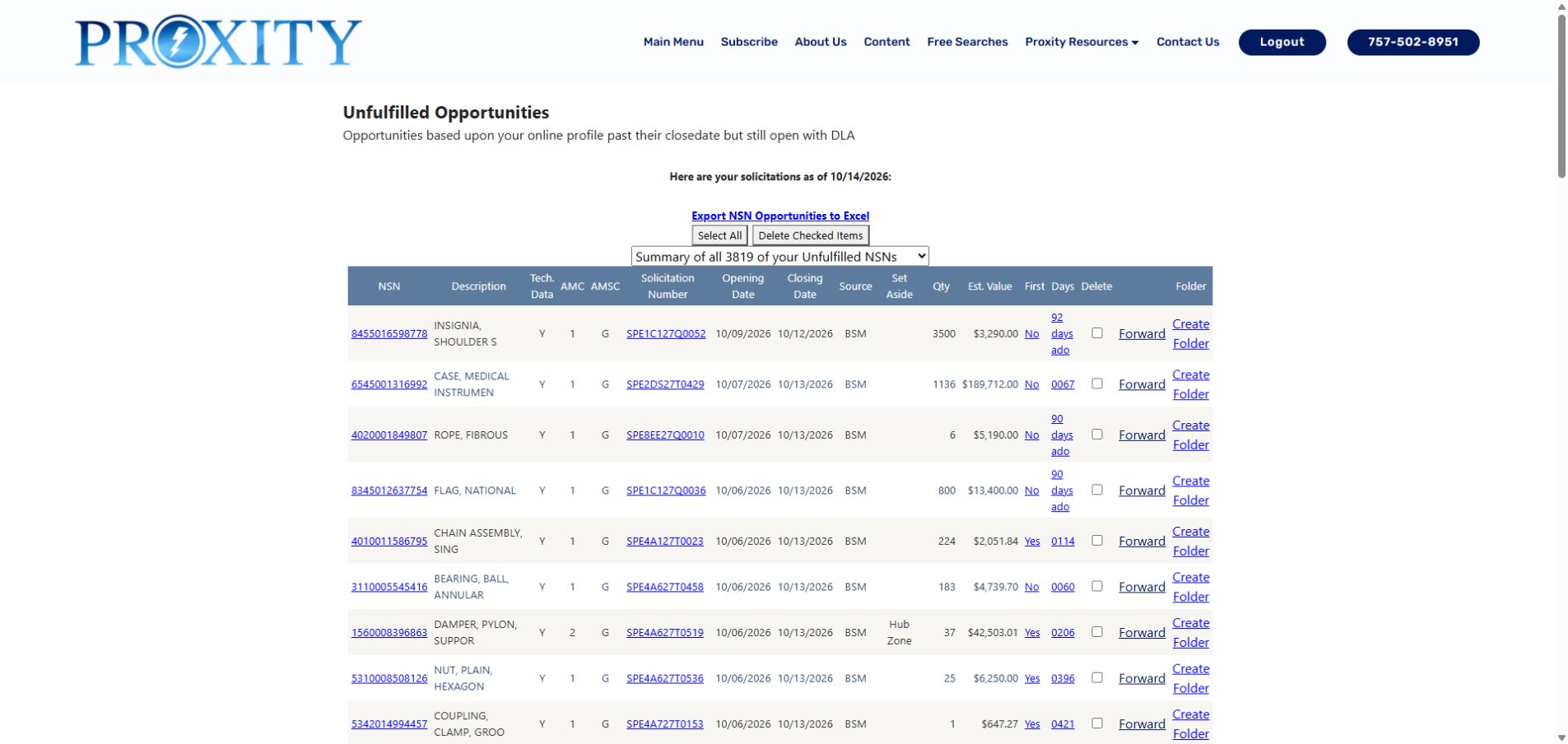
- Click the row's NSN 8455016598778. Solicitation Search Results opens for that stock number. Confirm the same solicitation and dates before choosing a research link.
- Click Tech. Chars. to check what the item must be. For this insignia, the replies identify 92ND MILITARY POLICE BRIGADE, EMBROIDERED, US ARMY, and HOOK FASTENER TAPE. A supplier can use these details to distinguish the requested insignia from another patch with a similar name.
- Click Back on Technical Characteristics to return to the same solicitation result. From there, the NSN opens the parts record; Award Hist. opens prior purchases; Forecast opens forecasting; and View Solicitation opens the DLA document. No Assoc Docs is a status message, not a document link.
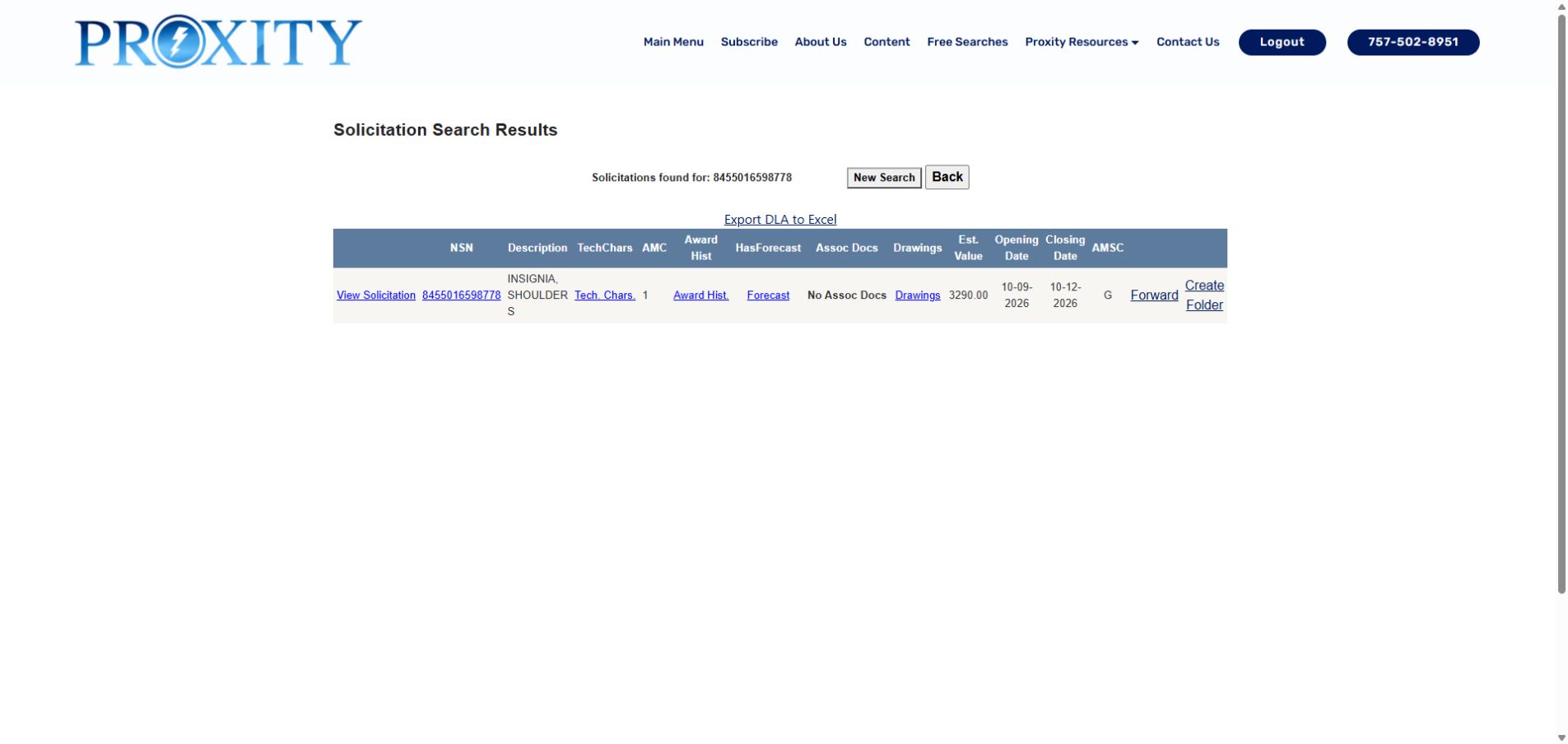
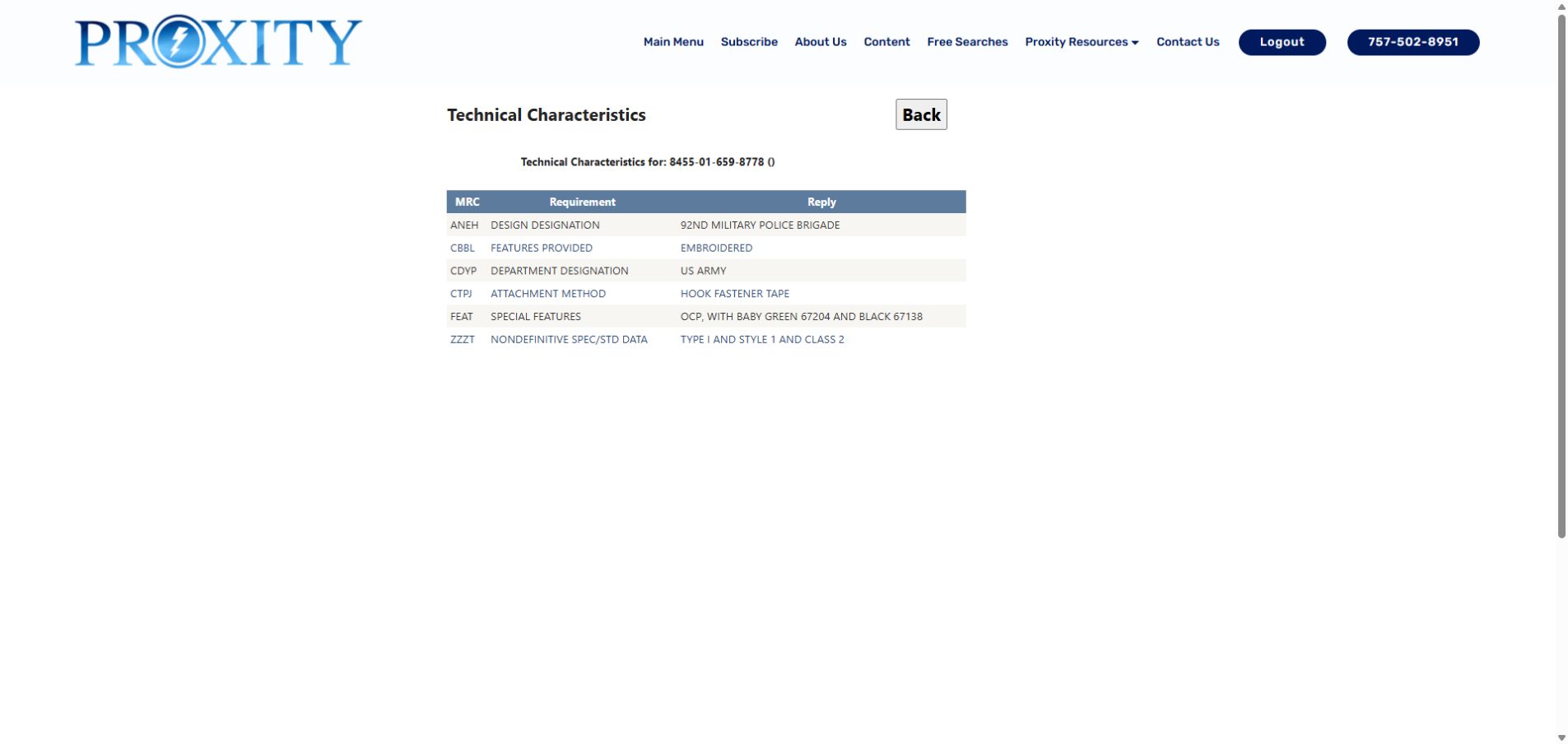
The technical table uses MRC for the characteristic code, Requirement for the property being described, and Reply for its recorded value. See the technical characteristics guide for the full explanation. Counts and available requirements change; the item and dates above identify this worked example.
Choose which matches to review
| Dropdown choice | What you are choosing | When to use it |
|---|---|---|
| Summary of all … of your Unfulfilled NSNs | The account's combined unfulfilled-opportunity matches. | Start here to see the full selection before narrowing it. |
| NSN | Opportunities matched to the specific stock numbers in your profile. | Focus on exact items your company supplies. |
| FSC | Opportunities matched to your Federal Supply Classes. | Look across a broader product class, including stock numbers you may not already sell. |
| Company name and CAGE | Matches associated with a competitor company configured in your profile. | Review opportunities related to that company's product references. |
In the example, selecting FSC 2085 bids displays the FSC-matched list below. The first visible row is still the chain requirement; a category can include items also present in the combined list. The 2085 here is the displayed number of bids, not an FSC code to enter.
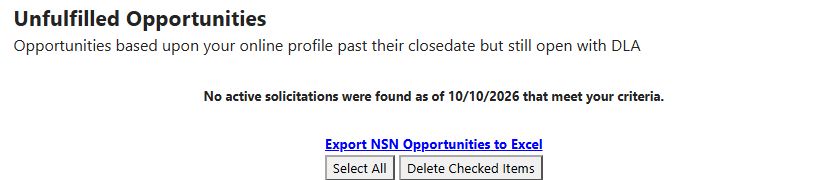
Use the dropdown again to return to Summary of all or choose another category. This account showed NSN 0 bids and zero bids beside its configured competitor choices. A category with no matches does not mean the other categories are empty. For reference, this earlier empty-list example shows the page's no-active-solicitations message; the populated examples above show the current walkthrough.
Worked example: investigate the chain requirement
A supplier reviewing chain and hardware can start with this actual row:
| Displayed field | Example value | How to use it |
|---|---|---|
| NSN / Description | 4010001495605 — CHAIN, STUD LINK | Identify the exact item, then open its NSN link for further research. |
| Solicitation Number | SPE4A526T481R | Open this link for the requirement's DLA document. |
| Opening / Closing Date | 09/30/2026 / 10/07/2026 | Recognize that the response date has passed; this is the unfulfilled-opportunity list. |
| Qty / Est. Value | 3 / $81,699.00 | Assess whether the requirement merits further review. The value is an estimate, not an awarded amount. |
| Tech. Data / AMC / AMSC | Y / 1 / G | Note the technical-data marker and acquisition codes, then examine the requirement and item details. |
| Source / Set Aside | BSM / Hub Zone | Identify the displayed source and program information before reviewing the notice's terms. |
Open the NSN's solicitation results
Click 4010001495605 in the Unfulfilled Opportunities list. Solicitation Search Results opens with Solicitations found for: 4010001495605. This example returns three rows for the same item, with different dates. The first row has the September 30 opening date and October 7 closing date from the selected opportunity.
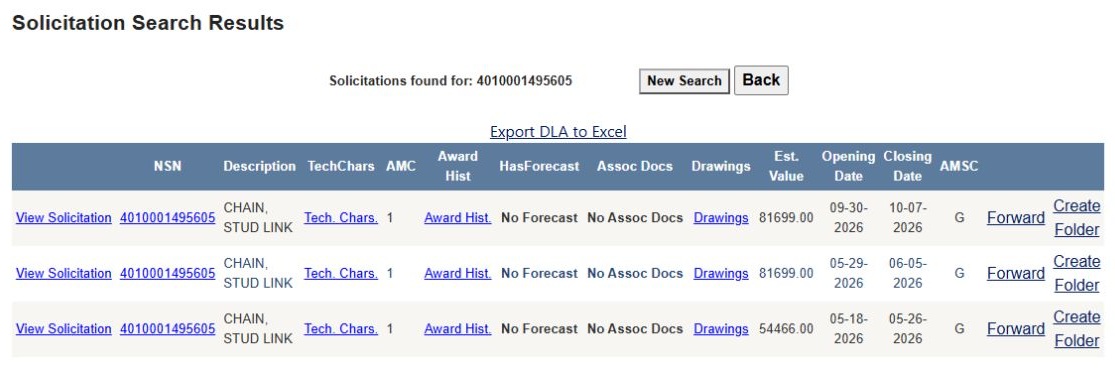
Choose the row for the requirement you are researching. The links have different purposes:
| Result action or value | What it displays or does |
|---|---|
| View Solicitation | Opens that row's DLA solicitation document. Use the correct row's dates to keep your research tied to the intended requirement. |
| NSN | Opens the item's parts record, where you can explore its product information. |
| Tech. Chars. | Opens the item's technical requirements and recorded replies, demonstrated below. |
| Award Hist. | Opens past purchases of this NSN, useful for researching previous suppliers and prices. |
| No Forecast | No forecast link is available for this item in the displayed results. |
| No Assoc Docs | No associated-document link is available in this example. Other items may offer one; see associated documents. |
| Drawings | Opens the drawing list for the item. |
| AMC / AMSC | The item's acquisition method and suffix codes. These are explained with the opportunity columns below. |
| Est. Value / Opening Date / Closing Date | The amount estimate and dates for each listed solicitation. |
| Forward / Create Folder | Prepare an email draft or organize the requirement in a project folder. |
| Export DLA to Excel | Downloads this results layout. See the Excel export guide for the DLA worksheet and its fields. This is separate from the Unfulfilled Opportunities export described below. |
| Back / New Search | Back returns along the research route; New Search starts a new solicitation search. Use browser Back to retrace the exact pages you opened. |
Read the item's specifications and return
From the first row, choose Tech. Chars.. The heading confirms Technical Characteristics for: 4010-00-149-5605.
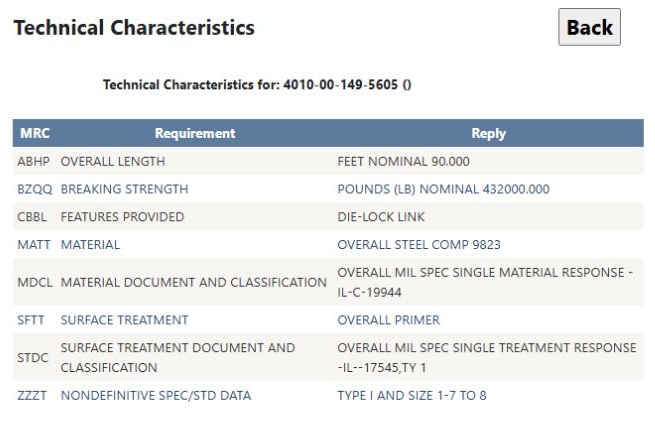
MRC is the characteristic's code, Requirement names the property, and Reply gives the recorded specification. Here OVERALL LENGTH is FEET NOMINAL 90.000, BREAKING STRENGTH is POUNDS (LB) NOMINAL 432000.000, and FEATURES PROVIDED is DIE-LOCK LINK. These details help a supplier determine whether its product matches the item instead of relying only on the short description “CHAIN, STUD LINK.” The remaining rows describe material, surface treatment and specification references. See technical characteristics for the full reading guide.
Use browser Back to return to the three solicitation rows, then Back again to the Unfulfilled Opportunities list. Continue with a different item, change the match category, or open the selected requirement's solicitation number to read its response instructions.
Read and manage the opportunity list
Click a linked column heading to sort by that column. Use the page numbers below the grid to review additional rows; the list displays up to 50 rows per page. Sorting and paging help you work through a large list without changing the profile that supplied the matches.
| Grid field or control | Meaning and why it matters |
|---|---|
| NSN | National Stock Number of the item; its link opens a related solicitation/item result. Confirm exact identity and the requested revision. |
| Description | Stored item description. It is a brief label, not the complete technical requirement. |
| Tech. Data | Recorded drawing-availability marker, despite the broader column name. It does not prove all drawings or specifications are available. |
| AMC | Acquisition Method Code attached to the item/solicitation. Read it with the source requirement to understand competition or source limitations; do not infer eligibility from this number alone. |
| AMSC | Acquisition Method Suffix Code. It refines the AMC context; verify the exact code's meaning before deciding whether your firm can bid. |
| Solicitation Number | Recorded identifier linked to the source notice. This is the primary route to confirm current status, amendments and response instructions. |
| Opening Date | Stored opening date of the recorded requirement. |
| Closing Date | The original response deadline. It has passed for these unfulfilled requirements; DLA still needs the listed items. |
| Source | Stored location/source value for the notice; it is not necessarily the place of performance. Confirm the issuing activity in the original record. |
| Set Aside | Recorded restriction or program category. Verify the current notice and your present eligibility. |
| Qty | Recorded requested quantity. Check unit of issue, packaging, options and amendments before using it for a capacity or price decision. |
| Est. Value | Stored estimated amount, currency-formatted. It is not a bid target or award value. |
| First | Recorded first-article requirement indicator, shown as Yes/No/blank. Clicking opens a linked solicitation report. Blank is unknown, not “No.” |
| Days | Recorded delivery-days value, linked to the same solicitation report. Confirm whether it counts from award, order or another milestone in the original requirement. |
| Delete checkbox | Selects this row for removal. Checking it alone does not delete the row. |
| Forward | Opens a prefilled email draft in the user's mail application. The application page does not send it automatically; review recipients, notice status and confidential material before sending. |
| Folder | Opens or creates a project folder for the solicitation/NSN. The action can change account records; see folder help. |
Select All / UnSelect All affects the checkboxes on the current page. Delete Checked Items removes the selected rows from your account list, so review the selection after sorting or paging. A “No active solicitations” or account-inactive message applies to this account lookup.
Choose an NSN or FSC category, inspect a candidate's technical details and quantity, then open the original notice. If it is still actionable, compare item details, technical characteristics and prior awards. A competitor association is a search clue, not proof that the competitor can perform the work.
Export NSN Opportunities to Excel
From the populated Unfulfilled NSN Opportunities page, choose Export NSN Opportunities to Excel. In the October 12 example, the downloaded file contained 4,705 data rows and 17 columns. The page's Summary of all 4296 of your Unfulfilled NSNs count and the file's row count differ; use the file's own rows for worksheet work, and do not treat the dropdown count as the number of exported lines. The file is an HTML-format .xls download, so a spreadsheet application may show a format notice when opening it.
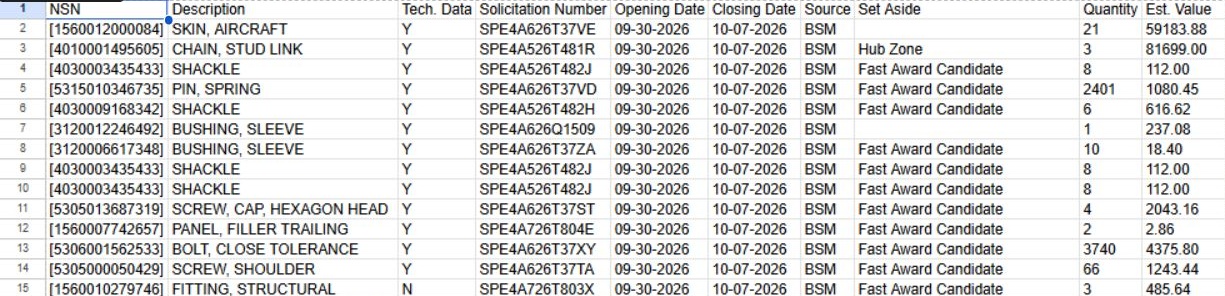
Open this worksheet view at full size.
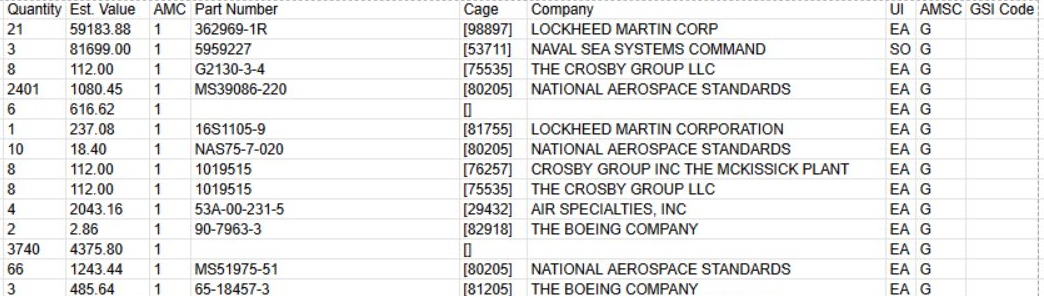
Open this worksheet view at full size.
The first exported row was [1560012000084] — SKIN, AIRCRAFT, solicitation SPE4A626T37VE, quantity 21, estimated value $59,183.88, with part 362969-1R and LOCKHEED MARTIN CORP. The next row was the worked CHAIN, STUD LINK requirement, [4010001495605] / SPE4A526T481R, quantity 3, estimated value $81,699.00, part 5959227, NAVAL SEA SYSTEMS COMMAND. The file displays square brackets around NSNs and CAGE values, including [53711] on that chain row. Keep these identifiers as text when moving the table to another spreadsheet, so leading zeroes remain intact. Check the original notice before using an export row to judge status or eligibility.
| Export column | Meaning and limitation |
|---|---|
| NSN | Stock number; keep any leading zeros when using it in another system. |
| Description | Stored item description, not a complete specification. |
| Tech. Data | Drawing/technical-data marker; file existence and completeness are not established. |
| Solicitation Number | Recorded notice identifier for official-source lookup. |
| Opening Date | Stored opening date. |
| Closing Date | Stored close date; verify current status and amendments separately. |
| Source | Recorded source/location value, not automatically the performance site. |
| Set Aside | Stored set-aside value; check current eligibility. |
| Quantity | Recorded requested amount in the notice's unit of issue. |
| Est. Value | Stored estimate, not a confirmed order or award. |
| AMC | Acquisition Method Code; interpret with current supporting records. |
| Part Number | Reference part number joined to the NSN. Several references may exist; do not treat one as the only approved part. |
| Cage | CAGE on the joined part-reference record, not necessarily the current solicitation's awardee or your account. |
| Company | Vendor name attached to that part/reference association. Verify current identity and capability. |
| UI | Stored unit-of-issue code. Decode it before multiplying quantity by a unit price. |
| AMSC | Acquisition Method Suffix Code, separate from AMC. |
| GSI Code | Inspection point from the DLA solicitation: origin means inspection at the source before shipment; destination means inspection at the receiving location. Use this to plan inspection and delivery. |
To work through the file, keep all 17 columns together when filtering by Closing Date, Set Aside, Source, or Company. Use NSN and Solicitation Number together to find the same requirement in the application, then open the source notice to check amendments and response instructions. An export with no matches may contain no table. For the account's other assigned solicitation lists, see My Opportunities.
Download this article as Markdown