Read award history results
Part of these button learning paths: Award History
Video sections for this page
Reach these results from Main Menu → Research → Award History, then choose a Year and press the Search button beside the field you are using. A flat row is one award action; in the grouped layout, select the left arrow to see the actions included under a contract/reference parent. Open Contract # to read an action in Award Details.
Award History shows either individual award actions or grouped contracts with expandable actions. The search guide explains which button opens each layout. Start by identifying the layout, then read its columns and amounts below.
First identify the layout
An award action means one recorded contract transaction: the original award or a later modification. A contract can have many actions, and a modification may add or subtract obligations without creating a new contract.
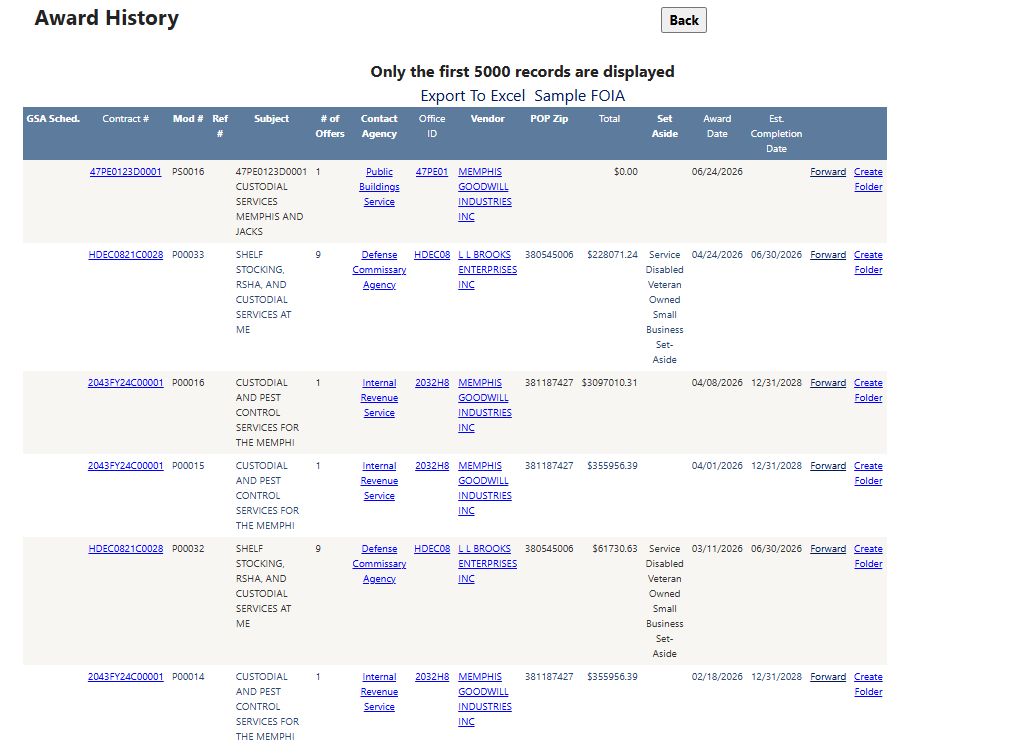
The custodial and Memphis search returned six actions. HDEC0821C0028 / P00033 shows a $228,071.24 obligation, an April 24, 2026 action date and estimated completion June 30, 2026. Use its Contract # link to read the full action detail.
The flat action list appears for a known contract number, a service code plus keyword, or searches with certain Step 2 location/GSA/Country choices. It shows 100 actions per page, up to 5,000 selected actions. The Only the first 5000 records are displayed banner describes that limit; use the pager for the current result count.
With 2026, NAICS 561720 and Tennessee place of performance, the flat list shows individual actions from several agencies. One VA janitorial P00018 action shows −$840 on September 17, 2026, and another P00002 shows $0. Those figures describe changes to recorded obligations. Office ID 36C249 opens the associated VA office profile.
The grouped view appears for some code-only, NAICS, keyword or vendor searches without those Step 2 refinements. A parent row represents a Ref # group when one exists, otherwise a Contract # group. Select its left arrow to see the related actions. The parent's Total adds amounts for that group; each child has its own action amount. # of Records counts rows in the group.
Use Back to return through browser history; the flat page's Main Menu button is hidden. Both layouts offer Export To Excel and a Sample FOIA example-document link. The sample is separate from the award record and does not send a request.
Flat action list: columns and actions
| Column/action | What it shows | How to use it |
|---|---|---|
| GSA Sched. | View appears when a GSA reference link is available. | Open it to examine the related schedule record. A blank cell offers no link here. |
| Contract # | Contract identifier and link to its action detail. | Keep it with Mod # and Ref # when comparing actions. |
| Mod # | The action's modification identifier. | Check whether the row is a base action, option, extension, funding change or correction. Do not call every row a new award. |
| Ref # | Related reference/vehicle identifier, when supplied. | Use it to understand how orders or actions relate; it is not interchangeable with Contract #. |
| Subject | First 50 characters of the recorded requirement description. | Open Contract # for the fuller description and action context. A word match in this preview is only a lead. |
| # of Offers | Number of offers recorded for this award action when available. | Use it for historical competition context. |
| Contact Agency | Linked agency label for the award action. | Opens related agency contacts. Confirm the current buyer before outreach. |
| Office ID | Linked contracting-office identifier. | Opens the office profile; distinguish office identity from the agency label. |
| Vendor | Recorded awardee name, linked to a vendor detail by CAGE. | Open the company profile to check identity and capabilities. |
| POP Zip | Place-of-performance ZIP recorded on the action. | It is the work location field, not the vendor's address ZIP. Confirm the full location in detail. |
| Total | On this flat view, the selected action's obligated amount. | It is not automatically a contract ceiling, full lifecycle spend or a future procurement amount. A negative or later modification can change obligations. |
| Set Aside | The recorded category for this action. | A historical category is not proof of the firm's present eligibility. |
| Award Date | Date of this contract action. | Match it to the PIID/modification and do not confuse it with a current bid deadline. |
| Est. Completion Date | Stored estimated completion of the award or action. | A research horizon for monitoring, not an announced recompete date or response deadline. |
| Forward | Opens an email draft with contract identifiers, dates and a detail link. | Review the recipient and text before sending. |
| Create Folder / Go To Folder | Opens the FPDS project-folder route for the contract/reference. | An existing folder can redirect immediately; creating a new one requires an explicit create action on that page and changes account/file state. Use only when intending to keep a project, then verify it under My Projects Folder. |
If the page says No awards were found meeting your search criteria, check the year, spelling, code and geography. Widen one condition at a time.
Grouped view: parent and expanded rows
The grouped parent shows GSA Sched, Contract #, Mod #, Ref #, Subject, Contact Agency, Office ID, Vendor, POP Zip, Total, Set Aside, Award Date, Est. Completion Date, # of Records, Forward and Create Folder / Go To Folder. These labels have the same identity, office, work-location and date roles as in the flat table, with two important differences:
- Total is the stored total for the reference group when Ref # exists, otherwise for the contract group. It may be far larger than the obligation on the parent action. Expand and compare child rows before quoting an individual action.
- # of Records counts related action rows in that group. Select the left arrow to read them. The chosen Year and the parent identifier help explain which actions appear.
The expanded child table repeats GSA Sched, Contract #, Mod #, Ref #, Subject, Contact Agency, Office ID, Vendor, POP Zip, Total, Set Aside, Award Date and Est. Completion Date. Here Total is each child action's obligation. The child table omits # of Offers and # of Records. Open the child Contract # to understand a particular modification.
For NAICS 561720 and Year 2026, contract 140FS225P0147 shows four child action amounts: $8,160, $5,376, $0 and −$1,498. Together they equal the $12,038 parent Total. The parent displays P00005, but its Total covers the group rather than only that modification. The pager showed 4,295 grouped items for this search.
Export award actions
A vendor-first grouped result
The 2026 / CAGE 1UF60 vendor-row search returned 251 grouped items across three pages. Its first row, SPE7L126P8321, has one action, so the $9,405 group Total and the linked action's $9,405 Action Obligation happen to agree. Opening Contract # showed a June 25, 2026 signed action and May 21, 2027 ultimate completion; Back returned to the group list. On a multi-action group, expand the arrow and compare each child amount before equating it with the parent Total. See the filled search and result images.
A 2026 search for 140FS225P0147 returned four actions. Its AwardHistory Excel file contains one sheet with 27 columns and the same four modifications, amounts and dates:
| Mod # | Action Total | Award Date | Est. Completion Date |
|---|---|---|---|
| P00005 | −$1,498.00 | September 23, 2026 | April 30, 2030 |
| P00004 | $0.00 | June 22, 2026 | April 30, 2030 |
| P00003 | $5,376.00 | February 22, 2026 | April 30, 2030 |
| P00002 | $8,160.00 | February 4, 2026 | April 30, 2030 |
The four action obligations add to $12,038.00, the grouped Total for this contract in the example. Keep that group amount separate from any one modification's obligation. The file also includes identifiers, agency and vendor details, work location and a longer description; see the export field guide.
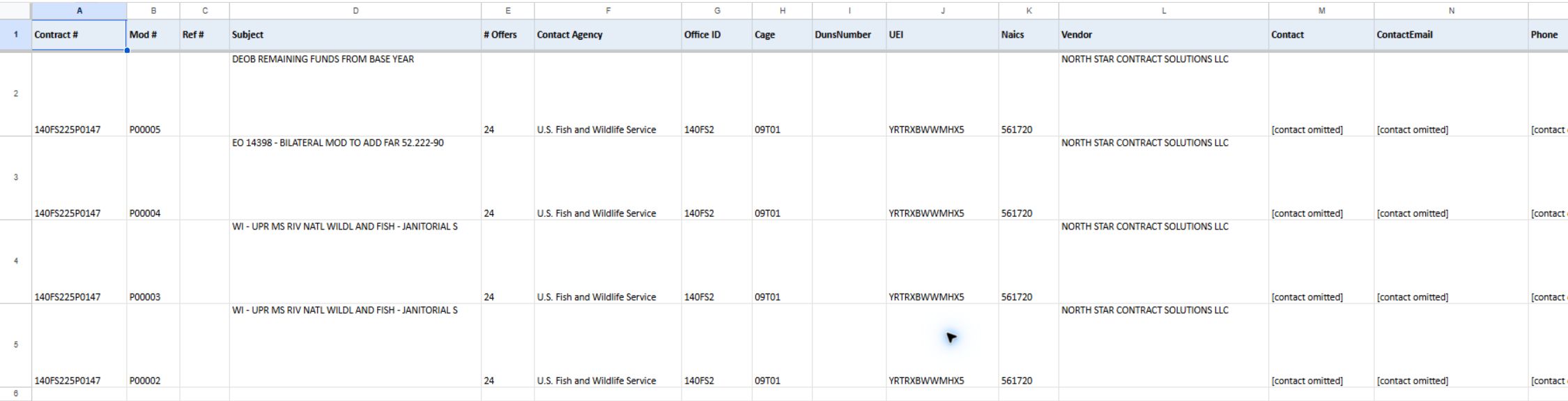
Open the identifying-fields image at full size. The amounts-and-dates image shows later columns; open it at full size.
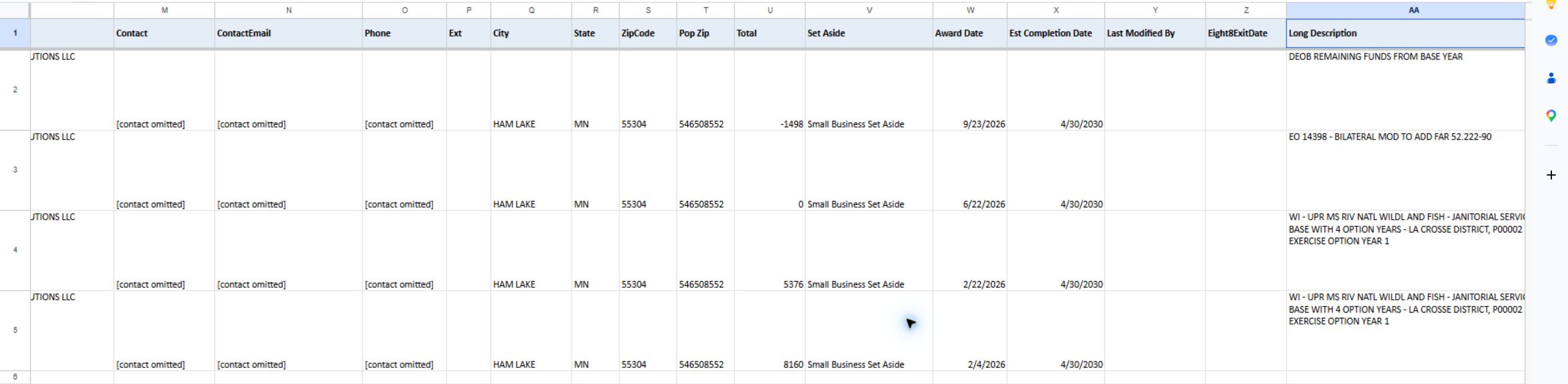
Export To Excel on the flat page produces 27 columns covering identifiers, # Offers, agency and office, vendor and contact details, industry and work location, action obligation, dates and long description. It follows the flat result's 5,000-action limit. Save the search criteria with the file so its rows remain understandable later.
Export To Excel on the grouped page produces 26 action-level columns, omitting # Offers. It exports actions, not the visible parent groups, so compare its amounts with child actions rather than parent Totals. A dated workbook example has 8,948 actions for 2026 and NAICS 561720. Vendor ZipCode is the business address; Pop Zip is the work location.
Turn an award row into a useful decision
Use the Award Details field guide when opening a Contract # link. It explains dates, amounts, buyer/vendor information and coded fields, including a modification-reason value shown under a confusing label.
- Record Contract # + Mod # + Ref # + Award Date. This prevents an option or modification from being mistaken for a new base award.
- Read Subject, then open contract detail for the fuller requirement, vendor, office, type of action and dates. Do not quote a 50-character preview as the whole scope.
- Decide which amount you need: the flat/child action obligation or a grouped contract/reference Total. Label the unit and selected year in notes.
- Treat Est. Completion Date as a possible monitoring horizon. Run a separate solicitation search and check official notices for a current competition.
- Use agency, office and vendor links for further research. Do not infer that a company will team, an office will rebid, or a customer will be eligible from the award row alone.