Understand agency, office, industry and incumbent reports
Part of these button learning paths: Prime Contractors By NAICS · Agency Profiles/Forecasting
Video sections for this page
Open these reports from the menu choice that matches your question: Main Menu → Research → Agency Profiles/Forecasting, then select a department and Show Department Profile; or Main Menu → Research → Prime Contractors By NAICS, choose a NAICS category and code, then select a company's AwardTotal. Department links such as Agencies, # of Offices, # of Contracts, Expenditures, NAICS or Incumbents open the next report level when linked. Use browser Back to return one report level or Main Menu to begin a different search. Each report changes the group being counted: department, agency, contracting office, NAICS or company. Read the title, filters and column definitions below before comparing amounts across reports.
Shared interpretation
NAICS identifies an industry; CAGE identifies a company; ID identifies the agency or department named in the report; OfficeID/CODE identify a contracting office. Keep these codes as text. # of Contracts and Awards count records at the report's stated grouping level. Award Total, Total and Expenditures are dollar amounts. Note the report title and selected filters when comparing figures, since their scopes and periods can differ.
Prime contractor's agency breakdown
The AwardTotal link from Prime Contractors By NAICS opens a CAGE-wide breakdown. Agency names the buying agency; CONTRACTING OFFICE names its office; Total sums recorded obligations for that CAGE after the first day of the month twelve months before the report runs, under this report's federal-spending and NAICS rules. The selected NAICS, state and business-type filters on the prime list are not carried over. Use this breakdown to see which agencies and offices account for the company's recorded obligations, rather than expecting its total to equal the filtered prime-list amount.
Department profile and agency/office lists
The department profile shows ID, Department Name, Agencies, conditional ORG CHARTS, CIO, CFO, HR, FM, SADBU, FIOA and PHONE BOOK links, and dated Expenditures. The full field meaning and conditional link behavior are in that guide.
The all-industry agency list below a department shows ID (agency identifier), Department (parent name), Name (agency or office name), # of Offices (office-code count), # of Contracts (reported contract count) and dated Expenditures (dollar total). # of Offices opens office rows; # of Contracts can open industry counts. In some departments, the list groups organizations differently, so compare the names as well as the counts. Its displayed expenditure year can differ from the parent profile's heading.
The all-industry office list shows ID (agency identifier), OfficeID (office code), Name (office name), Zip (office postal code), # of Contracts (reported contract count), and dated Expenditures. Name can open office contact and address information; # of Contracts can open an office-by-NAICS view. Preserve leading zeros in Zip. Read each report's displayed year when moving between lists.
When you follow a selected NAICS into the department-specific agency list, the fields are ID, Department, Name, # of Contracts and Total. This view shows industry activity by agency. Use the available linked count or amount to continue into finer detail.
Office addresses and office NAICS awards
The office contact/address report presents CODE (office code), Name (office name), ADDRESS (first street line), two unlabeled continuation address lines, CITY, STATE and ZIP CODE. Read all address lines before mailing or visiting. This page shows the office address, even when you reached it from a selected NAICS.
The separate Awards by NAICS report shows Naics (industry code), Name (industry description), # Contracts (count) and Total (dollar sum). Its title says 2025, but the label does not establish that all included actions fall in 2025.
Industry and incumbent summaries
The department industry summary lists NAICS, Name, a dated Awards count, # of Agencies, Incumbents, and dated Expenditures. # of Agencies counts distinct agencies. Incumbents adds company counts from the agencies, so a company active in more than one agency can contribute more than once. The agency and office industry summaries show NAICS, Name, dated Awards, Incumbents, and dated Expenditures. At the office level, Incumbents can count distinct CAGEs. Select an Incumbents link to see companies for the department, agency or office named in that report. Keep the displayed year with any number you record.
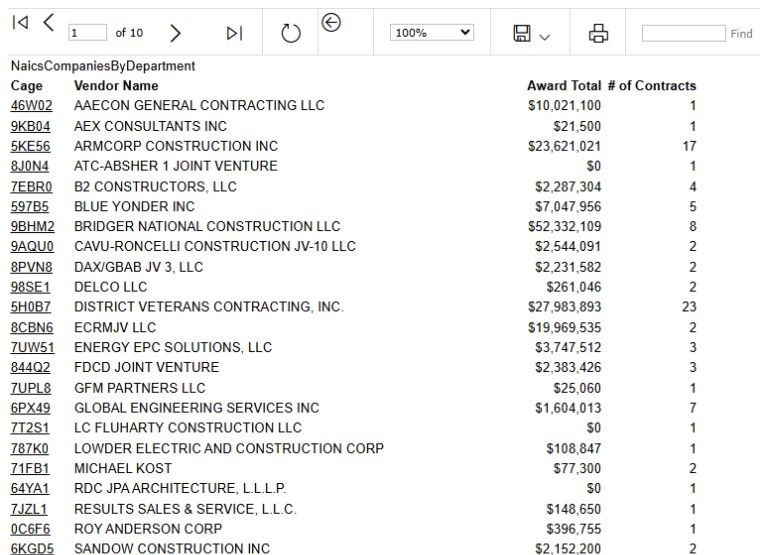
The three company lists each show Cage, Vendor Name, Award Total and # of Contracts. Cage links to company detail; Vendor Name identifies the company, not a contact person. The department list uses the selected NAICS and department or agency, the agency list narrows to an agency, and the office list narrows further to an office. Award Total and # of Contracts summarize the listed scope. Some office rows can represent more than one entry for a company, so the number of rows is not always a count of distinct companies.
Worked example: follow spending to an incumbent and an award
- From Main Menu → Research → Agency Profiles/Forecasting, choose Department of Veterans Affairs and select Show Department Profile. Its report shows ID 3600, 1 Agency and a linked 2026 Expenditures value of $156,654,759,670. Select that expenditure amount to open the department's industry table.

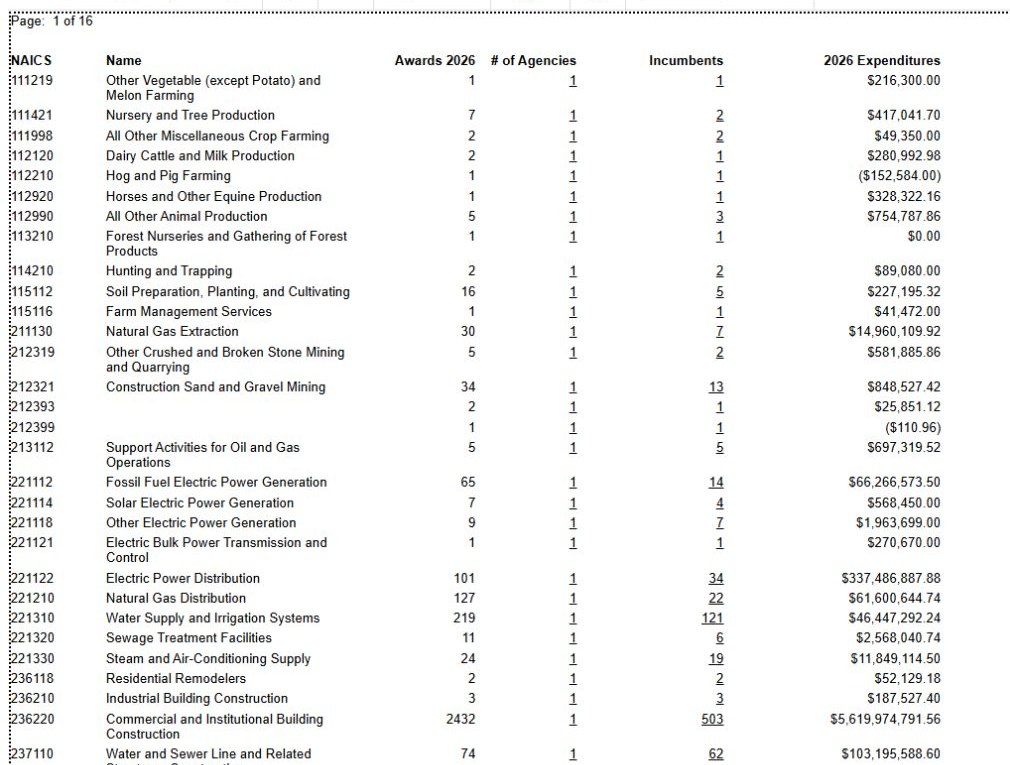
- In the industry table, find NAICS 236220 — Commercial and Institutional Building Construction. The displayed 2026 row shows 2,432 Awards, 1 Agency, 503 Incumbents and $5,619,974,791.56 Expenditures. Select the linked 503 under Incumbents. Keep the department, NAICS and displayed year with these figures.
- The company list shows Cage, Vendor Name, Award Total and # of Contracts. Find 9BHM2 — BRIDGER NATIONAL CONSTRUCTION LLC; its row shows $52,332,109 Award Total and 8 Contracts in this report. Select the 9BHM2 CAGE link to open its company detail.
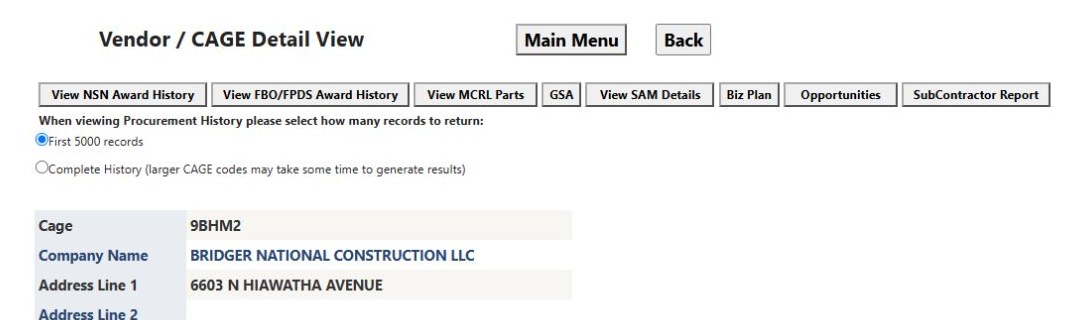
- Confirm that the Vendor / CAGE Detail View identifies BRIDGER NATIONAL CONSTRUCTION LLC and 9BHM2. Select View FBO/FPDS Award History. This opens the company's broader award history; it is a new view, so read its heading and columns before using a Total from it.
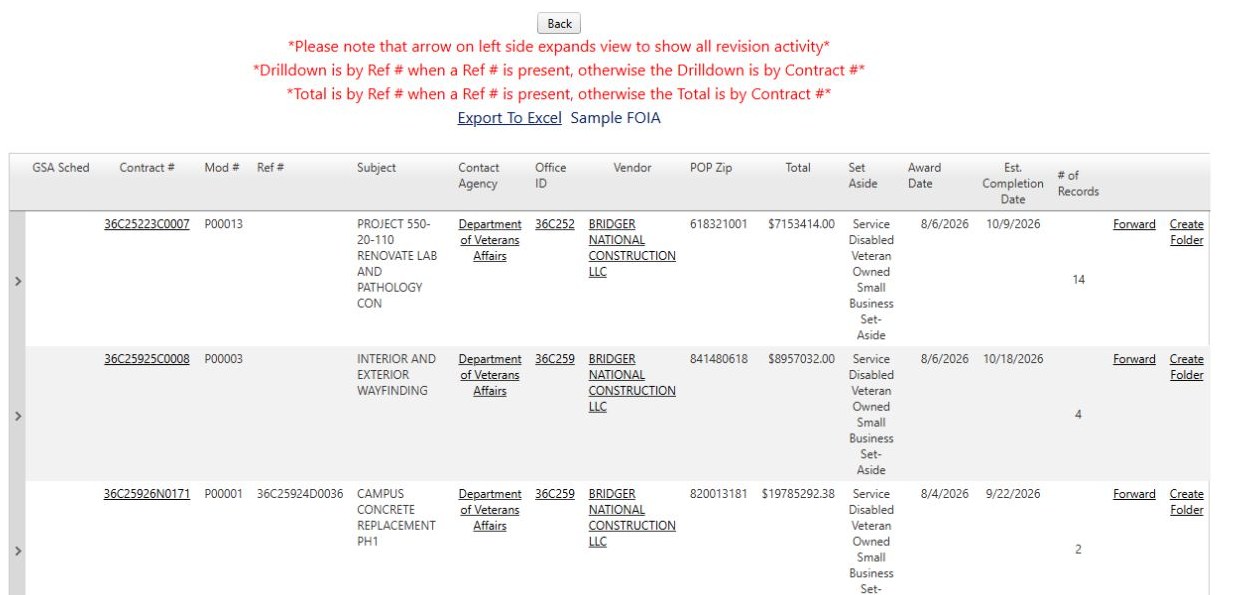
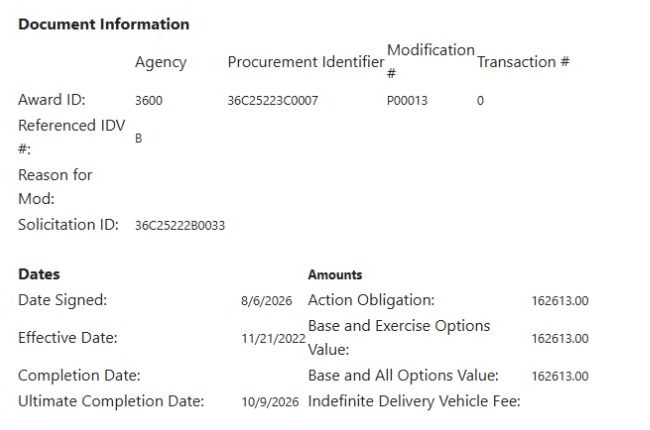
- In the award list, open Contract # 36C25223C0007. Its row shows modification P00013, a lab and pathology renovation subject, buying office 36C252, and August 6, 2026 Award Date. The linked Award Details shows $162,613 Action Obligation, August 6, 2026 Date Signed, and October 9, 2026 Ultimate Completion Date. An action obligation describes this modification; read the result list's Total with that list's contract grouping.
- Select Back on Award Details to return to the award list. Use browser Back to return through company detail, the incumbent list, the industry table and the department profile. A separate award-history search can help compare actions from other companies or years.