Read a company's GSA Schedule worksheet
From Main Menu → All Government Contractors, search for a company, select View Details in the results and choose GSA on its CAGE profile. This opens the worksheet with the company's schedule contract details and any listed categories. Use the browser's Back button to return to the profile; the worksheet itself has no Back control. Then choose another company research button or return to the results. The same worksheet is available from a company profile reached through another company search.
The GSA button is always present; schedule information is available for companies that have a GSA schedule. To find an example, choose GSA Schedule Holders Only in All Government Contractors, run the search, then select View Details → GSA.
The October 11 observed example used Keyword: electrical, All States, UNITED STATES and GSA Schedule Holders Only. ALUTIIQ LOGISTICS & MAINTENANCE SERVICES, LLC (CAGE 7GSM6) displayed contract 47QSHA19D004K, its terms link, company contacts, MAS, an option-period end of July 9, 2029, and ultimate contract end of July 9, 2039. The category field was blank in this observed row. This is an observed result, not a recipe for a new search.
A GSA Schedule is a government purchasing arrangement for ordering listed products and services. The worksheet helps you identify a company's contracts and categories, then follow links to their details and terms.
If the worksheet opens without any contract rows, return to the company profile. A blank page does not establish whether the company currently holds a schedule; check its current GSA listing before relying on that information.
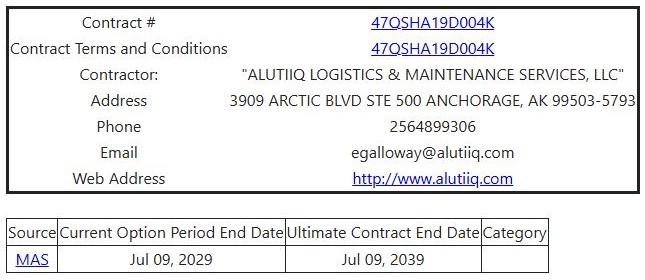
Worksheet fields and links
| Field or link | What it means |
|---|---|
| Contract # | The GSA contract number. Select it to open the contractor-information page for that contract. |
| Contract Terms and Conditions | Opens the contract's online terms. |
| Contractor | The company holding the listed contract. |
| Address | The contractor's business address. |
| Phone, Email | The vendor's listed contact details. |
| Web Address | A link to the company website. |
| Source | Identifies the schedule and links to its summary. |
| Current Option Period End Date | The end date shown for the current contract option period. |
| Ultimate Contract End Date | The final possible end date shown for the contract, including its option periods. |
| Category | A product or service category offered under the contract, when supplied. If linked, select it for Special Item Number, or SIN, details. A contract can have several categories; this field can also be blank. |
Use the worksheet
For example, when researching an IT services partner, open its company profile, select GSA, and review the contract's categories. Follow the contract and category links for current details and ordering terms. The worksheet is an on-screen reference; this page has no Excel export button.
Download this article as Markdown