Read the combined NSN research report
Part of these button learning paths: Just My Opportunities · Machine Shops Opportunities · Unfulfilled NSN Opportunities · Search by NSN/NIIN · APL/AEL Historical · DLA Prime Contractors · Commercial Part Number to NSN · Weapons System Designator Codes
Video sections for this page
Video sections for this page
Video sections for this page
Choose Create Report on an NSN result to open the combined report for that item. The report brings several catalog, management, award and technical sections together. Start from the NSN result, where the item is already selected. A section may have no rows. Individual research pages can show additional fields.
How to get here and continue
- From Search by NSN/NIIN, search for one item. On its NSN result, choose Create Report.
- The next page presents the combined report's sections for that NSN. Read the section headings and any no-data message; use the linked guides below when you need a field-level explanation or an individual detail page.
- Back returns to the item summary. The combined report has no Excel export; use the search form again for another NSN.
Catalog and reference blocks
| Section | Fields displayed | Why they matter |
|---|---|---|
| FLIS Header | NAME item name; INC Item Name Code; FIIG Federal Item Identification Guide; CCF and TOII catalog codes; RPDMRC identification-method reason; DEMIL, HMIC, ESD, PMIC and ADPEC classification or handling codes. | Use these fields to confirm catalog identity and review item classifications. See the identification guide for field context. |
| MCRL | Part No. reference number; RNCC category, RNVC variation, RNFC format, RNJC justification, RNSC status; RNAAC activity code; SADC service/agency designator; DAC document availability; CAGE organization identifier. | Read Part No. and CAGE together, then use the other fields to understand the reference record. See MCRL field guidance. |
| ML-C | MCD management code; SOS source of supply; AAC acquisition advice; QUP quantity per pack; UI unit of issue; SLC shelf life; CIIC controlled inventory; Eff. Date effective date; USC service code; Price management-list price. | Shows management context and unit information. See the logistics guide. |
| MOE Rules | NIIN item identifier; MOE Rule organization rule; DSOR depot source of repair; AMC acquisition method and AMSC suffix; NIMSC material support; IMC item management; IMCA management activity; AAC acquisition advice; Collaborators and Receivers activity codes. | Keep the values in each rule row together. See the Segment B guide for field context. |
Procurement and technical blocks
| Section | Fields displayed | Interpretation and difference from individual page |
|---|---|---|
| Awards / All Awards | Award Date; Contract #; Line Item; Qty; Price; Total; UI unit-of-issue code; CAGE and Company Name. | Line Item displays the modification indicator in this report. Price is the award unit price and Total is the line value. See the award guide. |
| Technical Characteristics | Required Details older requirement text; Details Data older reply text. | Uses an older characteristics source than the individual characteristics page. Both content and ordering may differ. |
| Associated Documents | Spec No. specification/drawing/standard number; Doc. Type document type; Type ID document identifier; Doc. Link and View Document links. | Opens references associated with the item. Compare the document with the current solicitation. See the individual document page. |
| Substitutes | FSC replacement NSN prefix, Repl. NIIN replacement identifier, ISC standardization code, Std Orig. decision-origin code, Std Date stored decision date and Status NIIN status code. | Research lead only; see substitute guide. |
In the Awards section, Line Item displays the modification indicator. Use the individual award-history page for its separate award-line fields. The report's technical and document sections may use different records than the individual pages.
The report shows several different price fields. ML-C Price is a management-list price; Awards Price and Total describe an award line; the forecast view shows LastPrice alongside forecast quantities. Read each amount with its date and unit. For unit terms, see DLA's unit-of-issue and pack guidance. Document links open the recorded file or reference; compare it with the current RFQ.
Example: prepare for an RFQ
Use the report to assemble item identity, CAGE/part references, management constraints, older technical details, associated-document leads and historical awards in one place. Confirm the exact current RFQ, then open the individual technical, document and award pages for closer inspection. Record conflicting values with their section names and source dates. The buying notice and its current attachments determine what can be offered.
Current combined-page example
From NSN 4030-00-266-7415 — HOOK,PELICAN, Create Report opened the combined page on October 10. It displayed one FLIS-header row, two MCRL references, three ML-C management rows, 41 award rows, 13 technical-characteristic rows, nine associated-document references, one substitute row and 24 MOE-rule rows. The substitute row had a blank replacement NIIN, so its presence does not supply an usable replacement identifier.
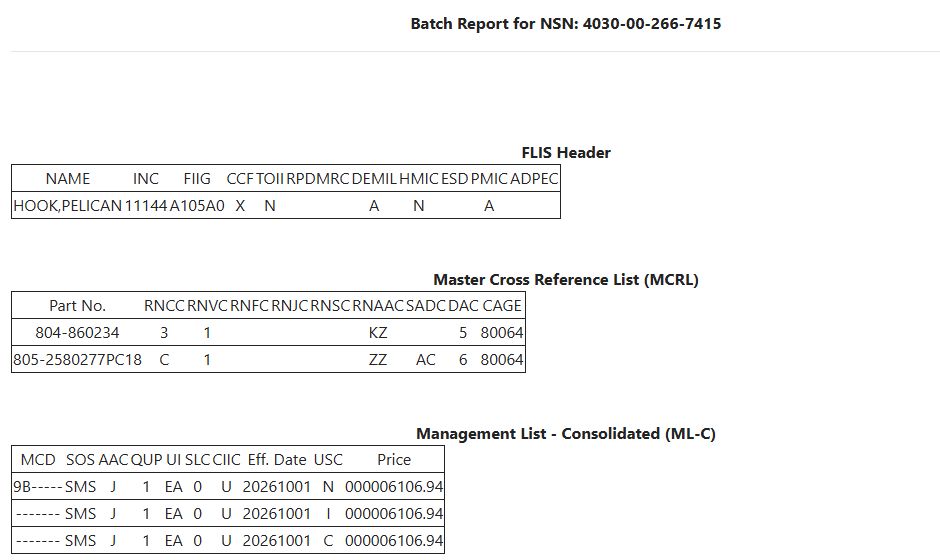
The ML-C example displayed UI = EA, QUP = 1, effective date 20261001, and price 6106.94. The first award row instead displayed June 25, 2026, contract SPE4A526V1672, quantity 1, unit price and total 4053.98, UI EA, and CAGE 7Z016. These rows concern the same item but different price sources and dates. Compare the complete row rather than treating the catalog price as the latest price paid.
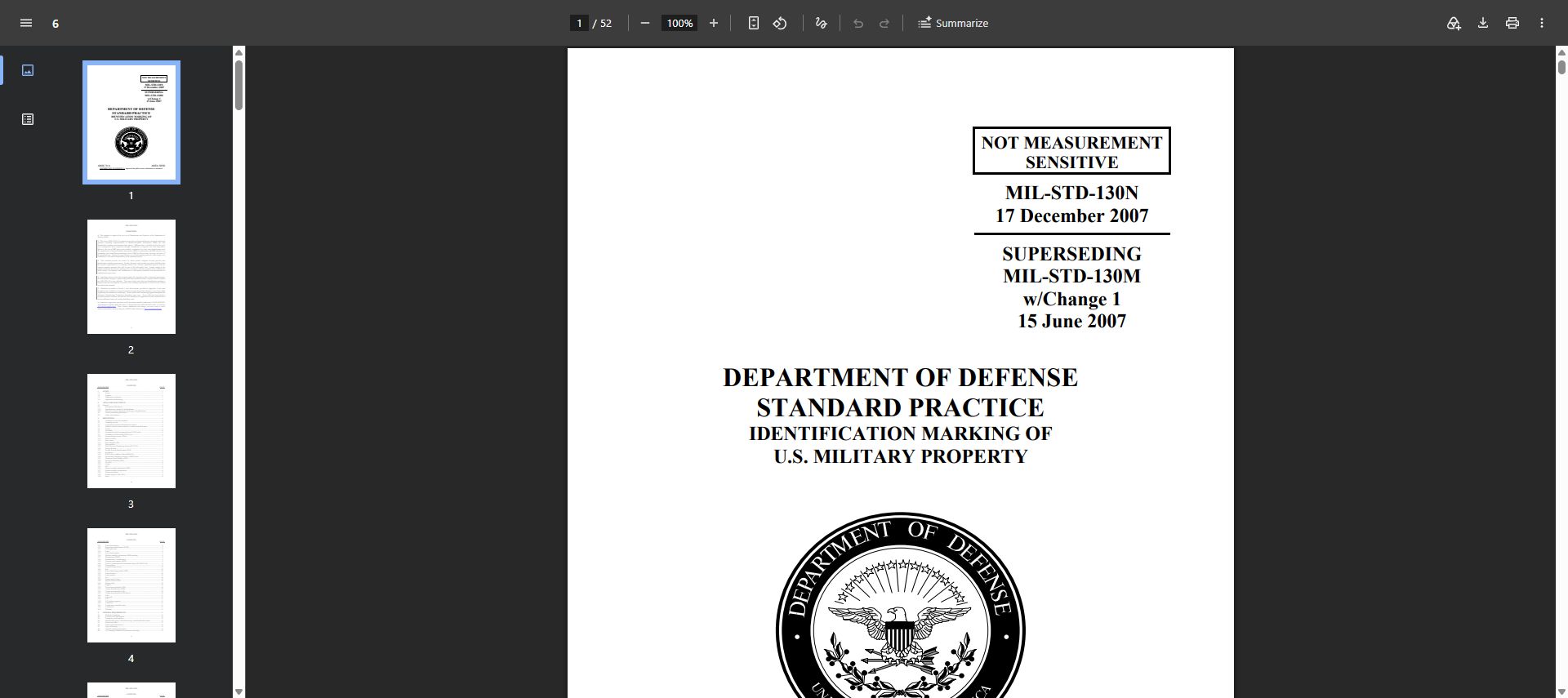
The associated-document block included multiple revisions of MIL-STD-130. A View Document link opened MIL-STD-130N, dated December 17, 2007, in the browser's PDF viewer with 52 pages. Compare the revision required by the solicitation with the listed document.
Use Back to return to the item summary. The combined report has no Excel export; individual research screens may have their own controls and fields.
Download this article as Markdown