State contractor detail
Part of these button learning paths: State Contractors
Video sections for this page
From Main Menu, choose State Contractors, then Find Contractors. On the results page, choose View Details for a company. The breadcrumb for this walkthrough is Main Menu > State Contractors > Find Contractors > View Details. The detail page combines information about one contractor and shows which supplier sources contributed it. See Find state contractors to build a search and state contractor results to compare candidates.
At the top of the page, Detail Help opens the application’s detail-page help, Back returns to the prior page, and State Contractor Detail identifies the current view. The header then shows the company name, Contractor ID, state, and any status or match indicator. Use the Contractor ID to keep this profile distinct from similarly named businesses. A status such as Active or a CCR/SAM Match marker is what this page displays; verify eligibility or federal registration with the issuing source before relying on it.
Read the consolidated summary
The Contractor Summary panel brings together company, location, identity, and contact information. These fields appear when provided by the sources:
| Field | What it shows |
|---|---|
| Company / DBA | The company name and, when present, its “doing business as” name. |
| Contractor ID | The identifier for this consolidated contractor profile. |
| State / Active / CCR/SAM Match | The displayed state and status or federal-match indicators. They do not independently confirm current eligibility or registration. |
| Address / County / Country | The displayed business location. |
| Website | A website value, when present. A value such as http://n/a is not a working company website. |
| Status / Business Type | Source-provided status or business category, when available. |
| Identifiers | Other source-provided IDs, such as the CCR ID in the electrical example. |
| Main Contact / Email / Phone | The contact shown first for the profile. Email is a clickable mail link; phone is displayed for reference. |
| Source Count / Vendor Rows | Number of source systems and number of source/vendor records contributing to the profile. |
| Contacts / Locations | Counts of contact and location entries associated with the profile. |
| Last Seen | When the source information was last seen, when shown. It is not a certification expiration date. |
Not every profile has every field. A missing value means the page has no value to show for that field.
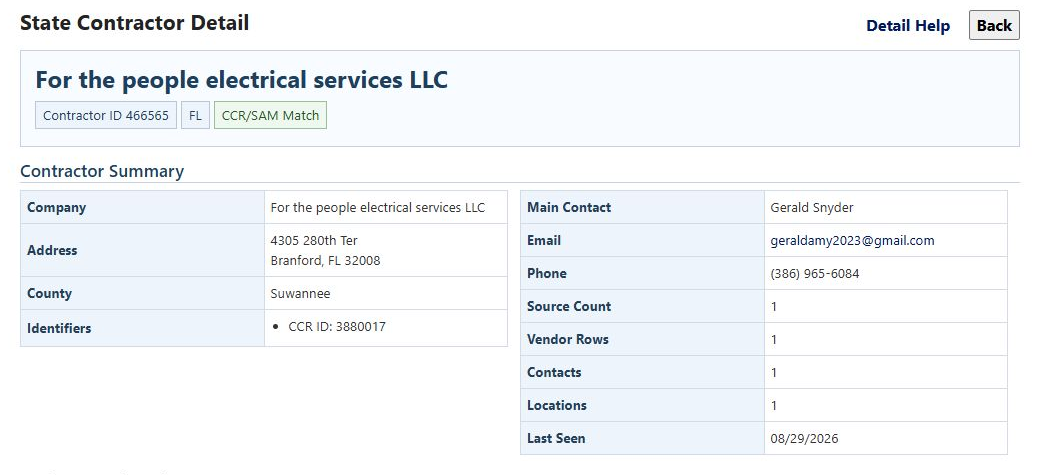
For example, a Florida search for the keyword electrical returned 844 results. Opening For the people electrical services LLC shows Contractor ID 466565, state FL, and a CCR/SAM Match marker. Its summary lists Branford, Suwannee County, Florida, CCR ID 3880017, one source, one vendor row, one contact, one location, and Last Seen 08/29/2026. The date tells you when the displayed source information was last seen; it does not establish that the contact details or registration remain current.
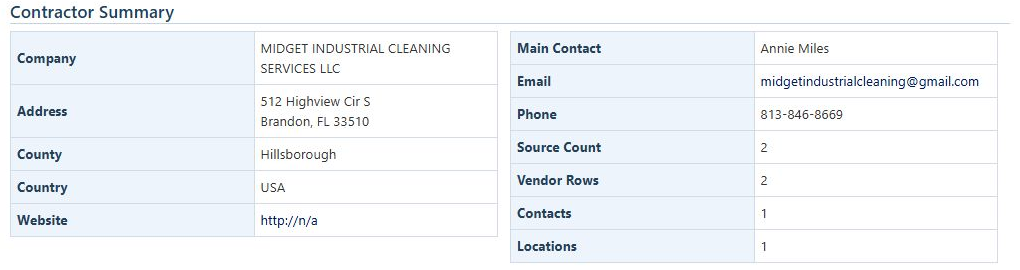
A second example began with janitorial, ZIP 34677, and a 25-mile radius, producing 106 results. The detail for MIDGET INDUSTRIAL CLEANING SERVICES LLC is Contractor ID 1580221, state FL, and marked Active. Its summary lists Brandon, Hillsborough County, USA, and counts of two sources, two vendor rows, one contact, and one location. The website field displays http://n/a; this is the value shown by the page, not a working company website.
Designations, work descriptions, and codes
Business Designations lists labels and certifications supplied for the contractor:
| Column | What it shows |
|---|---|
| Designation | The kind of label or certification, such as Certification Type or Supplier Certification. |
| Value | The designation or source-provided certification text. It may include an issuer, program, industry, or expiration date. |
| Source | The directory or program that supplied the value. |
| Rows | How many source rows supplied it. |
Treat certification details as source-reported information and confirm them with the issuer when they matter to a decision. If the panel says no designations were found, that means none are displayed for this profile; it does not prove the business has no qualifications.
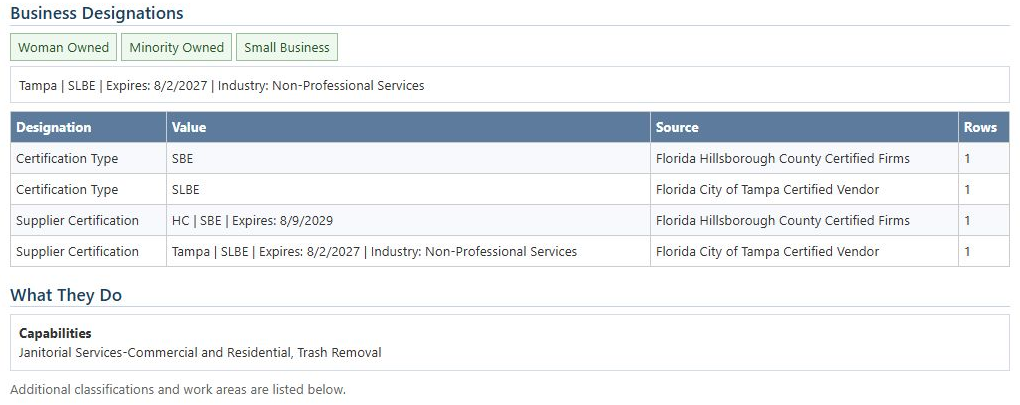
For MIDGET, the page displays Woman Owned, Minority Owned, and Small Business, plus source-reported SBE and SLBE certification details from Hillsborough County and the City of Tampa. The displayed details include expiration dates of 8/9/2029 and 8/2/2027, respectively. These are examples of values recorded on the captured page, not a statement that either certification is currently valid.
What They Do summarizes available descriptions or capabilities. On the MIDGET profile, the displayed capability is Janitorial Services-Commercial and Residential, Trash Removal. The Codes and Classifications section lists the available work labels or codes in columns for Type, Code / Classification, Source, and Rows. In this example, the capability appears under both county and city source names. Similar wording may appear more than once because the sources are shown separately. The Florida electrical example instead says no description, capability, commodity, classification text, codes, or classifications were found. An empty or unavailable section is a prompt to check other sources, not a conclusion about the contractor’s actual work.
Follow a direct NAICS match
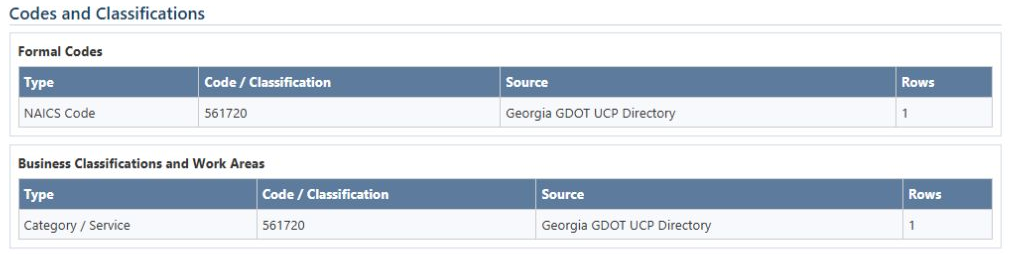
From Main Menu > State Contractors, set State = FL, Code Type = NAICS, and Code Value = 561720, leaving code-text expansion off. The 18-row result includes CRAIG STATEN VENTURES INC. Choose its View Details link. Under Codes and Classifications, Formal Codes shows NAICS Code, 561720, Georgia GDOT UCP Directory, and Rows 1. The separate Business Classifications and Work Areas table shows a Category / Service entry. Read the table heading as well as the value: a formal code and a descriptive work classification are different fields. The company's Florida location and the Georgia source describe different things.
Use Back to return to the 18-row result and compare another contractor.
Contacts and supplier sources
The Contacts table lists Name, Title, Email, Phone, and Sources. Name identifies the contact; Title is their listed role, if provided; Email is clickable; Phone is displayed for reference; Sources counts contributing records that include the contact. A blank title means no title is shown.
Vendor Registrations and Sources lists the source records separately:
| Column | What it shows |
|---|---|
| Source | The contributing directory or program. |
| State | The source jurisdiction shown for the record. |
| Vendor / Location | The supplier name and location as recorded by that source. |
| Contact | Contact details supplied with that source record. |
| Source Details | Source-reported certifications, capabilities, row counts, or last-seen date, when available. |
| Links | source detail and source feed links to the supplier entry or directory, when provided. A link may be unavailable. |
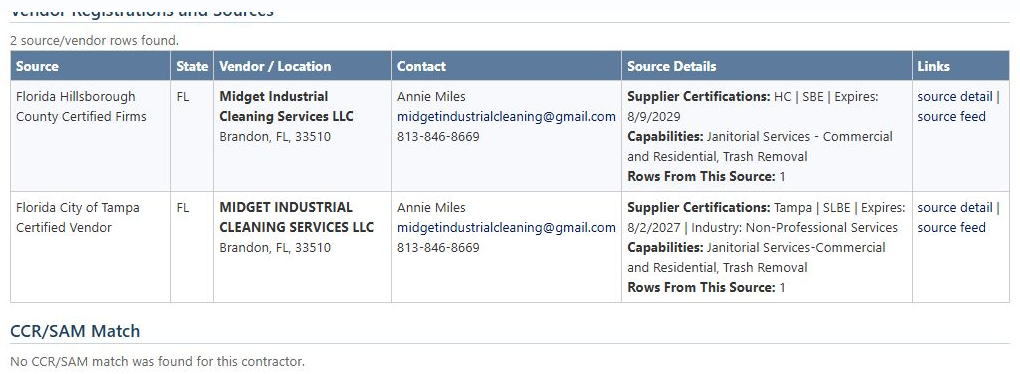
MIDGET’s page shows two contributing sources: Florida Hillsborough County Certified Firms and Florida City of Tampa Certified Vendor. Both list the same Brandon location and contact, while their certification wording differs. Comparing these rows helps explain what each source contributed; use the linked source when you need to verify its current entry. The electrical example shows one Florida MFMP source row, with one source row and Last Seen 08/29/2026.
Federal match and evidence summary
When available, CCR/SAM Match lists these columns:
| Column | What it shows |
|---|---|
| CCR/SAM | The linked federal record identifier, when available. |
| CAGE | The associated CAGE code. |
| Company | The company name shown for the association. |
| Source | The source label for the displayed row. |
| Score | The application’s matching indicator, not a contractor rating, qualification score, or guarantee of current registration. |
| Strategy | A label describing the matching approach; it is not an independent rating. |
| Rows | The number of contributing rows shown for the association. |
A linked CCR/SAM value opens the associated federal-record view. The electrical example shows CCR/SAM ID 3880017, CAGE 15YK2, and score 0.9922. MIDGET’s page says No CCR/SAM match was found for this contractor. That message means no match is displayed here; it does not establish whether the company has a federal registration under another name.
The Source Evidence panel summarizes the source/vendor-row and source-system counts and, when present, First seen and Last seen dates. Its Show original staged rows used as evidence control expands the underlying source entries for tracing how the consolidated profile was assembled. Use the summary and source links for routine review; the expander is available when you need to inspect the contributing entries.
Use the detail page to understand what the search found, compare contributing sources, and follow the available links. Return to state contractor search and results to refine the search or compare other candidates. Treat displayed contact, capability, designation, and match information as source-based leads to verify when making a business decision.
Download this article as Markdown