State contractor results and Excel export
Part of these button learning paths: State Contractors
Video sections for this page
Application path: Main Menu → State Contractors (under B2B) → Find State Contractors → Find Contractors → State Contractor Results
Use the results to build a supplier shortlist, open a consolidated company profile and inspect its source evidence. The count above the table refers to contractor rows in the result, not source records or just the rows visible on page one. The following searches were observed on October 13, 2026; later searches or data updates may return different counts.
Read an electrical-supplier search
On the form, choose Keyword / Description, enter electrical, select FL, then choose Find Contractors. Leave city, ZIP, radius, code and set-aside criteria blank; use Any Source and All Contractors for CCR/SAM. The result shows 844 contractor rows shown.
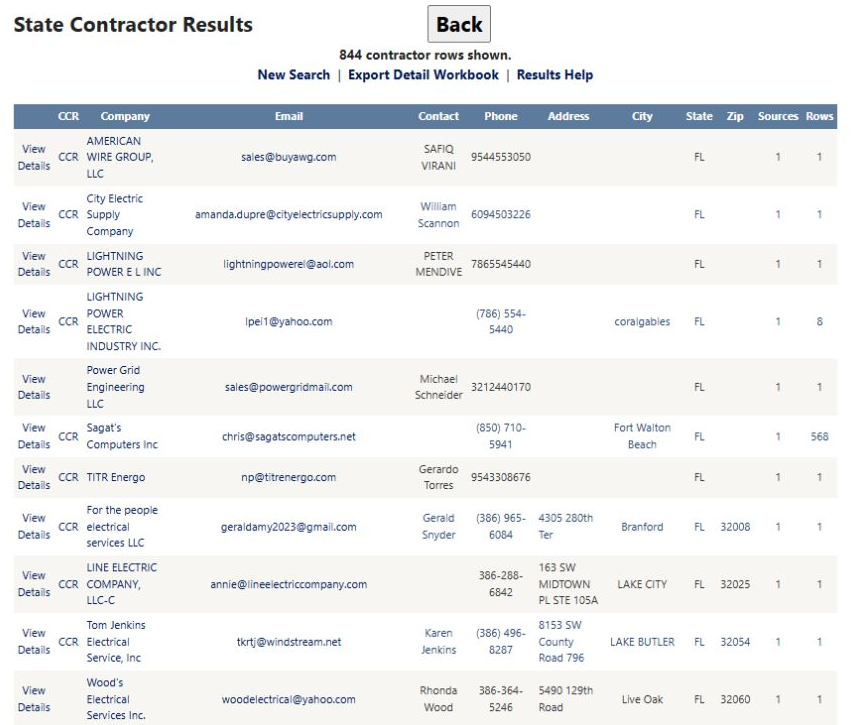
The first visible row is AMERICAN WIRE GROUP, LLC. It supplies an email, contact, phone and state FL, but street address, city and ZIP are blank. A state match does not supply the missing address. Keep those gaps visible when making a shortlist.
The row offers three different routes:
- View Details opens its consolidated State Contractor Detail, Contractor ID 97684, for company information and contributing records.
- CCR opens the separate federal contractor detail for CAGE 1VQG3. This link does not establish current SAM registration status.
- The AMERICAN WIRE GROUP, LLC company-name link points to an OregonBuys vendor profile. A Florida company can appear in another state's vendor source; this link is not necessarily the company's own website.
Start with View Details to understand the consolidated profile. Follow the source or CCR route for the particular evidence you need. Some recorded company links lead to a general directory or an unavailable destination; a displayed link alone does not establish a current individual source profile.
Open a linked CCR profile and return
For a direct company lookup, choose Company Name, enter Sani-Chem, select FL, and choose Find Contractors. The October 13 search returned one contractor row. Its CCR link opened Vendor / CAGE Detail View in the same tab, showing CAGE 5HLX5 and SANI-CHEM JANITORIAL SUPPLIES, INC. Choose Back to return to the original one-row State Contractor result.
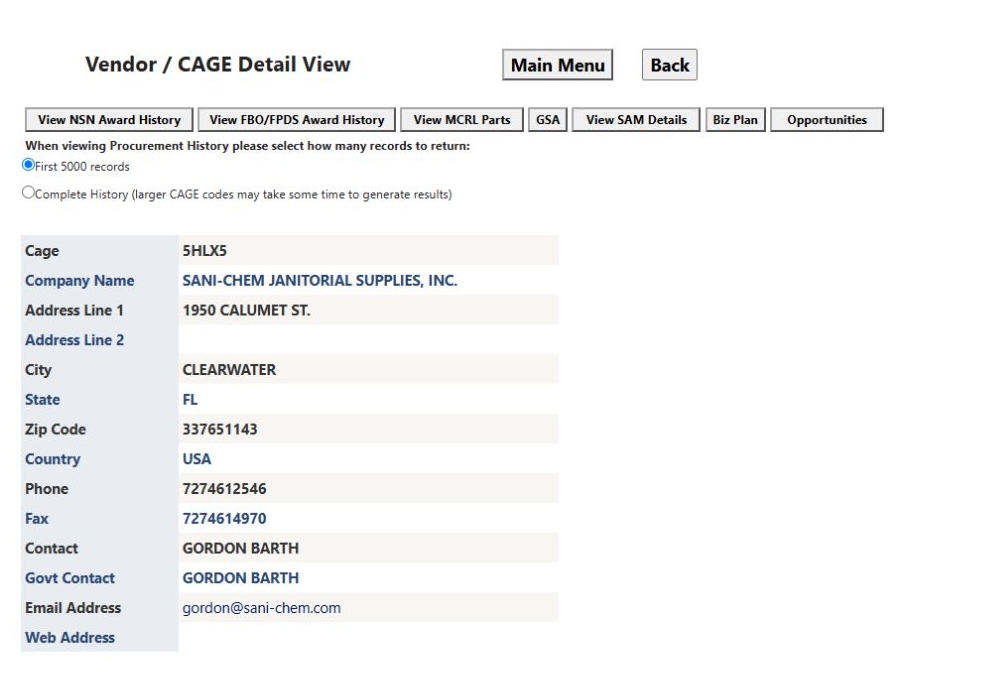
This is the federal company research view, distinct from the consolidated State Contractor profile. Its research buttons are explained in Read contractor results and profiles. Read each view's displayed fields as its own record; do not assume different contact names have the same role or currency.
Compare direct-code and expanded results
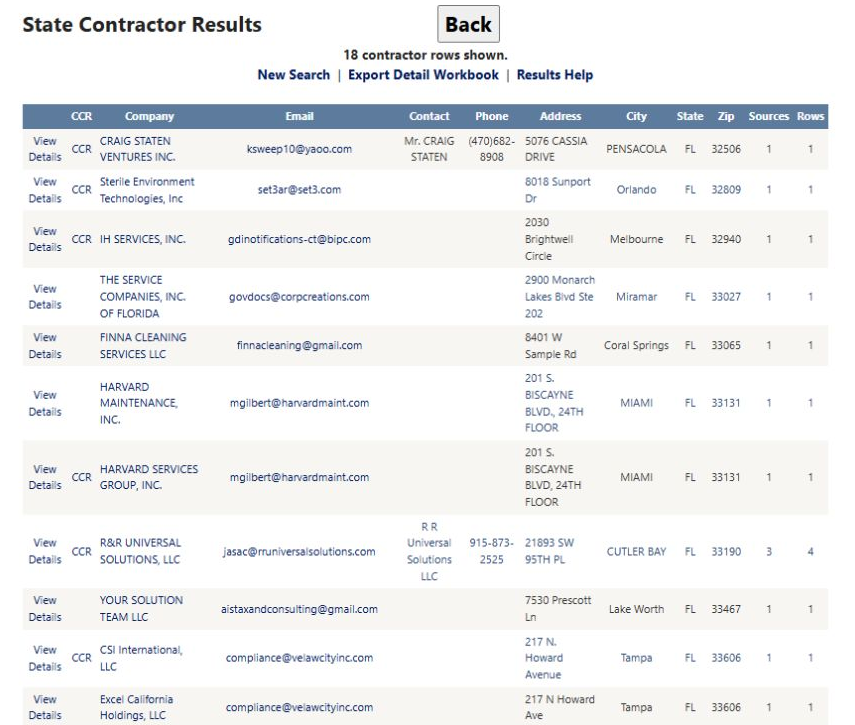
Clear the keyword and location fields. Select FL, choose code type NAICS, enter 561720, and leave Also search code descriptions and source text unchecked. The result shows 18 contractor rows. Visible firms include CRAIG STATEN VENTURES INC. in Pensacola and Sterile Environment Technologies, Inc in Orlando. Open View Details to examine formal codes and sources rather than deciding from the company name alone.
Return through New Search and repeat the same state, code type and code value, this time checking Also search code descriptions and source text. The result shows 234 contractor rows, with a message that text evidence is included for the selected source fields.
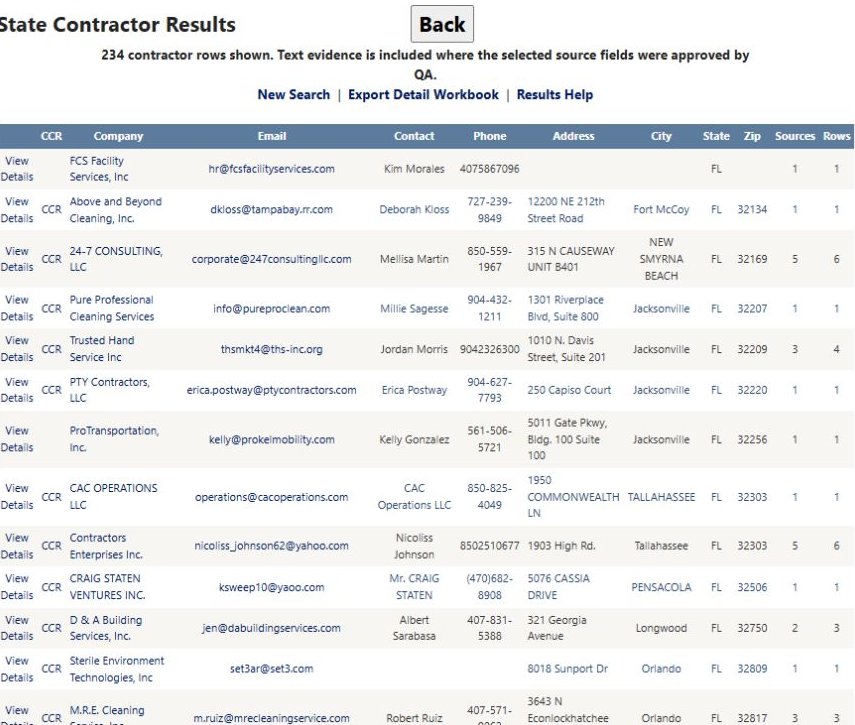
The expanded list includes candidates supported by descriptions or source text as well as formal code entries. It does not mean that all 234 firms have a recorded six-digit NAICS 561720 entry. Compare the profile's formal codes with its business description and source records. In the workbook, 06 Codes and 10 Search Matches distinguish formal-code entries from text evidence.
Interpret a ZIP-radius result
Choose Keyword / Description, enter janitorial, enter ZIP 34677, and select a 25-mile radius. Leave state, city, code and set-aside criteria blank. The result shows 106 contractor rows, followed by Within 25 miles of ZIP 34677 (approximate ZIP-to-ZIP distance).
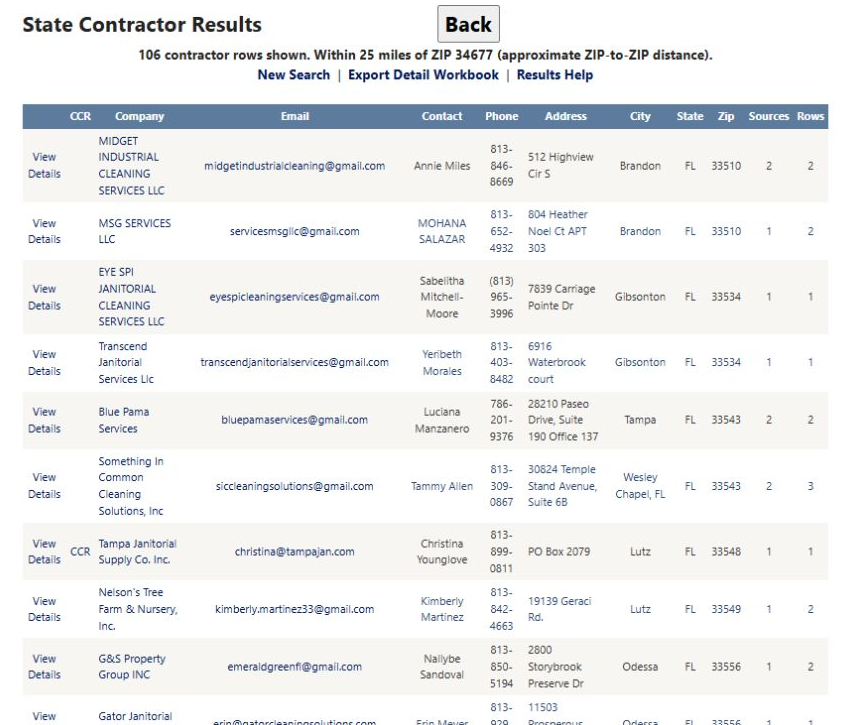
The table has Address, City, State and Zip columns; this view does not add a separate distance column. The message describes approximate ZIP-to-ZIP proximity, not driving distance or the exact distance to a company's premises.
For example, MSG SERVICES LLC is shown in Brandon, ZIP 33510, with Sources 1 / Rows 2. Those numbers describe the evidence behind its profile, not miles. Open View Details to inspect the retained location and source records before choosing a local supplier.
Read every result column
| Column/action | Meaning and use |
|---|---|
| View Details | Opens the consolidated company profile for that Contractor ID. Inspect contacts, designations, formal codes, classifications and original source evidence. |
| CCR | Opens an available linked CCR/SAM record. A blank cell means there is no displayed link for this row; it does not prove the firm has no federal registration. |
| Company | The consolidated name. A link opens its recorded source destination, which may be a profile or directory rather than the company's own website. |
| The retained main email; the link opens a mail draft. A populated address is not a delivery or mailing-eligibility check. | |
| Contact | The retained main person's name. Open the profile for additional contacts and missing context. |
| Phone | The retained main telephone number. Sources may retain different contacts or formatting. |
| Address | The consolidated street address. Keep a blank value as missing information. |
| City | The consolidated city. Compare it with ZIP and source evidence when location matters. |
| State | The consolidated state abbreviation used for the state filter; it may differ from the source system's jurisdiction. |
| Zip | The consolidated postal code. It is not a mileage value; read the separate radius message for proximity. |
| Sources | Number of distinct contributing source systems. |
| Rows | Number of source/vendor records consolidated into the profile, not distinct offices or current certifications. |
Sources and Rows can differ. The electrical result includes Sagat's Computers Inc with Sources 1 / Rows 568. One system can contribute many records; that number does not explain the match or make the firm a better supplier. Inspect its profile and source evidence.
Page through results and return to search
The electrical, expanded-code and radius examples show 50 contractor rows on page one. Use the numbered links below the table for other pages. The electrical result shows current page 1, links 2–10, and … for the next group. The radius result has pages 1, 2 and 3. The 18-row direct-code result fits on one page. The count above the table covers the result, not just the current page.
Read rows in their displayed order. The observed column headers do not provide sorting controls.
- New Search returns to the form. Set and check the next criteria before choosing Find Contractors.
- Results Help opens the application's results-and-export explanation.
- Back returns to the preceding page.
If the result is No state contractors found, review the combination on the form. Broaden one criterion at a time to see which change affects the result. A row is a candidate to investigate, not confirmation of procurement eligibility or a currently valid designation.
Export the detail workbook
Choose Export Detail Workbook above the results. The link carries the current criteria. For the radius example these include keyword janitorial, ZIP 34677 and radius 25; for the expanded-code example they include FL, NAICS 561720 and text expansion. Save the resulting workbook and retain its search context when comparing suppliers.
Start with Workbook Guide and 01 Prospects. Use Contractor Record to connect a company with its other worksheets. This is a record identifier, not an industry code or certification. One main prospect can have several contact, location, code or source rows.
Follow one firm through six worksheet excerpts
These are reformatted worksheet excerpts from a real September 6, 2026 public export for Florida NAICS 561720, with code/source-text expansion. They are not Excel application screenshots or a new October download. Selected columns, original worksheet row numbers and blanks are retained. Their values were checked against the saved original workbook on October 13. They illustrate the layout, not current contact or certification validity.
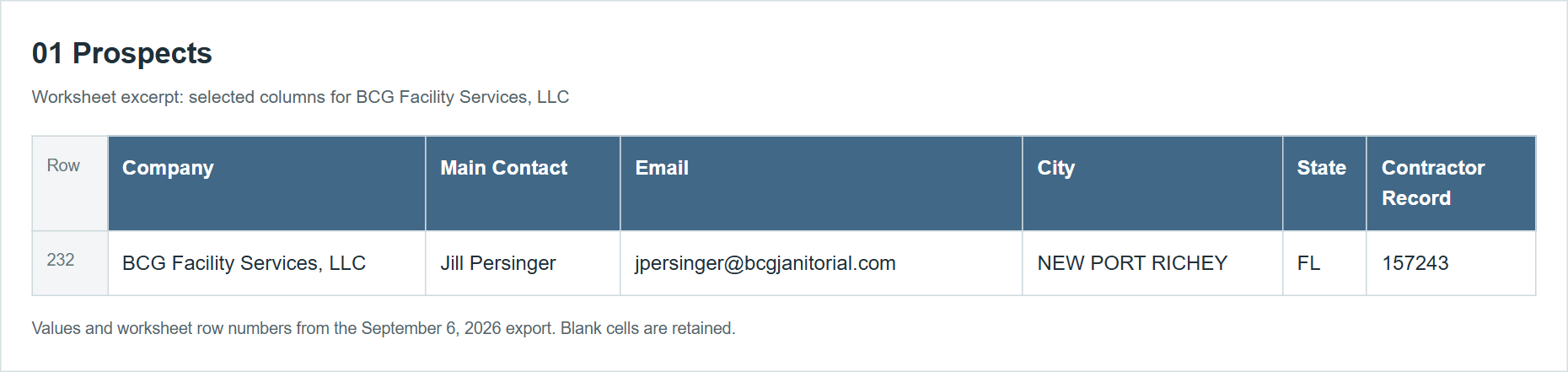
01 Prospects: the main company row
Row 232 identifies BCG Facility Services, LLC, main contact Jill Persinger, NEW PORT RICHEY, FL, and Contractor Record 157243. Begin with this main-list row, then use the record number to locate supporting details.
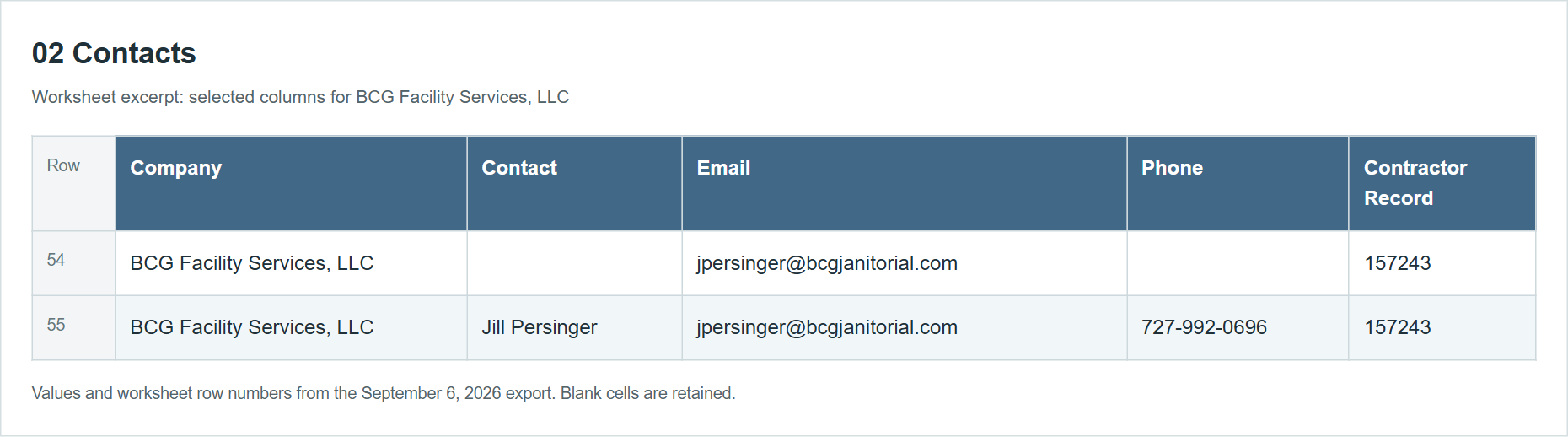
02 Contacts: retain blanks and repeated evidence
Rows 54–55 have the same company and email. One has a blank contact name and phone; the other names Jill Persinger and supplies a phone. Do not invent another named person for the blank row or count repeated email evidence as another contractor.
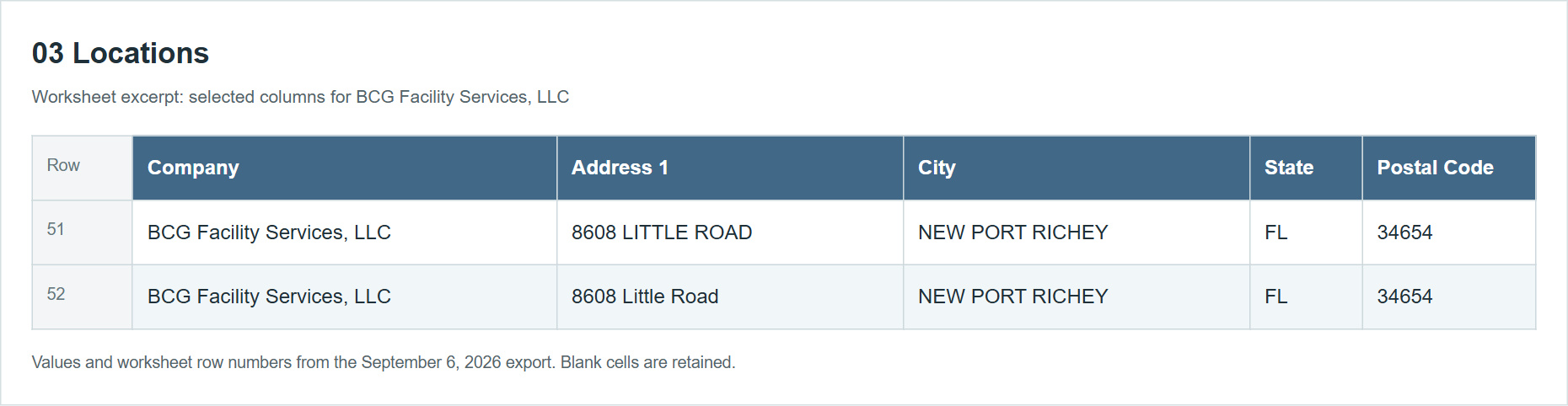
03 Locations: compare variants before counting offices
Rows 51–52 contain 8608 LITTLE ROAD and 8608 Little Road, both in NEW PORT RICHEY, FL 34654. The case differs, but these rows do not by themselves establish two separate offices.
06 Codes: distinguish prefixes from the complete code
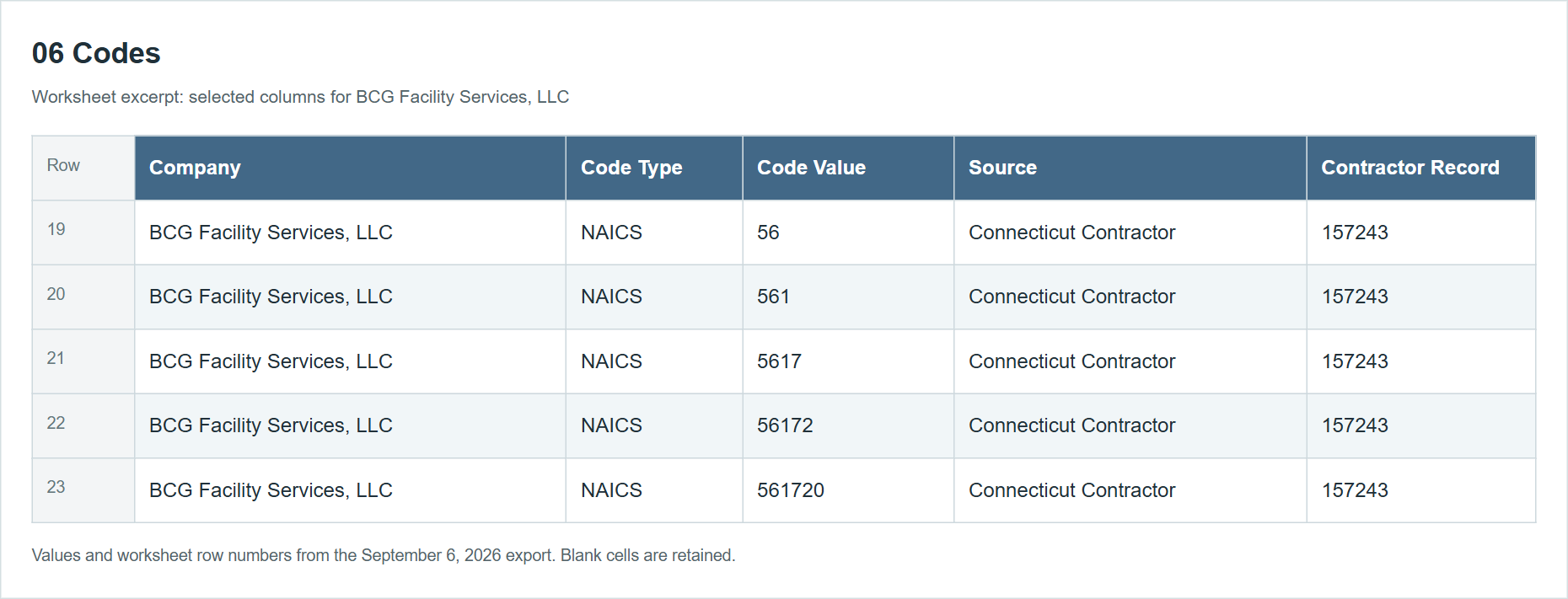
Rows 19–23 list NAICS 56, 561, 5617, 56172 and 561720, source Connecticut Contractor. The entries range from broad prefixes to the complete six-digit code. Keep Code Type, Code Value and Source together when comparing classifications.
08 Source Details: trace differences to their source
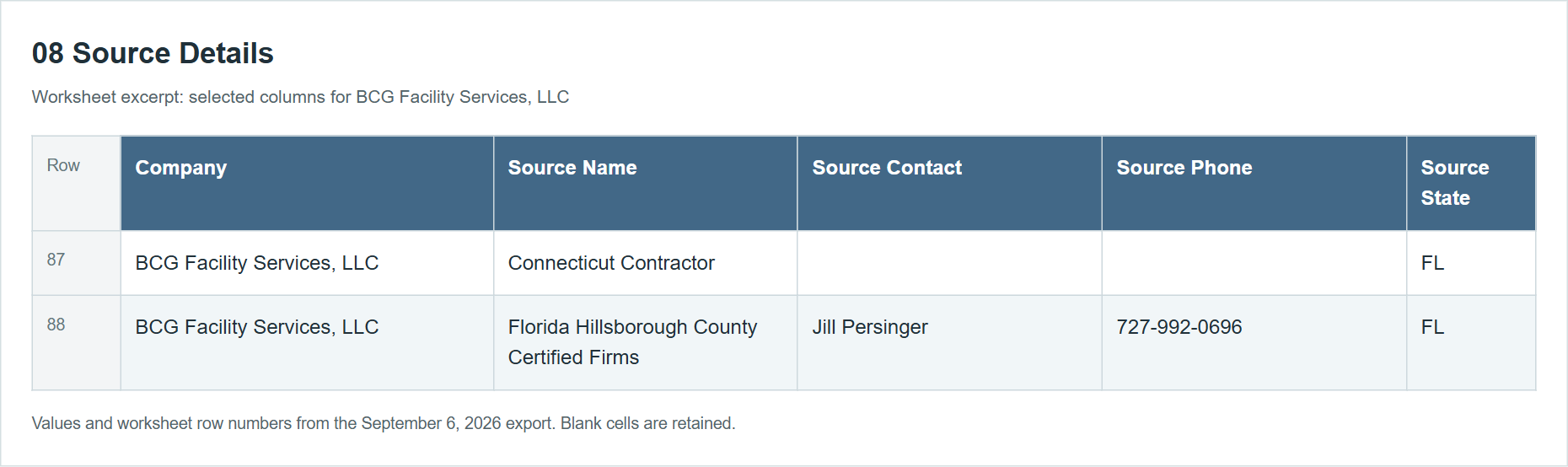
Rows 87–88 show Connecticut Contractor and Florida Hillsborough County Certified Firms, both with Source State FL. The first has a blank source contact and phone; the second supplies them. A Connecticut source system can contain a Florida company. Read its location fields rather than treating the source name as the supplier's location.
10 Search Matches: distinguish direct code from supporting text
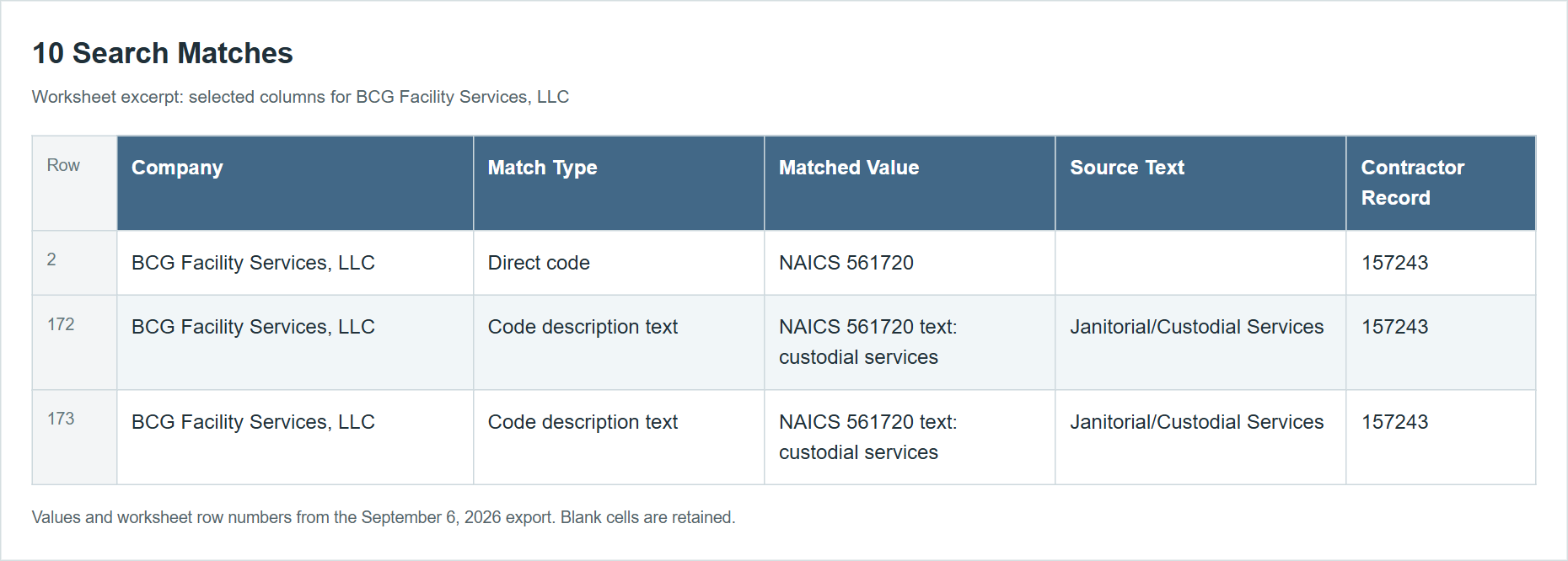
Row 2 shows Direct code / NAICS 561720. Rows 172–173 show Code description text, with custodial services in the matched value and Janitorial/Custodial Services in source text. These are different pieces of matching evidence for Contractor Record 157243, not three contractors.
Workbook fields and meanings
The sheet names and headings below were checked against the retained public workbook. A blank means the export did not supply that value. Source designations and certifications require issuer/program/current-status verification before use in a bid decision.
| Sheet | Columns and purpose |
|---|---|
| Workbook Guide | Sheet, What it contains: describes each sheet before analysis. |
| 01 Prospects | Company, DBA (trading name), Main Contact, Contact Title, Email, Phone, Website, Address 1, Address 2, City, State, Postal Code, County: identity, contact and location. Business Description, Business Type, Status, Woman Owned, Veteran Owned, Service-Disabled Veteran Owned, Minority Owned, Small Business, Disadvantaged Business, Certification Summary, Category Summary, Capability Summary: business and designation details to verify. Detail Page, CCR Record, CAGE, Contractor Record: links and identifiers. One row per consolidated contractor. |
| 02 Contacts | Company, Contact, Title, Email, Phone, Times Seen, Contractor Record: retained people and their contact channels. Times Seen is evidence frequency, not a quality score. |
| 03 Locations | Company, Address 1, Address 2, City, State, Postal Code, County, Country, Times Seen, Contractor Record: additional locations and source frequency. |
| 04 Set Asides | Company, Set Aside, Source, Contractor Record: recorded set-aside label and its source, useful for verifying a filtered candidate. |
| 05 Certifications | Company, Certification, Source, Contractor Record: other reported certifications, separate from set-aside labels. |
| 06 Codes | Company, Code Type, Code Value, Source, Contractor Record: formal NAICS/SIC/PSC/NIGP/UNSPSC entries and prefixes. Keep the family, value and source together; a short prefix is broader than a complete code. Confirm codes with the relevant official source. |
| 07 Classifications | Company, Classification Type, Classification, Source, Contractor Record: other descriptive category and work labels. These should not be mistaken for formal codes. |
| 08 Source Details | Company, Source Name, Source Company, Source Contact, Source Email, Source Phone, Source Address, Source City, Source State (company location as reported by that source), Source Postal Code, Source Status, Business Description, Certification Summary, Category Summary, Capability Summary, Source Detail Page, Source URL, CCR Record, Contractor Record: each source’s original view of a supplier and where to verify it. |
| 09 CCR Links | Company, CCR Record, CAGE, Contractor Record: known matched federal supplier records. |
| 10 Search Matches | Company, Match Type, Matched Value, Source Field, Source Text, Contractor Record: Match Type distinguishes direct-code or text evidence; Matched Value records the matched code/value/term, Source Field identifies its field when supplied, and Source Text retains the supporting text. This is not a certification report or a complete explanation of every keyword match. |
| Export Summary | Generated records the creation time; Request Host identifies the site; Search Page retains the request and criteria; Contractors records the main contractor count; Workbook Format describes the format; Detail Sheets lists the included detail categories. Use it to distinguish searches and exports. |
For a supplier shortlist, begin with 01 Prospects, follow the same Contractor Record through 04 Set Asides and 06 Codes, then compare 08 Source Details and the detail profile. Source counts and Times Seen are evidence counts, not quality scores. A cell containing an email is not a mailing-verification result.
Return to Find State Contractors to adjust the search, or read State Contractor Detail to investigate one firm.
Download this article as Markdown