Explore department profiles, agencies and industry spending
Part of these button learning paths: Agency Profiles/Forecasting
Video sections for this page
- 0:00 — Open Agency Profiles and Forecasting
- 0:11 — Select Veterans Affairs
- 0:22 — Read the department profile
- 0:44 — Open department expenditures
- 1:02 — Read the electrical-contractors row
- 1:31 — Open the department-wide supplier list
- 1:55 — Open the agency breakdown
- 2:14 — Open the department’s agency
- 2:36 — Find office 36C241
- 3:00 — Read the office’s industry row
- 3:24 — Open the office supplier list
- 3:47 — Continue to the company profile
- 4:03 — Open the office-name directory
Application path: Main Menu → Agency Profiles/Forecasting → select a department → Show Department Profile.
This route helps you move from a federal department to the offices buying in your industry and the companies serving those offices. It also supplies links to department resources and separate forecast/subcontracting workbooks.
Start with Veterans Affairs
Select Department of Veterans Affairs and choose Show Department Profile. The example checked October 21, 2026 shows department ID 3600, an Agencies count of 1, and expenditure amount $156,654,759,670.
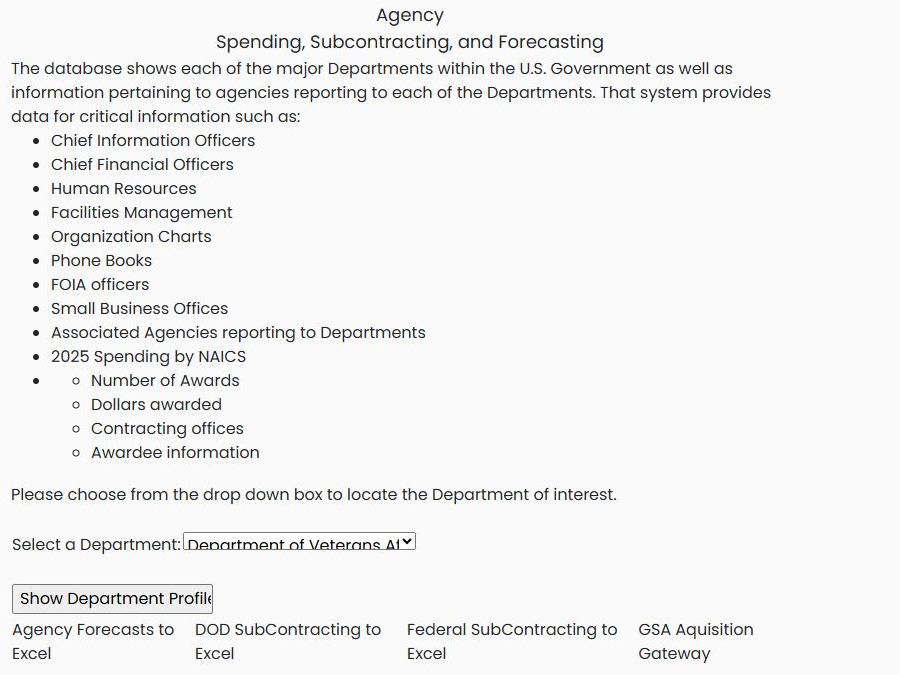

| Profile field or link | Meaning and use |
|---|---|
| ID | The department identifier. |
| Department Name | The department and its website link. |
| Agencies | Opens the organizations listed under this department. |
| ORG CHARTS | Organization chart link. |
| CIO | Chief information officer resource. |
| CFO | Chief financial officer resource. |
| HR | Human resources information. |
| FM | Facilities management information. |
| SADBU | Small-business office resource. |
| FIOA / FOIA | The heading says FIOA; the FOIA link leads to a Freedom of Information Act resource. |
| PHONE BOOK | Department contact-directory link. |
| Expenditures | The displayed spending total and link to industry-level information. Keep the report's displayed year with the amount. |
Follow department expenditures by industry
From the Veterans Affairs department profile, select 2026 Expenditures $156,654,759,670. The industry report opens at page 1 of 16; use Next Page to reach 2 of 16, where 238210 — Electrical Contractors and Other Wiring Installation Contractors appears.
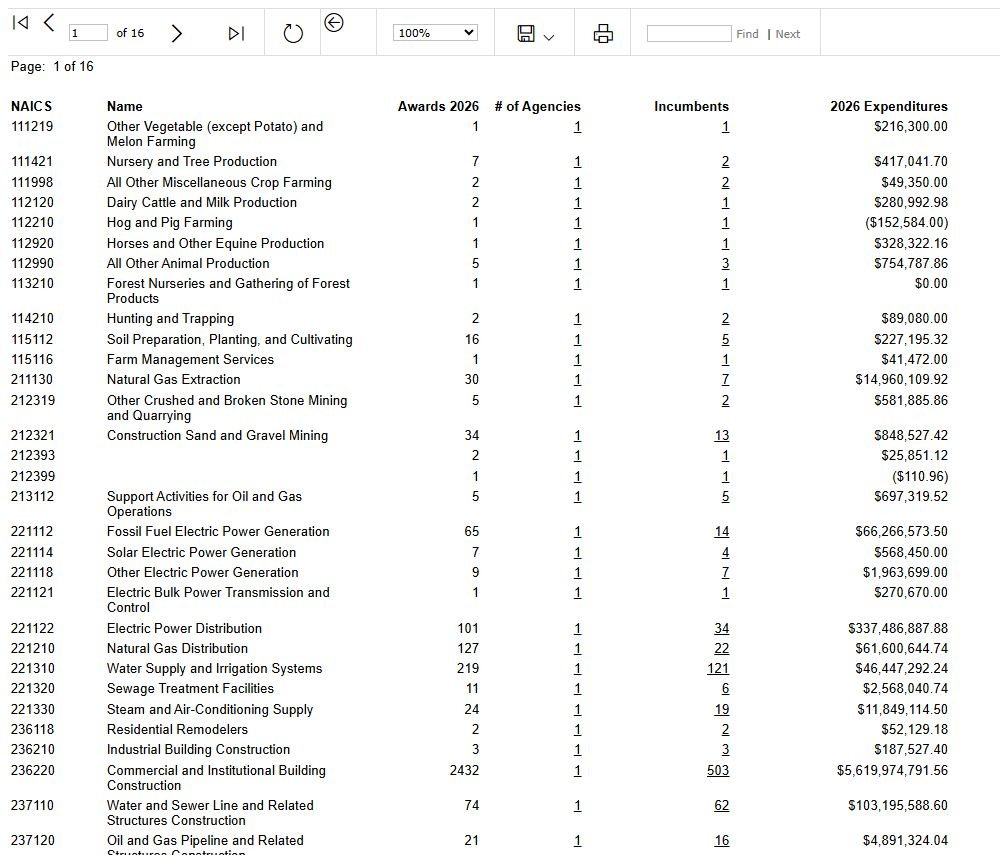
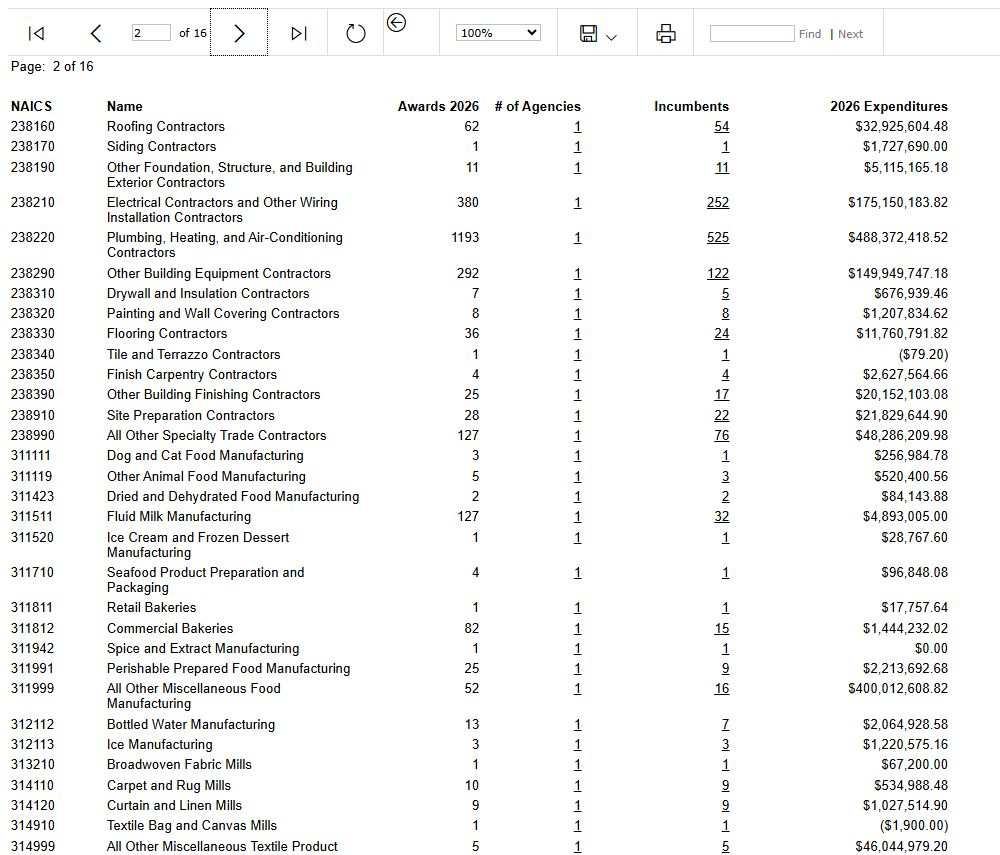
NAICS is the industry code and Name is its description. Awards 2026 is the displayed award count, # of Agencies links to the agency breakdown, Incumbents links to suppliers, and 2026 Expenditures is the amount shown for that industry and year. The observed 238210 row shows 380 awards, 1 agency, 252 incumbents and $175,150,183.82 in expenditures. This is a department-wide industry route; the office-specific example below starts instead from Agencies and office 36C241.
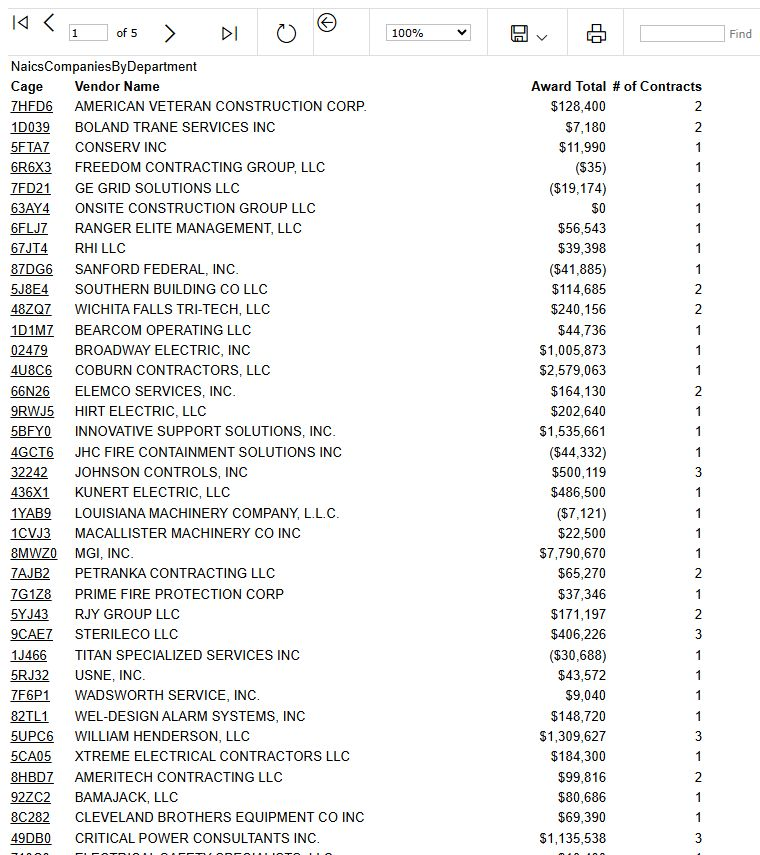
Select 252 under Incumbents to open the supplier list. It has Cage, Vendor Name, Award Total and # of Contracts columns and shows page 1 of 5. Cage identifies a supplier record, Vendor Name names it, Award Total is its displayed amount, and # of Contracts is its displayed contract count. The first row is AMERICAN VETERAN CONSTRUCTION CORP., CAGE 7HFD6, with $128,400 and 2 contracts.
Browser Back returns to page 2 of the industry report with the same 238210 row. Select 1 under # of Agencies on that row to open the agency report. Its fields are ID (agency identifier), Department (parent organization), Name (listed organization), # of Contracts and Total. The observed row identifies VETERANS AFFAIRS, DEPARTMENT OF, ID 3600, with 380 contracts and a displayed $175,150,184 total. Read that report's displayed whole-dollar amount alongside the industry report's amount with cents.

Find a buying office
- Select 1 under Agencies. The agency row shows 55 offices, 91,893 contracts and 2025 Expenditures of $156,654,759,670.
- Select 55 under # of Offices. The resulting office report has two pages.
- Find office 36C241, 241-NETWORK CONTRACT OFC 01(00241). Its row shows ZIP 04330, 4,395 contracts and 2027 Expenditures of $965,780,429.
- Select 4,395 to open that office's NAICS breakdown.

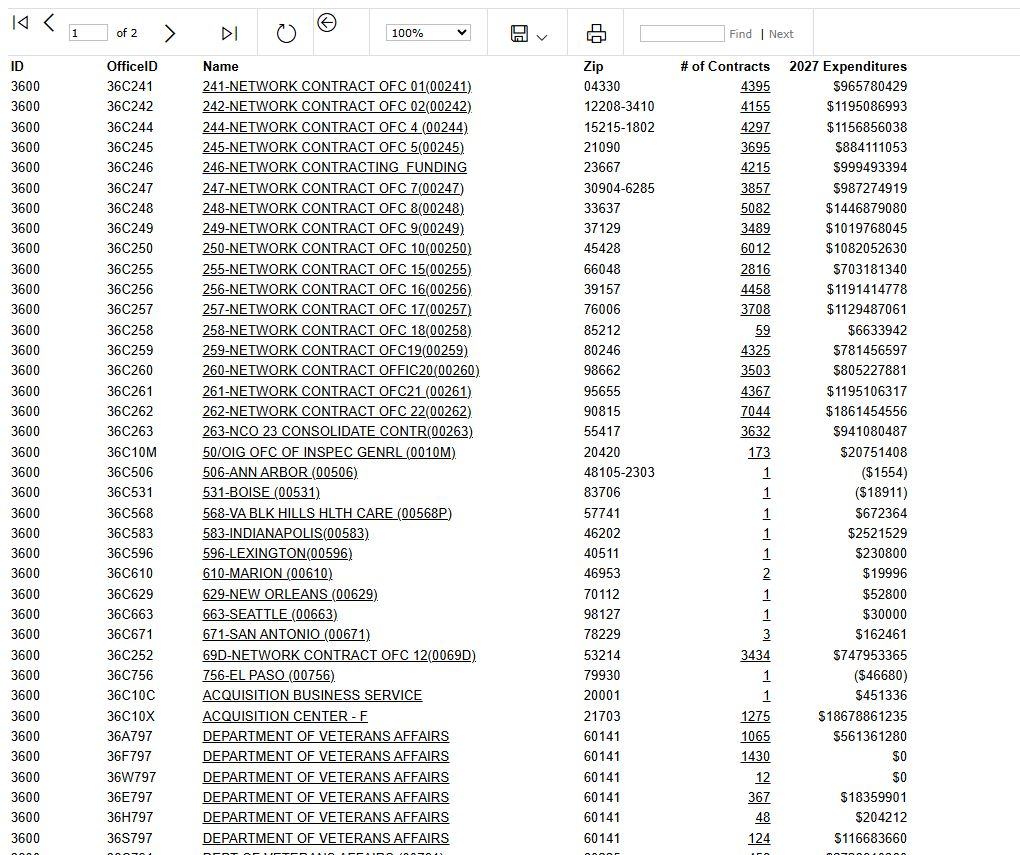
In the agency table, ID, Department and Name identify the organization; # of Offices and # of Contracts are links to the corresponding reports. In the office table, OfficeID identifies the buying office, Name opens an address directory, Zip locates it, and # of Contracts opens its industry report. Keep leading zeros when copying ZIP codes. The expenditure columns have different displayed years in these reports, so read each amount with its own heading.
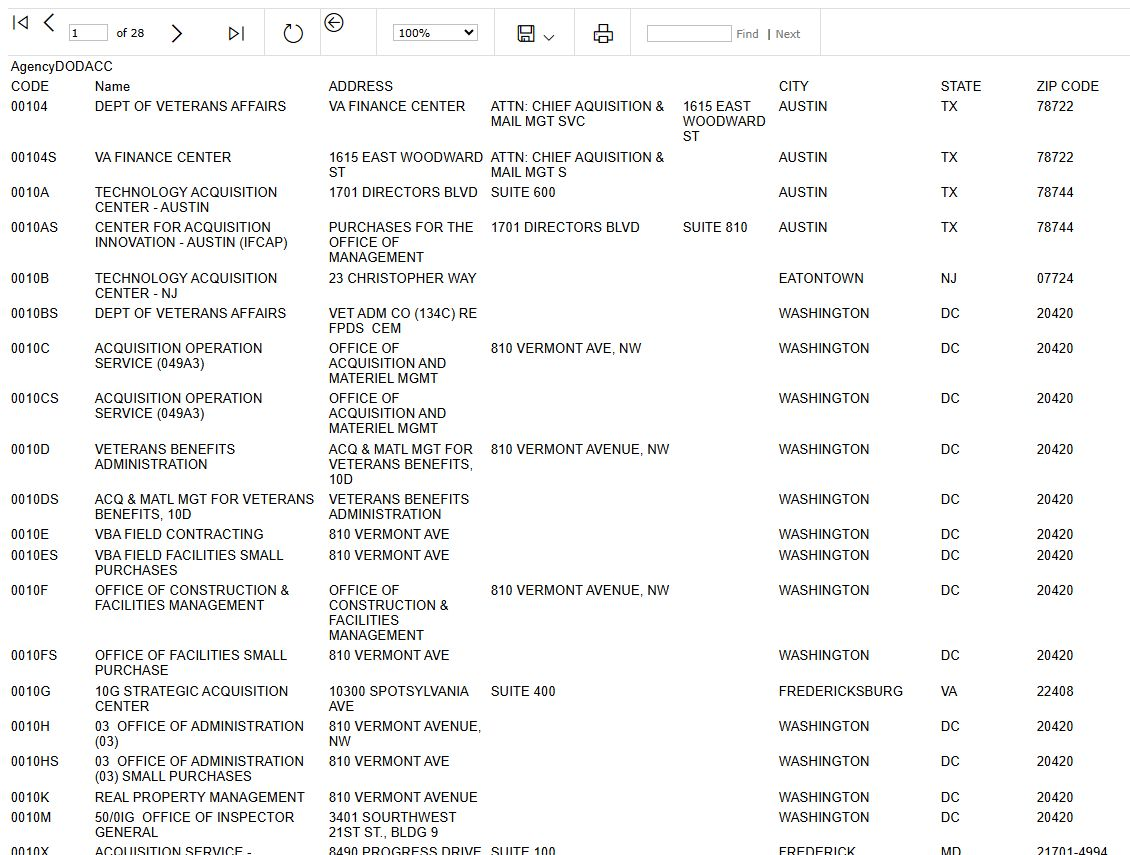
Selecting the 241-NETWORK CONTRACT OFC 01(00241) name opens a 28-page Veterans Affairs address directory, rather than a single-office contact card. Its columns show CODE, Name, address lines, CITY, STATE and ZIP CODE. The first row is a Veterans Affairs finance-center address in Austin, Texas; the directory also includes 00241 — 241-NETWORK CONTRACT OFFICE 01 in Togus, Maine 04330. Use the page controls to browse the directory. Browser Back returns to the office list.
Identify electrical suppliers for that office
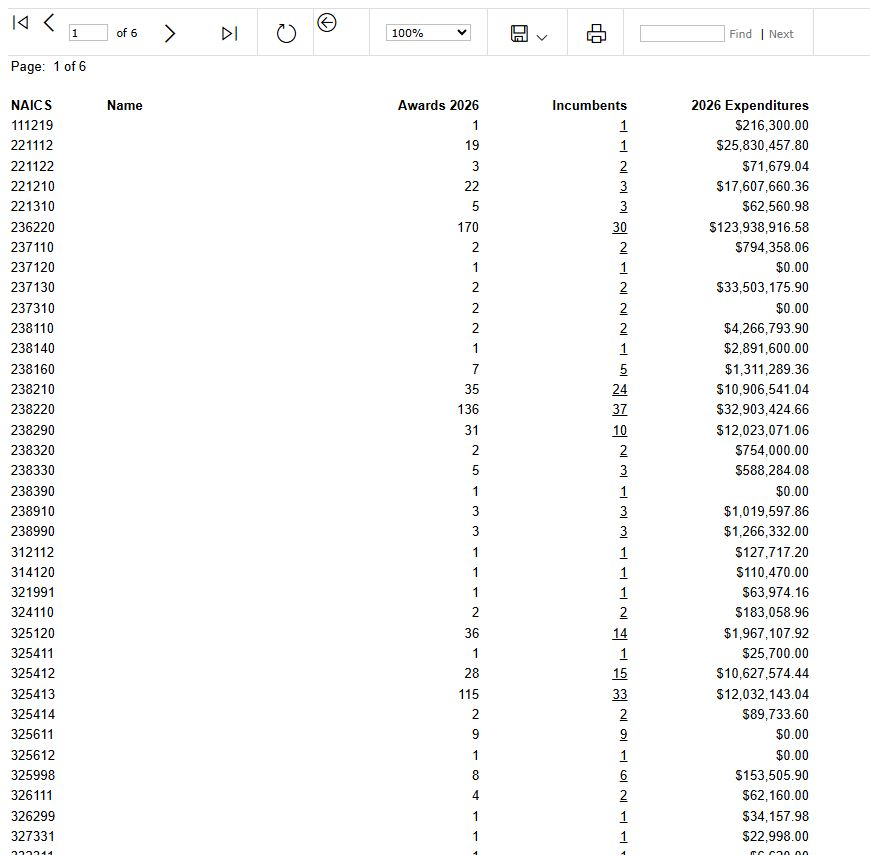
The office's industry report shows NAICS, Name, Awards 2026, Incumbents and 2026 Expenditures. NAICS identifies the industry; Name is its description when populated; Awards gives the displayed award count; Incumbents links to the supplier list; Expenditures is the amount shown for that industry and year. The Name cell for the observed 238210 row is blank, so use its NAICS code to find it.
For 238210, the example has 35 awards, 24 incumbents and $10,906,541.04. Select 24 to see the suppliers.
The supplier table contains Cage, Vendor Name, Award Total and # of Contracts. These identify the supplier, its displayed award amount and contract count. Its first row is THE COLLINS ELECTRIC COMPANY, INC., CAGE 0XB07, with $437,314 and 1 contract. Select 0XB07 to open its company profile in Chicopee, Massachusetts 01020. The company profile guide explains the shared research buttons.
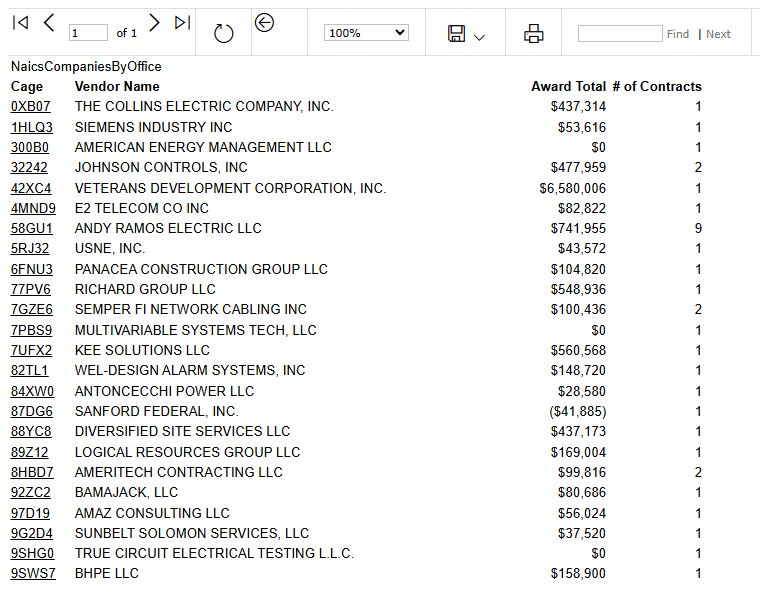
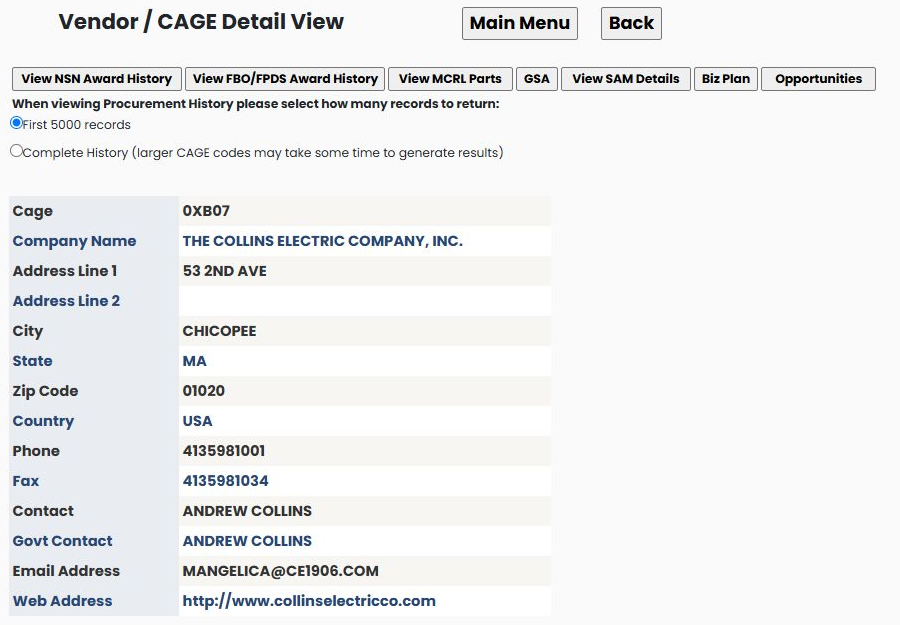
Browser Back from the company profile returns to the supplier table with 0XB07 still in its first row.
Separate resources on the department selection page
Agency Forecasts to Excel, DOD SubContracting to Excel and Federal SubContracting to Excel are separate workbook links on the department selection page. They do not require you to select Veterans Affairs. GSA Aquisition Gateway opens an external forecasting resource. These resources are separate from the department-to-office report sequence above.
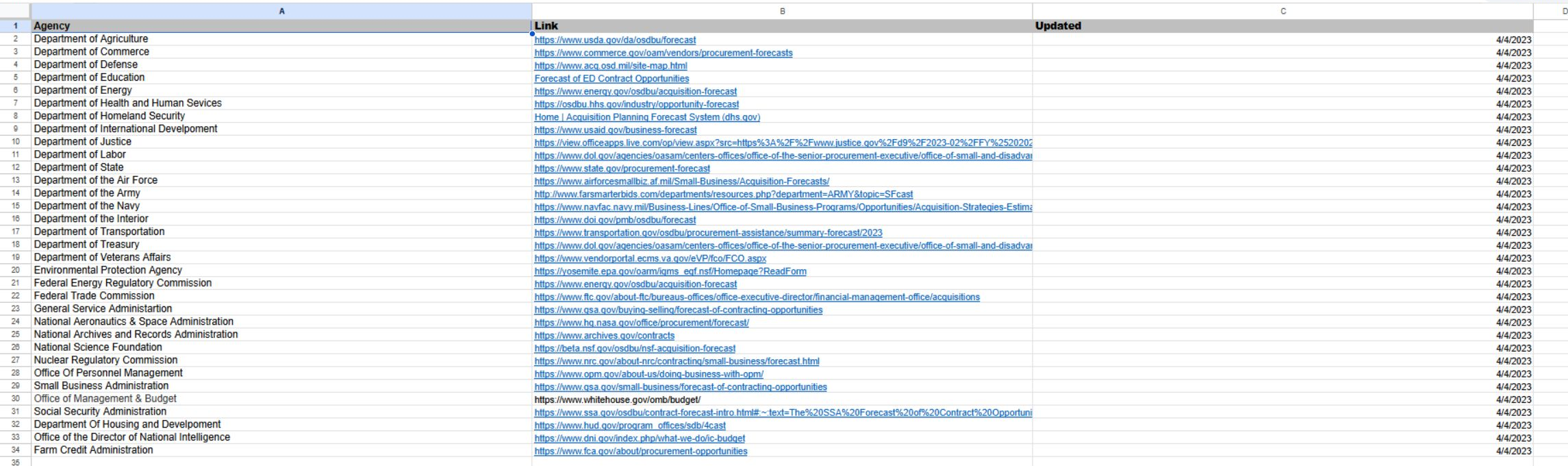
Agency Forecasts to Excel downloads a one-sheet list of 33 agencies. Agency names the organization, Link points to its forecast or procurement resource, and Updated shows the date recorded for that link. The example includes a Department of Veterans Affairs link. All 33 listed dates read 4/4/2023; this date describes the supplied list, not a current forecast period. Open a link to review that agency's own resource.
DOD SubContracting to Excel downloads a separate Report worksheet with 1,805 contract rows. Each row includes a contract number and vendor, effective and current completion dates, ultimate contract value and dollars obligated, contracting office, NAICS code and description, PSC, and a vendor point of contact with telephone and email. The dates in the observed first row are 2013 and 2016, so treat this as the supplied historical worksheet rather than a list of current openings. The monetary fields are distinct: Ultimate Contract Value is the listed contract value, while Dollars Obligated is the listed obligated amount. Contracting Office is the office code; NAICS and PSC classify the work; Vendor POC, Telephone Number and Email provide the listed vendor contact.

Federal SubContracting to Excel downloads a different one-sheet workbook with 339 rows and 18 populated columns. PIID is the listed contract identifier. NAICS Code/Description and Product or Service Code/Description describe the industry and the product or service. Contractor Name, Street, Vendor City, Vendor State, Zip and Vendor Phone Number identify the listed contractor and its contact location. The Principal Place of Performance city, state and ZIP columns describe the listed work location, which can differ from the contractor's address. Date Signed, Effective Date and Est. Ultimate Completion Date are separate contract dates; Action Obligation is the amount shown for that action. The first row has dates from 2011 through 2014, so use this as the supplied historical worksheet, not a current opportunity list. Scroll horizontally to see the date and obligation columns.

