Research federal offices and institutions by state
Part of these button learning paths: Federal and State Institutions
Video sections for this page
- 0:00 — Open Federal and State Institutions
- 0:16 — Choose the Florida result sections
- 0:33 — Read the grouped federal locations
- 1:01 — Open the Agriculture group
- 1:21 — Review the office email screen
- 1:36 — Return to the APHIS office row
- 1:52 — Review the pre-solicitation records
- 2:23 — Keep the historical rows in context
- 2:51 — Read the Department of Defense locations
- 3:28 — Read the university directory
- 3:52 — Add Hospitals to the Florida search
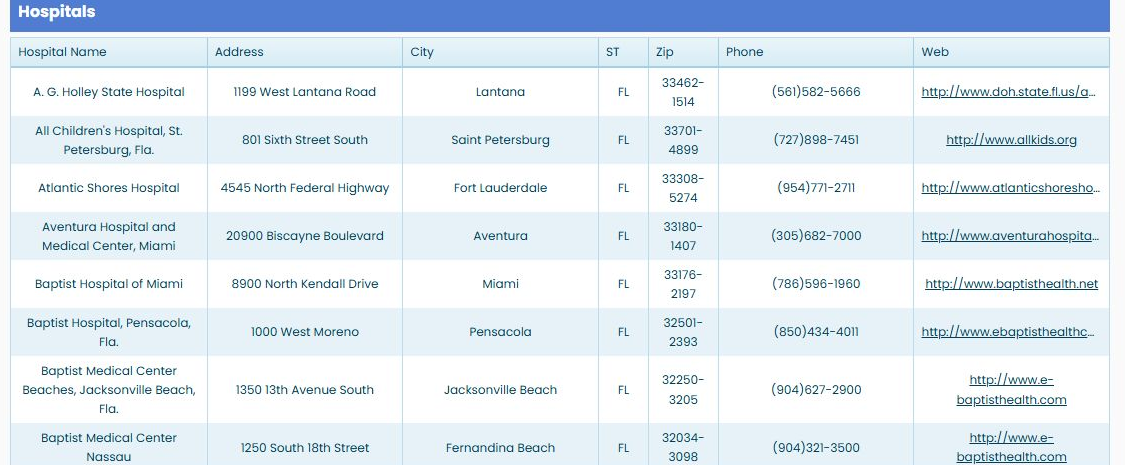
- 4:09 — Read the Florida hospital fields
- 4:33 — Treat Web as an external handoff
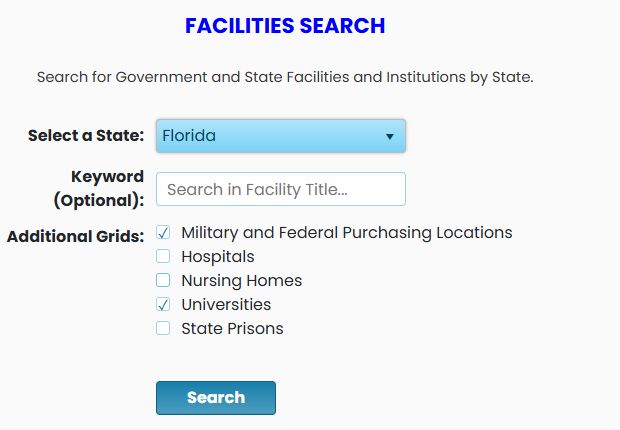
Application path: Main Menu → Federal and State Institutions → choose a state and location types → Search.
Use this search to identify buying locations and institutions in a state, then follow the available links to contacts and purchasing activity. It is useful when deciding which nearby organizations to research before making contact.
Example: Florida locations and universities
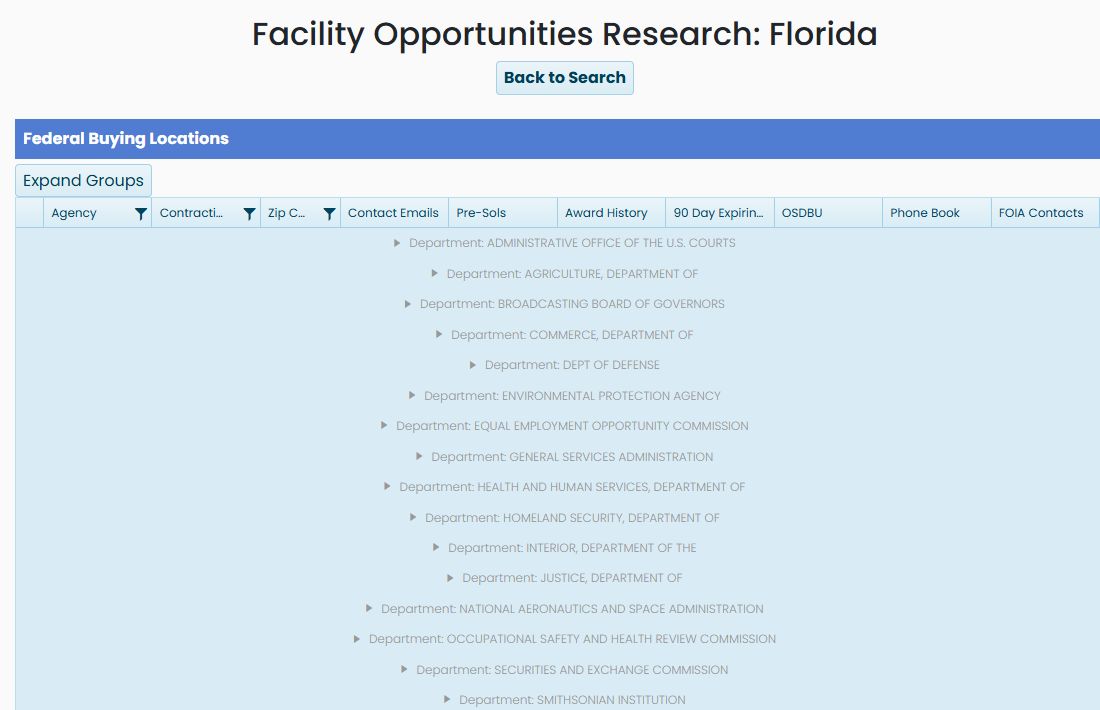
Choose Florida, leave Military and Federal Purchasing Locations selected, select Universities, and run the search with the keyword blank. The result is headed Facility Opportunities Research: Florida. The example checked October 21, 2026 includes federal buying locations, Department of Defense locations and universities.
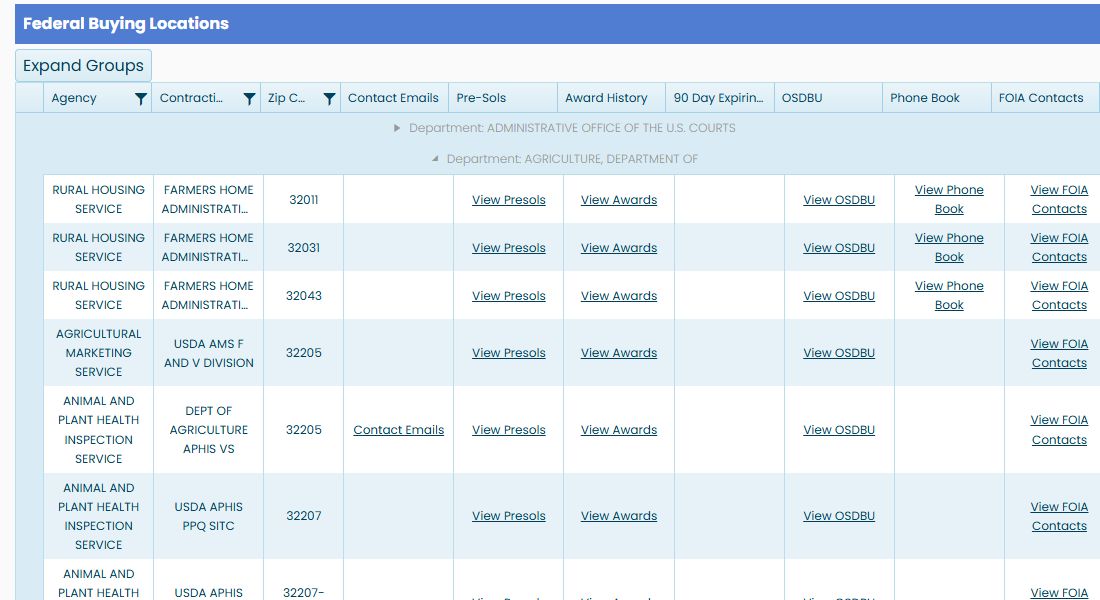
In Federal Buying Locations, departments initially appear as collapsed groups. Choose the arrow next to AGRICULTURE, DEPARTMENT OF to show its offices. Expand Groups provides a control for the groups together. Use Back to Search to change the search.
| Column | What it shows or opens |
|---|---|
| Agency | The government organization associated with the location. |
| Contracting Office | The named buying office or location. |
| Zip Code | Its postal ZIP code. |
| Contact Emails | Email addresses available for the selected office. |
| Pre-Sols | Solicitation records reached from the location. Check their dates when reviewing them. |
| Award History | Award-history link for further purchasing research. |
| 90 Day Expiring Contracts | A link, where present, to contracts approaching expiration. |
| OSDBU | Office of Small and Disadvantaged Business Utilization information. These offices help businesses understand an agency's small-business opportunities. |
| Phone Book | An agency contact-directory resource. |
| FOIA Contacts | Freedom of Information Act contact information. |
A blank cell does not provide a link for that row. Use the links actually shown beside the location you are researching.
Open an office's contact addresses
Under Agriculture, find ANIMAL AND PLANT HEALTH INSPECTION SERVICE, office DEPT OF AGRICULTURE APHIS VS, ZIP 32205. Choose Contact Emails. The next screen is a simple Email Address table; the observed example contains one USDA address. This separates the available contact information from the longer location list.

Use Back to return. The department groups may be collapsed again; expand Agriculture to return to the same office.
Review the location's solicitation records
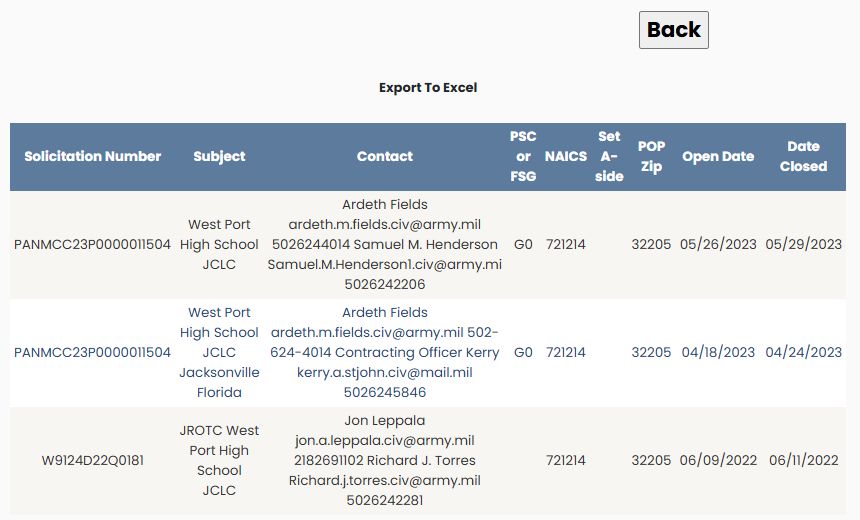
On the same office row, choose View Presols. The observed ZIP 32205 example contains three rows, including PANMCC23P0000011504 — West Port High School JCLC, opened 05/26/2023, closed 05/29/2023. These are the dates displayed in the example; do not treat an older closed record as a currently open opportunity.
| Result field | Meaning |
|---|---|
| Solicitation Number | The notice or solicitation identifier. |
| Subject | The short description of the requirement. |
| Contact | Contact names and available communication details recorded with the notice. |
| PSC or FSG | Product/service classification or federal supply group shown for the requirement. |
| NAICS | Industry classification associated with the notice. |
| Set A-side | The recorded set-aside category, when supplied. |
| POP Zip | Place-of-performance ZIP code. |
| Open Date | The displayed opening date. |
| Date Closed | The displayed closing date. |
Column headings are sorting links. Export To Excel is above the table. Back returns to the previous screen.
Export a contracting office's presolicitations
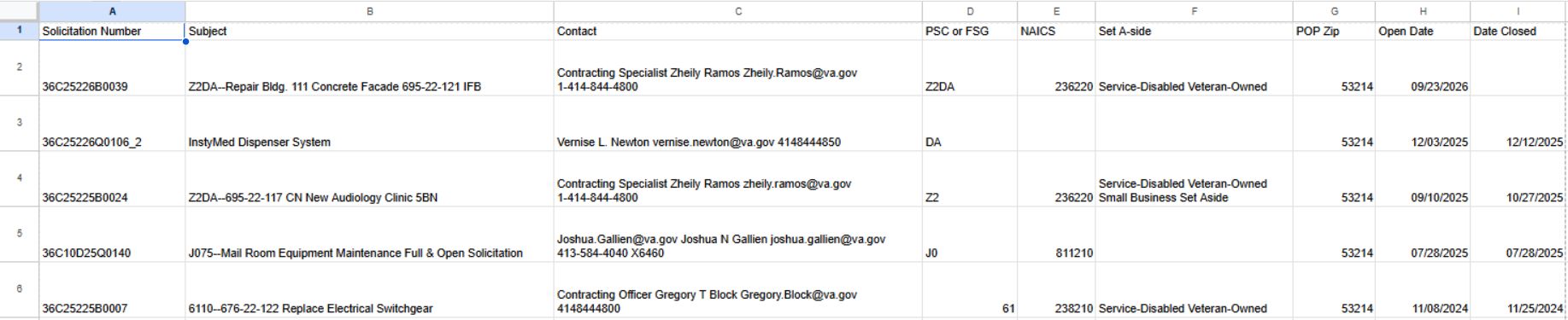
From an office record, choose View Presols and then Export To Excel above the results table. In the October 22, 2026 example, the path was Main Menu → Expiring Contracts 120 Days → Architectural → Month1 → Office ID 36C252 → View Presols. The export contained 18 records and these nine columns: Solicitation Number, Subject, Contact, PSC or FSG, NAICS, Set A-side, POP Zip, Open Date and Date Closed. Their meanings are described above. Use the downloaded table to review notice identifiers, requirements, contact information and dates together.
The first displayed record was 36C25226B0039, “Z2DA--Repair Bldg. 111 Concrete Facade 695-22-121 IFB,” with PSC or FSG Z2DA, NAICS 236220, place-of-performance ZIP 53214 and open date 09/23/2026. Its Date Closed field was blank in this example. This is a dated result snapshot; use the current screen and dates when researching an opportunity.
Read the other location sections
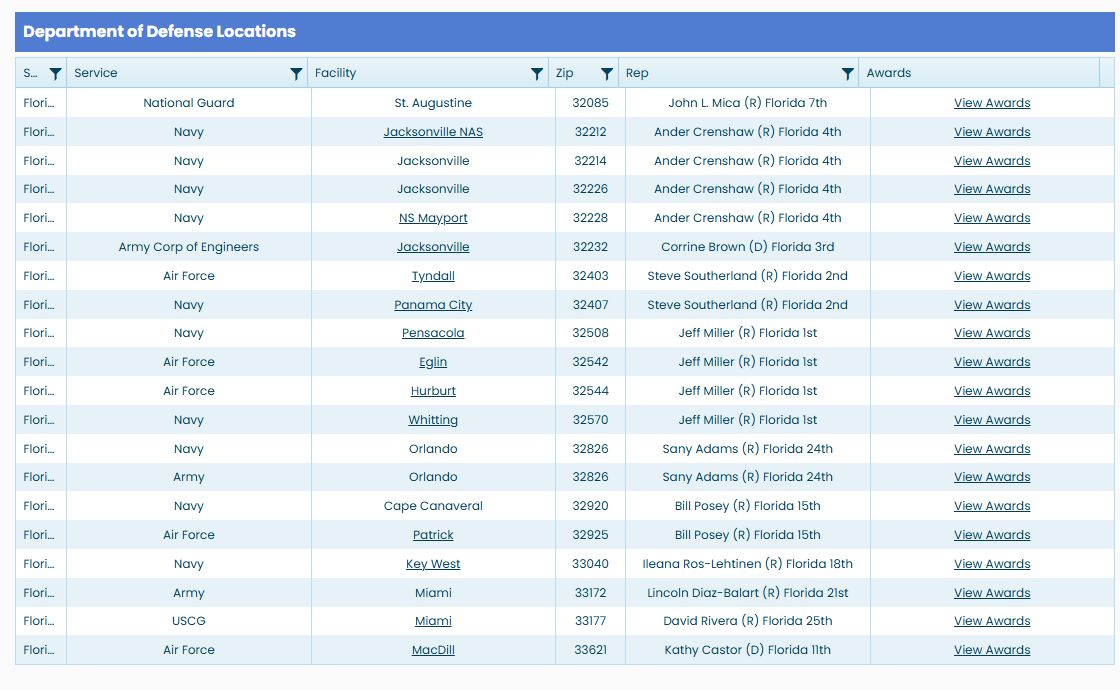
The Department of Defense Locations table shows ST (state), Service, Facility, Zip, Rep and Awards. Use the facility name and service to distinguish locations in the same state. Rep identifies the congressional representative recorded for the facility’s location, rather than its contracting officer; it does not confirm the current officeholder. View Awards is intended to open award history for the facility’s associated contracting offices. Check that the resulting office scope matches your intended facility before interpreting the awards. In the reviewed Florida example, the DoD rows did not supply an associated office to that link. Use the Federal Buying Locations section’s office-specific View Awards link to research a named buying office instead.
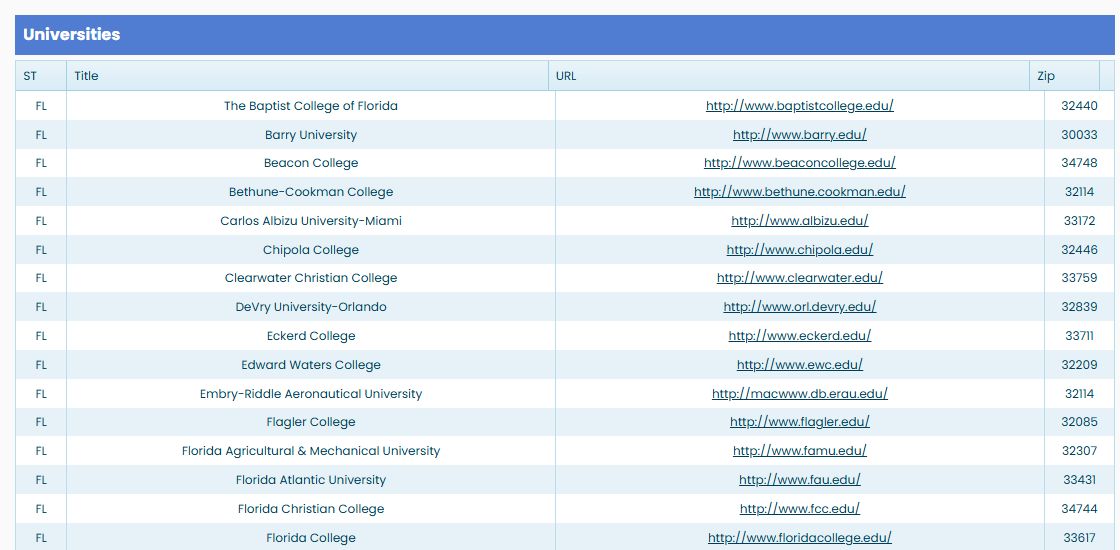
The Universities table shows ST, Title, URL and Zip. In the Florida example, the University of Central Florida is listed with ZIP 32816, the University of Florida with 32611, and the University of South Florida with 33620. The URL opens the institution's website.
Federal buying-office results
| Field or action | Meaning and use |
|---|---|
| Department / Agency | Stored organizational names. Confirm the current hierarchy on the agency's official site. |
Hospital, nursing-home, university and prison rows
| Section | Fields and their meaning |
|---|---|
| Hospitals | Hospital Name identifies the stored facility; Address, City, State, Zip Code locate its recorded site; Phone and Fax are stored contacts; Hospital Type is stored text/code without an accepted value legend; Web Site is stored website text. |
| Universities | State, Title, URL and ZipCode provide the directory's location, name and external site lead. |
Find Florida hospitals
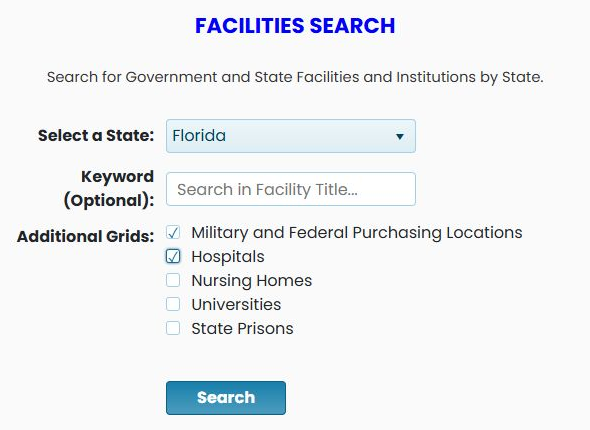
For a hospital list, return to Federal and State Institutions, choose Florida, leave the keyword blank, keep Military and Federal Purchasing Locations selected and also select Hospitals. The resulting page includes a Hospitals section in addition to the federal and military locations.
| Hospital column | What it shows |
|---|---|
| Hospital Name | The facility's displayed name. |
| Address | Its street address. |
| City | The city shown for that address. |
| ST | The state abbreviation. |
| Zip | The displayed postal code. |
| Phone | The recorded telephone number. |
| Web | A link to the hospital's external website, where supplied. |
The observed Florida list includes A. G. Holley State Hospital in Lantana, ZIP 33462-1514, and Baptist Hospital of Miami in Miami, ZIP 33176-2197. Use the displayed address and phone to distinguish similarly named facilities. Web hands you off to the listed external site; confirm its current details there before relying on them. The hospital section does not display a workbook-export control in this observed view.