Search contracts expected to expire
Part of these button learning paths: Expiring Contracts 120 Days · My Government RoadMap · Expiring Contracts through 2030
Video sections for this page
Video sections for this page
Application path: Main Menu → Expiring Contracts through 2030 → choose criteria and a year → Search.
Use this search to identify work whose recorded completion date is approaching. It helps you decide which agencies and requirements to research before a possible follow-on opportunity. An expected completion date is not an announcement that a new solicitation will be issued.
Example: computer-training contracts expected to end in 2027
- Open Expiring Contracts through 2030. The search page is titled Contracts Expected to Expire.
- Enter 611420 in NAICS Code.
- Select 2027 under Show contracts expected to expire in.
- Leave the additional criteria at their defaults and click Search beside NAICS Code.
- The October 21, 2026 example returned 84 items. The first row is W912LM23P0003, for online training, with an estimated completion date of December 31, 2027.
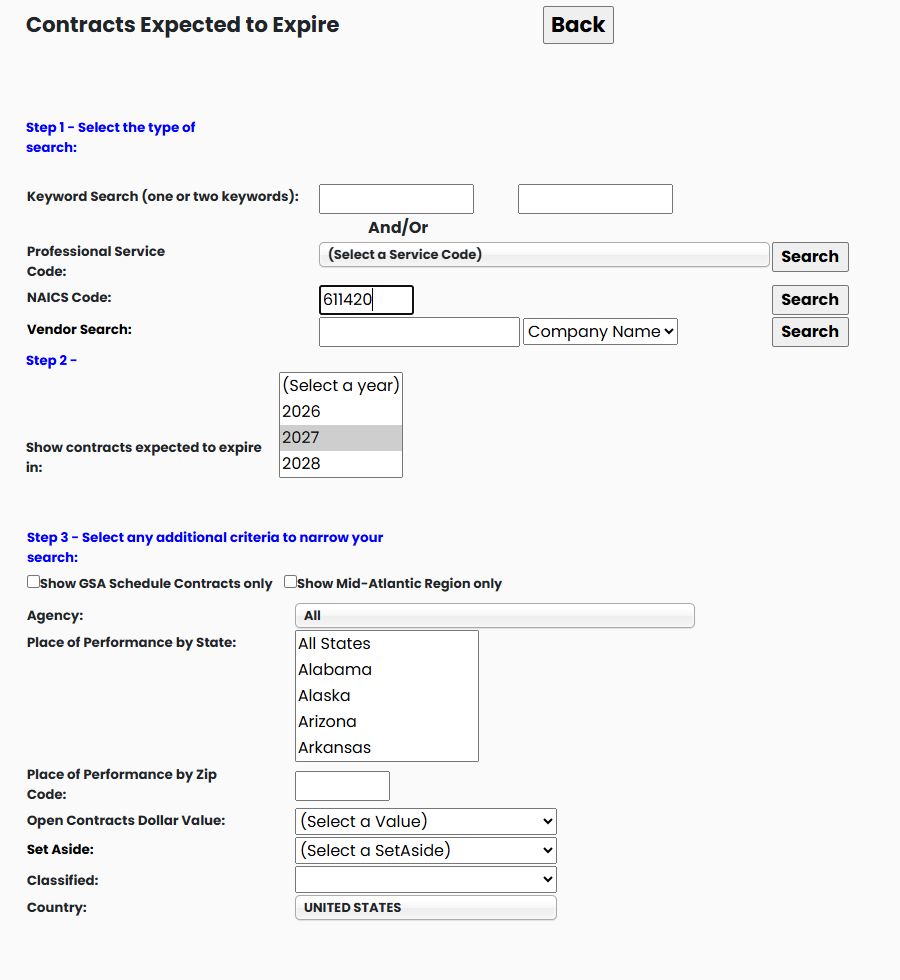
The button's Main Menu label ends in 2030; the actual form also offers 2031. Choose from the years displayed on the form when you run your search.
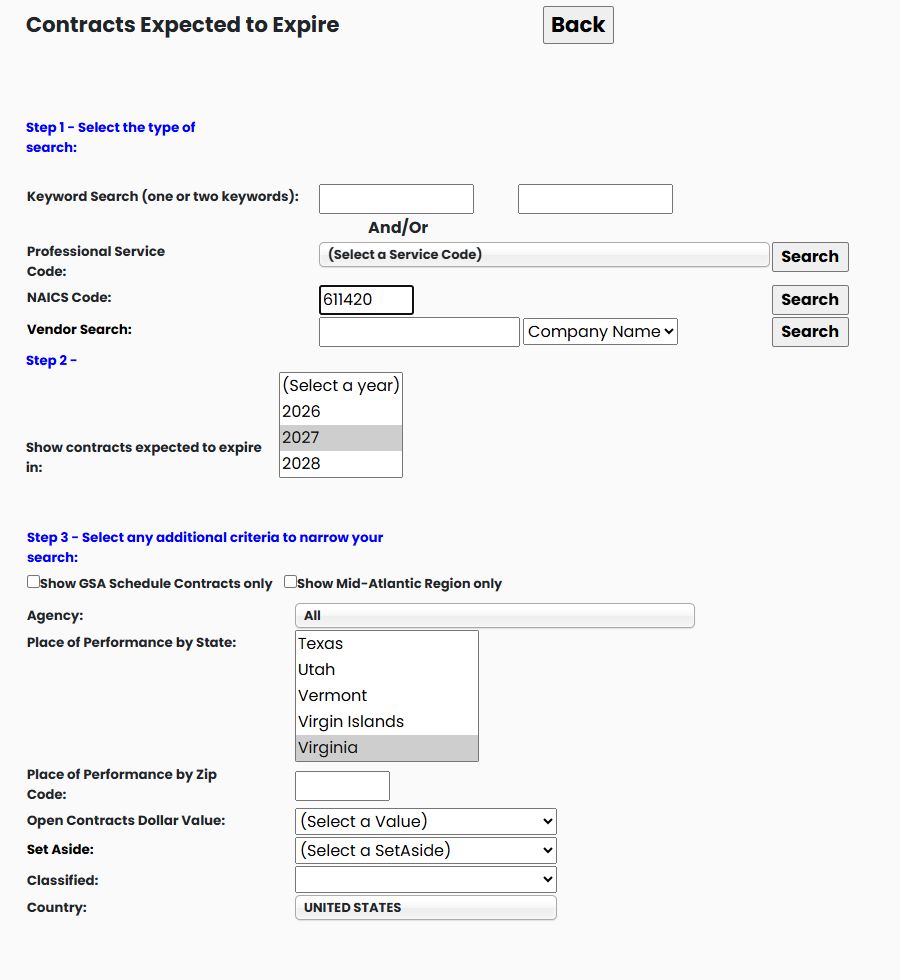
The year under Show contracts expected to expire in selects the expected-completion period, not the year an award action was signed. In this example, the selected action was signed in 2024 and has an Ultimate Completion Date in 2027. NAICS Code identifies the industry classification; use the Search beside that field to run this example. Place of Performance by State selects the work location, which can differ from the vendor's mailing state. Adding Virginia to the same NAICS/year search returns individual action rows for that work location. The examples leave other criteria at their shown defaults.
Choose the criteria that match your question
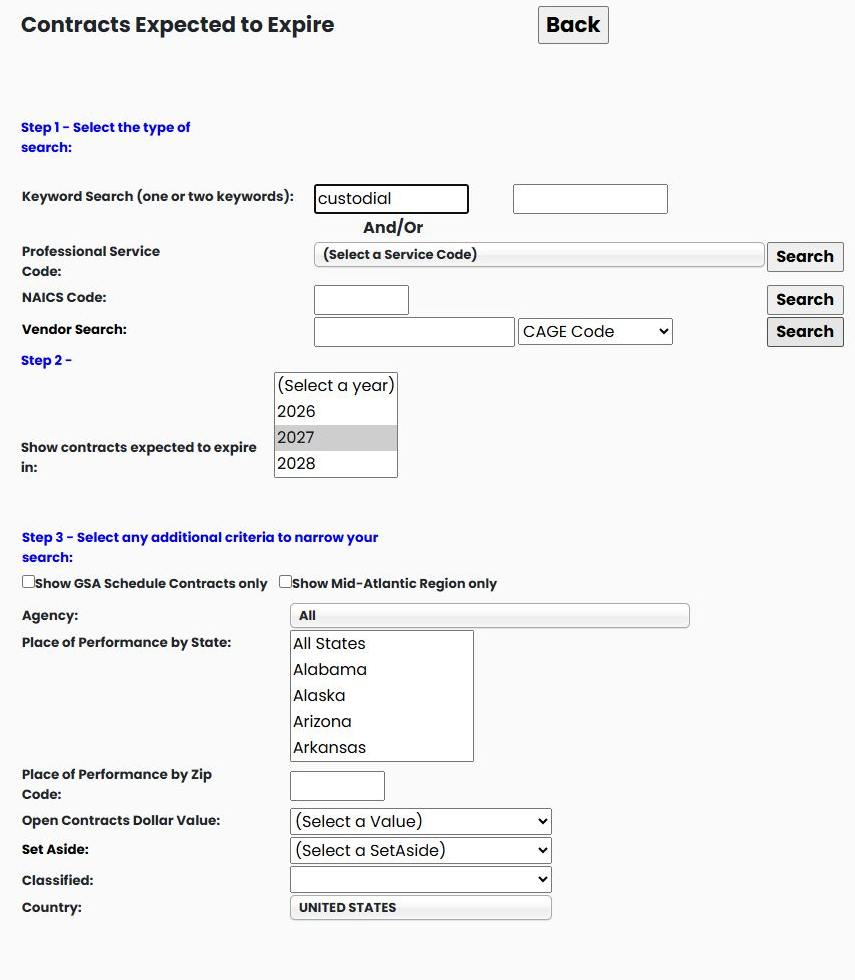
| Search field | What it is and when to use it |
|---|---|
| Keyword Search | Words describing the work you want to research. The form has two boxes; the NAICS example above leaves both empty. |
| Professional Service Code | A product or service classification. Use its Search button when researching the selected type of work. |
| NAICS Code | An industry classification. Enter the code and use the Search button on the same row. |
| Vendor Search | Find work associated with a company you already know. Choose Company Name, CAGE Code, or DUNS Number to match the identifier entered in the box. |
| Show contracts expected to expire in | The expected completion year or years you want to research. This is separate from the award date. |
| Show GSA Schedule Contracts only | The option for restricting the search to GSA schedule contracts. A GSA schedule is a government purchasing arrangement with approved suppliers. |
| Show Mid-Atlantic Region only | Apply the displayed regional restriction when researching that market. |
| Classified | Apply the displayed classification restriction when it is relevant to the work you are researching. |
| Agency | The buying agency. Leave All selected to avoid an agency restriction. |
| Place of Performance by State / Zip Code | The location where the work is performed. This is not necessarily the contractor's business address. |
| Open Contracts Dollar Value | The displayed contract-value range. The form offers all values, contracts under $1 million, or contracts between $1 million and $5 million. |
| Set Aside | The recorded business-eligibility or competition category. Use it when researching work associated with a particular category. |
| Country | The country for the search; the illustrated form displays United States. |
| Back | Return to the preceding screen. |
Set the additional criteria before choosing the Search button for your primary search field. The examples demonstrate the NAICS/year route, its state restriction, a supplier CAGE search and a keyword search.
Example: narrow the same industry to Virginia
Return to Contracts Expected to Expire, enter 611420, select 2027, and choose Virginia under Place of Performance by State. Click the NAICS-row Search.
This example returns a flat list of 61 individual actions, initially displaying 20 per page. There are no expansion arrows or ModNumberCount column in this view. The first row is 70T01026F7670N017, for Coursera enterprise licenses, with a displayed $740,500.00 Total and expected completion September 29, 2027.
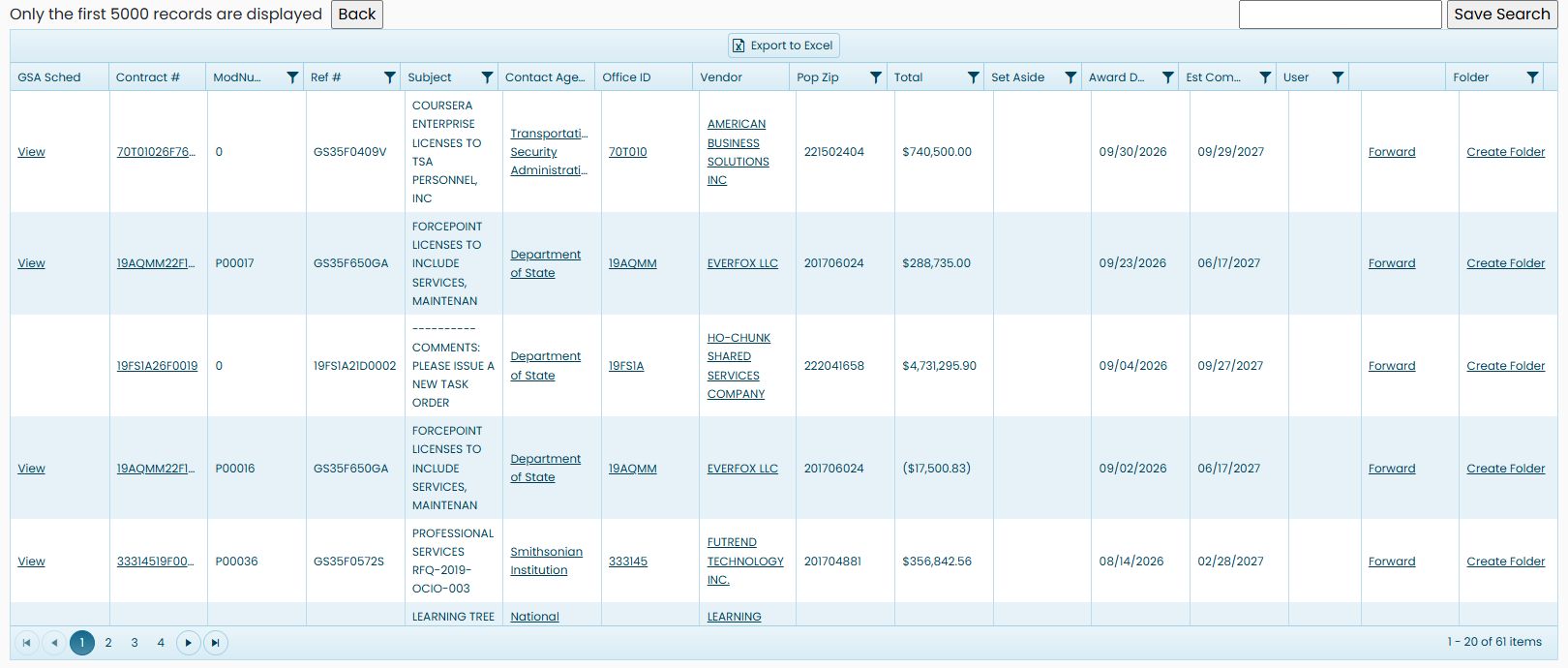
The state choice is about the worksite. The company may have a mailing address elsewhere. Use Contract # to open action details; a Vendor link is also displayed. Keep each action's amount distinct from the combined contract figures in the expandable view. To investigate the buying office, return to the earlier grouped search without the Virginia restriction and open W912LM under Office ID.
Export the Virginia result list
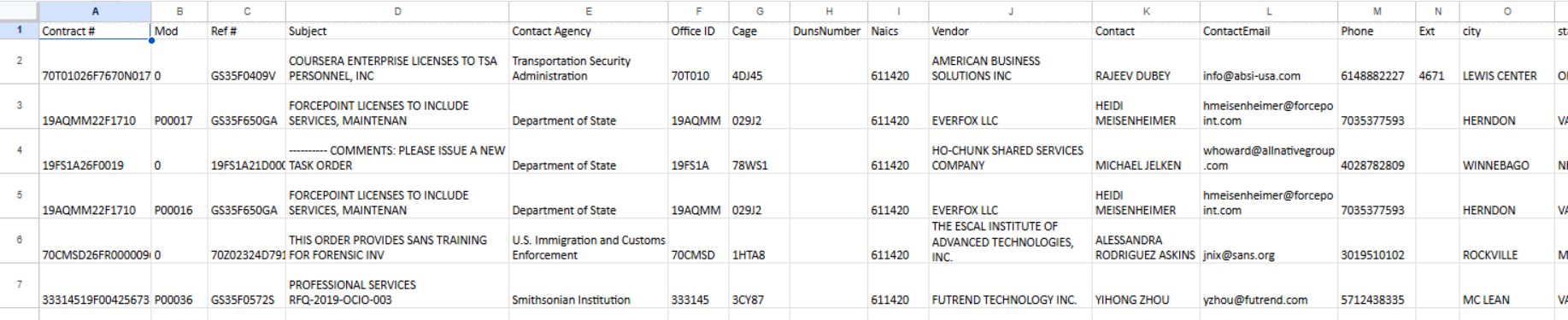
In the October 22, 2026 run with the same 2027 / NAICS 611420 / Virginia criteria, the pager showed 63 items. Choose Export to Excel above the result grid to download the list. This export contains 63 data rows and 25 fields. The image shows the first records and the left side of the worksheet; additional columns continue to the right.
| Export field | What it identifies |
|---|---|
| Contract # | The contract or action identifier. |
| Mod | The modification number or base action shown for the record. |
| Ref # | A related contract or schedule reference, when present. |
| Subject | The short description of the work. |
| Contact Agency | The buying agency. |
| Office ID | The contracting office identifier. |
| Cage | The vendor's CAGE code, when present. |
| DunsNumber | The vendor's DUNS identifier, when present. |
| Naics | The industry classification recorded for the vendor or action. |
| Vendor | The company associated with the record. |
| Contact | The contact name recorded in the export. |
| ContactEmail | The email address recorded in the export. |
| Phone | The telephone number recorded in the export. |
| Ext | The telephone extension, when present. |
| city | The vendor city shown in the export. |
| state | The vendor state abbreviation shown in the export. |
| ZipCode | The vendor ZIP code. |
| PopZip | The place-of-performance ZIP code. |
| Total | The amount recorded for the action. |
| Set Aside | The recorded set-aside category, when present. |
| Award Date | The award date recorded for the action. |
| Est Completion Date | The estimated completion date. |
| LastModifiedBy | The user identifier recorded with the last modification, when present. |
| eightaexitdate | The 8(a) exit-date field, when present. |
| LongDescription | The longer description of the work. |
The first export row corresponds to contract 70T01026F7670N017, reference GS35F0409V, for AMERICAN BUSINESS SOLUTIONS INC. The export includes vendor identifiers and contact/location fields alongside amount and date details. The on-screen grid also includes controls and fields such as GSA Sched, User, and Folder that are not workbook columns. Use the headings in each view to identify the information you need.
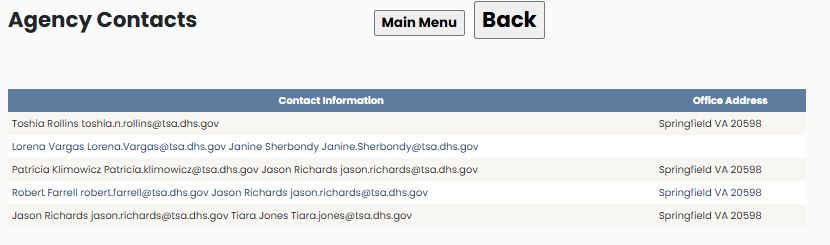
On this Virginia list's first 70T01026F7670N017 row, Contact Agency identifies Transportation Security Administration. Its linked Agency Contacts report has five rows with Contact Information and Office Address columns; the displayed office address is Springfield, VA 20598. Back returns to the same Virginia results.
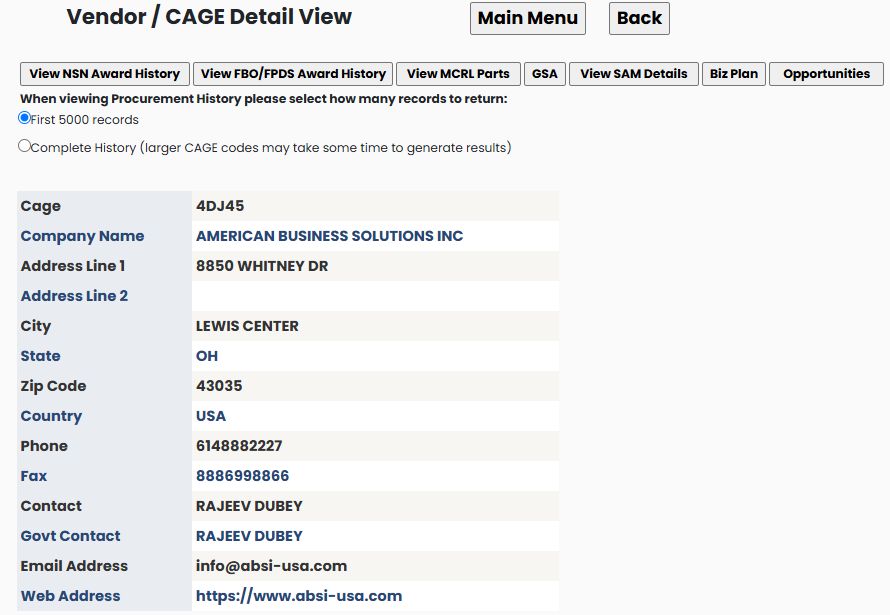
The same row identifies AMERICAN BUSINESS SOLUTIONS INC as the vendor. Its linked Vendor / CAGE Detail View shows CAGE 4DJ45 and a business address in Lewis Center, OH 43035. This is different from the Virginia place of performance selected for the search. The profile displays seven research buttons; use the company profile guide for their shared fields and destinations. Back returns to the Virginia results.
Example: find a supplier's expiring contracts
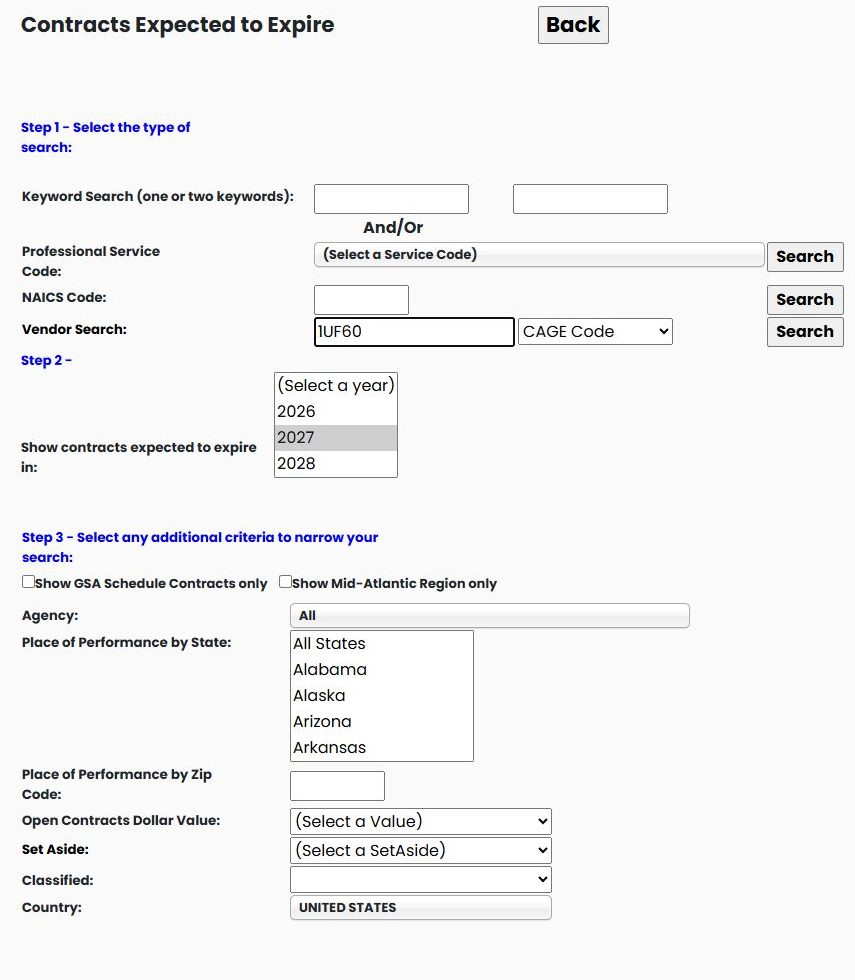
From Main Menu → Expiring Contracts through 2030, choose 2027 as the expected-expiration year. Leave keywords and NAICS blank. In Vendor Search, enter 1UF60, select CAGE Code, leave the other restrictions at their defaults, and click Search beside Vendor Search.
The October 23, 2026 search returns 146 grouped items, with 100 on the first page. The first example is SPE7M126P2366, modification P00001, RING,PISTON, for U.S.A. SPARES INC, showing $95,450, estimated completion December 29, 2027, and ModNumberCount 2. Another row, N0010425CZA32, describes DRIVE,ANTENNA, with $1.9 million and estimated completion December 28, 2027.
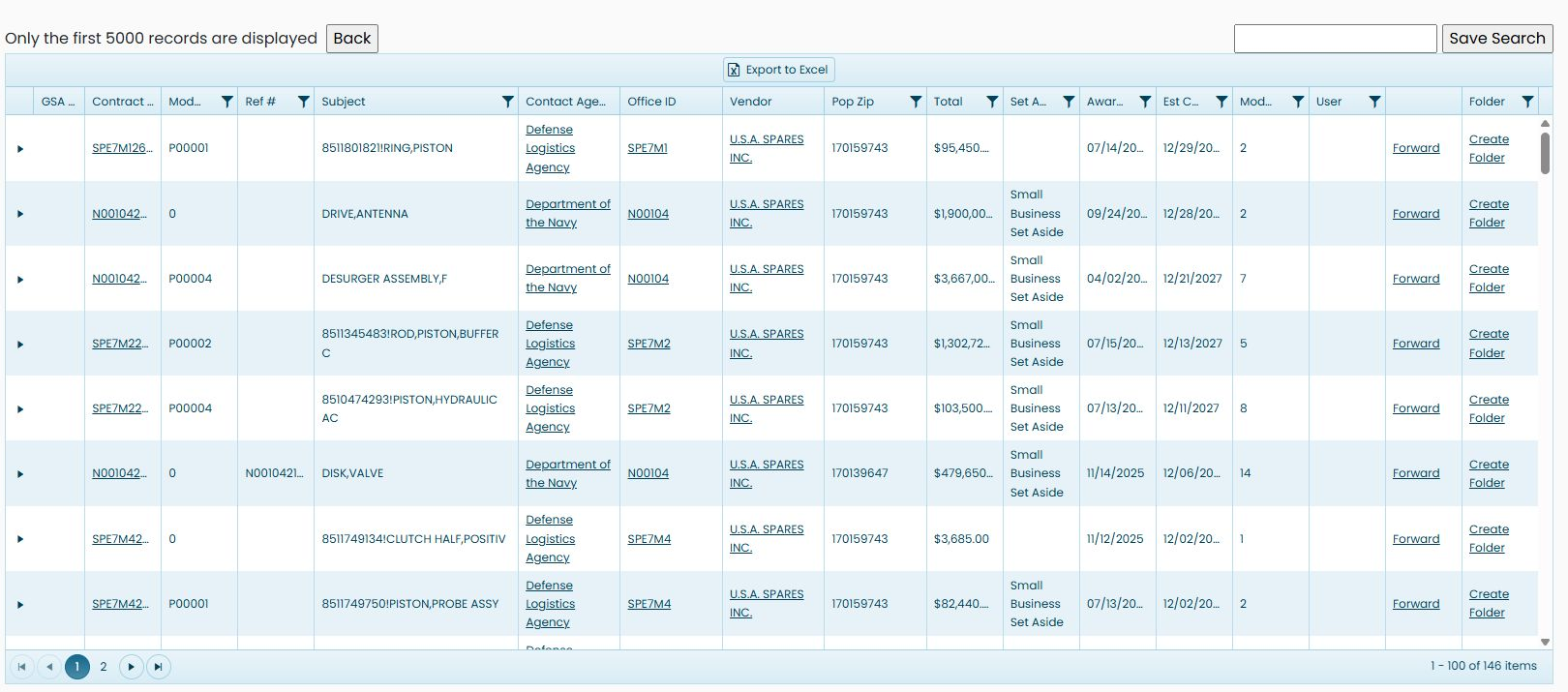
Expand a grouped contract to read its associated actions using the same controls as the industry example. This is the same supplier used in the Award History CAGE example, but the question is different: the expected-expiration year asks when the work is due to finish; the Award History year identifies the award actions being researched.
Example: find expiring work by keyword
Return to the expiration form, select 2027, and enter custodial in the first keyword box. Leave the vendor and NAICS fields blank and the service-code selection unset. Keep the remaining restrictions at their defaults, then click the Search beside the keyword/service-code route.
The October 23, 2026 search returns 3,427 individual actions, with 20 on the first page. This is the flat action layout rather than an expandable grouped list. One example is 47PC5227F0001, modification 0, NFOB FEDERAL ICE AFTER HOURS CUSTODIAL DEPARTMENT, for PORTCO INC, with $8,743.88 and estimated completion March 10, 2027. Another is 19AQMM26C0457, modification P00013, DJTIP O&M CUSTODIAL SERVICES, with estimated completion April 15, 2027.
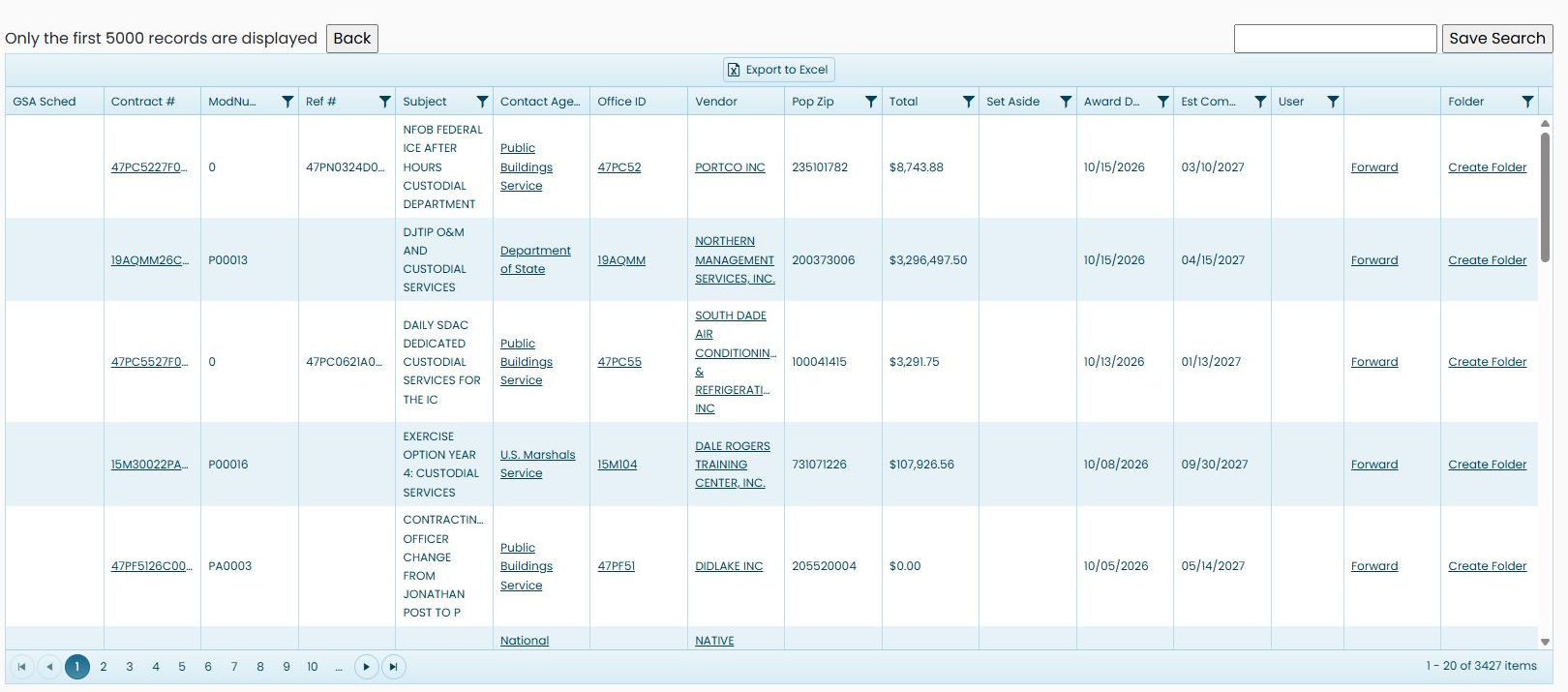
Read each contract number and modification together. Use the individual action fields and follow the office or vendor when you want to research the buyer or incumbent. The existing flat-layout export explanation applies; another keyword does not create a different workbook layout.