Review contracting officers matched to your criteria
Video sections for this page
Application path: Main Menu → Just My Contracting Officers.
This page lists contact information for officers associated with the account's search criteria. It separates the results into Contracting Officers by NAICS, Contracting Officers by Service Code and Contracting Officers by FSG. Review the section relevant to the products or services you research.
Read a matched-officer row
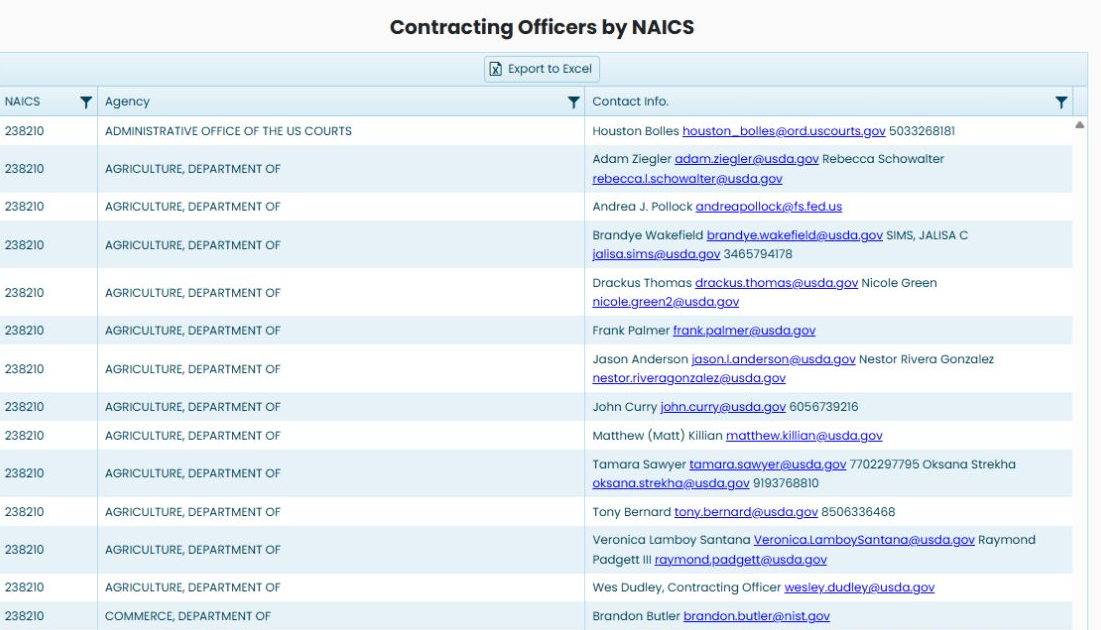
In the October 22, 2026 observed account view, the NAICS section contains 3,478 items, with 20 displayed per page. Its visible rows use NAICS 238210. The Service Code and FSG sections say No items to display in that view; their empty grids do not mean those categories are unavailable to every account.
| Field | Meaning |
|---|---|
| NAICS | The industry code associated with the row. The example begins with 238210. |
| Service Code | The service classification associated with a row in the service section. |
| FSG | The Federal Supply Group associated with a row in the supply section. |
| Agency | The government organization shown for the contact information. |
| Contact Info. | The displayed names, email addresses and telephone information. One cell can contain more than one person. |
For example, an Agriculture row under NAICS 238210 lists more than one contact. Read the names, email addresses and any phone numbers together rather than assuming each grid row represents exactly one person. The contact information is displayed as recorded; check it before relying on it for outreach.
Example: populated industry, service and supply sections
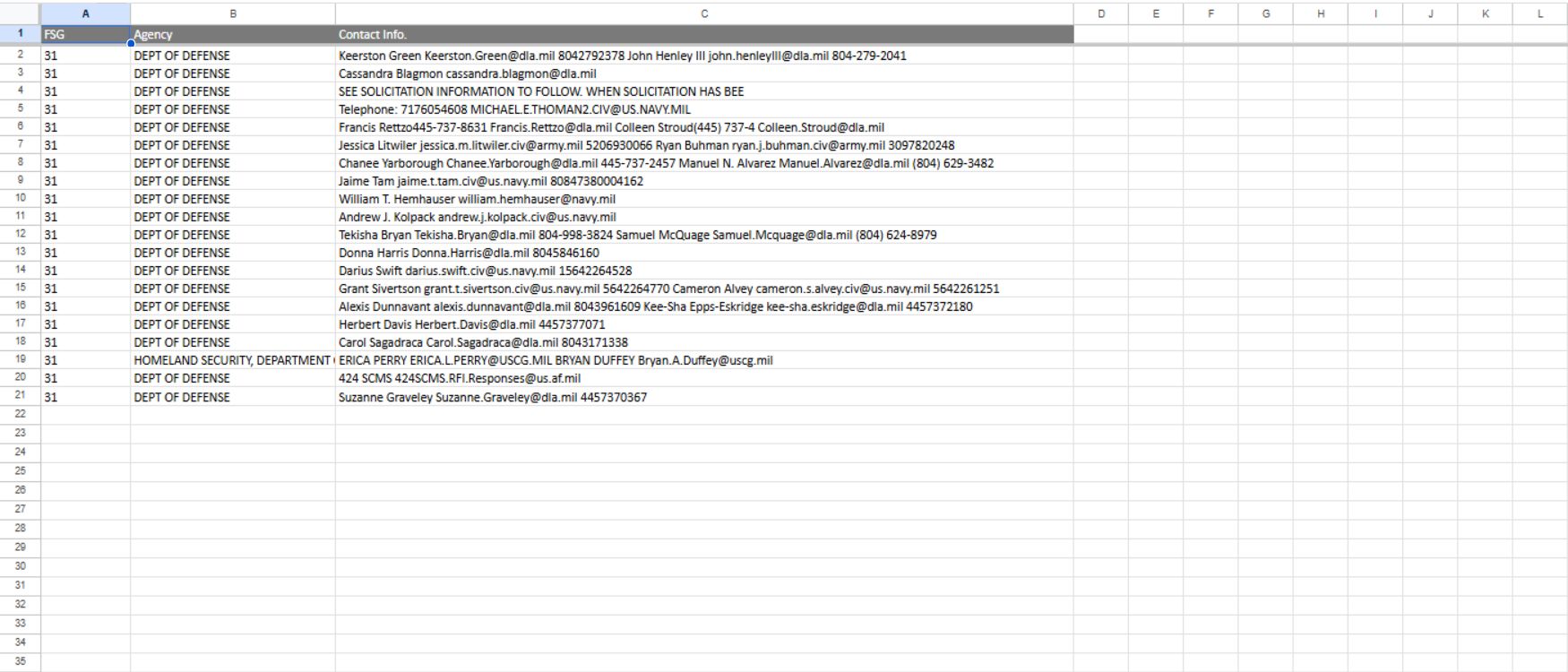
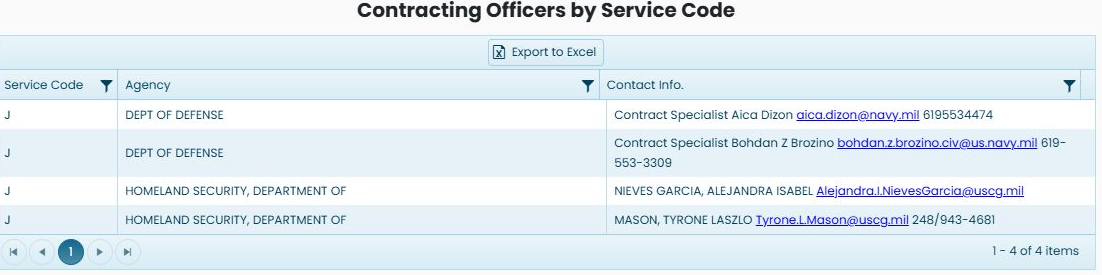
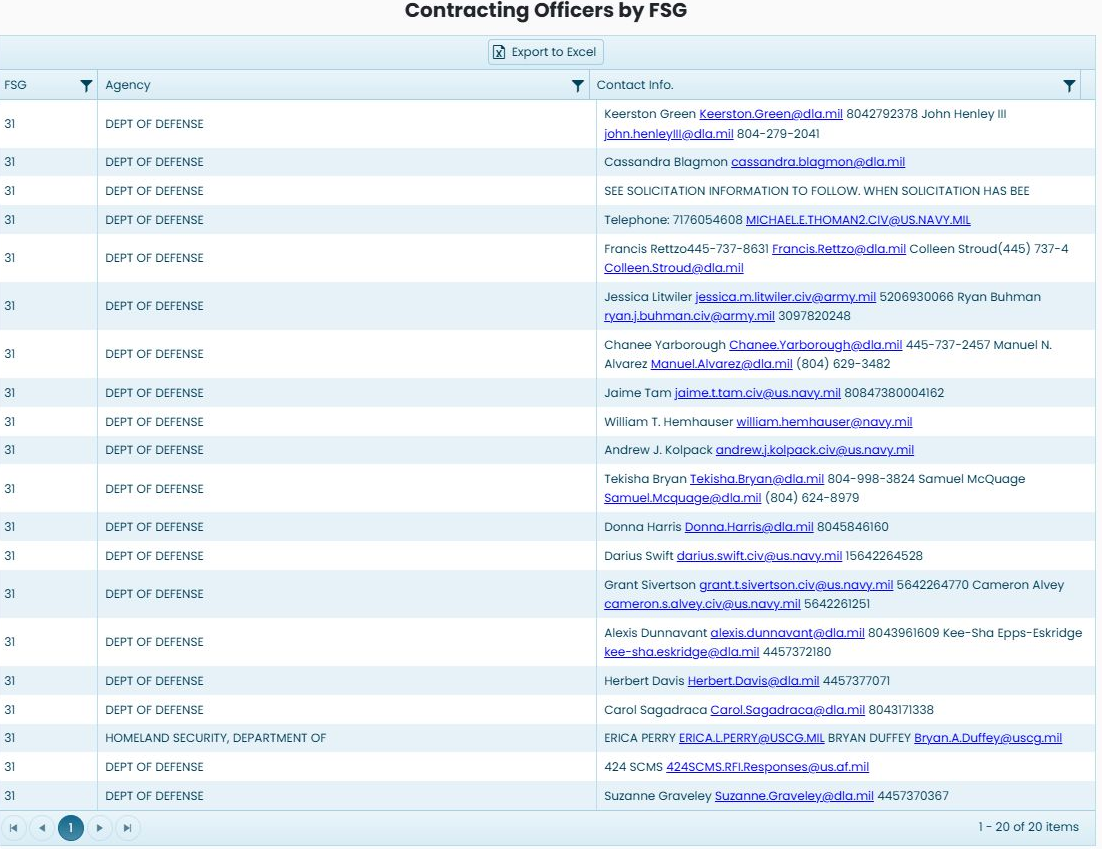
A separate October 24, 2026 example shows matches in all three sections. The NAICS section has 45 items under 811111, the Service Code section has four items under J, and the FSG section has 20 items under 31. These are separate lists matched to the selected criteria, not three totals to add together. Your counts and classifications can differ.
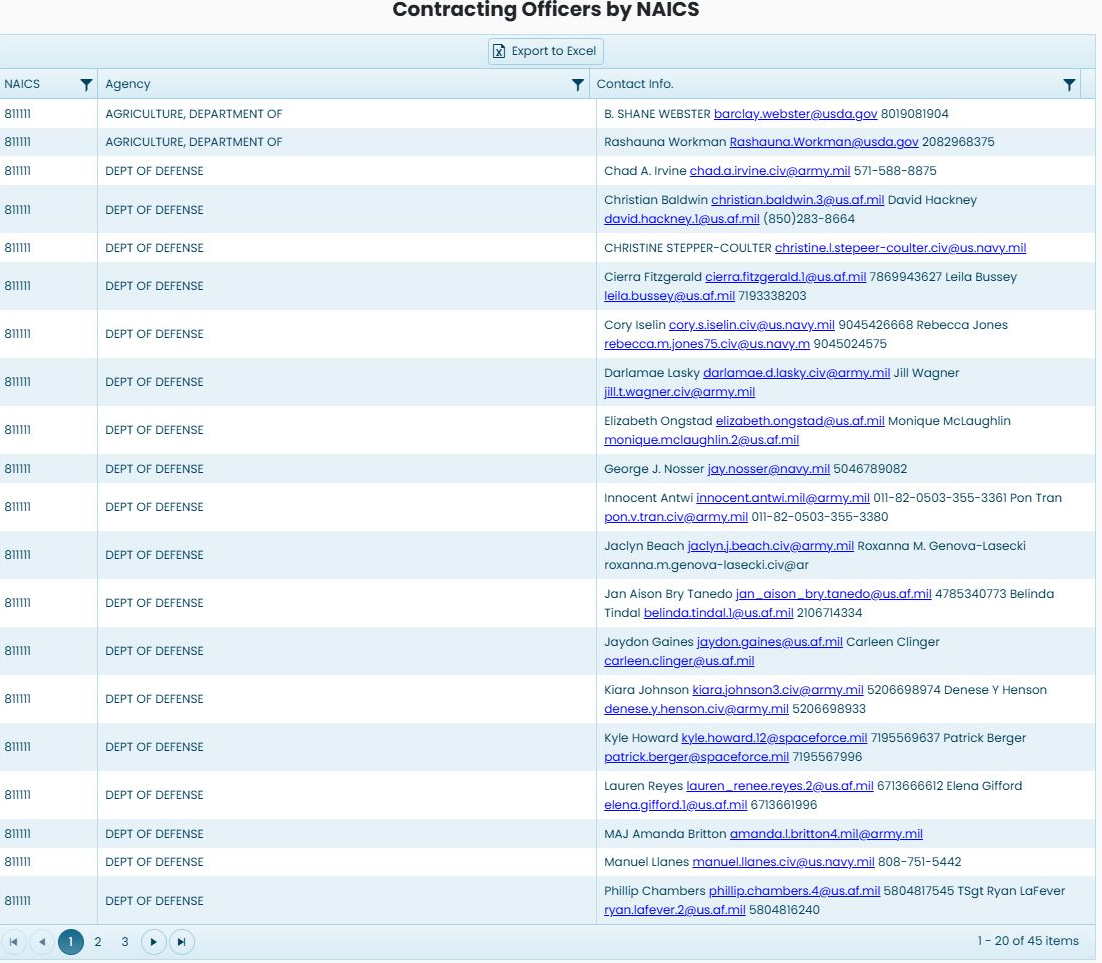
Read Agency beside Contact Info. in each section. A contact cell can hold more than one person or a note; do not assume one row is one individual. The service section uses Service Code as its first heading, while the supply section uses FSG. Their other headings have the same purpose.
Move through the list
Use the page numbers or next-page arrow beneath the relevant grid. The NAICS page shows 1–20 of 3,478 items initially; a previously verified next-page action showed 21–40. Each of the three sections has its own grid controls, so paging one section does not describe another section's results.
In the October 24 example, the NAICS pager initially shows 1–20 of 45 items. Choose 2 or the next-page arrow beneath that grid. The selected page changes to 2, and the range becomes 21–40 of 45 items. Read the same NAICS, Agency and Contact Info. columns on the next page. Choose 1 or the previous-page arrow to return to the first group of rows.
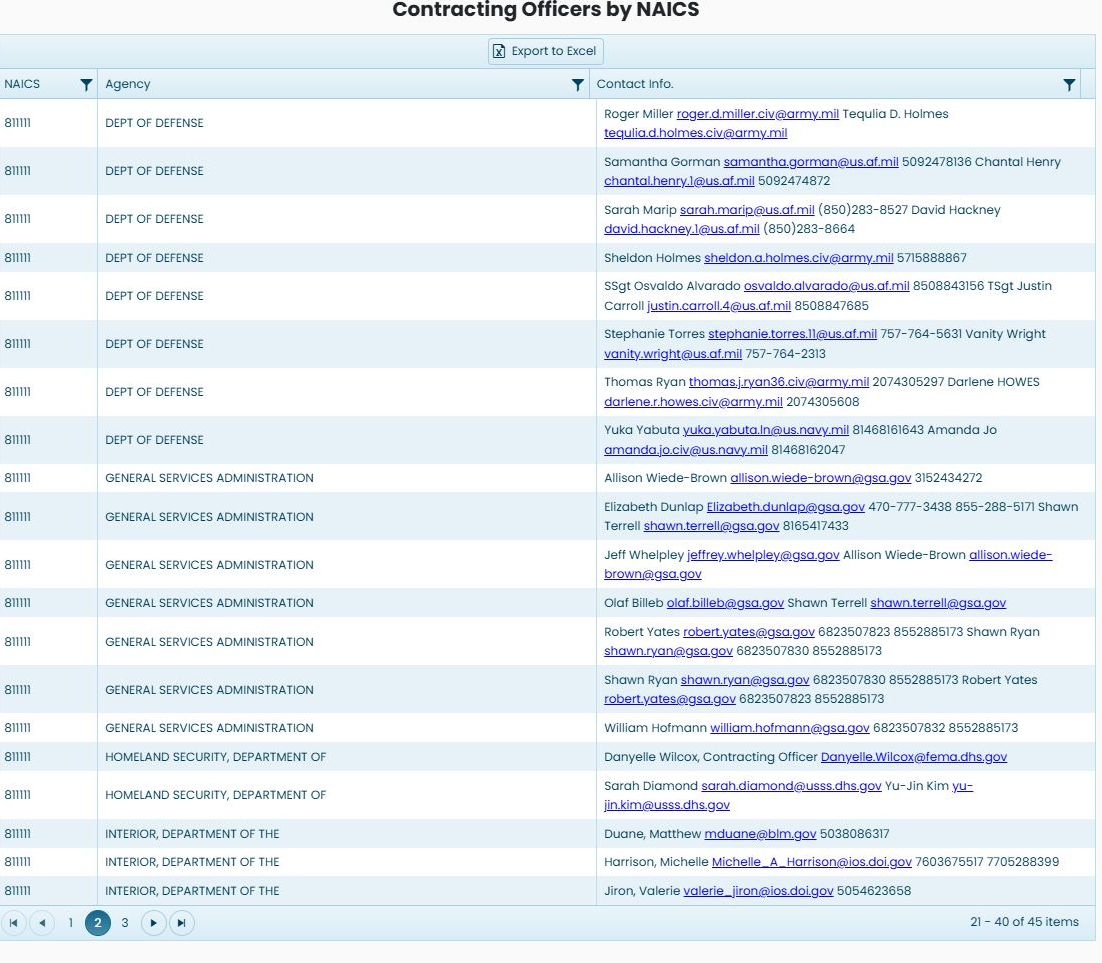
Each section also has its own Export to Excel button. Choose the button belonging to the section you are reviewing. Displayed email addresses are email links. Selecting one can hand the address to your configured mail application; it does not send a message from this page.
Review the NAICS workbook
Choose Export to Excel above Contracting Officers by NAICS. The observed download is MyCO_NAICS.xlsx. Its Sheet1 contains 3,478 contact rows beneath one header row, matching the NAICS grid's displayed item count in this example. The workbook has three columns: NAICS is the industry code, Agency is the government organization, and Contact Info. contains the recorded names, email addresses and any phone numbers together. It does not separate email and phone into their own columns.

For example, one 238210 Agriculture row contains both Adam Ziegler and Rebecca Schowalter in the same Contact Info. cell. Review the whole cell before using or sorting the exported contacts; one spreadsheet row can contain multiple people. This example verifies the NAICS export only. The Service Code and FSG grids were empty in that earlier view. The October 24 example above supplies populated screen examples and separate exports for both.
Export the Service Code or FSG section
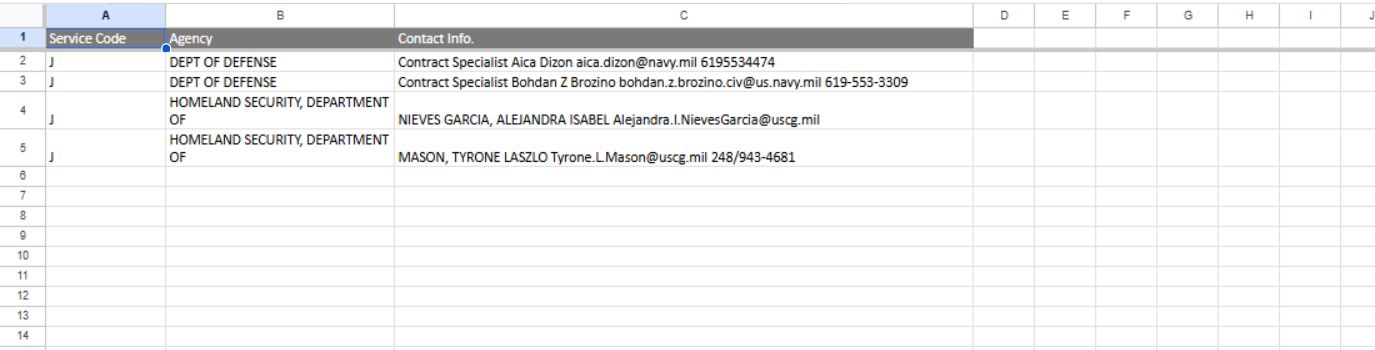
Use Export to Excel above the section you want. In the October 24 example, the Service Code button downloads MyCO_ServiceCode.xlsx. Its Sheet1 has four data rows, with Service Code, Agency and Contact Info. as the three headings. Service Code identifies the service classification; the other two fields name the agency and provide its recorded contact information.
The FSG button downloads MyCO_FSG.xlsx. Its Sheet1 has 20 data rows, headed FSG, Agency and Contact Info. FSG identifies the supply group. Read the remaining fields in the same way as the NAICS workbook above. Both exports contain the rows from their own section; they are not a combined export of all three lists. Contact names, email addresses and telephone information remain together in Contact Info., so one cell may contain several people.