Recorded workbook reference: all 70 columns
Part of these button learning paths: Just My Opportunities · Award History
Video sections for this page
Video sections for this page
Video sections for this page
Application paths: The NSN award workbook follows Main Menu → Search by NSN/NIIN → Search → NSN result → Award History. The broader AwardHistory exports follow Main Menu → Research → Award History search. Saved solicitation/opportunity exports follow Main Menu → Primary Searches → Just My Opportunities.
These four downloaded files accompany the recorded export lesson. They are examples from September 29, 2026, so their rows need not match a search made today. The views below show the actual worksheets, with contact details hidden in the illustrations. For current export fields, see the export guide.
Controlled October 10 flat export: four contract actions
A search for Year 2026 and Contract/Solicitation Number 140FS225P0147, with other fields left at their defaults, produced AwardHistory (26).xlsx: one AwardHistory sheet with four actions and 27 columns. The downloaded rows match the displayed results.
The actions are P00005: −$1,498, P00004: $0, P00003: $5,376 and P00002: $8,160. Their sum is $12,038 in action obligations. All four rows show 24 offers. Total is numeric, while Award Date and Est Completion Date are date cells. Some optional fields are blank. See the export field guide for all 27 columns.
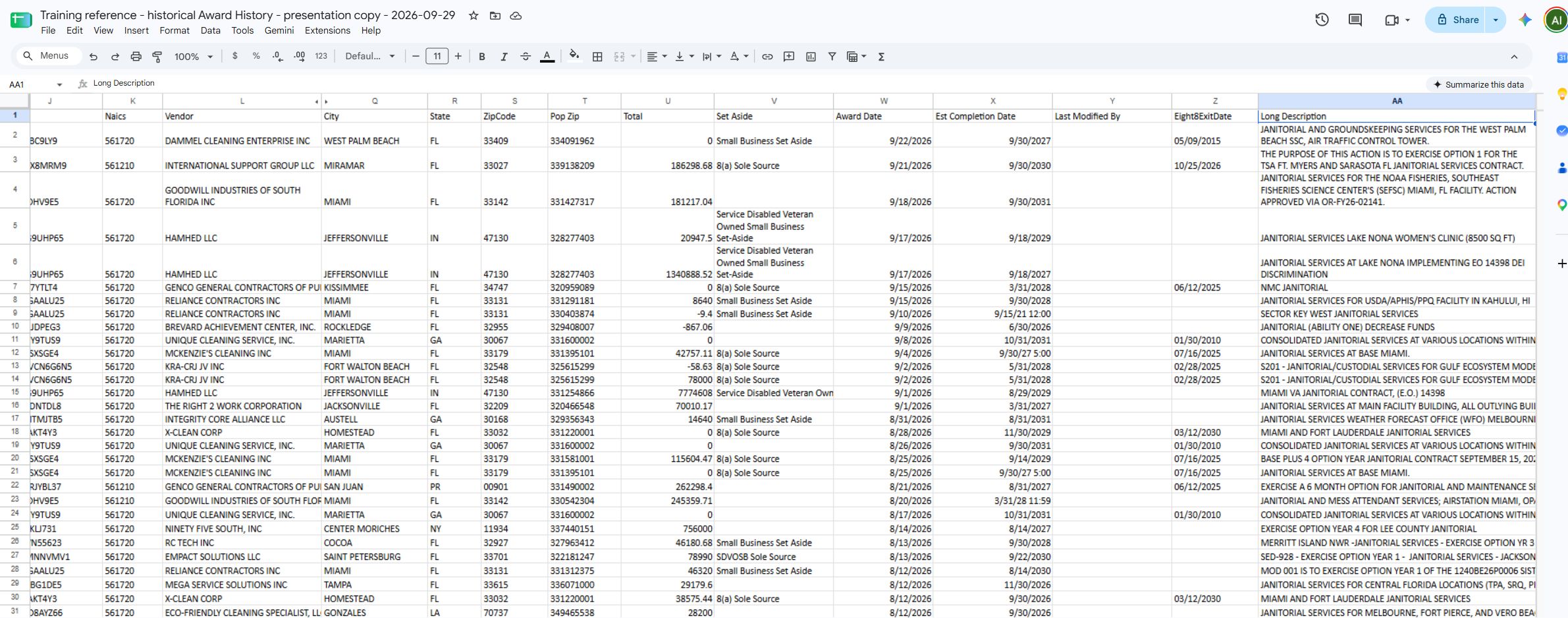
These views of the downloaded sheet show all 27 headers. Contact names, email addresses and telephone numbers are masked. Select a Long Description cell to read text that is clipped in the image.
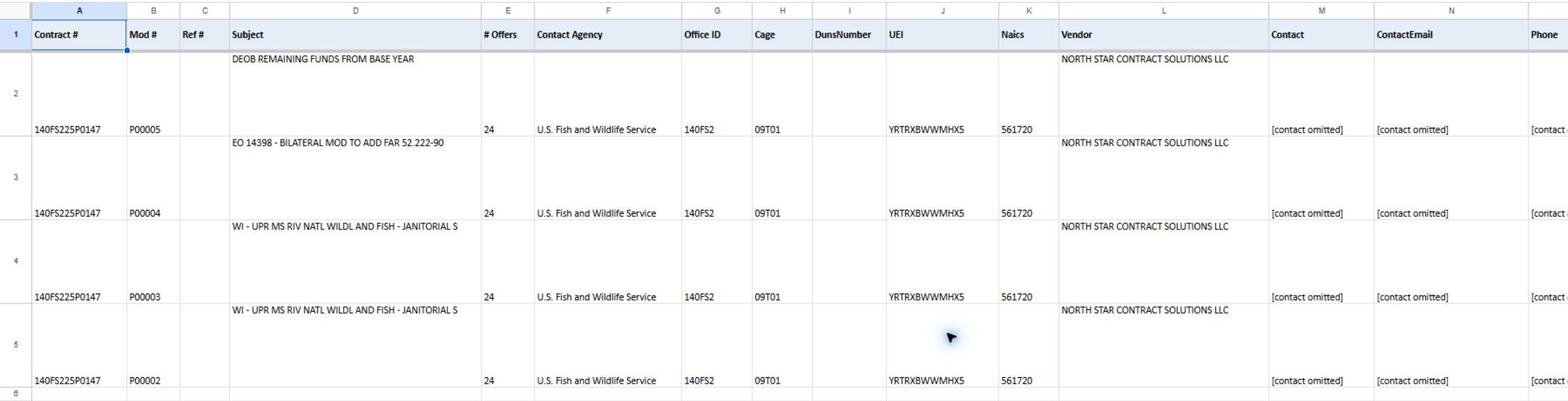
Open the identifying-field view at full size.
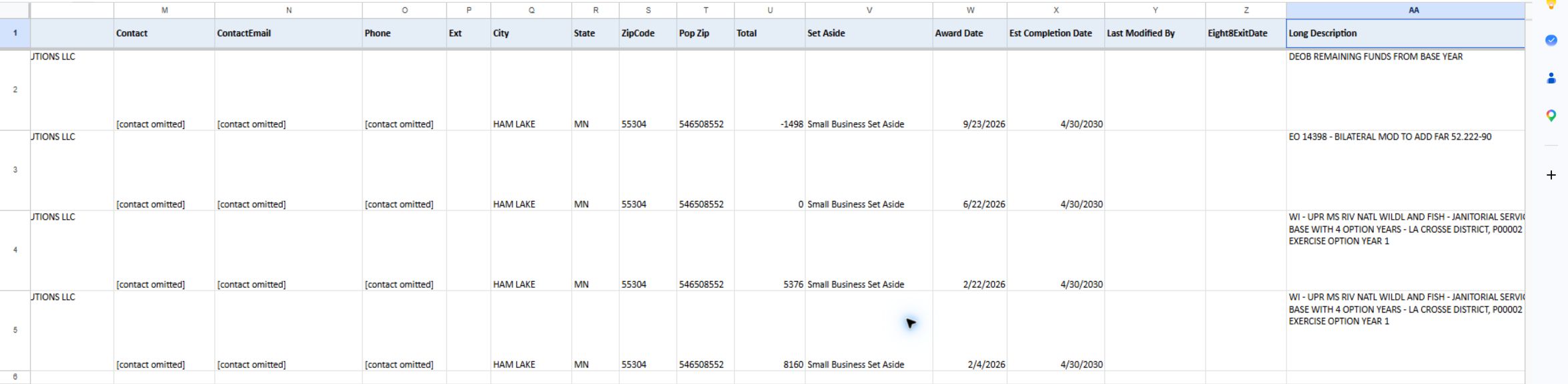
Open the amounts-and-dates view at full size.
Which workbook is which
| Downloaded workbook | Worksheet | Rows × columns (data rows × columns) | What the worksheet contains |
|---|---|---|---|
AwardHistory (22).xlsx |
AwardHistory |
180 × 27 | Award History search results, including award, agency, vendor, contact, vendor location, place of performance and description fields. The export has more fields than the result grid. |
awards (19).xlsx |
awards |
41 × 12 | DLA award records for the NSN drilldown. It includes reported and display price/total values and a Modified indicator for a DLA price correction. |
DLASolicitations (12).xlsx |
DLASolicitations |
649 × 20 | NSN opportunities with item, notice, quantity, part and requirement fields. |
FboSolicitations (7).xlsx |
FboSolicitations |
3,508 × 11 | My Opportunities notices. State and local rows may also appear; the filename does not mean every notice came from SAM.gov. |
Counts are from the downloaded files in the original download folder on September 29, 2026. They describe these snapshots only.
AwardHistory (22).xlsx — AwardHistory
City, State and ZipCode describe the vendor's address. Pop Zip describes the contract's place of performance. They answer different questions and may legitimately differ.
| Column | Meaning in this export | Why it helps |
|---|---|---|
| Contract # | Contract PIID. | Identifies the award record to look up or compare. |
| Mod # | Award modification number. | Distinguishes a contract action/version from other actions on the PIID. |
| Ref # | IDV PIID, the referenced indefinite-delivery vehicle identifier. | Connects an order/action to its referenced vehicle where supplied. Blank values occur. |
| Subject | Short requirement/contract subject. | Lets the reader recognize the work without opening a separate record. |
| # Offers | Recorded number of offers received. | Shows the reported competition count when populated; blank means no value was exported. |
| Contact Agency | Award agency. | Identifies the awarding agency. |
| Office ID | Contracting office identifier. | Narrows the award to its contracting office. |
| Cage | Contractor CAGE code. | Provides a contractor identifier. |
| DunsNumber | Vendor DUNS number. | Provides a legacy vendor identifier where populated. |
| UEI | Vendor UEI. | Provides the vendor identifier where populated. |
| Naics | Principal NAICS code. | Shows the industry classification attached to the award/vendor record. |
| Vendor | Award vendor name. | Names the contractor associated with the award. |
| Contact | Vendor point of contact. | Supplies the listed vendor contact for follow-up. Treat as contact data, not a contract officer. |
| ContactEmail | Vendor contact email. | Provides the listed contact address. |
| Phone | Vendor contact phone. | Provides the listed phone number. |
| Ext | Vendor contact phone extension. | Completes the phone field where present. |
| City | Vendor city. | Shows the vendor’s location. It is not the place-of-performance city. |
| State | Vendor state/province. | Shows the vendor’s location. It is not the place-of-performance state. |
| ZipCode | Vendor postal code. | Shows the vendor’s postal code. It is not Pop Zip. |
| Pop Zip | Award place-of-performance ZIP. | Shows where performance is recorded, so users can compare work location with vendor location. |
| Total | Obligated amount from the award action. | Shows the amount obligated in the exported action; do not assume it is the full potential contract ceiling. |
| Set Aside | Award set-aside value. | Shows the exported set-aside classification when present. |
| Award Date | Award date. | Places the award action in time. |
| Est Completion Date | Estimated ultimate completion date. | Shows the estimated ultimate completion date. |
| Last Modified By | Historical record field identifying who last modified the record. | Useful context when reviewing an older award entry. |
| Eight8ExitDate | Historical 8(a) program exit date from older SBA records. SBA no longer publishes this field. It is not contract completion or proof of current eligibility. | Check current program status separately. |
| Long Description | Long contract requirement description. | Adds contract detail beyond Subject; it can be long and may repeat the short description. |
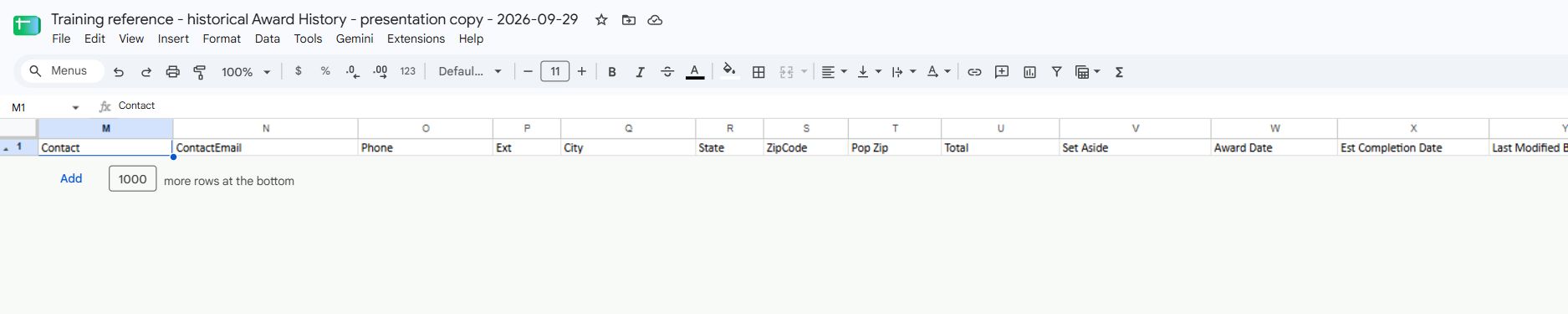
The worksheet views show AwardHistory A:L and Q:T, Q:AA and contact headings M:P. Together they cover all 27 headers; contact values are hidden.
Supplemental rendered excerpt: AwardHistory Q1:X4, showing the vendor City/State/ZipCode beside Pop Zip, then award total, set-aside and dates. Columns M:P (contact, email, phone and extension) are omitted from the image.
awards (19).xlsx — awards
This sheet contains DLA award-history rows for the NSN award drilldown. Price/total values need the page’s warning beside them: some DLA source values can be misreported by two or more orders of magnitude; the page moves the displayed price three decimal places in that case, and Modified marks the adjustment. ReportedPrice and ReportedTotal retain the reported values so the displayed and reported figures can be compared. Do not describe Modified as a date; it is the correction indicator. The source page explains this immediately above the grid.
| Column | Meaning in this export | Why it helps |
|---|---|---|
| Contract Number | Award identifier. When a delivery order is shown, this column contains that order identifier. | Read both identifier columns and verify their roles against the award record; see the NSN award guide. |
| Delivery Order No | Original contract identifier when a delivery order is shown; otherwise blank. | The heading may not describe the value's role. Verify both columns before citing a contract or order. |
| Mod | Modification value, when present. | Identifies a modification row/action; it may be blank. |
| Line Item | Contract line item number. | Locates the item within the award record. |
| Qty | Awarded quantity. | Provides the quantity used with the unit price to calculate the line total. |
| Price | Displayed unit price after the page’s conditional three-decimal-place correction. | Supports price comparison, subject to the warning above. |
| Total | Displayed extended total after the same correction behavior. | Shows the displayed line total; compare with Qty × Price where populated. |
| Awarded | Award date. | Places the award in time. |
| Company Name | Awardee name. | Identifies the supplier associated with the award. |
| Modified | Yes/no-style correction flag; Y indicates the display price/total was adjusted by the page’s rule. |
Alerts the reader that Price/Total are corrected display values rather than untouched reported values. |
| ReportedPrice | Original DLA-reported unit price. | Provides the source-reported figure for comparison with Price. |
| ReportedTotal | Reported total value. | Compare with Total and the award record; it may not be a simple price-times-quantity calculation. |
This example has 41 data rows and 12 columns. Its first three rows show Modified as N.
See all twelve awards columns in the worksheet view.
Supplemental rendered excerpt: awards A1:L4, with all 12 columns and three rows.
DLASolicitations (12).xlsx — DLASolicitations
This worksheet lists NSN opportunities in 20 columns. Tech. Data indicates available technical or drawing material; it is not the detailed characteristics table. Opening Date and Closing Date describe the recorded solicitation timeline. Keep unfamiliar codes as shown until you can check the applicable notice or item record.
| Column | Meaning in this export | Why it helps / status |
|---|---|---|
| NSN | National Stock Number for the item. | Identifies the supply item. In this file, the values appear in square brackets; keep the digits intact when matching an item. |
| Description | Short item description. | Lets the user recognize the supply item. |
| Tech. Data | Technical or drawing-data availability indicator. | Prompts a check of the available files; it is not the detailed characteristic table. |
| Solicitation Number | Solicitation/RFQ reference. | Identifies the specific procurement notice; source documents can be linked from this value in the UI. |
| Opening Date | Solicitation opening date. | Shows the scheduled opening point. |
| Closing Date | Solicitation closing date. | Shows the response deadline; check the source notice for the current date. |
| Source | Recorded source/location label. | Helps identify where the notice information came from. |
| Set Aside | Exported set-aside label. | Signals the displayed set-aside restriction/classification. |
| Quantity | Requested quantity field. | Shows requested item quantity when populated. |
| Est. Value | Estimated solicitation value. | Provides a rough opportunity-size indicator; it is an estimate, not an awarded amount. |
| AMC | Acquisition Method Code. | Use the applicable procurement definition, separate from item identity or price. See AMC 1 and 2 for the official meanings used in the current teaching example. |
| Part Number | Part number associated with the row. | Helps identify a referenced part. |
| Cage | CAGE of the company associated with the item’s part reference. | Use with Part Number and Company to identify the referenced source. |
| Company | Company name associated with the item’s part reference. | Read with Cage and Part Number; this is not the buying agency. |
| UI | Unit of Issue: the unit in which an item is issued or ordered. | Read quantity together with this code. For example, EA means each; a package unit is not necessarily one individual item. Verify the solicitation’s unit and packaging. |
| AMSC | Acquisition Method Suffix Code. | Read with AMC; see the G example. That example does not define every suffix or certify this historical workbook's rows as current opportunities. |
| GSI Code | Inspection code. | Inspection point from the DLA solicitation: origin means inspection at the source before shipment; destination means inspection at the receiving location. Read the notice for the specific inspection arrangements. |
| PRN | Procurement/Purchase Request Number. | Identifies the originating purchase request; it is distinct from the solicitation number and the item’s NSN. Preserve the complete text. |
| Exp | Export-control indicator. | Check the notice's technical-data and export terms. It is not an expiration date or permission to export. See My Opportunities. |
| CMMC | Cybersecurity requirement indicator. | Check the notice for the actual requirement and assessment level. This value does not certify your company. See My Opportunities. |
This example has 649 data rows.
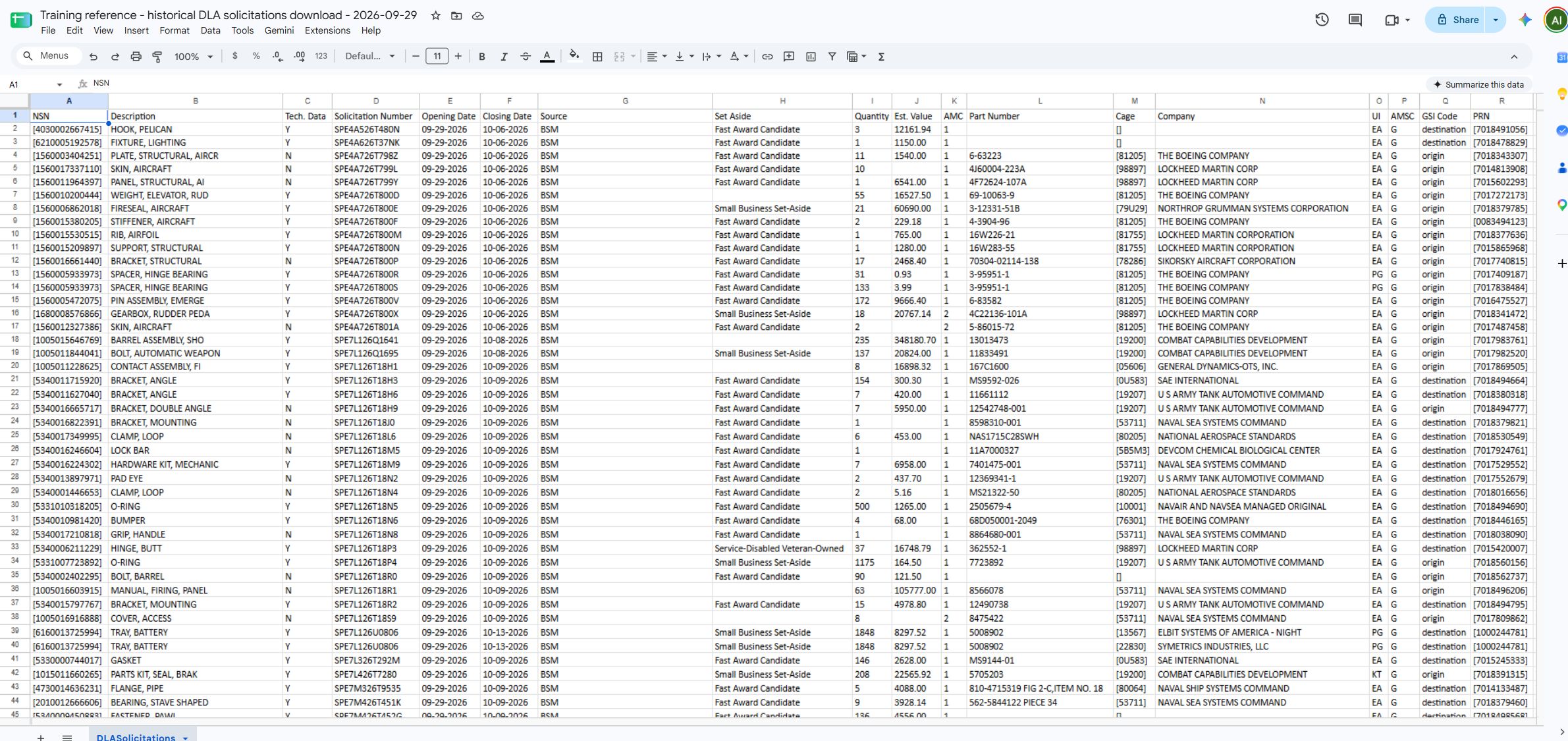
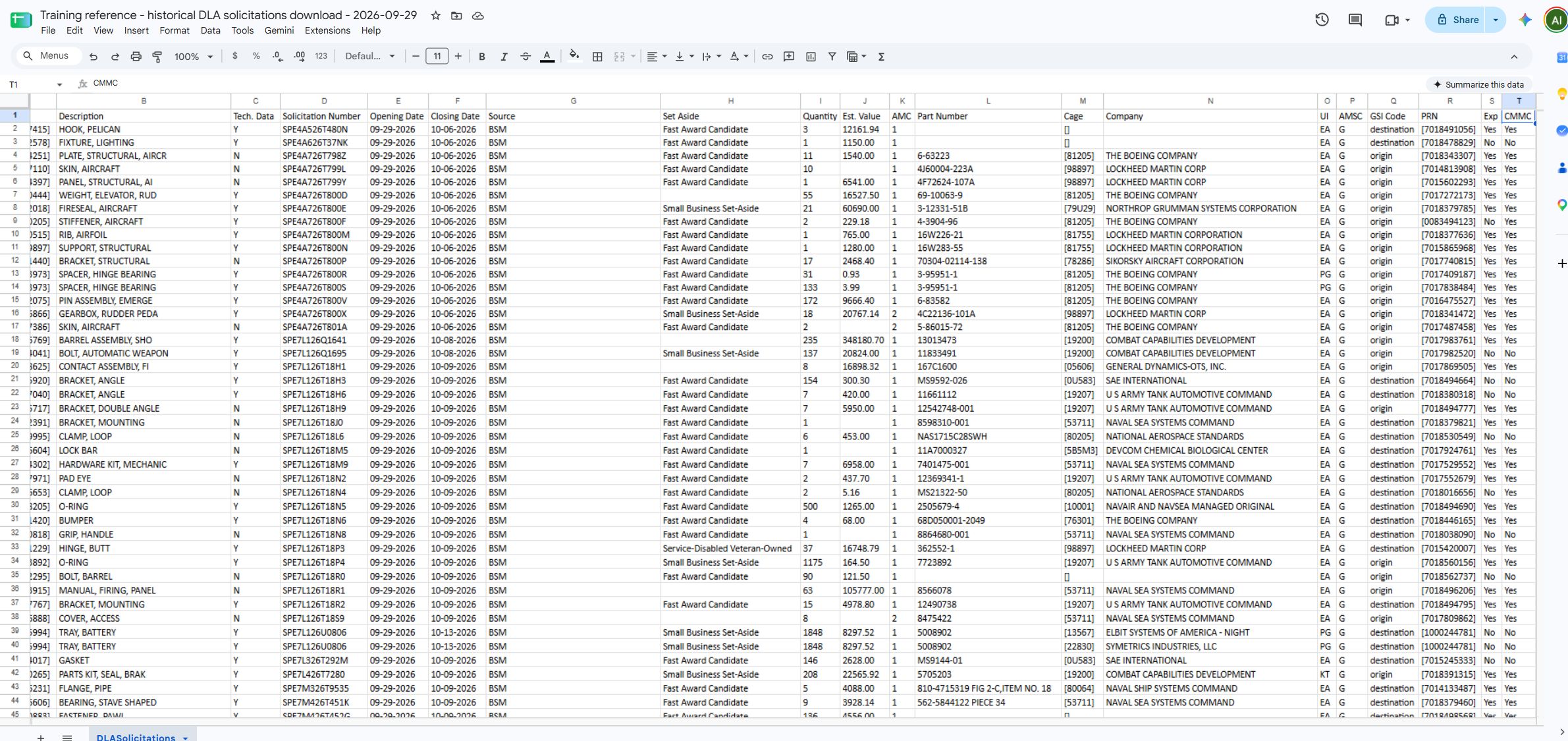
See columns A:R and B:T for all 20 headers and sample rows.
Supplemental rendered excerpts: DLASolicitations A1:H4 and DLASolicitations I1:T4, together covering all 20 columns.
FboSolicitations (7).xlsx — FboSolicitations
This 11-column workbook lists the signed-in account's My Opportunities notices. State and local notices may appear alongside federal ones. Award History is a related link when enough information is available for the application to show it.
| Column | Meaning in this export | Why it helps / status |
|---|---|---|
| Solicitation Number | Solicitation identifier from the saved opportunity row. | Opens/identifies the notice; observed source rows can use a title where no formal number is present. |
| Subject | Solicitation subject/title. | Summarizes the work sought. |
| Agency | Agency or procuring organization as supplied for the row. | Shows who is associated with the notice; local/state organizations may appear. |
| Office | Office value when supplied. | Adds organizational detail; blank means no value in this export. |
| State | State value supplied with the solicitation row. | Helps locate/filter opportunities; exact place-of-performance semantics are not established by this exporter alone. |
| Opening Date | Opening date supplied for the row. | Shows the scheduled opening date when present. |
| Closing Date | Closing date supplied for the row. | Shows the deadline when present; blank is not proof of no deadline. Verify the current notice. |
| Search Criteria | Criteria associated with the saved result. | Helps explain why a result appeared. |
| Set Aside | Set-aside value supplied for the row. | Displays the restriction/classification when present. |
| Solicitation Link | Related notice URL. | Opens the source notice when a usable link is present. |
| Award History | Related award-history URL, when available. | Opens historical context; check the linked contract's relevance to the notice. |
This example has 3,508 data rows. Search Criteria may contain a keyword such as “Electrical”; it is separate from the solicitation title.
See all eleven columns in the worksheet view.
Supplemental rendered excerpts: FboSolicitations A1:H4 and FboSolicitations I1:K4, together covering all 11 columns.
Working safely with these exported values
Each file has one worksheet and a header row. Add filters or analysis in your own copy if you want to keep the download unchanged.
Keep NSN, CAGE, contract numbers and postal codes as text, including leading zeros. In AwardHistory, Total is numeric and Award Date / Est Completion Date are date cells. Other amounts and dates may be text, so check cell types before sorting or calculating. Blank cells are not zero. A literal in the FboSolicitations Award History column is a blank placeholder, not a usable link.
No raw workbook containing contact details is bundled in this training package. Screenshots omit direct contact-value columns; their headers and purpose remain documented.
Actual worksheet excerpts
The worksheet views below cover all four downloads. Additional close-ups make wide columns easier to read. The original files were not changed.
awards A1:L42: native Google Sheets view of all twelve columns and 41 data rows.
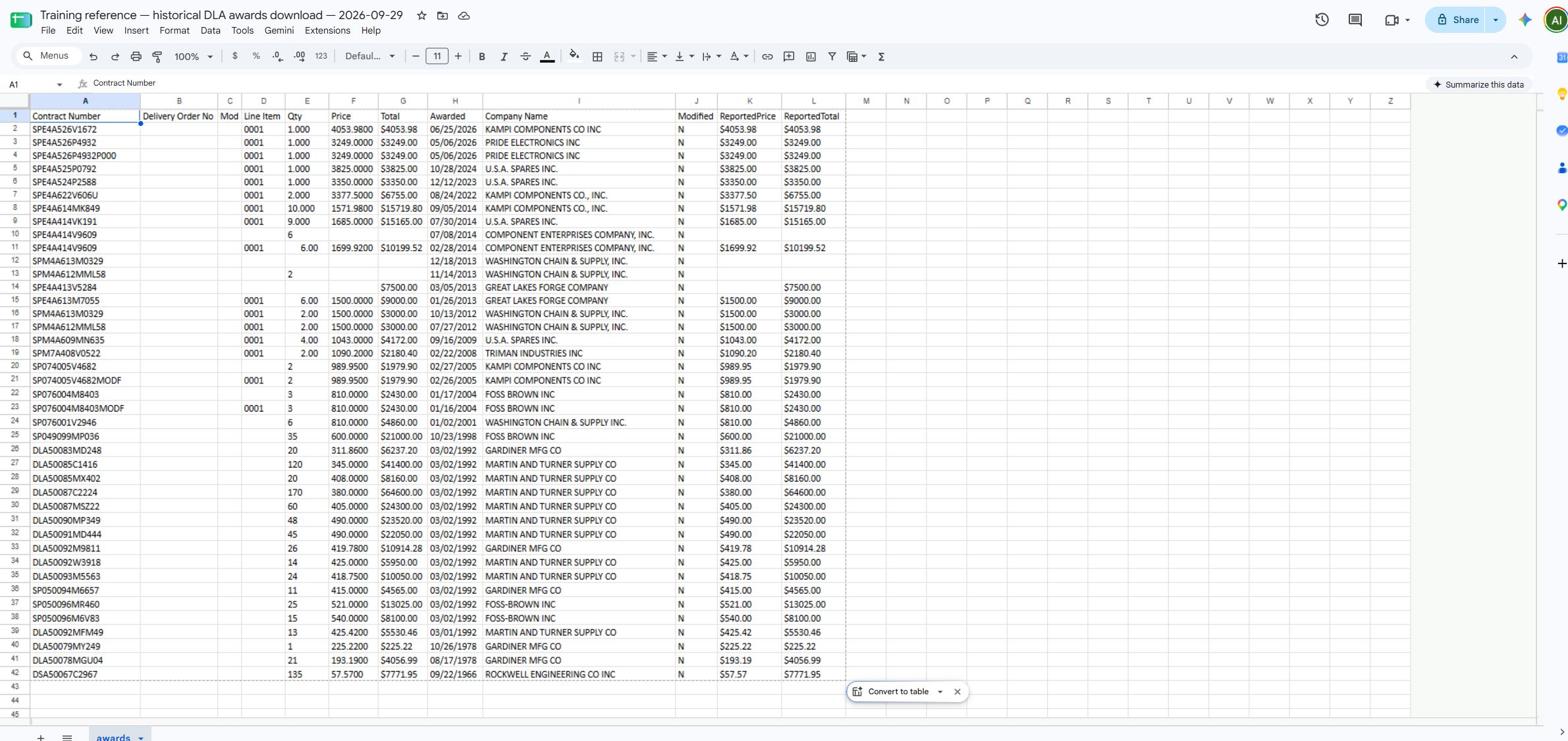
Open full-size native spreadsheet view.
AwardHistory native Google Sheets views: all twenty-seven headers with contact values hidden.
The left and right views show sample rows with contact columns M:P hidden. A separate headings-only view shows M:P with all data rows hidden. The three historical views together cover A:AA without exposing direct contact values.
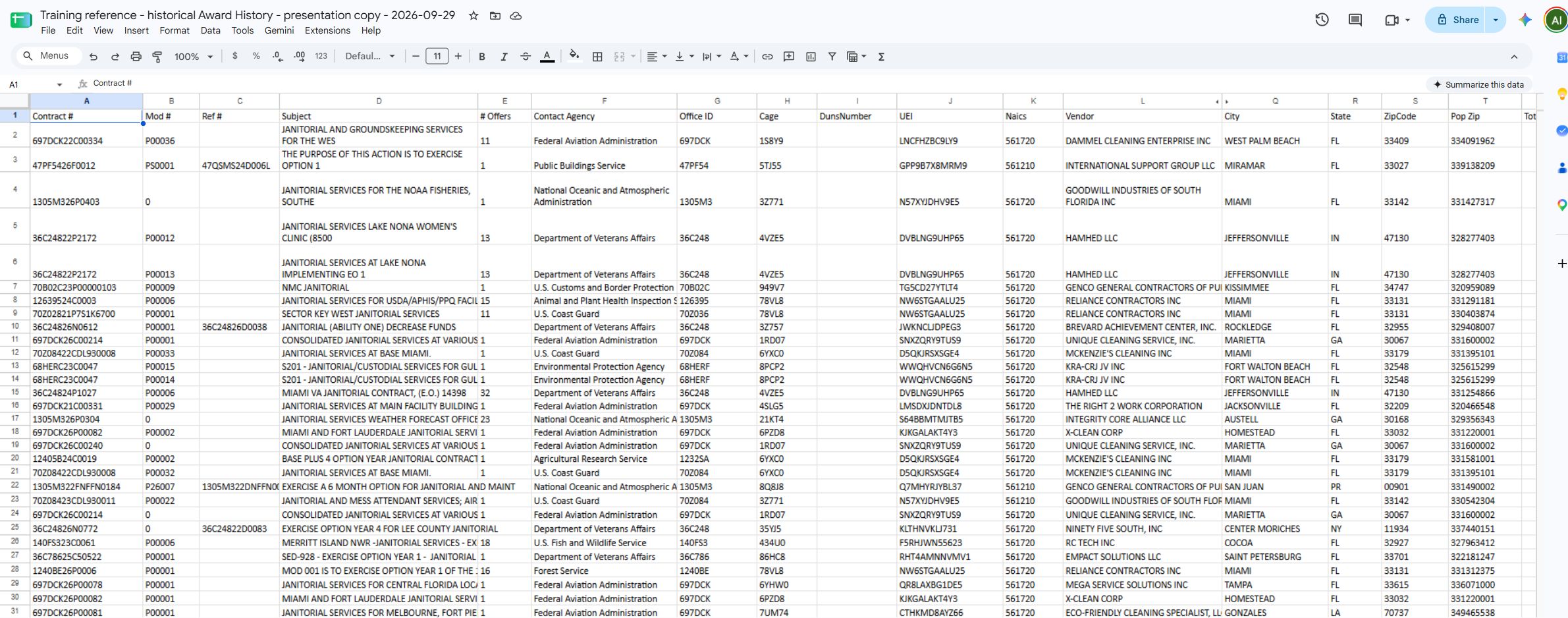
Open full-size native left view.
Open full-size native right view.
Open full-size contact-headings view.
AwardHistory A1:L4: contract and vendor identifiers; three example rows.

Open full-size worksheet excerpt.
AwardHistory M1:AA1: all remaining headers; direct contact data rows omitted.

Open full-size worksheet excerpt.
AwardHistory Q1:X4: vendor address versus place-of-performance ZIP; contacts M:P omitted.

Open full-size worksheet excerpt.
awards A1:L4: all twelve columns.
This rendered excerpt of the first three data rows is supplemental to the native Google Sheets view above.

Open full-size worksheet excerpt.
DLASolicitations native Google Sheets views: all twenty headers and sample rows.
The left view includes NSN in column A through PRN in R. The right view overlaps at B and extends through Exp and CMMC in S:T. Both display the historical September 29 download; the paired images are needed to see all headers.
Open full-size native A:R view.
Open full-size native B:T view.
DLASolicitations A1:H4: item and solicitation identity.

Open full-size worksheet excerpt.
DLASolicitations I1:T4: quantity, estimate, supplier/part and procurement codes.

Open full-size worksheet excerpt.
FboSolicitations native Google Sheets view: all eleven headers and sample rows.
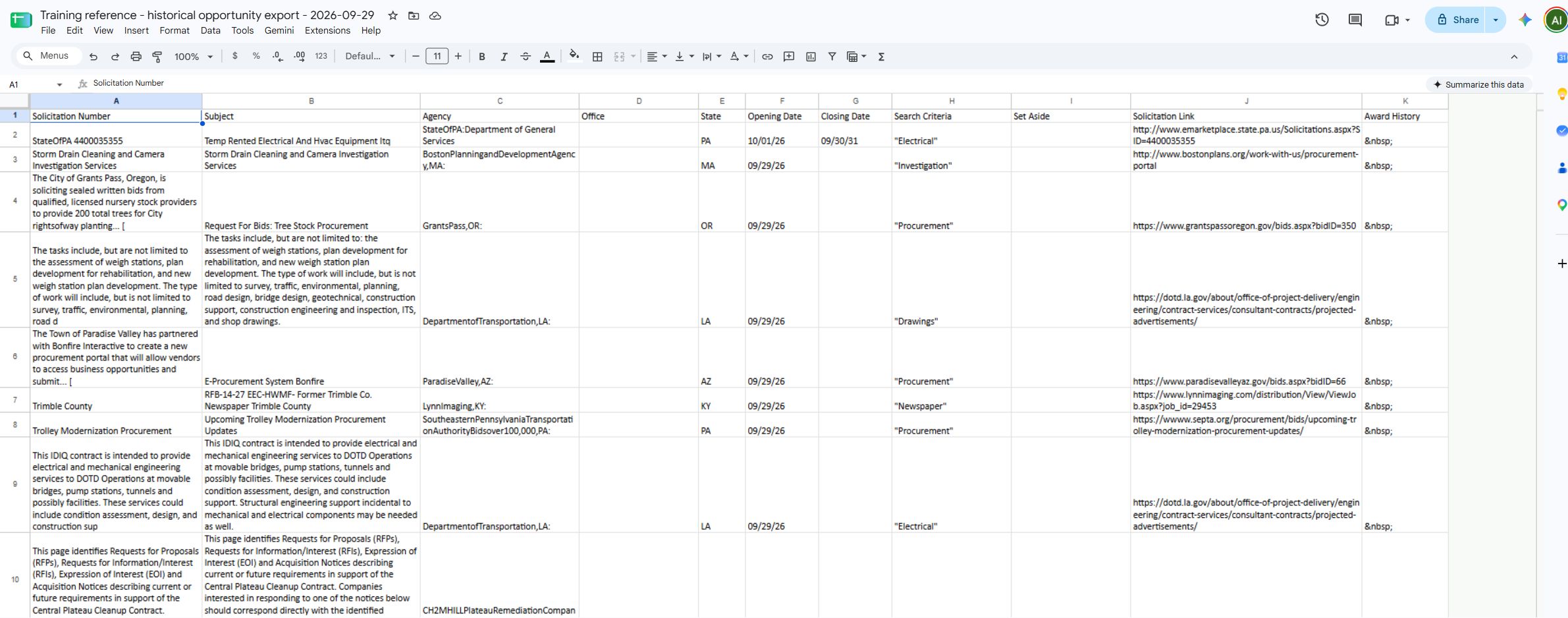
Open full-size native spreadsheet view.
FboSolicitations A1:H4: notice and matching criteria.

Open full-size worksheet excerpt.
FboSolicitations I1:K4: set-aside and navigation links.
