Review solicitations linked to a supply class
Part of these button learning paths: Naics To FSC Cross
Video sections for this page
Application path: Main Menu → Naics To FSC Cross → choose an industry.
Use this cross-reference when you know an industry's NAICS code and want to identify related Federal Supply Classes. NAICS describes an industry; FSC classifies the goods. The table provides another way to decide which product classes to research.
Follow the solicitation count
Return to the cross-reference and choose View 6 Solicitations for FSC 4920. The prepared result shows six NSN rows. NSN identifies the item; Description names it; Qty, Est. Value, Opening Date and Closing Date give the supplied notice values. Read each row separately and check the source notice for current requirements.
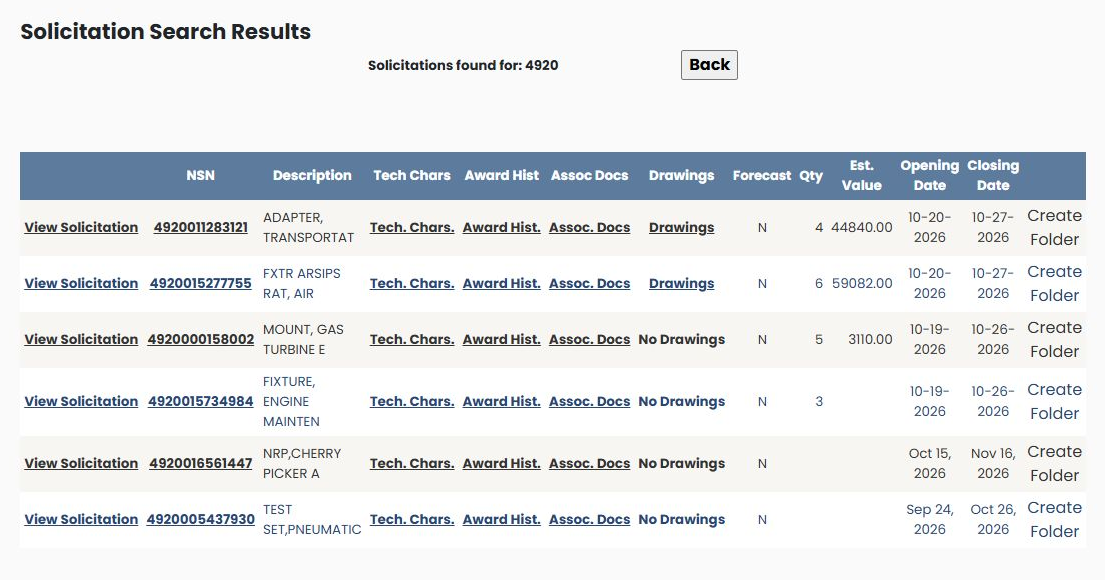
View Solicitation opens the notice. Tech. Chars., Award Hist., Assoc. Docs and Drawings provide the corresponding item-research routes; No Drawings is displayed where that row has no drawing link. Forecast shows the recorded indicator. Create Folder is the saved-work action. Use Back to return to the cross-reference. The NSN item guide explains the shared item screens.