Find an NSN and choose what to research
Video sections for this page
Video sections for this page
Video sections for this page
Video sections for this page
Video sections for this page
Video sections for this page
Video sections for this page
Application path: Main Menu → Search by NSN/NIIN → enter the number → Search.
Use this search when you have a stock number and want its identity, technical details, reference parts or buying history. Enter the full 13-digit NSN or its 9-digit NIIN. Keep leading zeros.
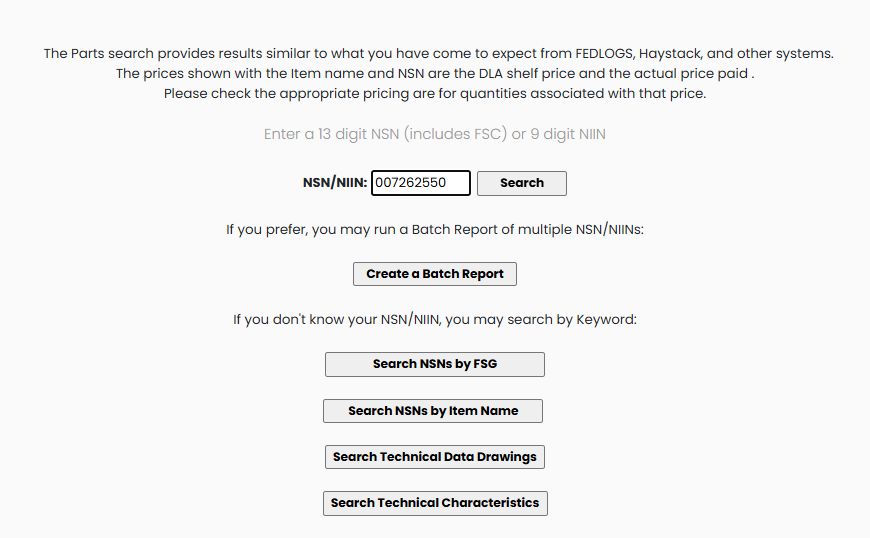
Example: find a cap screw
Enter 5305007262550 or its nine-digit NIIN 007262550, then choose Search. Both verified searches identify SCREW,CAP,HEXAGON HEAD; the NIIN search returns full NSN 5305007262550. The item page is titled NSN/NIIN Search Results. Confirm the displayed name before continuing.
You can reach the same item through NSN Opportunities: select the NSN in the opportunity list, then select it again in the solicitation results. Once you reach the item page, its research buttons work with that selected item.
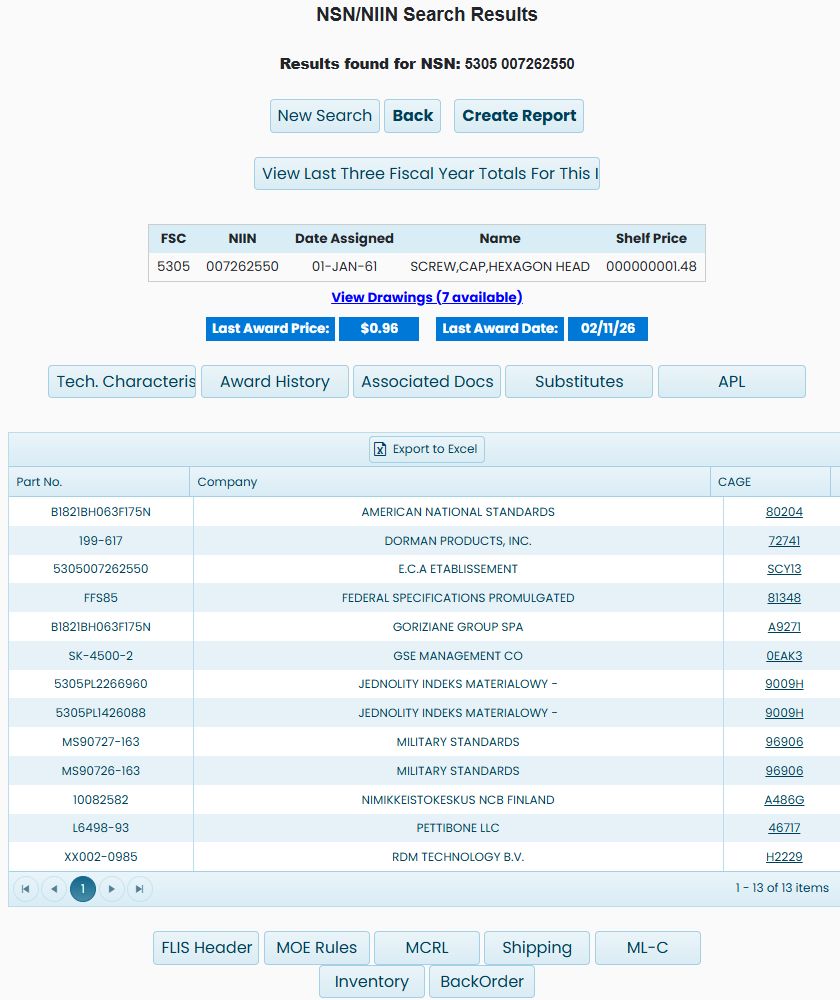
The complete item page below shows the identity, price fields, reference-parts list and research buttons for the same NSN.
Find a number when you know the product instead
From the starting Search by NSN/NIIN screen, Search NSNs by Item Name opens Keyword to NSN Search. Enter SCREW,CAP,HEXAGON HEAD and choose Search. The example returns a paged table of item names and NSNs. Many stock numbers share that name, so the name alone does not identify a particular size or specification. Page-number links below the list show additional matches.
For a guided classification search, choose Search NSNs by FSG from the starting screen:
- Select 53 - Hardware and Abrasives and choose Show FSCs.
- Select 5305 - Screws and choose Show Term(s).
- Select SCREW in the first term list, then Search 1st Term.
- Select CAP in the next list, then Search 2nd Term.
- Select HEXAGON HEAD in the third list, then Search 3rd Term.
- The NIIN list contains matching numbers, including 007262550. Use the number in the direct search above to inspect the item and its technical characteristics.
FSG is the broad Federal Supply Group; FSC narrows it to a Federal Supply Class. The term lists narrow the product description in stages. Disabled lists become available as you complete the preceding step.
Prepare a batch of stock numbers
From Main Menu → Search by NSN/NIIN, choose Create a Batch Report. The Batch Reporting form lets you supply a list and choose the information to request for those items.
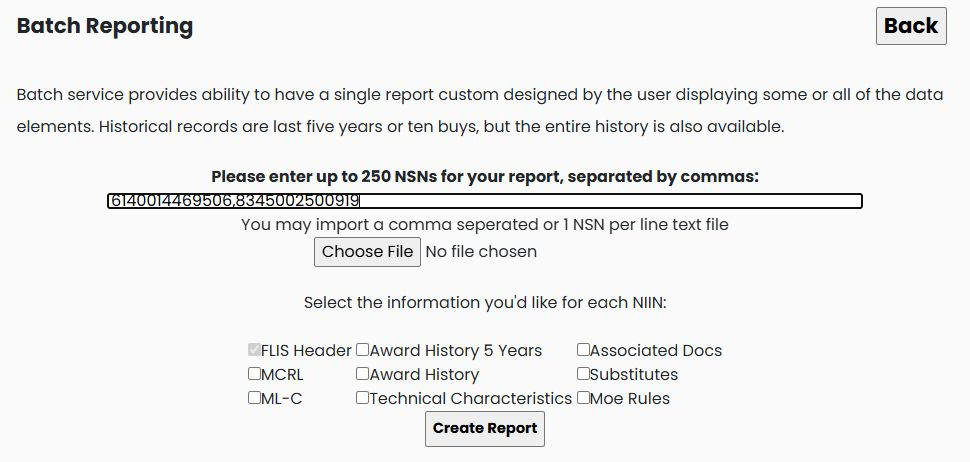
The example enters 6140014469506,8345002500919. Use full NSNs separated by commas, keeping leading zeros. The form allows up to 250 NSNs. Alternatively, Choose File accepts a text list with comma-separated numbers or one NSN per line. Prepare one input list and keep a copy for reuse.
| Section | Information it requests |
|---|---|
| FLIS Header | Catalog identification. This is already checked and cannot be cleared on this form. |
| MCRL | Part-number references and the organizations associated with them. |
| ML-C | Management-list information, such as unit of issue, supply source and price. |
| Award History 5 Years | The five-year award-history selection. |
| Award History | The broader award-history selection. |
| Technical Characteristics | Item specifications, dimensions, materials and other characteristics. |
| Associated Docs | Related specification, standard and document references. |
| Substitutes | Listed substitute and interchangeability references. Review their conditions before relying on a substitute. |
| Moe Rules | Item management and acquisition-rule information. |
Before selecting Create Report, keep a copy of any batch list you may need again. Submitting a nonempty list replaces the batch list saved for your account and downloads the selected report as an Excel file. Back returns to the preceding screen; it does not restore the previous batch list. Select the sections relevant to your research before requesting the report. For the meaning of the individual catalog sections, use the catalog and logistics guide. The batch form is separate from the single-item Create Report screen described below. Read the batch-workbook guide for examples of every worksheet and the meaning of its columns.
Continue from name and classification results
Choose the matching stock number from the item-name table, or select a NIIN after narrowing by FSG, FSC and stored item terms. Confirm the item identity before choosing its research buttons. The walkthrough below follows both paths with its recorded item examples.
Watch: Find and open an item through classification or item-name results
Read the item identity
| Field | Meaning and use |
|---|---|
| FSC | Federal Supply Class: the first four digits of the full NSN. This example is 5305. |
| NIIN | The nine-digit National Item Identification Number. This example is 007262550. |
| Date Assigned | The catalog assignment date shown for the item. |
| Name | The item's catalog name. Use it to confirm what you are researching. |
| Shelf Price | The DLA shelf price shown with the catalog item. Here it is displayed as 000000001.48. |
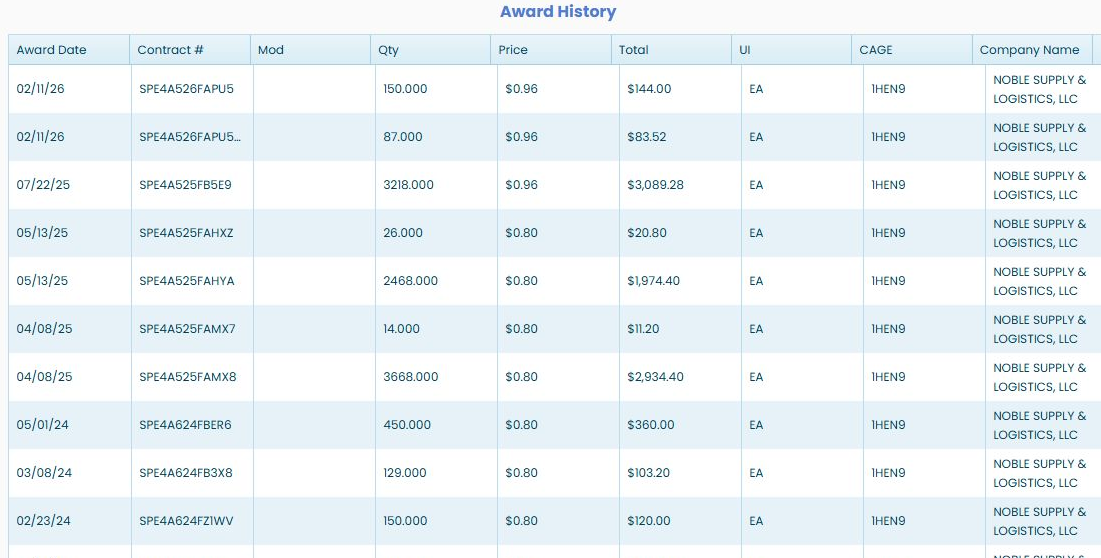
| Last Award Price | The most recent award price displayed for the item: $0.96 in this example. |
| Last Award Date | The date associated with that displayed price: 02/11/26 here. |
Shelf Price and Last Award Price are different figures. Open Award History to see the quantities, dates and suppliers associated with past purchases rather than using a price without its context.
Read the part references
The list contains Part No., Company and CAGE. A CAGE identifies the organization associated with the reference. Read the part number and organization together: 199-617 appears beside DORMAN PRODUCTS, INC., CAGE 72741. This example has 13 rows, including standards organizations as well as companies.
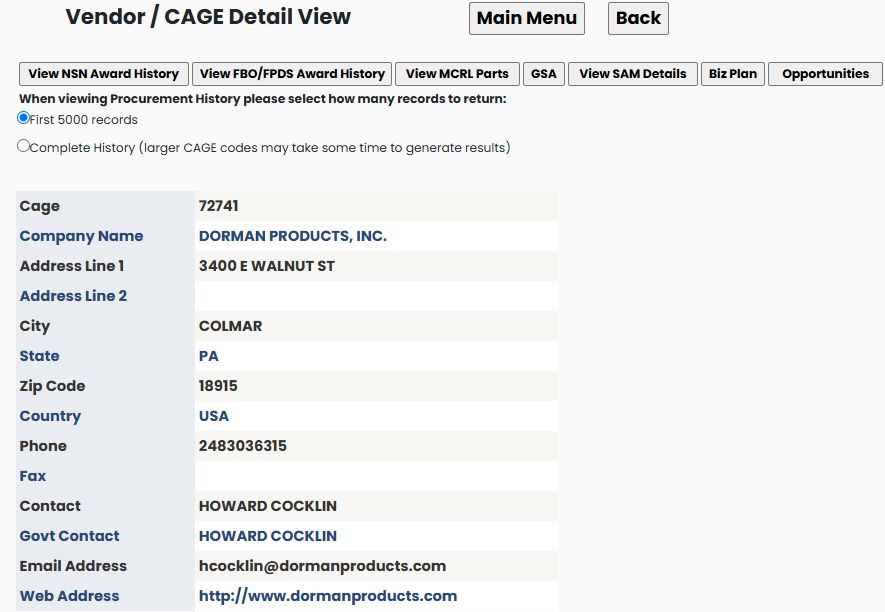
The linked CAGE 72741 opens the Vendor/CAGE Detail View for DORMAN PRODUCTS, INC., in Colmar, PA 18915. Use Back to return to the same item. Continue with the company profile guide for company research.
Export to Excel appears above the part-reference list. For additional reference classifications, choose MCRL.
Export the item reference list
The Export to Excel button above the item page's part-reference grid exports that grid. A separate verified example reached the item page through Main Menu → Machine Shops Opportunities → FSC 5305 — Screws → NSN 5305002061533. Its workbook has one sheet, Sheet1, with Part No., Company and CAGE in columns A–C and four reference rows.

Part No. is the displayed reference number, Company names the organization on that row, and CAGE identifies it. Read all three together: part number 9409072 appears once with ALLISON TRANSMISSION INC / 73342 and again with GENERAL MOTORS CORP / 24617. The other rows are 5306002061533 / E.C.A ETABLISSEMENT CENTRAL DES / A00AM and 8350635 / U S ARMY TANK AUTOMOTIVE COMMAND / 19207. The workbook contains these part-reference fields; it does not export the item's prices, award dates, drawings or research-button panels. Return to the Machine Shops opportunity example to see how that item page was reached.
Choose the next screen
| Button or link | Use it to |
|---|---|
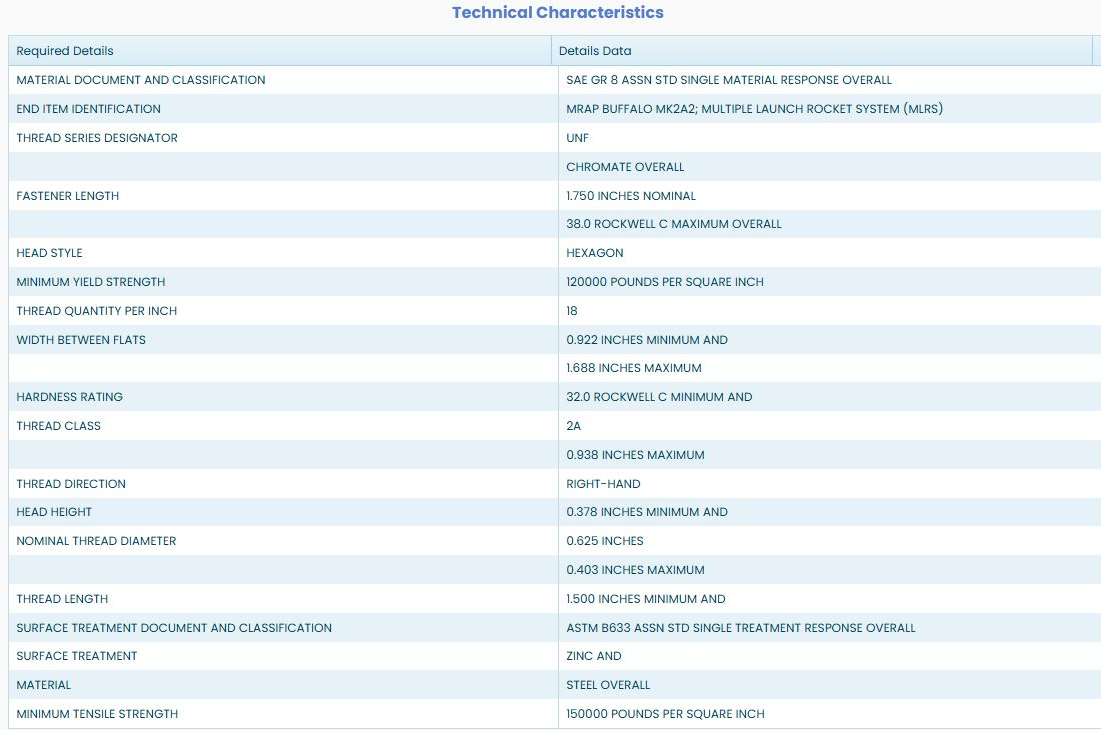
| Tech. Characteristics | Read dimensions, material and other characteristics. |
| Award History | Compare previous purchases, quantities and prices. |
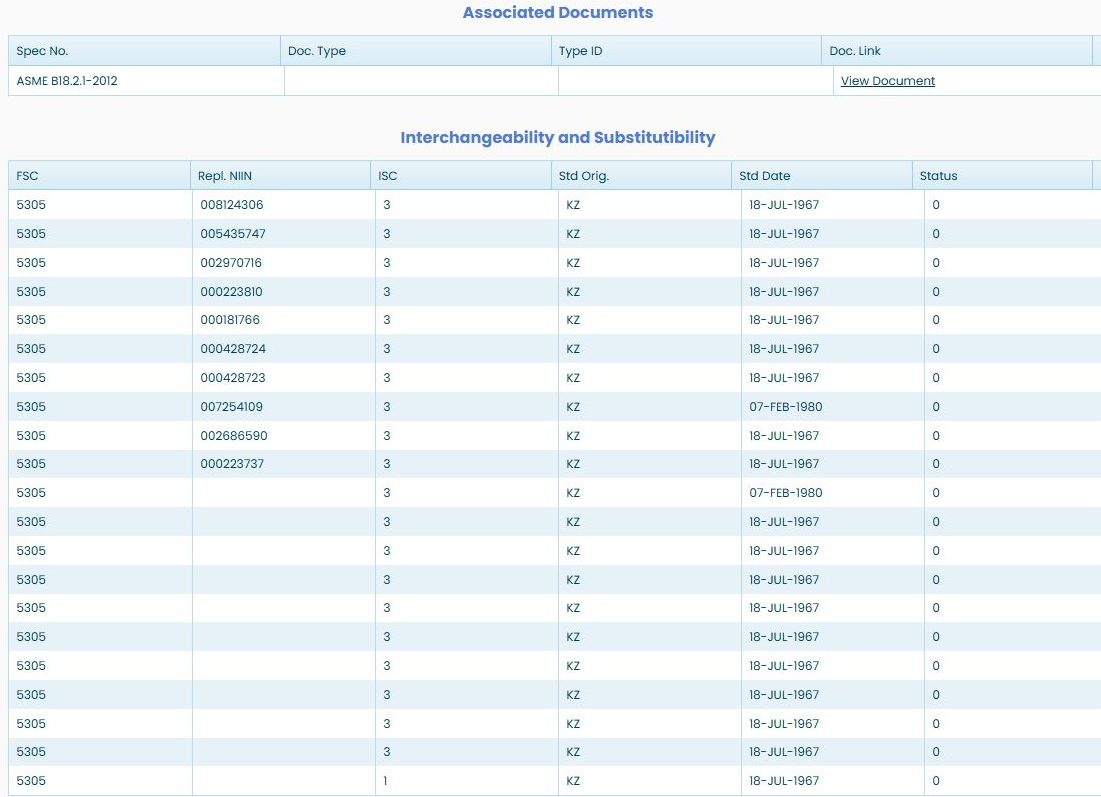
| Associated Docs | Find document references associated with the item. This screw lists ASME B18.2.1-2012 with a View Document link. |
| Substitutes | Review the listed interchangeability and substitute references. |
| APL | Find allowance parts lists that contain this NIIN. The example opens four ditcher/trencher lists. |
| FLIS Header | Read catalog identification and classification fields. |
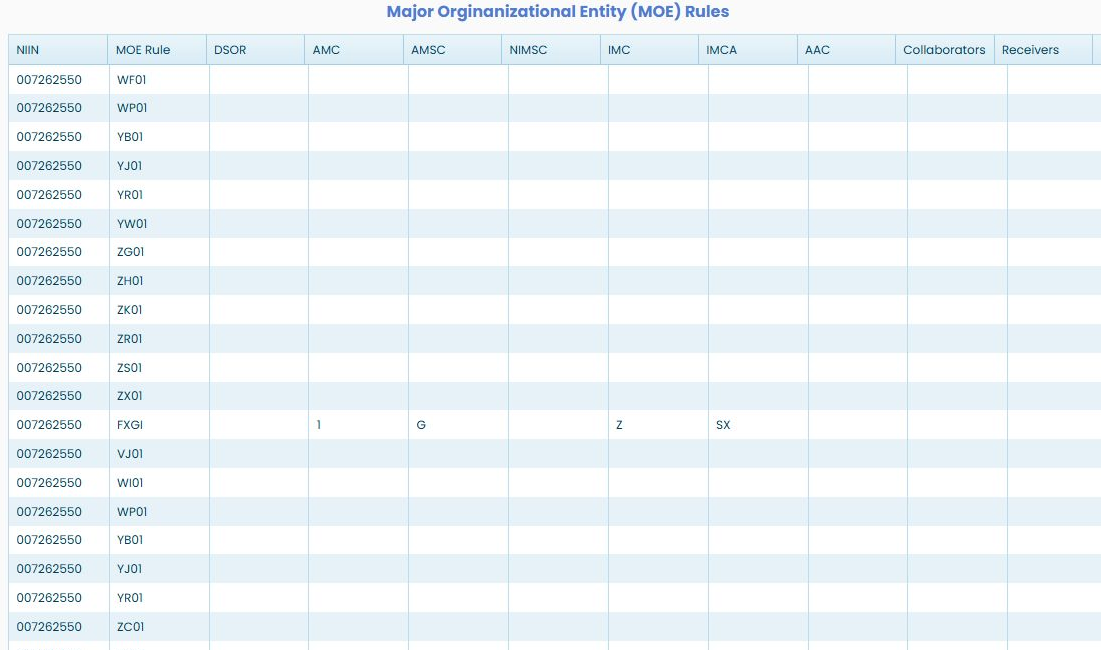
| MOE Rules | Read management and acquisition-code rows. |
| MCRL | Read part-number references and their codes. |
| Shipping | Read the item's freight and handling classification fields. |
| ML-C | Read management-list information, including unit of issue, source of supply and catalog price. |
| Inventory | Review dated stock and reorder-point information. |
| BackOrder | Review dated backorder and annual demand figures. |
| View Last Three Fiscal Year Totals For This Item | Open the market-analysis page with this stock number supplied. |
| View Drawings | Open the seven drawing-reference rows for this cap screw. Continue with Find drawings by stock number or drawing number. |
| Create Report | Open the combined on-screen report. See Create Report below. |
| New Search | Return to the stock-number search. |
| Back | Return to the preceding page. |
Review other item views
These views are also available from the same item page. The examples below were reached from Main Menu → Search by NSN/NIIN → enter 5305007262550 → Search, then selecting the named item button.
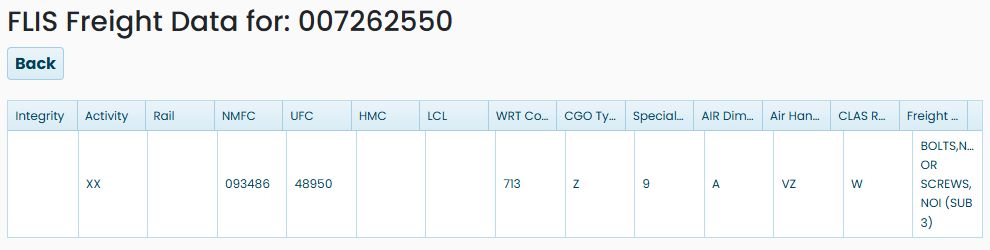
Shipping
Choose Shipping to view freight and handling classification information recorded for the item. The example displays one row with abbreviated headings and the description BOLTS, NUTS OR SCREWS. Read each value with its column heading; the short code values are not expanded here.
ML-C
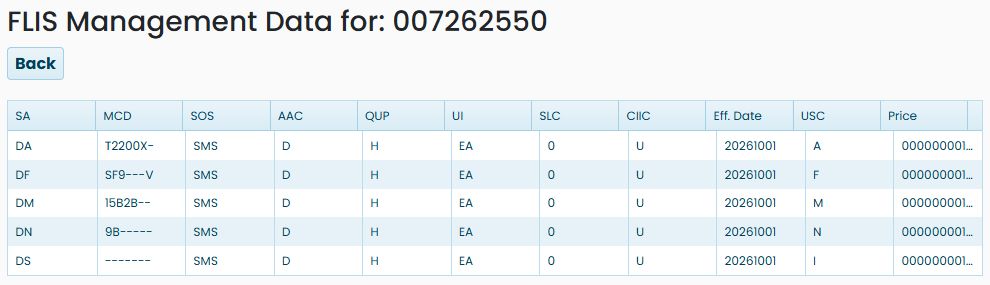
Choose ML-C to review the item's management-list entries. The cap-screw example shows five rows. Read each row using its headings; the same field can vary across rows, so keep the values together. These plain-language descriptions explain each field's role without decoding its displayed code.
| Field | What it describes |
|---|---|
| MCD | Management Control Data recorded for the row. Its positions can carry different service-specific values. |
| SOS | Source of Supply field used in supply routing; it does not show current stock or promise availability. |
| AAC | Acquisition Advice Code field. Check an approved code reference before interpreting its value. |
| QUP | Quantity per Unit Pack field. Check the applicable definition before using it to compare pack quantities. |
| UI | Unit of Issue field. Read it when comparing quantities or prices. |
| SLC | Shelf Life Code field. Do not infer a specific shelf-life rule from an unexplained value. |
| CIIC | Controlled Inventory Item Code field. Read the value with its approved definition. |
| Eff. Date | Effective-date value recorded with the management row. |
| USC | Using Service Code field. Read the value with its approved definition. |
| Price | Stored management-list price; it is not a current award or supplier quote. |
Substitutes
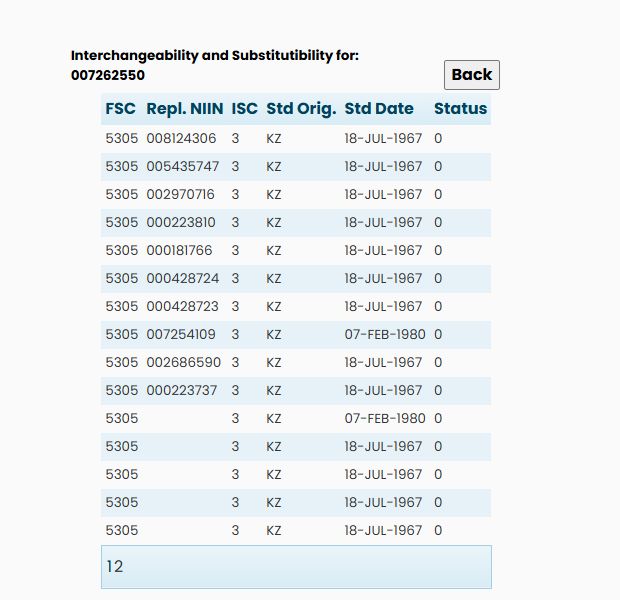
Choose Substitutes to review recorded replacement references for the item. The table displays Repl. NIIN, FSC, ISC, Std Orig., Std Date and Status. Keep those values together as one recorded relationship; the row does not itself establish that an alternate is acceptable for a particular solicitation.
Create Report
Choose Create Report to open a combined on-screen report for the selected item. Back returns to the item page. The report brings together FLIS Header, MCRL, ML-C, Award History, Technical Characteristics, Associated Documents, Interchangeability/Substitutibility and MOE Rules. The overview below shows the first three sections; scroll to review the sections that follow.
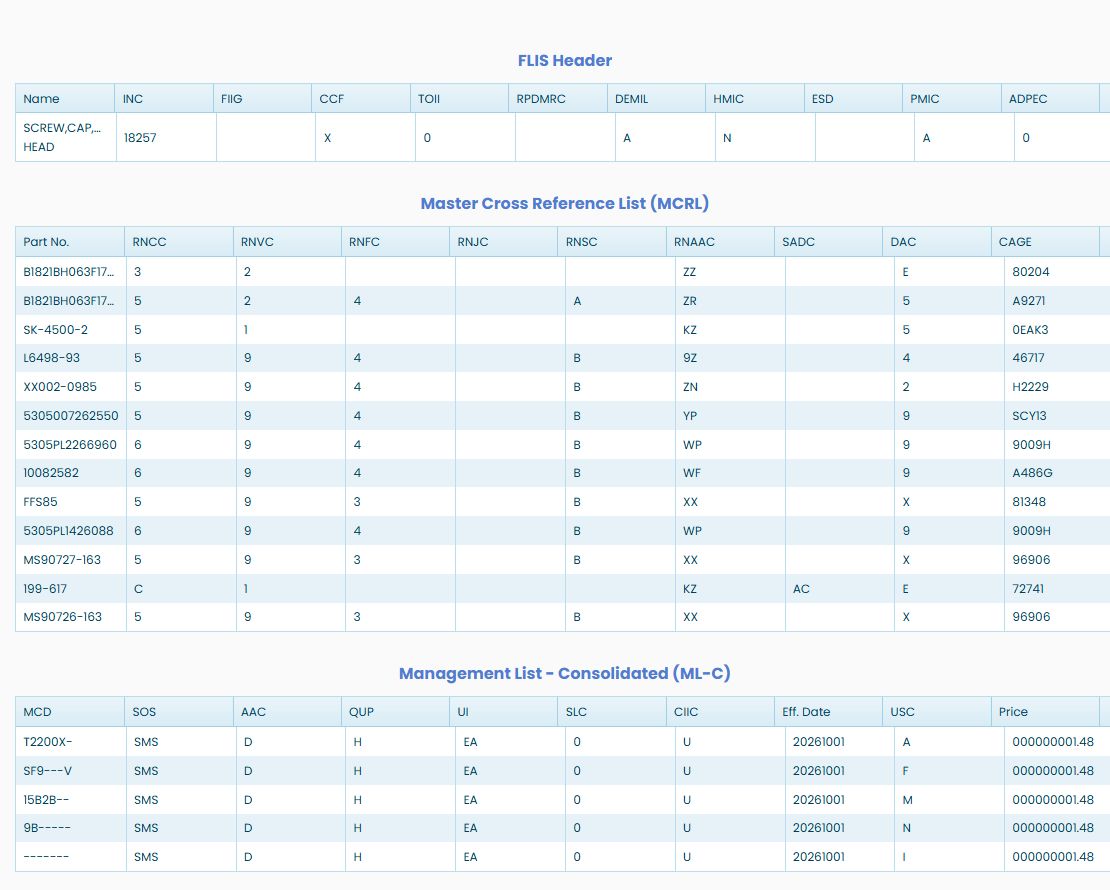
Use the catalog guide for FLIS Header and MCRL fields, the NSN awards guide for award rows, and the technical characteristics guide for item requirements. The ML-C fields describe management information for the row; its price is separate from the price in award history.
The following views continue the same report for NSN 5305007262550. The Award History and MOE illustrations show the column headings and first rows; scroll further in the report to see the remaining records.