Review stock and backorder history
Video sections for this page
Application path: Main Menu → Search by NSN/NIIN → enter 5305007262550 → Search → Inventory or BackOrder.
Use these two views to compare recorded stock and demand over time. Inventory shows stock and reorder-point information. BackOrder adds backorder and annual demand quantities. Both identify the item by its NIIN, 007262550, and date each row.
Example: compare stock across months
Open Inventory from the cap-screw item page. The example viewed October 21, 2026 contains 14 dated rows. The August 31, 2026 row shows 9,564 in Total_Stock; July 31 shows 9,756. Use Date_Stamp to keep each quantity with its reporting date.
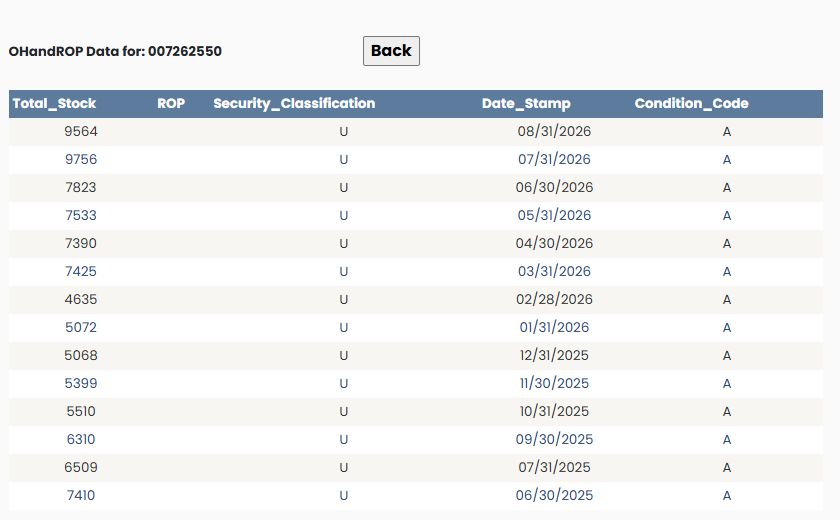
The ROP column is blank in this example. It does not give you a reorder-point figure; do not read that blank as a displayed zero.
Example: compare backorders with stock
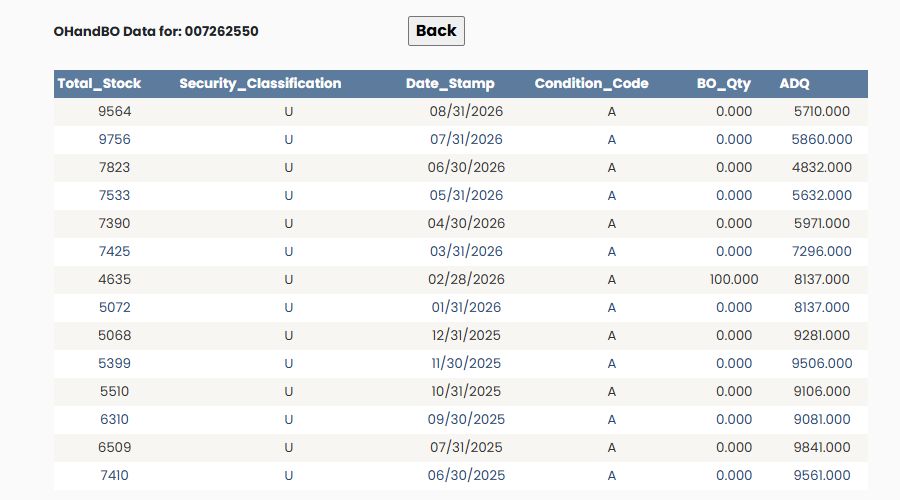
Choose Back, then BackOrder on the item page. The August 31 row shows BO_Qty 0.000 and ADQ 5710.000. Farther down, February 28 shows BO_Qty 100.000 alongside Total_Stock 4635 and ADQ 8137.000. This lets you see the recorded demand context for different dates.
What the fields mean
| Field | Where it appears | Meaning |
|---|---|---|
| Total_Stock | Both views | The recorded total stock quantity for the row's date. |
| ROP | Inventory | Reorder point: the stock-level planning figure, when supplied. |
| BO_Qty | BackOrder | The recorded backorder quantity. |
| ADQ | BackOrder | Annual demand quantity: the yearly demand planning figure. |
| Security_Classification | Both views | The classification code recorded with the row. |
| Date_Stamp | Both views | The date associated with the stock and demand information. |
| Condition_Code | Both views | The recorded stock-condition code. |
Read the figures as dated information, rather than today's availability to buy. These screens do not label a quantity unit. Use Back to return to the item. Neither view shows an Excel export control.
Related item research
Use NSN buying history to compare previous purchases, or technical characteristics to examine the item itself.