Find prospective teaming and subcontracting partners
Part of these button learning paths: Teaming/SubContractor Data · Agency Profiles/Forecasting
Video sections for this page
- 0:00 — Open Teaming/SubContractor Data
- 0:12 — Set the search criteria
- 0:34 — Locate 15 LIGHTYEARS in the matches
- 0:58 — Read the partner-result columns
- 1:19 — Confirm the company profile
- 1:44 — Choose the federal award-history route
- 2:10 — Read the displayed award record
- 2:44 — Note the award-table controls
Application path: Main Menu → Teaming/SubContractor Data → enter criteria → Search Contractors → View Details.
Use this route to find companies with relevant buying-history connections, then examine a potential partner's profile and awards. A search result is a starting point for research; compare the company's experience with the work you need covered.
Example: electrical contractors in Florida
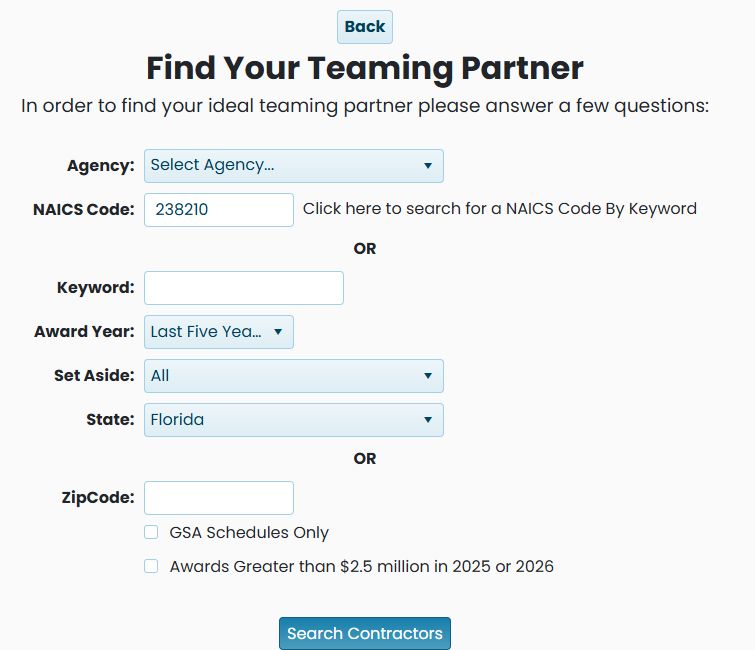
Enter 238210 in NAICS Code, select Florida under State, and leave Award Year at Last Five Years and Set Aside at All. Leave the keyword, ZIP and optional checkboxes blank. Choose Search Contractors.
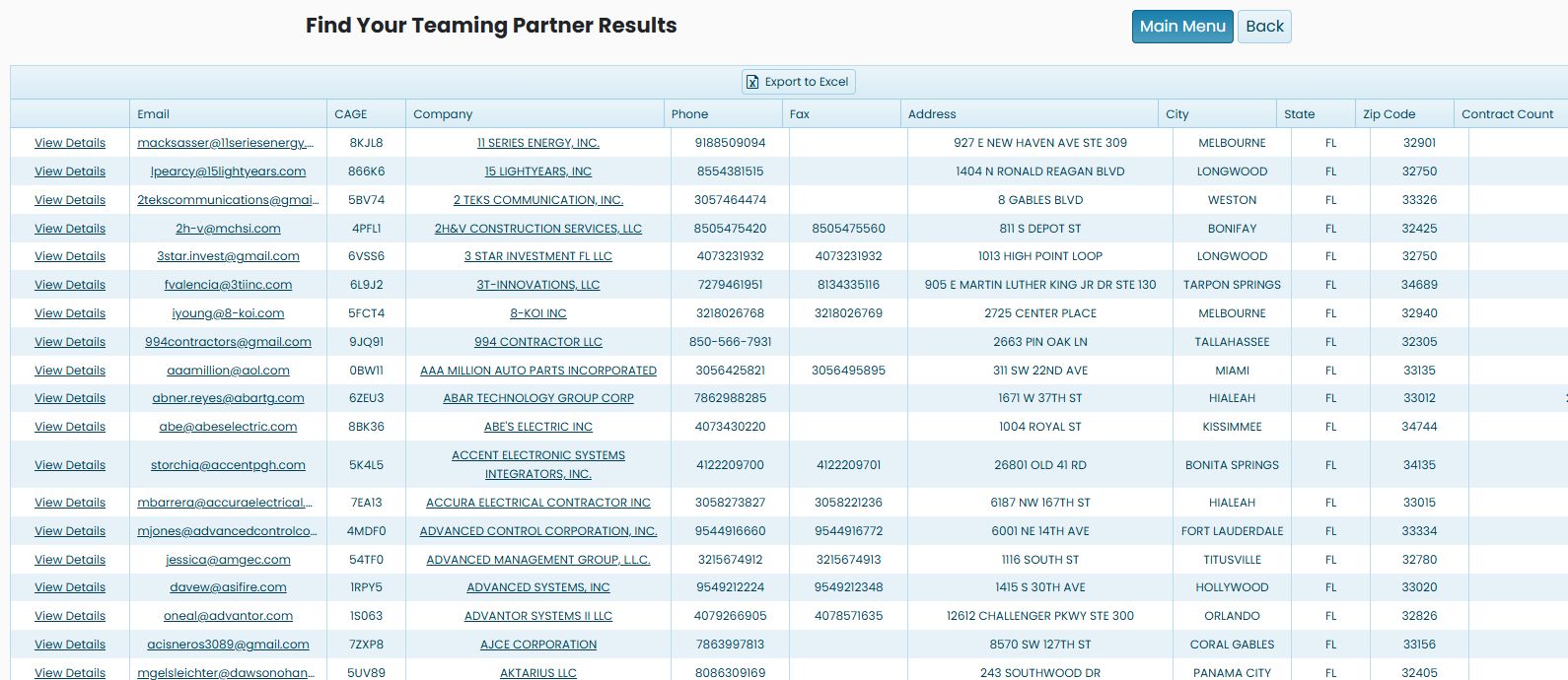
The October 21, 2026 example returns 277 matches, with 50 displayed on the first page. One row is 15 LIGHTYEARS, INC, CAGE 866K6, in LONGWOOD, FL 32750, with a displayed Contract Count of 6. A later run with the same criteria on October 22 showed 280 matches.
Choose useful search criteria
| Field | Purpose |
|---|---|
| Agency | Narrow the search to a government buying organization. |
| NAICS Code | Identify the industry you want a partner to serve. The keyword lookup helps find the appropriate code. |
| Keyword | An alternative to the NAICS entry for describing the work. The form separates these choices with OR. |
| Award Year | Select the award period to research. The default is Last Five Years. |
| Set Aside | Narrow to the displayed business category. |
| State | Select a geographic area. |
| ZipCode | An alternative location entry, separated from State by OR. Keep leading zeros. |
| GSA Schedules Only | Restrict the search to companies with GSA Schedule information. A GSA Schedule is a purchasing contract used by government buyers to acquire covered products or services. |
| Awards Greater than $2.5 million in 2025 or 2026 | Apply the award-size condition stated on the form. Read the years on the current screen. |
Build a valid search
| Field or control | Meaning and useful choice |
|---|---|
| Search Contractors | Runs the selected company/award search and opens its result page. |
| DOD SubContracting to Excel / Federal SubContracting to Excel | Opens separate reference workbooks, not this search's results. See how to read the subcontracting workbooks. |
| Back | Returns through browser history. |
Read the company results
| Field or action | Meaning and next step |
|---|---|
| View Details | Opens the company detail, normally by CAGE. Confirm the entity and current registration there; see the company result and profile guide. |
| Export To Excel | Downloads the matching company results for review in Excel. |
| Worksheet heading | What it tells you |
|---|---|
| Contact | Name of the contact recorded for the company. |
Read the matches
View Details opens the company's application profile. Email is the listed contact address; selecting it opens an email action. CAGE identifies the company. Company names it and may link to its website. Phone, Fax, Address, City, State and Zip Code provide contact and location information. Contract Count is the count displayed for that company in these search results.
The grid provides sortable column headings and page controls. Export to Excel sits above the results. Use Back to change the search or Main Menu to return to other searches.
Export the matching companies
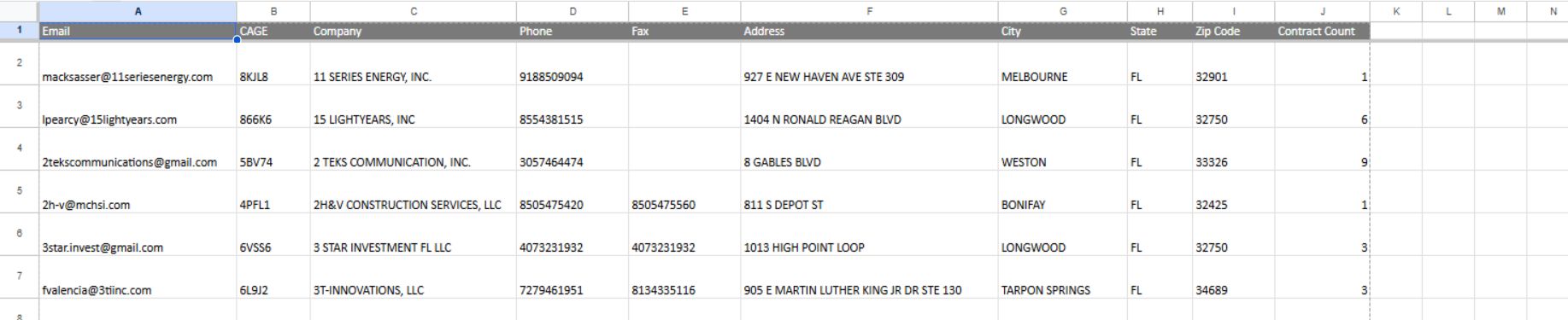
In the October 22, 2026 run, the pager showed 1–50 of 280 items. Choose Export to Excel above the results to download the full list. The reviewed export has 280 data rows and ten fields; it omits the result row's View Details action. The screenshot shows all ten headings and the first six rows:
| Export field | What it shows |
|---|---|
| The listed contact email. | |
| CAGE | The company's CAGE identifier. |
| Company | The company name. |
| Phone | The listed telephone number. |
| Fax | The listed fax number, when present. |
| Address | The listed street address. |
| City | The city in the listed address. |
| State | The state abbreviation. |
| Zip Code | The ZIP code in the listed address. |
| Contract Count | The count displayed for that company in this search. |
The first row is 11 SERIES ENERGY, INC., CAGE 8KJL8. The next row is 15 LIGHTYEARS, INC., CAGE 866K6, with a Contract Count of 6. These records illustrate the exported fields; verify current contact details before using them.
Follow the company into award research
Choose View Details on the 15 LIGHTYEARS row. Vendor / CAGE Detail View displays a two-column Detail / Information grid with the company name, address, contact details and CAGE. Confirm 866K6 before continuing.
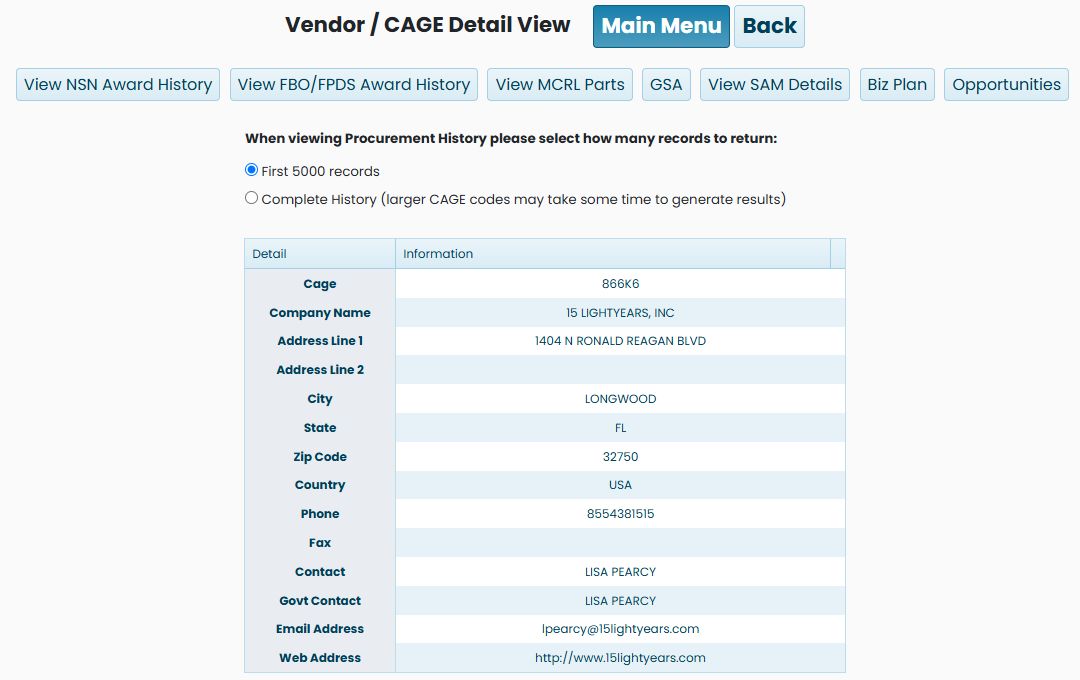
The profile provides buttons for View NSN Award History, View FBO/FPDS Award History, View MCRL Parts, GSA, View SAM Details, Biz Plan and Opportunities. The procurement-history choice defaults to First 5000 records; Complete History is the alternative shown beneath the buttons.
Choose View FBO/FPDS Award History. In this example the next screen shows 80NSSC26P1093, REPLACE 5KW OFF-GRID SOLAR PHOTOVOLTAIC (PV) ARRAY, for $70,871.43, awarded 07/27/2026 with an estimated completion date of 10/25/2026. This is a specific example of work the company has performed.
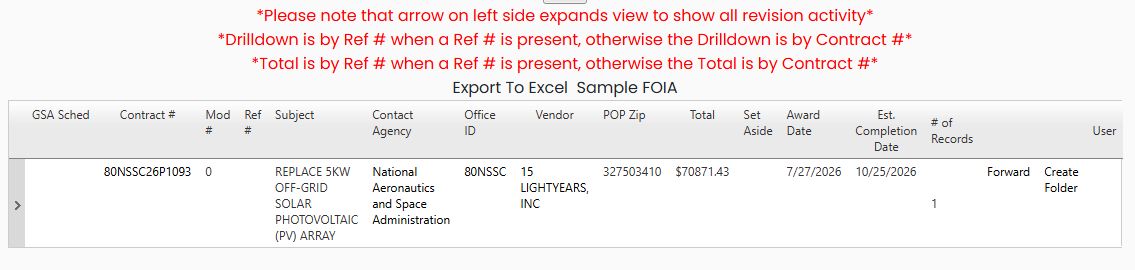
The award screen has its own display and scope. Read the rows and dates shown there rather than expecting its visible rows to equal the count from the earlier partner search. Continue with the award-results guide for the contract, modification, office, vendor and expansion controls.
Separate subcontracting workbooks
The search form also provides DOD SubContracting to Excel and Federal SubContracting to Excel. These open the same two static workbook resources available from Agency Profiles/Forecasting; see the Agency Profiles workbook guide for their separate worksheet fields and examples. They are different from exporting the criteria-based teaming-partner result grid above, and do not export its matching companies.