My Government RoadMap
Part of these button learning paths: My Government RoadMap
Application path: Main Menu → My Government RoadMap.
The roadmap puts several kinds of research beside each industry classification. Start with a row relevant to your work, then compare the displayed figures. The examples below show the agency and supplier breakdowns.
Read the industry row
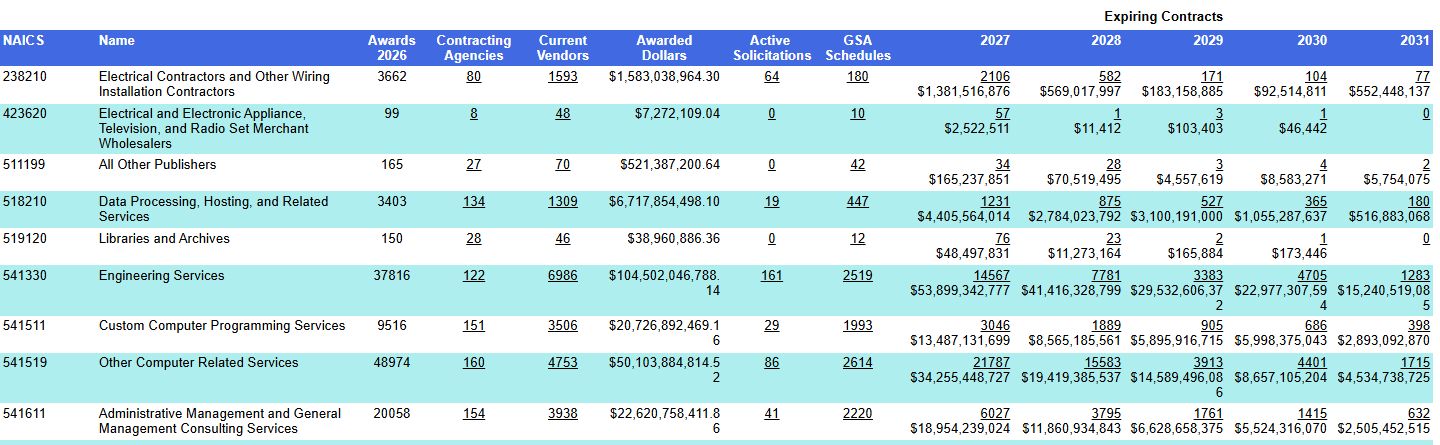
In this October 21, 2026 example, 238210 — Electrical Contractors shows 3,662 awards, 80 contracting agencies, 1,593 current vendors and 64 active solicitations. These are the figures displayed for this example; results can change as records are updated.
| Field | Meaning and reason to use it |
|---|---|
| NAICS | The industry classification code for the row. |
| Name | The description of that industry. |
| Awards 2026 | The displayed award count for the year in the heading. |
| Contracting Agencies | The number of buying agencies. Open the count to see which agencies are listed. |
| Current Vendors | The displayed supplier count. Open it to identify companies and investigate their profiles. |
| Awarded Dollars | The displayed dollar total for the row. |
| Active Solicitations | The count of currently listed solicitations. |
| GSA Schedules | The displayed GSA schedule count. A GSA schedule is a contract arrangement through which government buyers can purchase listed products or services. |
| Expiring Contracts, by year | Each year pairs the count of expiring contracts with their dollar amount. Use the year headings to distinguish the periods. |
Company information
| Field | What it means |
|---|---|
| Company name | The company whose RoadMap you are viewing. |
| CAGE | Its five-character company/facility identifier. |
| Address | The company's listed business location. |
Review contracts expiring in a selected year
In the 238210 — Electrical Contractors row, select the displayed 2,241 for 2027 under Expiring Contracts. The link opens an Award History action list. In this example, 2027 is the selected expiration year; the first action has an Award Date of September 21, 2026 and an Est. Completion Date of January 1, 2027. The report says Only the first 5000 records are displayed; that notice is a display limit, not the displayed roadmap count or a confirmation of the total number of matching actions.
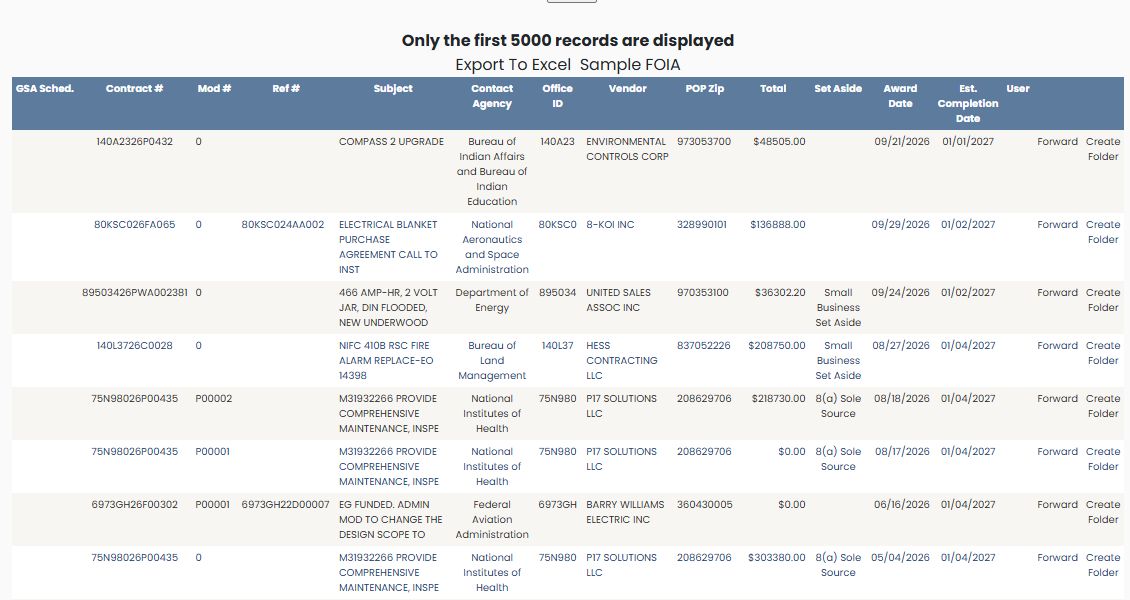
The first row is contract 140A2326P0432, modification 0, subject COMPASS 2 UPGRADE, with total $48,505.00. The list also shows the buying agency and office, vendor, place-of-performance ZIP, set-aside, dates, and row actions. See Follow an award search into its related actions for the matching Award History field explanations. Browser Back returned to the RoadMap.
Review companies with GSA Schedules
In the 238210 — Electrical Contractors row, select the displayed 180 under GSA Schedules. The report lists Cage and Vendor Name and shows a page indicator; the observed example is page 1 of 4. Cage identifies the company record, and Vendor Name gives the displayed company name.
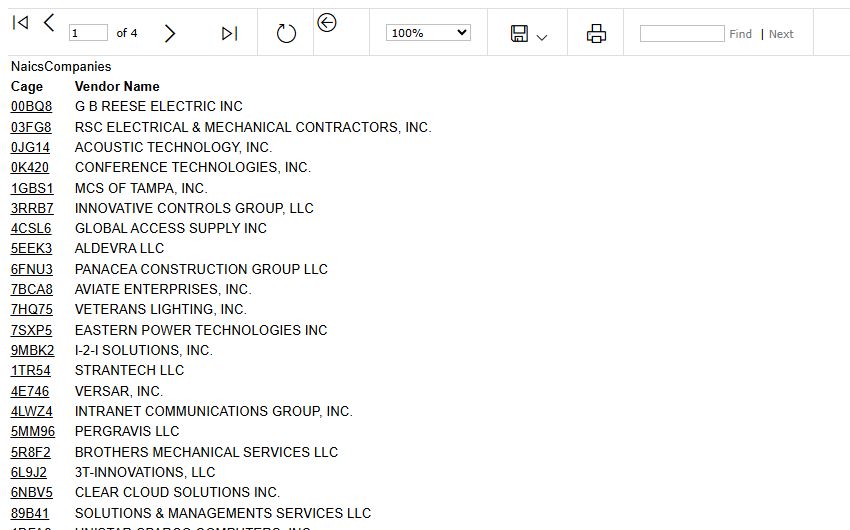
Select 6L9J2 to open the 3T-INNOVATIONS company profile. The profile offers the same company research buttons described in the company profile guide; this example reaches that profile from the classic GSA report table. Browser Back returned to the GSA report.
See which agencies buy this work
- Locate 238210 — Electrical Contractors.
- Select 80 under Contracting Agencies.
- Read the agency breakdown.
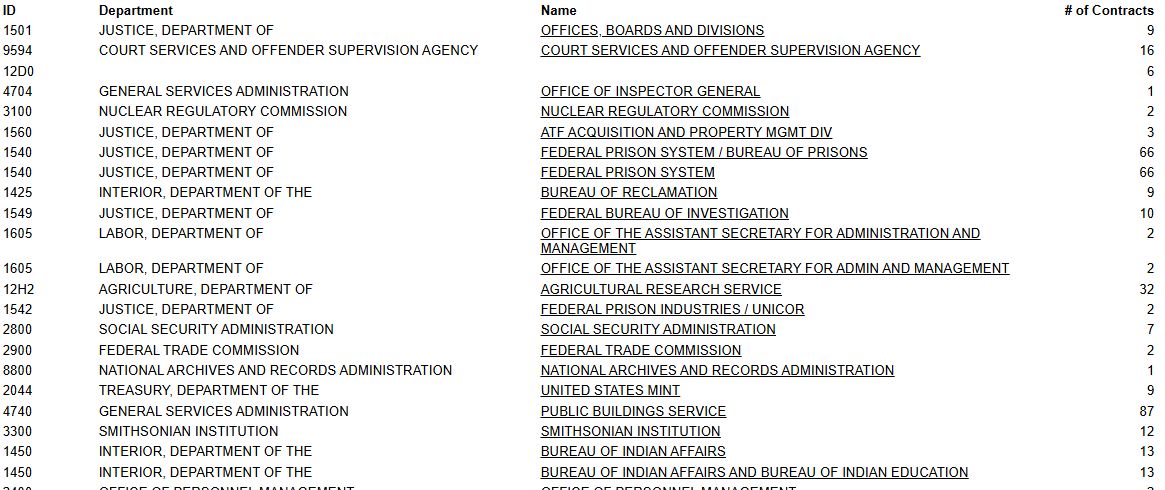
The breakdown lists ID, Department, Name and # Contracts. The department identifies the parent organization; the name identifies the listed agency. The count shows its displayed contracts for this research route. Agency names appear as links.
Follow an agency to its offices
In a later view of the same 238210 route, the Contracting Agencies link showed 84; select it to open the agency breakdown. Choose BUREAU OF LAND MANAGEMENT in the Name column. The resulting office report displays CODE, Name, ADDRESS, CITY, STATE and ZIP CODE. The viewer shows 1 of 5 pages for this report.
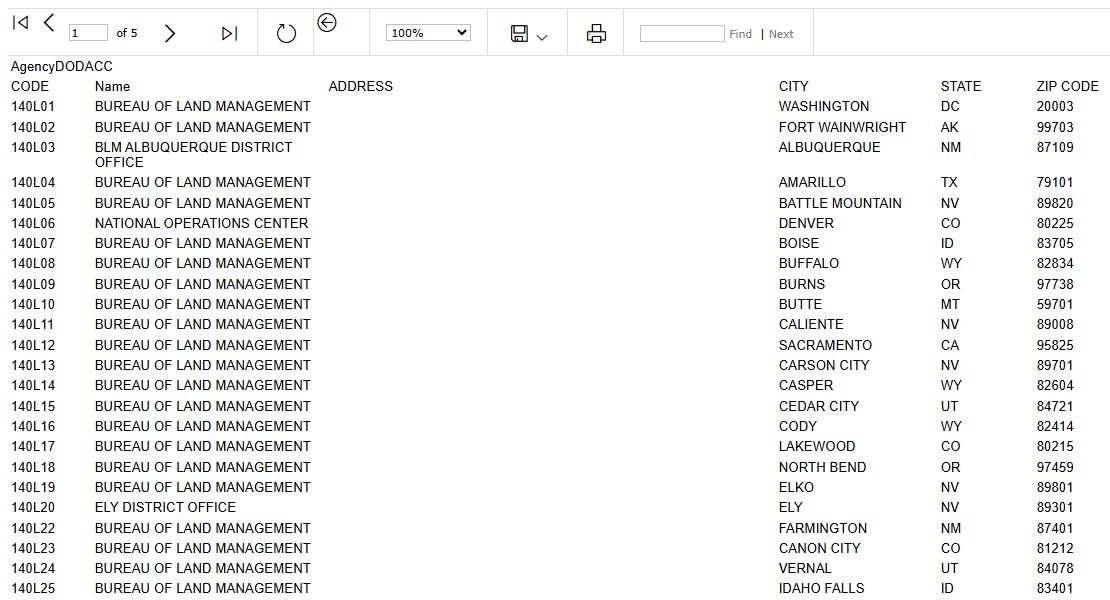
CODE is the identifier shown for an office row; Name is its listed office or component. The remaining fields give the recorded address and location. The first row is code 140L01, Bureau of Land Management, Washington, DC 20003. Another row is 140L03, BLM Albuquerque District Office, Albuquerque, NM 87109. ADDRESS is blank in these displayed rows, so use the populated city, state and ZIP as shown rather than treating a blank street address as verified contact information. The change from 80 agencies in the earlier example to 84 in this later view reflects the displayed counts at each observation; this guide does not equate those counts with the office-report rows.
Use the viewer's Next Page arrow to continue the office list; the observed example advanced to 2 of 5 pages. Browser Back returned to the 238210 agency breakdown.
Find suppliers and open a company profile
- Return to the roadmap.
- Select 1,593 under Current Vendors in the same row.
- Review Cage, Vendor Name, Award Total and # of Contracts.
- Select a company's CAGE to open its Vendor / CAGE Detail View. For example, 00BQ8 opens G B REESE ELECTRIC INC.
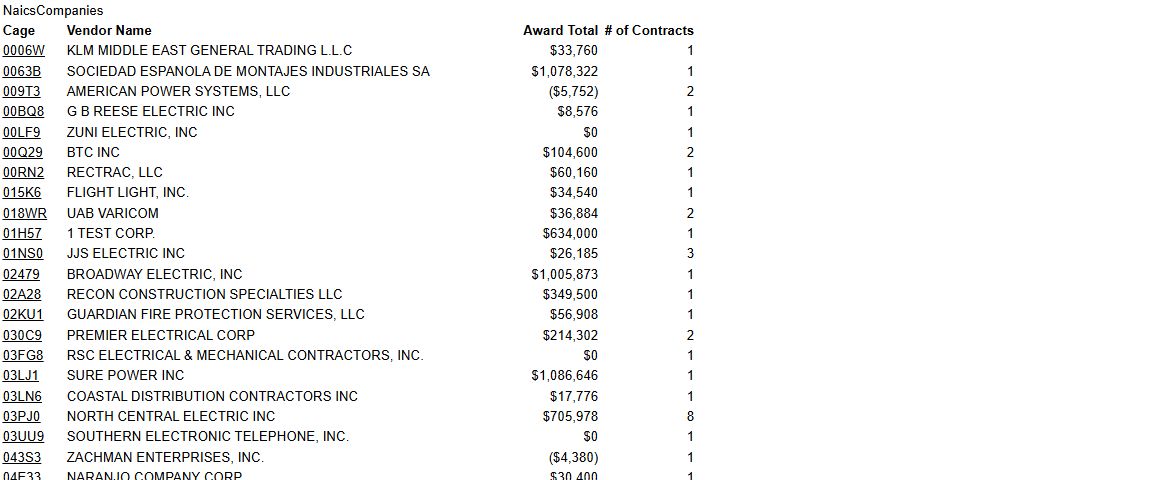
The company list lets you move from an industry overview to individual supplier research. Award Total is the dollar amount displayed for that company in the report; # of Contracts is its displayed count. The opened profile provides company and contact details together with buttons for award history, parts and other research. See the contractor research example for the company-to-award-history route.