Read a company's GSA Schedule worksheet
Video sections for this page
Video sections for this page
Application path: Main Menu → My Government RoadMap.
The roadmap puts several kinds of research beside each industry classification. Start with a row relevant to your work, then compare the displayed figures. The examples below show the agency and supplier breakdowns.
Review companies with GSA Schedules
In the 238210 — Electrical Contractors row, select the displayed 180 under GSA Schedules. The report lists Cage and Vendor Name and shows a page indicator; the observed example is page 1 of 4. Cage identifies the company record, and Vendor Name gives the displayed company name.
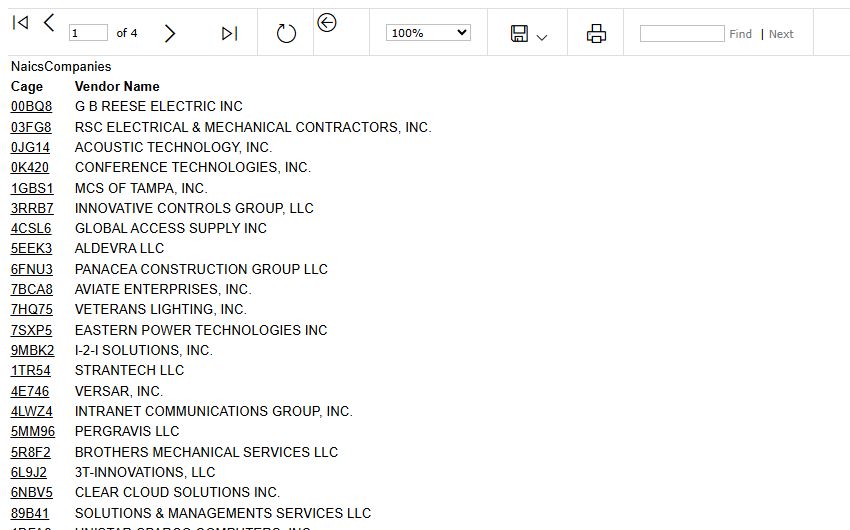
Select 6L9J2 to open the 3T-INNOVATIONS company profile. The profile offers the same company research buttons described in the company profile guide; this example reaches that profile from the classic GSA report table. Browser Back returned to the GSA report.
Example: read a GSA contract
From the 6L9J2 profile, select GSA. The example displays contract GS-35F-528GA for 3T-INNOVATIONS, LLC.
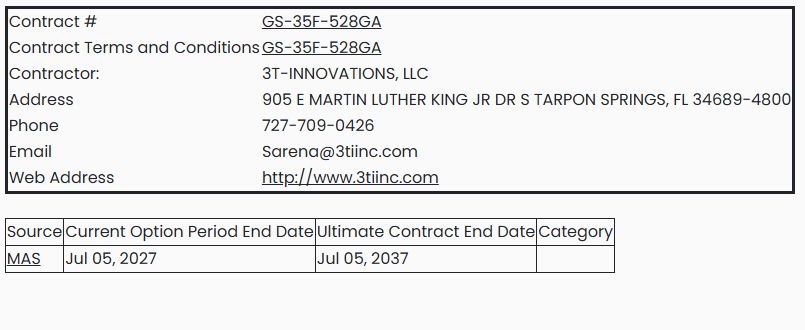
A GSA Schedule is a contract through which government buyers can purchase covered products or services. This page helps you identify the company's contract and follow its published details.
| Displayed field or link | Meaning and use |
|---|---|
| Contract # | The GSA contract identifier. Its link leads to that contract's GSA eLibrary entry. |
| Contract Terms and Conditions | The link to the contract's published terms and conditions. |
| Contractor / Address / Phone / Email / Web Address | The company and contact information shown with this contract. |
| Source | The source label shown with the contract. This example displays MAS; use the contract link for its published details. |
| Current Option Period End Date | The end date displayed for the current option period: July 5, 2027 in this example. |
| Ultimate Contract End Date | The displayed final contract end date: July 5, 2037 here. |
| Category | A category value when supplied; the example's cell is blank. |
Use the contract and terms links to check the scope relevant to your research. The presence of a GSA button on a profile does not by itself tell you what contract information will be returned.