Evaluate recorded substitute items
Part of these button learning paths: Just My Opportunities · Machine Shops Opportunities · Unfulfilled NSN Opportunities · Search by NSN/NIIN · APL/AEL Historical · DLA Prime Contractors · Commercial Part Number to NSN · Weapons System Designator Codes
Video sections for this page
Video sections for this page
Video sections for this page
Video sections for this page
Application path: Main Menu → Search by NSN/NIIN → enter the number → Search.
Use this search when you have a stock number and want its identity, technical details, reference parts or buying history. Enter the full 13-digit NSN or its 9-digit NIIN. Keep leading zeros.
Substitutes
Choose Substitutes to review recorded replacement references for the item. The table displays Repl. NIIN, FSC, ISC, Std Orig., Std Date and Status. Keep those values together as one recorded relationship; the row does not itself establish that an alternate is acceptable for a particular solicitation.
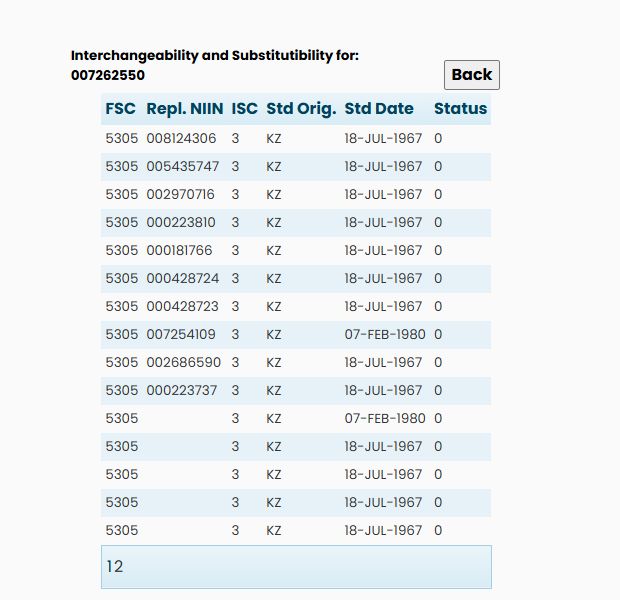
How to get here and continue
| Field | Meaning and why to check it |
|---|---|
| FSC | Federal Supply Class shown for the relationship. Read it with the original NSN and replacement NIIN when following the row. |
| Repl. NIIN | Last nine characters of the recorded replacement NSN. When populated, its link is intended to open the replacement's item summary. Preserve leading zeros and compare the full resulting NSN. A blank linked cell is not an usable replacement identifier. |
| ISC | Item Standardization Code. The displayed code needs its applicable official value table before it can be interpreted as a substitution decision. |
| Std Orig. | Stored origin code for the standardization decision. The page does not expand the code. |
| Std Date | Stored decision date, shown in the original encoding. It dates the recorded decision, not a current procurement approval. |
| Status | Stored NIIN status code. It does not establish current stock, approved-source status or permissibility under a notice. |
Buying example
A substitute row identifies a recorded relationship; it does not itself approve an alternate for the current purchase. Compare the original and replacement identifiers, technical requirements and the solicitation’s alternate-item terms. Ask the buyer for clarification when those terms do not establish whether your proposed item is acceptable.