Find a part by NSN or NIIN
Part of these button learning paths: Unfulfilled NSN Opportunities · Search by NSN/NIIN
Video sections for this page
Video sections for this page
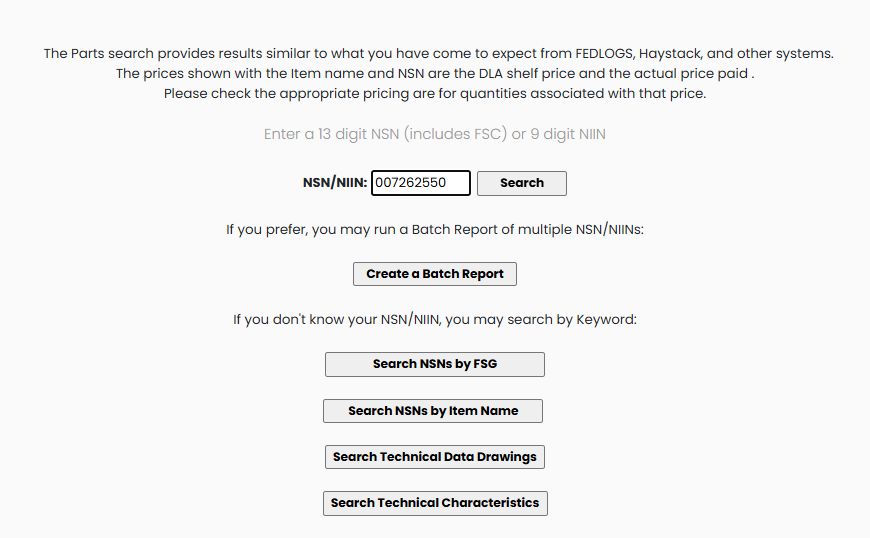
Application path: Main Menu → Search by NSN/NIIN → enter the number → Search.
Use this search when you have a stock number and want its identity, technical details, reference parts or buying history. Enter the full 13-digit NSN or its 9-digit NIIN. Keep leading zeros.
Example: find a cap screw
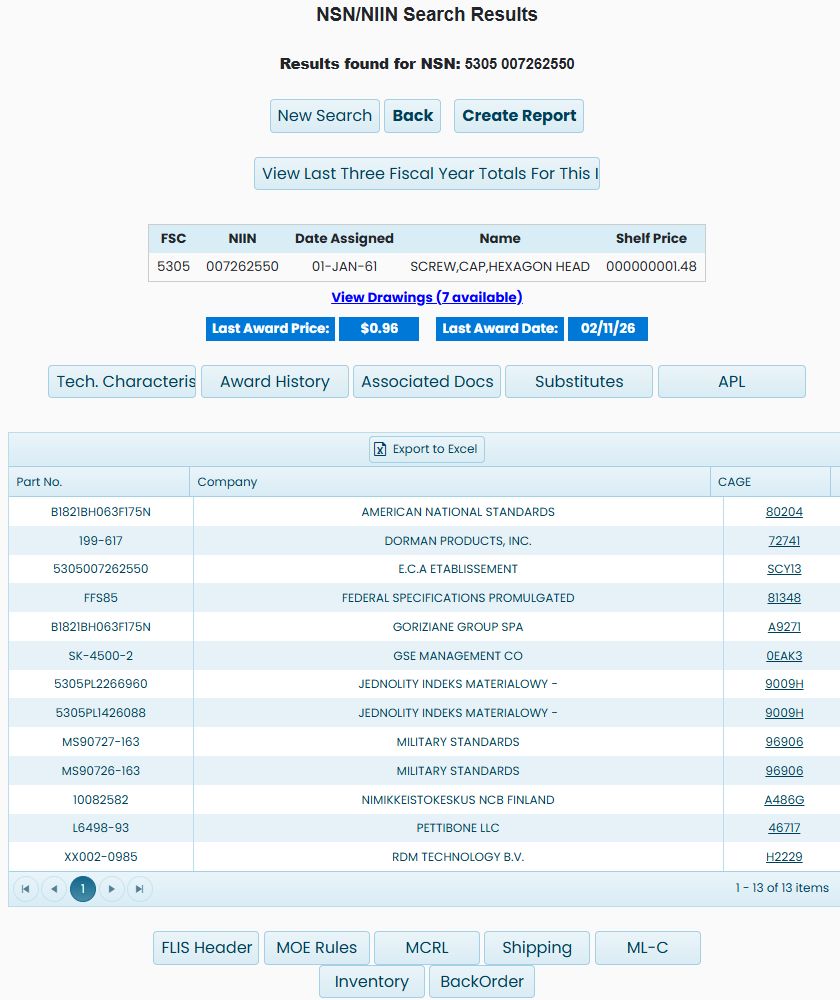
Enter 5305007262550 or its nine-digit NIIN 007262550, then choose Search. Both verified searches identify SCREW,CAP,HEXAGON HEAD; the NIIN search returns full NSN 5305007262550. The item page is titled NSN/NIIN Search Results. Confirm the displayed name before continuing.
You can reach the same item through NSN Opportunities: select the NSN in the opportunity list, then select it again in the solicitation results. Once you reach the item page, its research buttons work with that selected item.
The complete item page below shows the identity, price fields, reference-parts list and research buttons for the same NSN.
Choose a starting route
| Button or entry | Use it when |
|---|---|
| NSN/NIIN and Search | You know the stock number. Enter the full 13-digit NSN or its 9-digit NIIN, retaining leading zeros, then confirm the item name on the result. |
| Create a Batch Report | You have multiple stock numbers. Continue with the batch input guide for the list format and report choices. |
| Search NSNs by FSG | You know the product family and want to narrow group, class and item-name terms. See the supply-group workflow. |
| Search NSNs by Item Name | You know the item's name rather than its number. Use the item-name search and compare the matching identifiers. |
| Search Technical Data Drawings | You need a drawing reference. The drawing search offers stock-number and drawing-number routes. |
| Search Technical Characteristics | You want items that meet recorded requirements. Use the characteristics search to choose descriptive replies and narrow the matching NSNs. |
Find a number when you know the product instead
From the starting Search by NSN/NIIN screen, Search NSNs by Item Name opens Keyword to NSN Search. Enter SCREW,CAP,HEXAGON HEAD and choose Search. The example returns a paged table of item names and NSNs. Many stock numbers share that name, so the name alone does not identify a particular size or specification. Page-number links below the list show additional matches.
For a guided classification search, choose Search NSNs by FSG from the starting screen:
- Select 53 - Hardware and Abrasives and choose Show FSCs.
- Select 5305 - Screws and choose Show Term(s).
- Select SCREW in the first term list, then Search 1st Term.
- Select CAP in the next list, then Search 2nd Term.
- Select HEXAGON HEAD in the third list, then Search 3rd Term.
- The NIIN list contains matching numbers, including 007262550. Use the number in the direct search above to inspect the item and its technical characteristics.
FSG is the broad Federal Supply Group; FSC narrows it to a Federal Supply Class. The term lists narrow the product description in stages. Disabled lists become available as you complete the preceding step.