Find businesses in a local market
Video sections for this page
- 0:00 — Open Commercial Prospecting
- 0:14 — Set the market and industry
- 0:34 — Include the hospital table
- 0:50 — Read the contractor results
- 1:16 — Identify the visible company actions
- 1:28 — Read the separate hospital table
- 1:48 — Locate Mease Countryside Hospital
- 2:02 — Compare Tampa General Hospital
- 2:19 — Choose the contractor export
- 2:25 — Read the contractor worksheet
- 2:43 — Choose the hospital export
- 2:49 — Read the hospital worksheet
Application path: Main Menu → Commercial Prospecting.
Use Commercial Prospecting to build a list of businesses in a geographic area, then inspect individual company profiles. Start with the market you serve and the kind of business you want to find.
Example: electrical businesses around Oldsmar
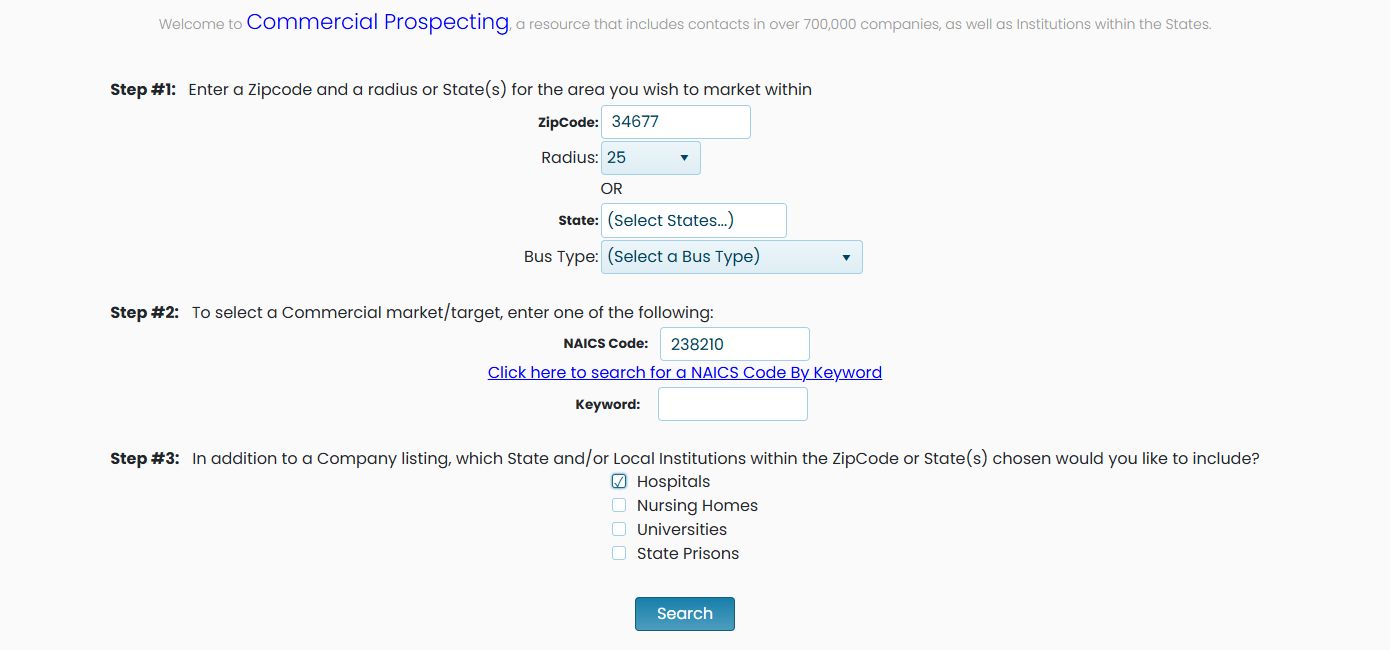
- Enter 34677 in ZipCode and retain radius 25.
- Enter 238210 in NAICS Code.
- Leave Keyword, State and Bus Type unselected, and the institution checkboxes clear.
- Select Search.
This example returned 849 items on October 21, 2026. The Commercial Contractors grid showed 50 rows on its first page. Counts can change as the data changes.
Choose your criteria
| Field | Meaning and use |
|---|---|
| ZipCode and Radius | The starting ZIP and surrounding area for a local prospect list. |
| State | An alternative to ZIP/radius when you want a state-based market. The control allows state selections. |
| Bus Type | A business-type restriction for your target list. |
| NAICS Code | The industry classification. 238210 identifies electrical contractors and other wiring installation contractors. |
| NAICS keyword lookup | Helps find a classification when you know the type of work but not its code. |
| Keyword | A text alternative for describing the commercial market you want to search. |
| Hospitals / Nursing Homes / Universities / State Prisons | Optional institution groups to include for the selected area. |
Include institutions alongside companies
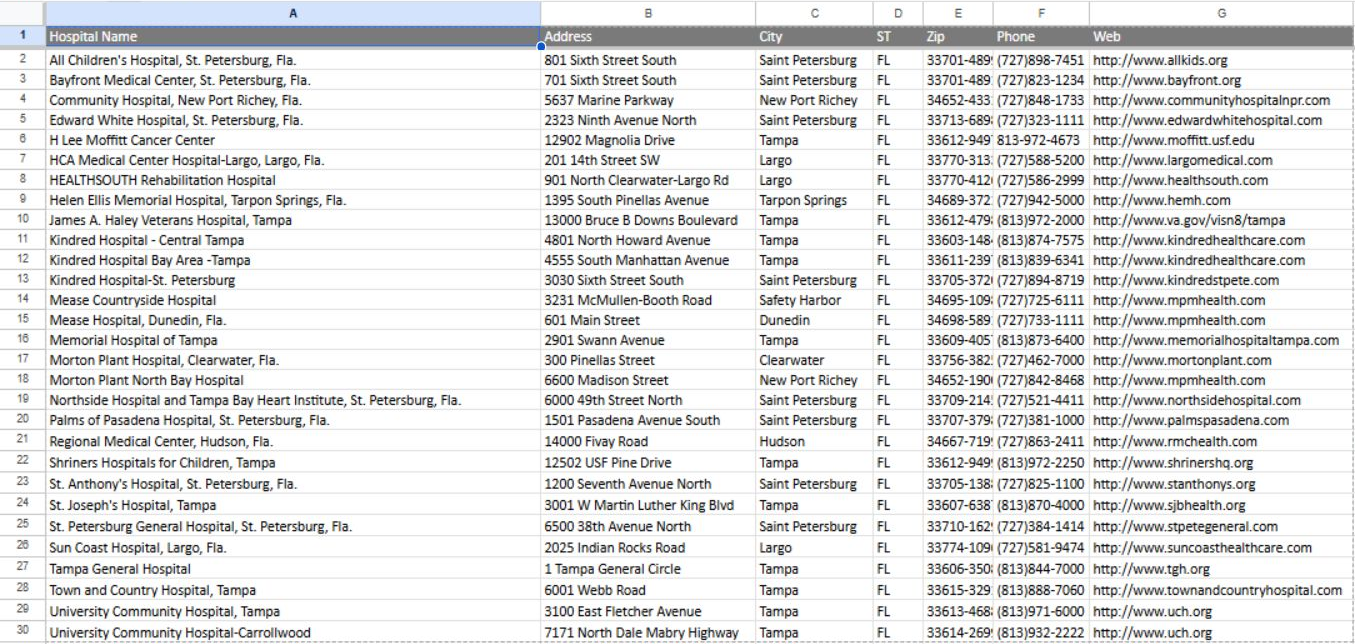
Repeat the 34677 / radius 25 / NAICS 238210 example, but select Hospitals before Search. The result contains a Commercial Contractors grid followed by a separate Hospitals table. In the October 21 example, the hospital table contained 29 rows, including Mease Countryside Hospital in Safety Harbor and Tampa General Hospital in Tampa. These are separate institution records, not electrical-contractor rows.
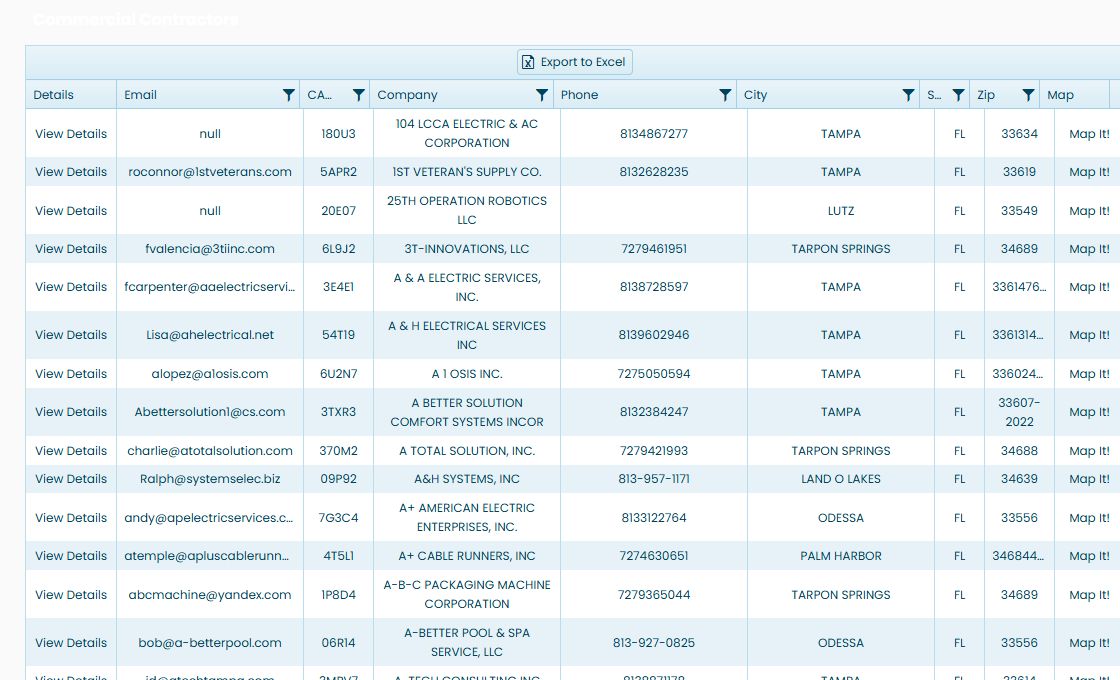
The hospital table shows Hospital Name, Address, City, ST, Zip, Phone and Web. Use these to identify the institution, its listed location and contact details. Web opens its listed website. Each section has its own Export to Excel button; choose the button for the list you want.
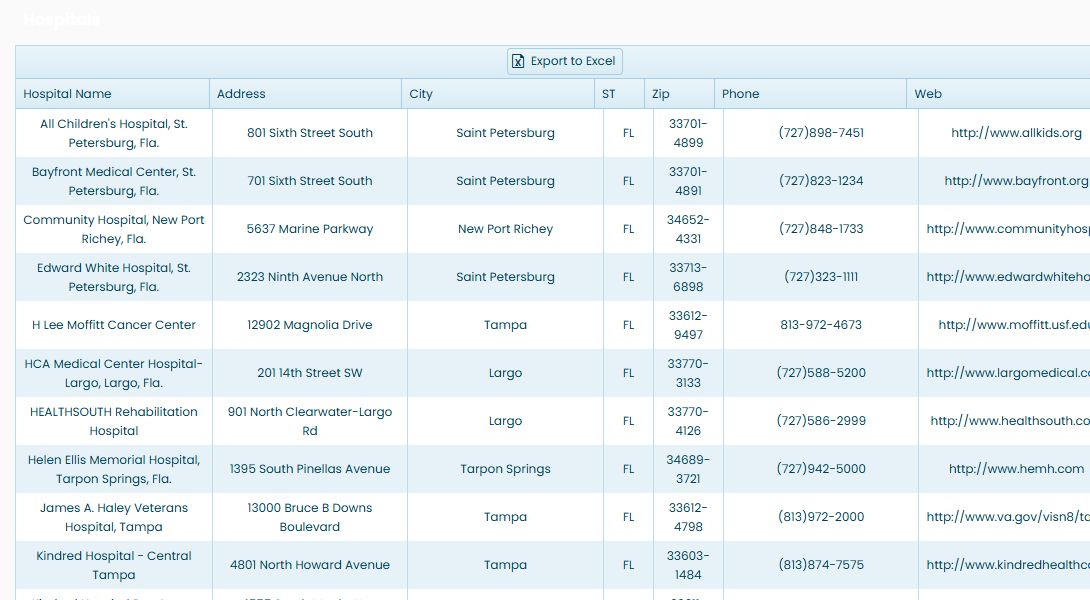
For example, the hospital rows show Mease Countryside Hospital and Tampa General Hospital with their listed locations and contact details.


Read and use the company results
| Column | Meaning and next action |
|---|---|
| Details | View Details opens the company's Vendor / CAGE Detail View. |
| The listed business contact email. | |
| CAGE | The company's five-character identifier. |
| Company | Business name; a website link is shown where supplied. |
| Phone | Listed business telephone number. |
| City / ST / Zip | The business location shown in the record. |
| Map | Map It! is the location link. |
Use the numbered pages or next/previous controls to move through the list. The grid also displays column filter icons, sortable headings and Export to Excel.
For example, choose View Details beside ALL PHASE ELECTRIC & MAINTENANCE, INC., CAGE 6HP50. Its profile shows the company in Tampa, Florida, with address and contact fields. The research buttons provide routes to NSN awards, federal awards, MCRL parts, GSA information, SAM details, a business plan and opportunities. The contractor research example follows a company into its federal award history, and the registration-field reference explains SAM detail fields.
Export the company or hospital list
In the 34677 / radius 25 / NAICS 238210 search with Hospitals selected, each result section has its own Export to Excel button. Use the button above Commercial Contractors for companies, or the button above Hospitals for institutions. The two downloads have different columns.
The observed company download, Export (7).xlsx, has 50 rows and seven columns on Sheet1: Email is the listed contact address; CAGE identifies the company record; Company is its name; Phone is the listed telephone number; and City, ST and Zip are its location fields.
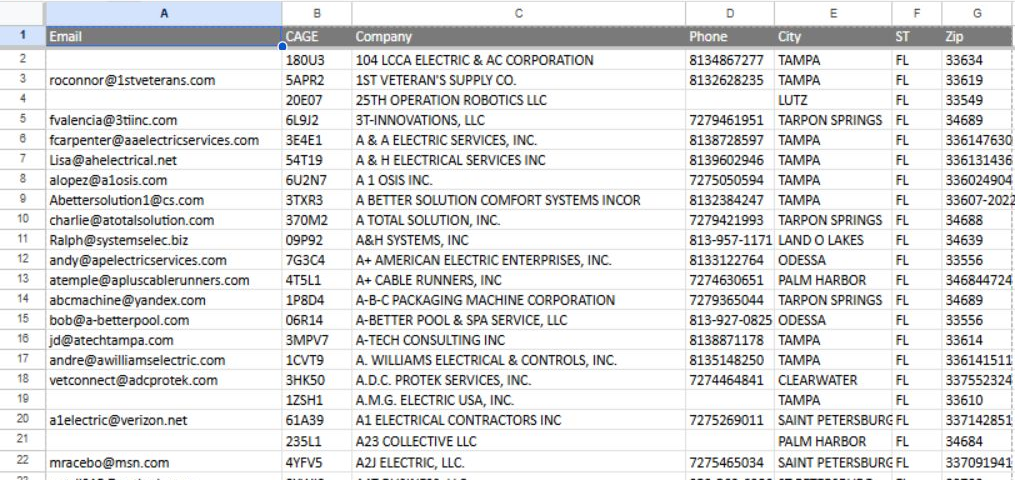
The on-screen company grid reported 849 matches, while this actual download contained 50 rows. Do not treat this workbook as an export of all 849 matches. The observed row count matches the grid's first-page size; behavior for exporting later pages or the entire result set was not established.
The observed hospital download, Export (8).xlsx, has 29 rows and seven columns on Sheet1: Hospital Name names the institution; Address, City, ST and Zip give its listed location; Phone is the recorded number; and Web contains its listed website address. These are hospital records, separate from the contractor rows.
Check current contact and website details before using an exported row for outreach.
Example: a statewide business type and keyword search
From Main Menu → Commercial Prospecting, select Florida, choose Women-owned Business, and enter janitorial as the keyword. Leave ZipCode and NAICS Code blank. Select Nursing Homes, Universities and State Prisons, and clear Hospitals. Run the search.
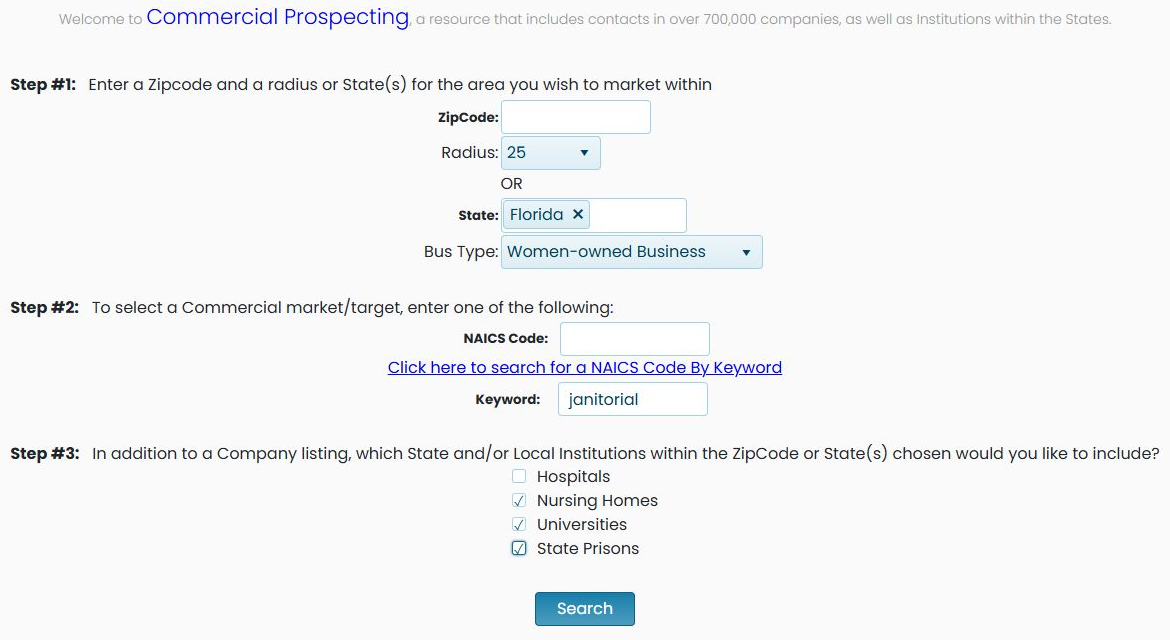
This example illustrates a different way to define the market than the ZIP-radius/NAICS search: it combines a state, business type and a word describing the business. The institution selections request additional lists with their own headings; do not read an institution row as a contractor match. Continue with the company and institution results.
Read statewide company and institution matches
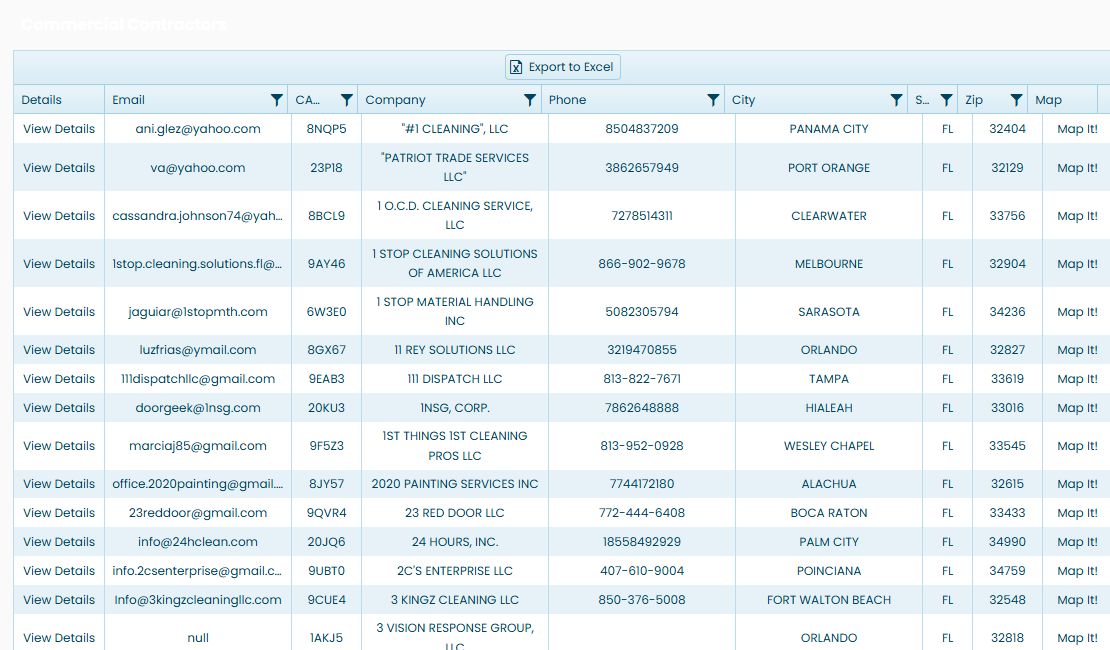
The October 23, 2026 Florida / Women-owned Business / janitorial example returns 3,696 companies, with 50 on the first page. The first displayed company is #1 CLEANING LLC, CAGE 8NQP5. Read the company and contact fields together, then use View Details for the selected company profile.
The selected institution lists appear separately. Each grid has its own records and headings.
| List | Displayed columns and their meaning |
|---|---|
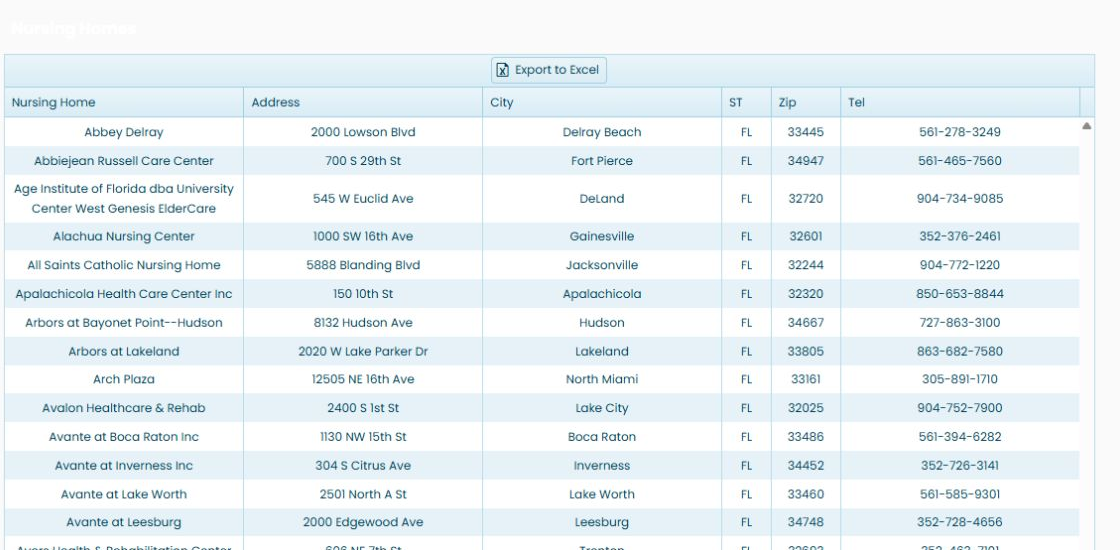
| Nursing Homes | Nursing Home names the facility; Address, City, ST and Zip locate it; Tel is its listed telephone number. The example has 543 nursing-home rows. |
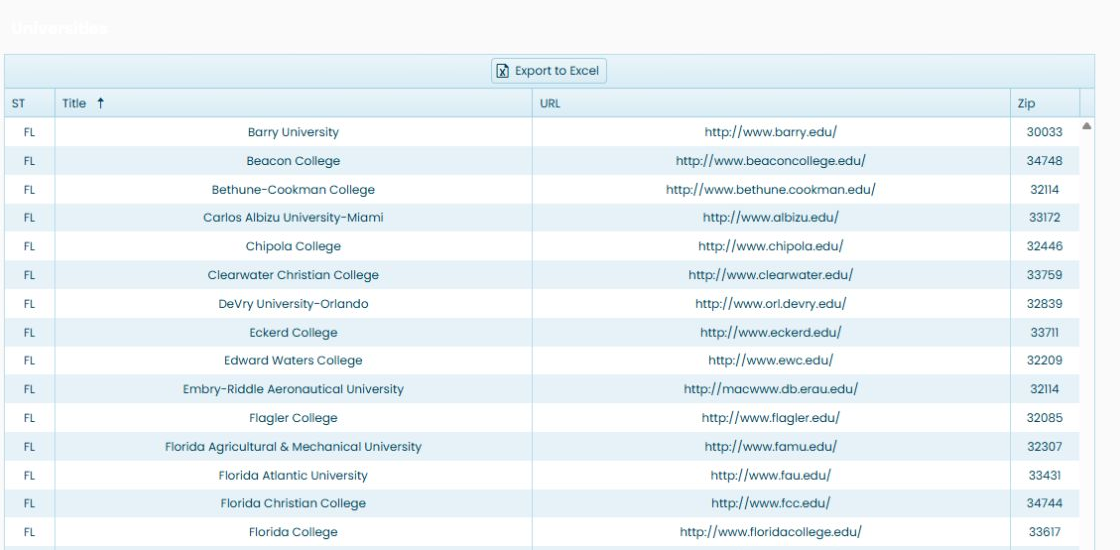
| Universities | ST is the state; Title is the institution name; URL is its listed website; Zip is the location ZIP. The example has 53 rows. |
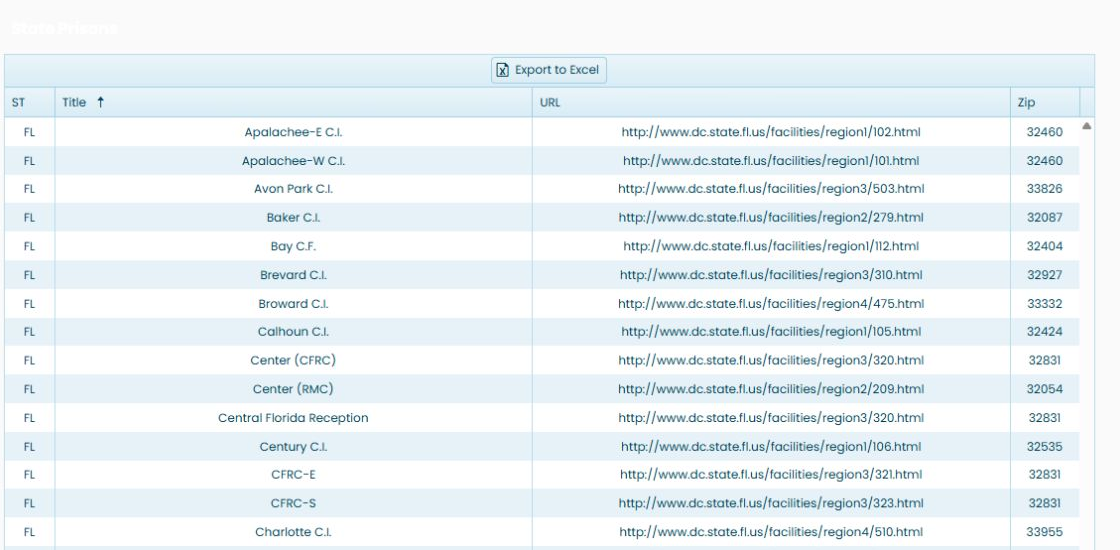
| State Prisons | ST is the state; Title names the institution; URL is its listed website; Zip is the location ZIP. The example has 75 rows. |
Sort the nursing-home name column ascending to begin with Abbey Delray in the illustrated list. Use the address and telephone fields when researching the facility.
Sort Title ascending in the university grid to begin with Barry University in this example. The URL belongs to the institution on that row.
The prison list starts with Apalachee-E in the illustrated result. Read its state, title, URL and ZIP as one institution record.
Use these additional lists to research organizations in the same state while retaining the company search as a separate result. Return to the Commercial Prospecting form to change the market or institution selections. For the company and hospital workbook fields, see the export explanation above.