Find DLA requirements that remain unfulfilled
Part of these button learning paths: Just My Opportunities · Unfulfilled NSN Opportunities
Video sections for this page
Video sections for this page
Application path: Main Menu → Unfulfilled NSN Opportunities → choose an NSN → solicitation results → NSN research.
Unfulfilled opportunities are DLA opportunities whose closing dates have passed but which remain unfulfilled and are still wanted by DLA. Use this list to identify those items, then review the related solicitation and item information.
Read an opportunity
The October 21, 2026 example displays a summary of 3,995 account NSNs and a result grid with 2,401 items, 50 per page. The selector's NSN summary and the grid's opportunity count are different labels; use the count appropriate to what you are reviewing.
One row is 5305007262550 — SCREW, CAP, HEXAGON HEAD, solicitation SPE4A627T1856, opened October 13, 2026, closed October 20, 2026, with 21,873 quantity and $20,998.08 estimated value.
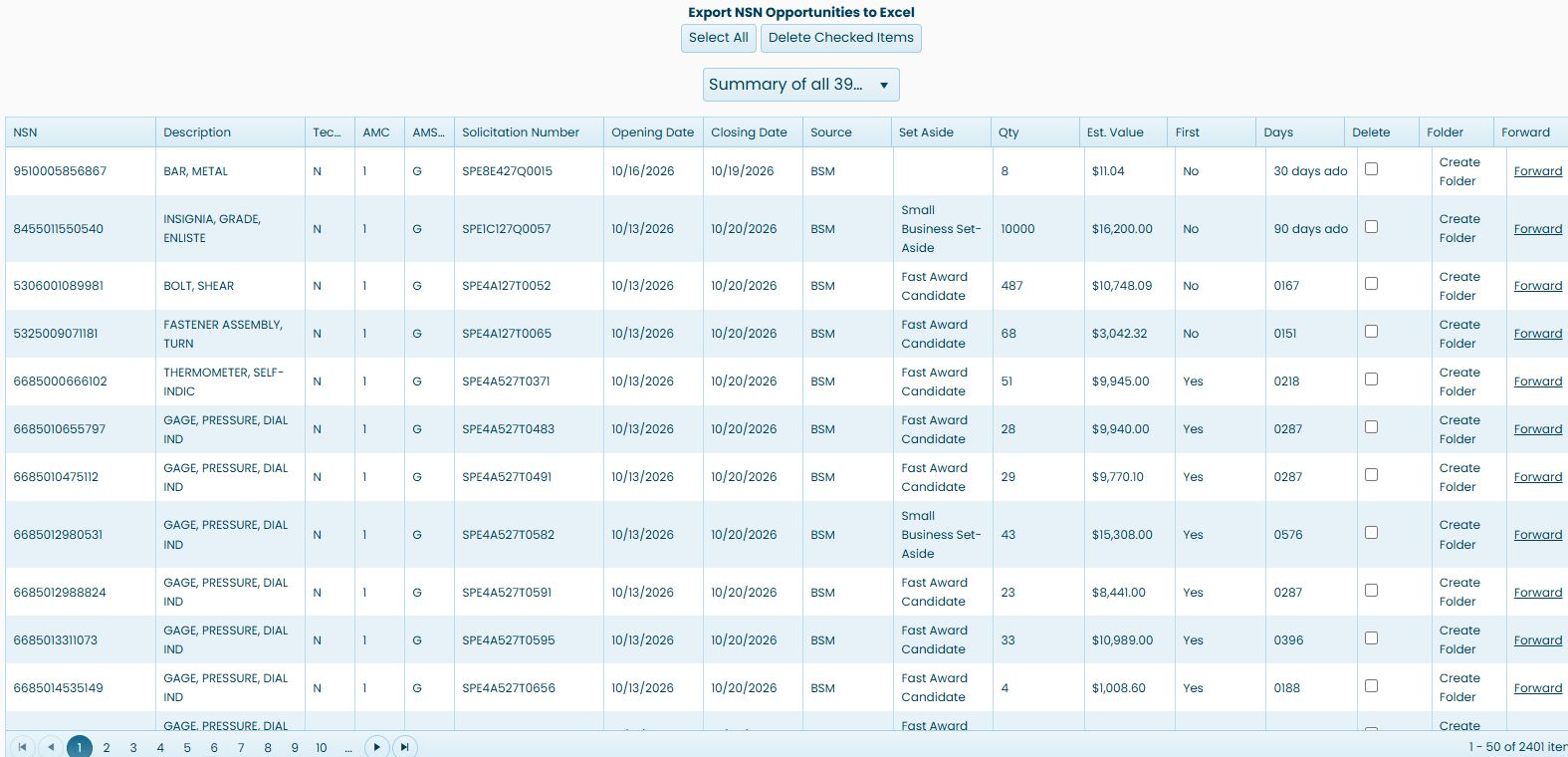
The pictured first rows are a different part of the same list; select the linked NSN for the item you want to examine.
| Column | Meaning and use |
|---|---|
| NSN | The stock number. Open it to see solicitation results for the item. |
| Description | The item description shown for the opportunity. |
| Tech. Data | The technical-data indicator displayed on this row. |
| AMC / AMSC | The acquisition method and its suffix code. |
| Solicitation Number | The notice identifier; its link points to the solicitation document. |
| Opening Date / Closing Date | The dates shown for this notice. |
| Source | The source label supplied for the opportunity. |
| Set Aside | The displayed procurement designation, when present. |
| Qty | The requested quantity shown in the row. |
| Est. Value | The estimated value displayed for the opportunity. |
| First | The displayed first-article value. Select it to open the linked solicitation report and review the actual requirement. |
| Days | The displayed delivery-days value. Select it to open the linked solicitation report and review the delivery requirement. |
| Delete | A checkbox used with the checked-item controls. |
| Folder | The Create Folder action for the opportunity. |
| Forward | An email handoff link with the solicitation information and document link. Review the message and recipient before sending. |
Choose which matches to review
| Dropdown choice | What you are choosing | When to use it |
|---|---|---|
| FSC | Opportunities matched to your Federal Supply Classes. | Look across a broader product class, including stock numbers you may not already sell. |
Read and manage the opportunity list
| Grid field or control | Meaning and why it matters |
|---|---|
| Delete checkbox | Selects this row for removal. Checking it alone does not delete the row. |
Select the displayed rows or forward a notice
Use a row's Delete checkbox to select it, or choose Select All to select the current page. In the October 22 example, Select All checked the 50 displayed rows; Unselect All cleared them back to 0. This selection did not delete any records. The NSN Opportunities guide illustrates the same displayed-page selection controls.
The first displayed row in this example is 9510005856867 — BAR, METAL, solicitation SPE8E427Q0015, opened October 16, 2026 and closed October 19, 2026. Its Forward link prepares an email handoff with subject Current Bid Opportunity, the solicitation number, item description and a link to the notice PDF. Choose a recipient and review the notice before sending it.
Delete checked opportunity entries
Check only the rows you intend to remove from your opportunity list, then choose Delete Checked Items. This button submits immediately; it does not ask for confirmation. To change your mind before submitting, clear the row checkboxes or choose Unselect All.
If no rows are checked, the page displays No items selected for deletion. After a successful request, it displays Selected items deleted successfully. and reloads the list. If the request fails, it displays An error occurred while deleting the items. Review the refreshed list before taking another action. This is the opportunity-list control, separate from deleting a saved entry in My Projects Folder.
Continue into the item's solicitations
Select 5305007262550. The resulting table includes both SPE4A627T1856 and the later SPE4A627T5567, whose displayed dates are October 21–28, 2026. Read the notice number and dates on this next screen; you are now researching the item across its listed notices.
The result's NSN link leads into the shared item-research route described in the NSN guide. That guide covers the catalog, characteristics, awards and related information without requiring you to repeat the original search.
Export the unfulfilled opportunities
Click Export NSN Opportunities to Excel above the grid to download the opportunity records. The October 21 example downloaded an .xls file with 4,392 rows and 17 columns. Its content is an HTML table saved with an .xls extension. The file has one header row, and its NSNs appear inside square brackets.
The exported fields are NSN, Description, Tech. Data, Solicitation Number, Opening Date, Closing Date, Source, Set Aside, Quantity, Est. Value, AMC, Part Number, Cage, Company, UI, AMSC and GSI Code. Use NSN and Solicitation Number together to identify an exported row. The example 5305007262550 / SPE4A627T1856 appears with quantity 21,873 and estimated value $20,998.08.

The exported row count differs from both the live grid's 2,401 items and its separate 3,995 account-summary label. The sample BAR, METAL / SPE8E427Q0015 row also shows Y under exported Tech. Data while the live grid showed N. Confirm technical-data availability from the solicitation documents before relying on that flag. Page numbers and arrows move through the opportunity grid.