Review a company's DLA part-award history
Application path: Main Menu → All Government Contractors → Find a Contractor → Search Contractors → View Details beside a company.
The Vendor / CAGE Detail View brings the selected company's identity, contact information and research buttons together. CAGE is the company's Commercial and Government Entity code. Check the name and code before following a button: the next screen concerns that selected company. Other searches, including Commercial Prospecting and Teaming, can also lead to this profile.
Example: follow a supplier's stock-item awards
From All Government Contractors, choose CAGE, enter 1HEN9, leave other criteria at their defaults and select Search Contractors. Open View Details for NOBLE SUPPLY & LOGISTICS, LLC. Keep First 5000 records selected and choose View NSN Award History.
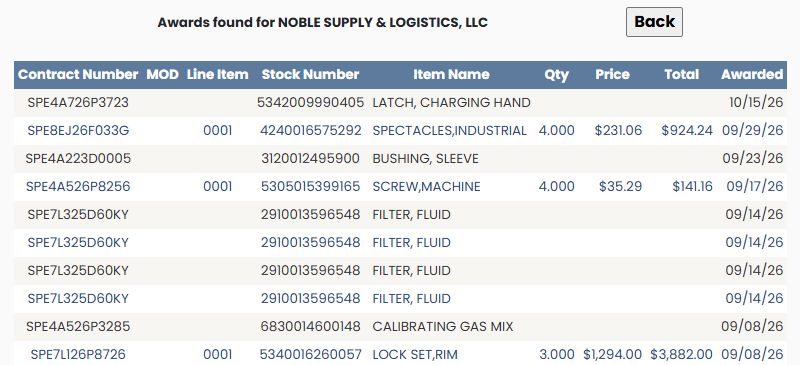
| Column | Meaning and use |
|---|---|
| Contract Number | The procurement's contract reference. |
| MOD | The modification identifier when supplied. |
| Line Item | The number identifying the listed contract line. |
| Stock Number | The item's NSN and link to its research screen. |
| Item Name | The item description recorded for the award. |
| Qty | The quantity displayed for the line. |
| Price | The displayed unit price. |
| Total | The displayed amount for the line. |
| Awarded | The award date shown. |
For example, SPE4A526P8256, line 0001, lists 5305015399165 — SCREW,MACHINE, quantity 4, price $35.29, total $141.16, awarded September 17, 2026. Select the stock number to reach NSN/NIIN Search Results and its item-research buttons. The NSN item guide explains those shared screens. Some rows have blank quantity or amount cells; read the values supplied rather than treating blanks as zero.
Use the numbered pages below the list for more award rows. Back returns to the company profile.
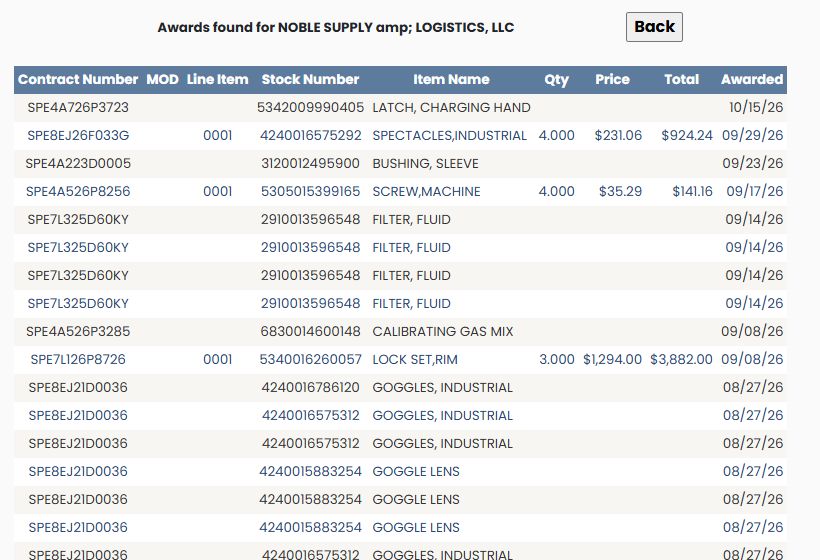
The Complete History choice was also opened for 1HEN9. It uses the same nine columns explained above, so read each row's contract, stock number, quantity, price, total and date in the same way. The first visible row in this example is SPE4A726P3723, awarded October 15, 2026; its quantity, price and total cells are blank. The choice changes the requested history scope, but the observed screen does not establish a fixed number of returned records.