Read an NSN result
Part of these button learning paths: Research All Open Solicitations · Just My Opportunities · Machine Shops Opportunities · Unfulfilled NSN Opportunities · Search by NSN/NIIN · APL/AEL Historical · DLA Prime Contractors · Naics To FSC Cross · Commercial Part Number to NSN · Weapons System Designator Codes
Video sections for this page
Video sections for this page
Video sections for this page
Video sections for this page
Video sections for this page
Video sections for this page
Application path: Main Menu → Search by NSN/NIIN → enter the number → Search.
Use this search when you have a stock number and want its identity, technical details, reference parts or buying history. Enter the full 13-digit NSN or its 9-digit NIIN. Keep leading zeros.
Example: find a cap screw
Enter 5305007262550 or its nine-digit NIIN 007262550, then choose Search. Both verified searches identify SCREW,CAP,HEXAGON HEAD; the NIIN search returns full NSN 5305007262550. The item page is titled NSN/NIIN Search Results. Confirm the displayed name before continuing.
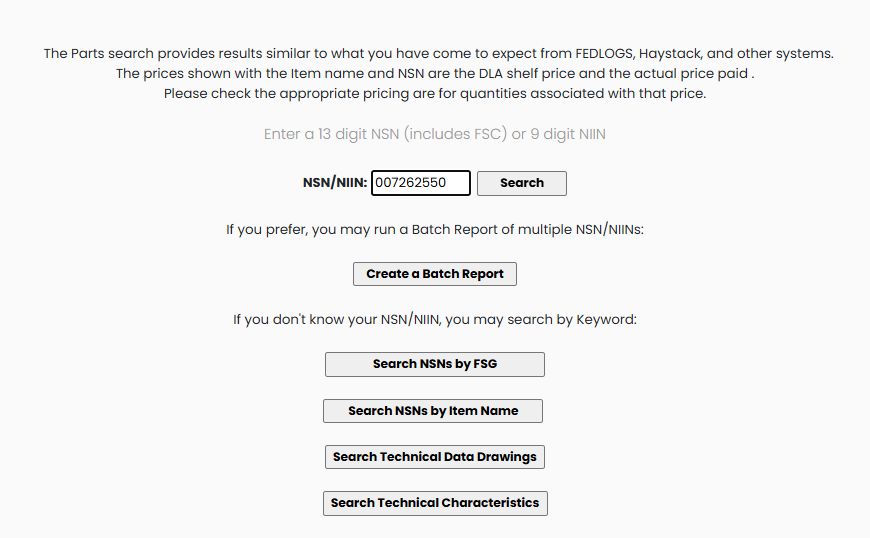
You can reach the same item through NSN Opportunities: select the NSN in the opportunity list, then select it again in the solicitation results. Once you reach the item page, its research buttons work with that selected item.
The complete item page below shows the identity, price fields, reference-parts list and research buttons for the same NSN.
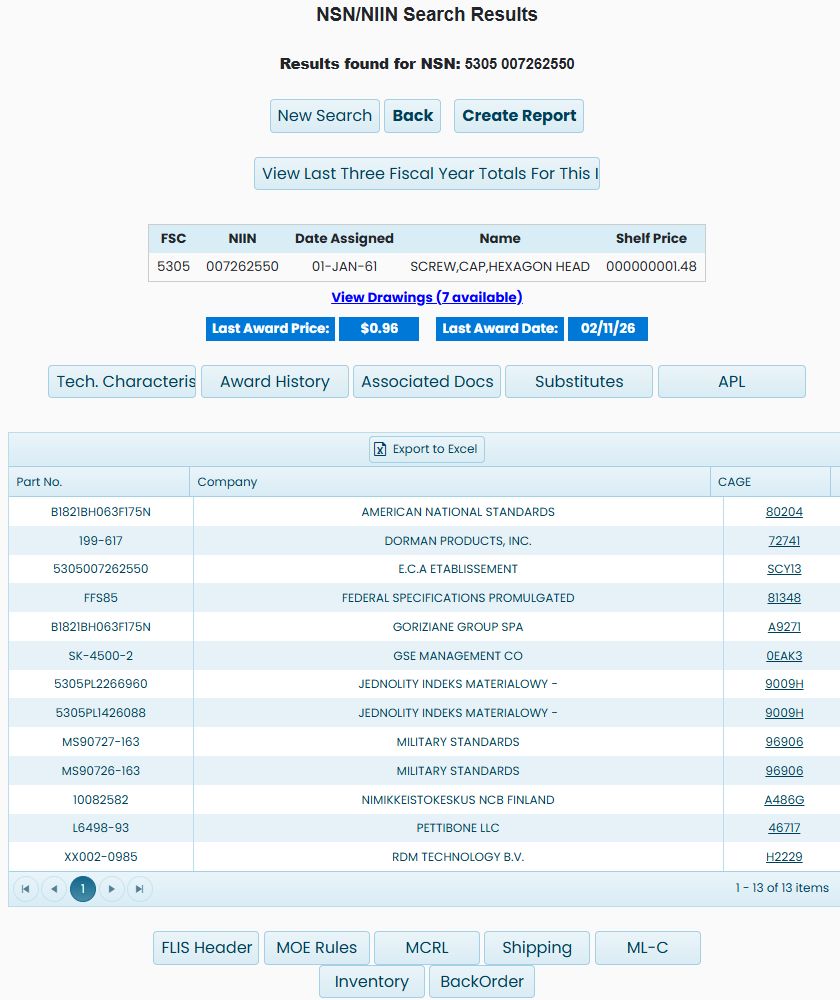
Read the item identity
| Field | Meaning and use |
|---|---|
| FSC | Federal Supply Class: the first four digits of the full NSN. This example is 5305. |
| NIIN | The nine-digit National Item Identification Number. This example is 007262550. |
| Date Assigned | The catalog assignment date shown for the item. |
| Name | The item's catalog name. Use it to confirm what you are researching. |
| Shelf Price | The DLA shelf price shown with the catalog item. Here it is displayed as 000000001.48. |
| Last Award Price | The most recent award price displayed for the item: $0.96 in this example. |
| Last Award Date | The date associated with that displayed price: 02/11/26 here. |
Shelf Price and Last Award Price are different figures. Open Award History to see the quantities, dates and suppliers associated with past purchases rather than using a price without its context.
Read the part references
The list contains Part No., Company and CAGE. A CAGE identifies the organization associated with the reference. Read the part number and organization together: 199-617 appears beside DORMAN PRODUCTS, INC., CAGE 72741. This example has 13 rows, including standards organizations as well as companies.
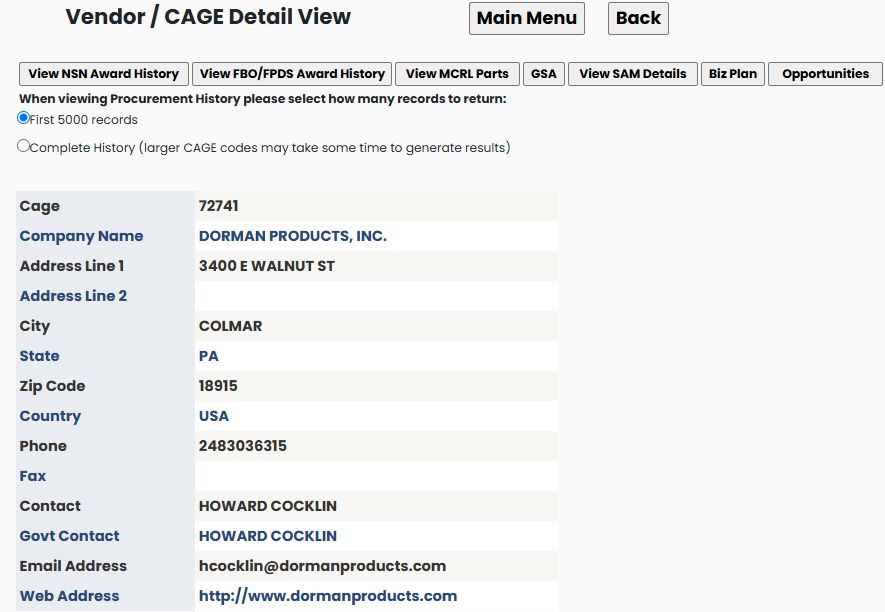
The linked CAGE 72741 opens the Vendor/CAGE Detail View for DORMAN PRODUCTS, INC., in Colmar, PA 18915. Use Back to return to the same item. Continue with the company profile guide for company research.
Export to Excel appears above the part-reference list. For additional reference classifications, choose MCRL.
Export the item reference list
The Export to Excel button above the item page's part-reference grid exports that grid. A separate verified example reached the item page through Main Menu → Machine Shops Opportunities → FSC 5305 — Screws → NSN 5305002061533. Its workbook has one sheet, Sheet1, with Part No., Company and CAGE in columns A–C and four reference rows.

Part No. is the displayed reference number, Company names the organization on that row, and CAGE identifies it. Read all three together: part number 9409072 appears once with ALLISON TRANSMISSION INC / 73342 and again with GENERAL MOTORS CORP / 24617. The other rows are 5306002061533 / E.C.A ETABLISSEMENT CENTRAL DES / A00AM and 8350635 / U S ARMY TANK AUTOMOTIVE COMMAND / 19207. The workbook contains these part-reference fields; it does not export the item's prices, award dates, drawings or research-button panels. Return to the Machine Shops opportunity example to see how that item page was reached.
Choose the next screen
| Button or link | Use it to |
|---|---|
| Tech. Characteristics | Read dimensions, material and other characteristics. |
| Award History | Compare previous purchases, quantities and prices. |
| Associated Docs | Find document references associated with the item. This screw lists ASME B18.2.1-2012 with a View Document link. |
| Substitutes | Review the listed interchangeability and substitute references. |
| APL | Find allowance parts lists that contain this NIIN. The example opens four ditcher/trencher lists. |
| FLIS Header | Read catalog identification and classification fields. |
| MOE Rules | Read management and acquisition-code rows. |
| MCRL | Read part-number references and their codes. |
| Shipping | Read the item's freight and handling classification fields. |
| ML-C | Read management-list information, including unit of issue, source of supply and catalog price. |
| Inventory | Review dated stock and reorder-point information. |
| BackOrder | Review dated backorder and annual demand figures. |
| View Last Three Fiscal Year Totals For This Item | Open the market-analysis page with this stock number supplied. |
| View Drawings | Open the seven drawing-reference rows for this cap screw. Continue with Find drawings by stock number or drawing number. |
| Create Report | Open the combined on-screen report. See Create Report below. |
| New Search | Return to the stock-number search. |
| Back | Return to the preceding page. |
Part references
| Column or link | What it shows and where it leads |
|---|---|
| Part # | Recorded reference number. The link searches the web for that number; compare results with the item's technical and purchase documents. |
| Company | Stored company name associated with the reference. |
| CAGE | Organization identifier associated with the reference. The link opens the site's company detail; see contractor results and profiles. |